Tilgore Kraut - August 11, 2008
 We are usually game for online videos and movies, and often wish to download these on our PCs, but due to non availability of an appropriate tool, we usually couldn’t fulfill this wish. However, you can easily get this easily with the help of MovieSaver 2.0. It is an easy to use tool that helps the users in downloading their favorite videos from different video websites. The program supports downloading videos from the sites like YouTube, MySpace, MyVideo, GoogleVideo, Metacafe, Yahoo! Video, etc. The interface of the program is modestly designed, and the video downloading process. In order to start downloading process, you just need to enter the video link, and after the proper analysis of the website, the program would kick off the process. The program is compatible to the flash videos, but it does not require flash player application for the reproduction process. We are usually game for online videos and movies, and often wish to download these on our PCs, but due to non availability of an appropriate tool, we usually couldn’t fulfill this wish. However, you can easily get this easily with the help of MovieSaver 2.0. It is an easy to use tool that helps the users in downloading their favorite videos from different video websites. The program supports downloading videos from the sites like YouTube, MySpace, MyVideo, GoogleVideo, Metacafe, Yahoo! Video, etc. The interface of the program is modestly designed, and the video downloading process. In order to start downloading process, you just need to enter the video link, and after the proper analysis of the website, the program would kick off the process. The program is compatible to the flash videos, but it does not require flash player application for the reproduction process.
By using the MovieSaver 2.0 application it becomes an easy task for you to download the videos from various websites. It’s a small utility which helps you get effective output results. Whenever you want to get the videos downloaded, you just need to copy-paste, or drag or drop the video URL into the program. You’re provided with the ‘Video URL’ option, where you need to enter the link for the video. When you have entered the URL, click on ‘Download’ icon shown on the screen, and the program would start analyzing the URL. Finishing the analyzing process, the program starts the downloading the video. The progress level relating to video downloading is shown below the ‘Download’ option to help you know when the video is saved on your system. While processing the mentioned URL, the program enlists the unknown URLs at the bottom side of its interface. To reduce your work, the application provides the drop down list of video websites, thus making them easily accessible. You just need to open the website, watch the videos and get the desired video downloaded.
The MovieSaver 2.0 application utilizes a simple process to download videos and store them to the desired location.
{More Info and Download}
Rating:  Loading... No Comments »
Tilgore Kraut - August 11, 2008
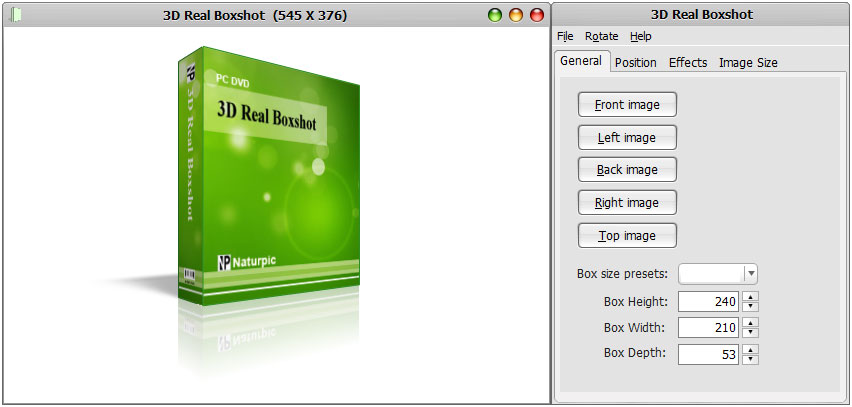 Often when a customer buys any product, the foremost thing that catches his eyeballs is the product’s packing. If the packing of the product is made attractive, it would persuade the customers to buy the product. Thus, while designing the graphics for the product’s cover box, every designer puts his best efforts to make it more captivating. If you also want to design your product’s covering that makes it more tempting, then you can take the assistance of 3D Real Boxshot 4.0. The software is easy to use and helps you in creating 3D boxes for your products like softwares, CD, DVD, Poker, etc. To form the box, just select the type of box required, and set the images that you want to be placed on the covers. Often when a customer buys any product, the foremost thing that catches his eyeballs is the product’s packing. If the packing of the product is made attractive, it would persuade the customers to buy the product. Thus, while designing the graphics for the product’s cover box, every designer puts his best efforts to make it more captivating. If you also want to design your product’s covering that makes it more tempting, then you can take the assistance of 3D Real Boxshot 4.0. The software is easy to use and helps you in creating 3D boxes for your products like softwares, CD, DVD, Poker, etc. To form the box, just select the type of box required, and set the images that you want to be placed on the covers.
3D Real Boxshot 4.0 provides an extremely simple user interface and convenient features that makes it a delight to use. The interface of the application somewhat resembles the image viewer window. A dialog box placed on the screen shows the customization features that you can use to make the modifications. The graphic for the box is shown at the middle of the screen. To start the box formation, firstly you’re required to select the Box size preset to be Software, DVD, CD/VCD, 3.5″ Disk and Poker. To make further changes to box size you can easily set the Box height, width and depth. Coming to the cover graphics of the box, you can select different images for all the sides of the box. Select desired images for the front, left, back, right and top side of the box. The ‘Position’ option helps you to set the ‘Distance’, ‘Rotation’ and ‘Camera Position’ to change the box view. To give the graphics a realistic feel you can apply Shadow and Reflection effects. Modify the size of the image that you placed on the sides of the box, if required. Finally play the graphic to view its appearance from all the sides and save it with the desired format.
3D Real Boxshot 4.0 supports creating, rotating and zoom the graphics on box-covering, to help the users to create attractive boxes. The application is capable of importing the images with different formats, such as- GIF, JPG, TGA, TIF, WMF, WBMP, etc.
{More Info and Download}
Rating: Loading... No Comments »
O. James Samson - August 11, 2008
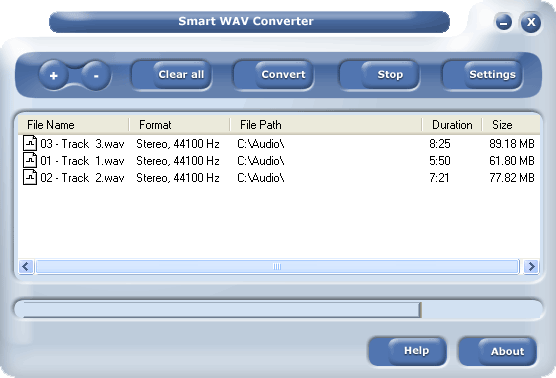 If you work with Cakewalk, Seria or Cooledit and probably have a problem converting your WAV files, I’m pretty sure this is a good software for you. If you work with Cakewalk, Seria or Cooledit and probably have a problem converting your WAV files, I’m pretty sure this is a good software for you.
Where other converters convert a file at a time, this one could convert a group of files at a time… I think that’s awesome cos it saves me a lot of stress. It also has some sort of player that allows you play your files so you know exactly what files to convert. It also converts other formats like WAV (compressed and uncompressed), WMA (Windows Media Audio 9), OGG, MP2, MPC, RAW audio, VOX, MPC, G.726, G.723, G.721, AIFF and AU files to MP3, WAV (compressed and uncompressed), WMA (Windows Media Audio 9), OGG, MP2, MPC, RAW audio, VOX, MPC, G.726, G.723, G.721, AIFF and AU files. Read the rest of this entry »
Rating: Loading... No Comments »
Tilgore Kraut - August 8, 2008
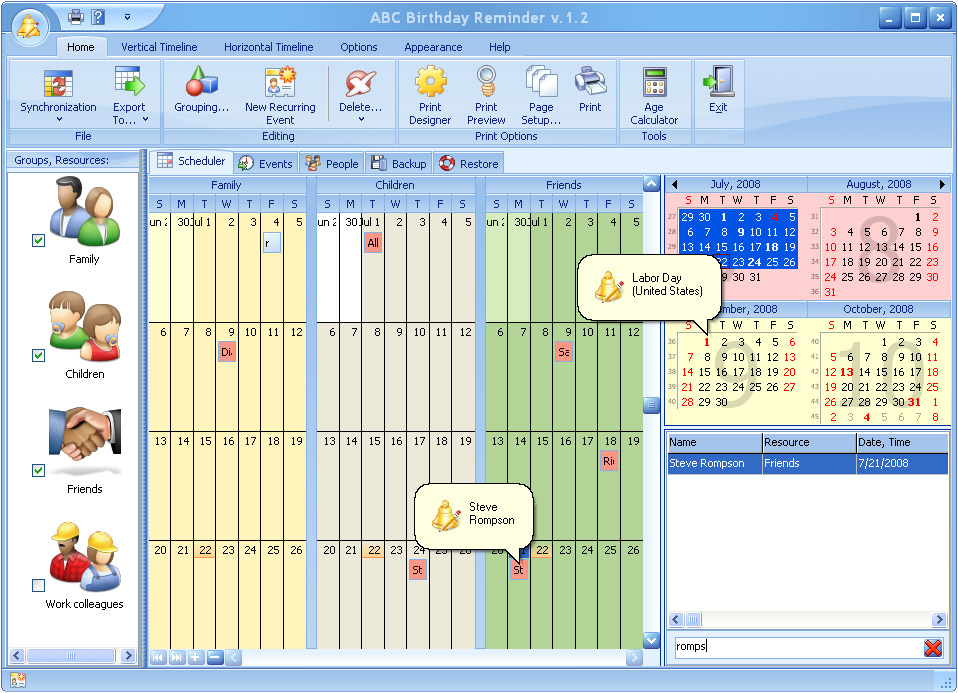 ABC Birthday Reminder is an easy-to-use tool that keeps detailed information about birthdays and other remarkable events. ABC Birthday Reminder is an easy-to-use tool that keeps detailed information about birthdays and other remarkable events.
Pros: This application keeps detailed information about birthdays and other important events. Recurring events need to be entered once. Lot of related data can be stores in a database. Description of gifts, cost associated with it; notifications etc can be stored for example. This database is completely searchable too. There’s even a built in calculator for calculating the gift cost. Advance reminder will ensure that you cannot miss an event even if you have not worked with the computer in the immediate time of the event. The program also has a holiday database. The holiday editor lets you mark up the holidays in a color choice of your own and with the help of listed holidays for different parts of the world. It loads into the system tray so that it is always accessible.
Events can be entered with details such as related people, their phone numbers gift budget and other details. One can review this database any time, available a tab on the user interface. Other tabs are about people whose birthday data you want to capture, Two more tabs lets you set up the back up and restore parameters. Several views of the calendar are possible. Color scheme of the interface can be changed. The scheduler presents a month at a glance view while other views such as week at a time (work week or calendar week) is possible too. Synchronization with outlook is possible while you could also export data to Excel, HTML, XML or TXT formats. If your system is not going to be on all the time, you could keep a printed list of events as reminder for you. Print designer will help with the reports you need to get printed.
Cons: Keeping track of gifts, gifts calculation, skin/color choice are some of the things that are different than the Outlook. Question is would that justify another program if you already have Outlook?
{More Info and Download}
Rating: Loading... No Comments »
Tilgore Kraut - August 8, 2008
Spam filter & Antivirus (ClamAV) for Outlook, Outlook Express & Vista. It uses SpamAssassin to score new incoming mails and decides based on the settings made in options what to do with the mail. It supports Black and White list filtering and Bayes.
Pros: One of the major pain areas in using an e-mail address is that very soon you start getting a whole lot of unsolicited mail. Mail that hold, most often, no interest for you. One remedy so as not to increase mails from the same sources is not to even open these spam mails. Any application that helps separate out spam from regular mail is a big help in this area. SpamAware is a plug-in for MS-Outlook, Outlook Express and Windows Mail (Vista). It uses SpamAssassin to score new incoming mails and decides based on the settings made in options what to do with the mail. The application starts up immediately on installation essentially integrating with your Outlook/Outlook express or Vista’s Windows mail. It adds a few buttons to the mail client in use. This includes the training buttons of white list and black list. You use these to tell the package which mail is whitelisted and which is blacklisted. It contacts several spam servers through SpamAssassin to be more efficient. Bayseian algorithm is used internally to automatically detect spam and isolating them. This is a learning algorithm and improves filtering with time. The main spamaware button has several choices including scan active folder, options and choices about the product such as checking for updates, help etc. Couple of other links point to other products published by the same publisher. Options lest you set up spam filtering properly.
Cons: Several text fields in the user interface have typos. For example Englisch, Spanisch, Arabisch, Japanisch etc. or they are not translated.
{More Info and Download}
Rating: Loading... No Comments »
Tilgore Kraut - August 8, 2008
 Blogspreading is a free utility, which automatically appends a link to the latest post in your blog to your e-mail signature. This will easily catch the recipients’ interest and convert them to the readers of your blog. Spread your blog around world. Blogspreading is a free utility, which automatically appends a link to the latest post in your blog to your e-mail signature. This will easily catch the recipients’ interest and convert them to the readers of your blog. Spread your blog around world.
Pros: This is a small utility that adds links to your signature file, signature to your eMails that is. The links point to the latest post made by the user to his blog. What that is likely to achieve is that the title of the post is likely to trigger the interest of the recipient unlike a bland URL pointing to your blog. The publisher makes a claim that this is likely to increase the traffic to your blog site. That is probably true. People tend to skip the bland URLs without paying much attention to them. Whereas a title of a specific post may look interesting and with a link to the post being right there can make the reader of your e-mail actually click on the same. Once there he may find the content interesting and keep going back. That surely is one way of promoting your blog, alright. All e-mail clients allow automatic adding of a signature to outgoing message.
As you publish a post the RSS feed on your blog publishes the latest one to the world. If this is read one knows exactly what has been published and where. The application reads from this information. This title and the link are specified as parameters in the signature file. So when the values of the title and links are updated the signature will get updated with this new information. So that, all outgoing mail then on will have this new information. Besides automatically updating the attention getting part of the signature it can help in SEO too as if someone mails to mailing lists they are usually indexed by the search engines and they’ll find links to internal pages of your site rather than the root page only and thereby increase rankings.
Cons: True effectiveness of this program depends on the program being able to update the signature files automatically. Two major mail clients such as the outlook and thunderbird do not allow the same. They have to be updated manually.
{More Info and Download}
Rating: Loading... 1 Comment »
Tilgore Kraut - August 7, 2008
 With large music collection it is really difficult for us to pick out song of our choice immediately. But now with the help of Music Catalogue Master 5.15, you can manage your music records well, and access them easily whenever required. It is capable of downloading and entering the information relating to different tracks automatically from internet. You can form categories to save your files in an organized manner. The program also supports tracking multiple copies of same recording and records information like current value, purchase price, etc. With all these features you also get the feature to print and export the reports in HTML, Word, PDF, Excel, RTF, XML and MHT documents. With large music collection it is really difficult for us to pick out song of our choice immediately. But now with the help of Music Catalogue Master 5.15, you can manage your music records well, and access them easily whenever required. It is capable of downloading and entering the information relating to different tracks automatically from internet. You can form categories to save your files in an organized manner. The program also supports tracking multiple copies of same recording and records information like current value, purchase price, etc. With all these features you also get the feature to print and export the reports in HTML, Word, PDF, Excel, RTF, XML and MHT documents.
The Music Catalogue Master 5.15 has a lucid interface and also contains different shortcuts that help you to quickly record and format the information. Launching the program you get the Automatic CD Entry Window. The software reads the CDs and also works in Batch Entry Mode to read multiple CD together. Click ‘Enter CDs’ and the program shows all the containing tracks, credits etc listed automatically for further selection.. You can conduct the record search and the results are shown on the screen. Select the records that you want to include in your database, click ‘Enter’ and they all get entered with the related information. You can easily manage your CDs/Records List, CD/Record, Additional Info and Classical Info. These features contain different sub-features that help you to enter the information more specifically. With the ‘Composer’ tab you’re shown the composers linked with the displayed CD/Record. The MP3 Catalogue Master Window of the program helps you to easily keep the track and play the MP3 files, and also you can edit info, place tags, remove file, check path and perform other functions. Finally you can get the report generated with the Report Manager in any of the supported format.
The Music Catalogue Master 5.15 application helps you to manage and organize your music CDs, MP3s and the vinyl records in the most convenient manner. The application includes a variety of features, including, the capability of retaining the information about the tracks, managing playlist, adding or removing file and many more.
{More Info and Download}
Rating: Loading... No Comments »
Tilgore Kraut - August 7, 2008
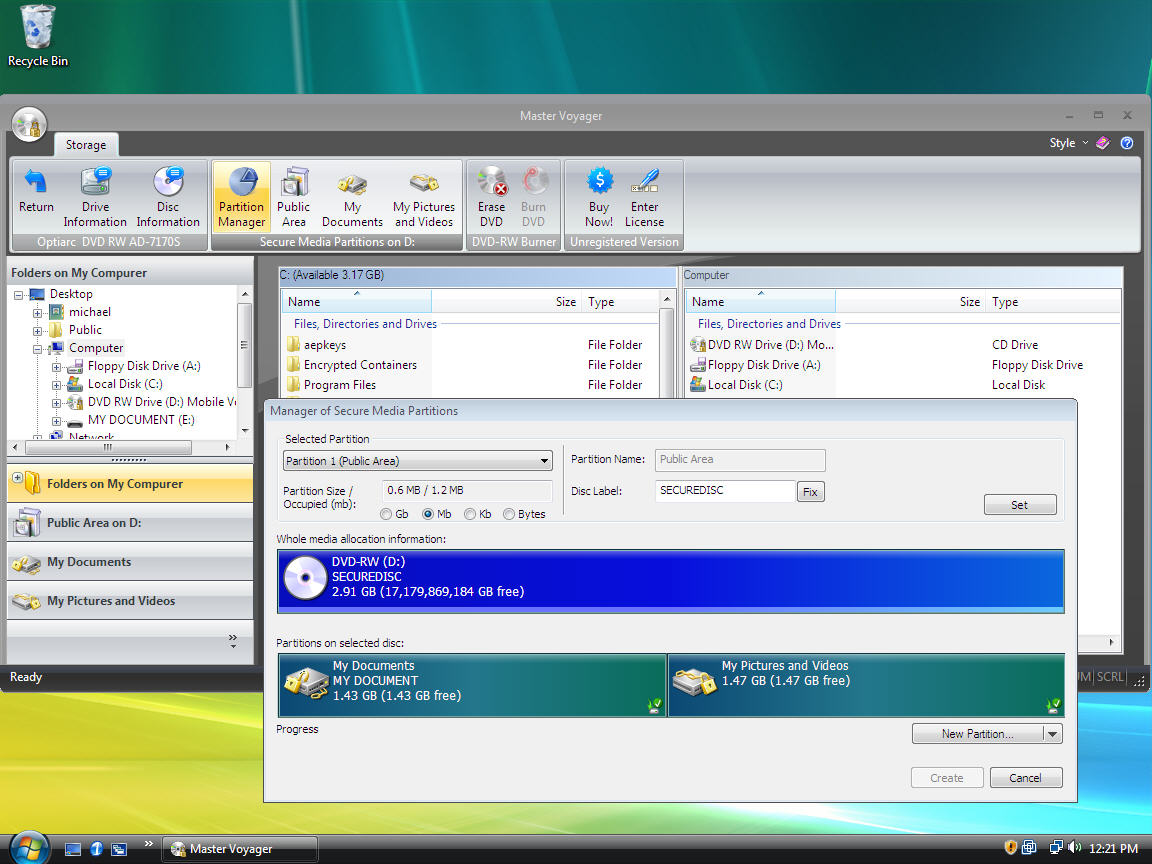 Removable storage devices are popular for transferring data from one system to other. If you also use DVD/CD or USB Stick for transferring the data, and you want to keep your information safe and secure, the Master Voyager 1.17 could prove to be worth using solution for you. Master Voyager is particularly designed to create protected USB Memory Sticks, and DVD/CD. It helps you to create protected areas on the media that can be accessed by entering correct password to view protected contents. The program works with Advanced Encryption Standard 256 bit method for protecting your records. Removable storage devices are popular for transferring data from one system to other. If you also use DVD/CD or USB Stick for transferring the data, and you want to keep your information safe and secure, the Master Voyager 1.17 could prove to be worth using solution for you. Master Voyager is particularly designed to create protected USB Memory Sticks, and DVD/CD. It helps you to create protected areas on the media that can be accessed by entering correct password to view protected contents. The program works with Advanced Encryption Standard 256 bit method for protecting your records.
Master Voyager includes strong and advanced encryption standard method, which is used to protect contents. It foes not requires the user to install any additional CD burning software as it consists of DVD/CD burning module embedded with it. The program is compatible to work with CDR/ DVD+-R/CDRW/ /DVD+-RW disc types. The interface contains different options on the toolbar enabling the users to protect their data. Select the folder and files that you want to be saved with protection. It’s easy to get the information about the discs and drive, browse through different partition areas formed like Public Area, My Documents, My Pictures and Videos, etc. When it comes to protection of the partition you’re provided ‘Partition Manager’, you can select the partition and make the required changes to it. You can form many secure partitions with different passwords on one media. You also get the features to Erase or Burn the DVD. Creating the protected media you need install Master Voyager on all system as you just need to enter the correct password to access the files.
Master Voyager 1.17 is used to protect CD/DVD and USB memory stick with password to make your data secure from non-permitted intrusion.
{More Info and Download}
Rating: Loading... No Comments »
Tilgore Kraut - August 6, 2008
 Sometimes we become our own physicians, and handle minor health issues by ourselves. For minor headaches and fever, we usually escape visiting doctors, and take appropriate drugs from chemist. However, we always intend to broaden our knowledge of drugs and their use in treating various ailments, which can be obtained from Desktop Drug Reference 2008.1.0 application. It works as desktop drug reference indexes that provide you with detailed pharmaceutical information about majority of the famous brands and generic drugs. It presents the information in a categorized manner, and makes it easy for you to search the information relating to any drug. Searching the required information is made much easier with the help of the in-built Search feature. It also provides crucial details like ingredients, drug class, drug mechanism, drug uses, side effects, storage information, etc. The interface of the application is the same as the ‘Help’ file, hence it’s quite convenient to use. Sometimes we become our own physicians, and handle minor health issues by ourselves. For minor headaches and fever, we usually escape visiting doctors, and take appropriate drugs from chemist. However, we always intend to broaden our knowledge of drugs and their use in treating various ailments, which can be obtained from Desktop Drug Reference 2008.1.0 application. It works as desktop drug reference indexes that provide you with detailed pharmaceutical information about majority of the famous brands and generic drugs. It presents the information in a categorized manner, and makes it easy for you to search the information relating to any drug. Searching the required information is made much easier with the help of the in-built Search feature. It also provides crucial details like ingredients, drug class, drug mechanism, drug uses, side effects, storage information, etc. The interface of the application is the same as the ‘Help’ file, hence it’s quite convenient to use.
Desktop Drug Reference 2008.1.0 provides detailed information about the pharmaceutical products and different drugs. It would definitely enhance the knowledge and make the information easily accessible for you, whenever required. The ‘Contents’ feature includes the different categories of the drugs making it easy for you to search the relevant details of any drug. These are shown in the expandable menu form that can further be explored to get the different information like Drug Name, Drug Uses, Storage, Precautions, Missed Dose, etc. With the ‘Index’ feature you get the names of all the mentioned drugs in alphabetical order and the Index Search bar makes it easy to find the desired drug details. The ‘Search’ option helps you to search for any drug or product, when the search finishes select the drug to get the information about it. You can get the drug information printed to keep it with you anytime anywhere. The options and the searching features are easy to use.
Desktop Drug Reference 2008.1.0 provides you details relating to variety of drugs like Anti-Acidity, Anti-Allergic/ Asthma, Anti-Diabetic, Body Building, Gums, Skin Care, Weight Loss and many more.
{More Info and Download}
Rating: Loading... No Comments »
Tilgore Kraut - August 6, 2008
 YouTube has completely redefined the meaning of videos for us, and with its striking collection of videos, the website has the potential to engage us for hours. From Diego Maradona’s “goal of the century” to worst tragedies, YouTube has ingredients for all tastes. While watching these striking videos, we often wish to download these on our PCs, and add these to our favorite video lists. However, there are number of tools available for downloading the videos, but the main trouble arises in playing them, as the downloaded content might not be supportive to your PC. This can be resolved by the assistance of Video Download Pro 1.12. It helps in converting various formats, such as – AVI, WMV, MPEG, MOV, MP4, 3GP, etc- into desired ones. It also supports extracting the audio from the music videos and save them in MP3 format. You can also carry out the keyword search to find the YouTube videos and get all of them downloaded at the same time. YouTube has completely redefined the meaning of videos for us, and with its striking collection of videos, the website has the potential to engage us for hours. From Diego Maradona’s “goal of the century” to worst tragedies, YouTube has ingredients for all tastes. While watching these striking videos, we often wish to download these on our PCs, and add these to our favorite video lists. However, there are number of tools available for downloading the videos, but the main trouble arises in playing them, as the downloaded content might not be supportive to your PC. This can be resolved by the assistance of Video Download Pro 1.12. It helps in converting various formats, such as – AVI, WMV, MPEG, MOV, MP4, 3GP, etc- into desired ones. It also supports extracting the audio from the music videos and save them in MP3 format. You can also carry out the keyword search to find the YouTube videos and get all of them downloaded at the same time.
By using the Video Download Pro 1.12 application it becomes easy to get the YouTube videos downloaded and converted in any supported format while maintaining the quality of the file. To get started with the program you need to enter the Video URL in the space provided with the ‘Direct Download and Convert’ feature. Entering the URL select the suitable format for your output file from the drop-down menu provided with the ‘Convert The Downloaded Files To’ option. Selecting the format, browse and select the desired location to store the output file. Click ‘Get/Convert option to start the conversion process. If you want to search the videos then you can ‘use the Search Mode and select the keyword, sort by and uploaded features. Click ‘Analyse’, you’ll get the videos listed and click ‘Get/Convert All’ or ‘Get/Convert Selected’ to download and convert the videos. You can save the space at your drive by selecting the feature to delete the FLV files after the conversion.
The Video Download Pro 1.12 is a competent application tool that helps in getting all your favorite videos downloaded, and turned into the format compatible with your media player.
{More Info and Download}
Rating: Loading... 7 Comments »
|
|
|


 (1 votes, average: 4.00 out of 5)
 (6 votes, average: 4.83 out of 5)

