Ciaran Moore - March 27, 2008
 Due to the widespread availability of fast Internet connections over the last few years, online video is everywhere these days. The thing about most online video is the quality. It’s usually not great, as its compressed to minimize file size, ensuring faster download times. Due to the widespread availability of fast Internet connections over the last few years, online video is everywhere these days. The thing about most online video is the quality. It’s usually not great, as its compressed to minimize file size, ensuring faster download times.
This is good enough in most cases, like when you just want to watch some short clips online, but what if you want to see longer, more high quality videos? Check out Vuse.com. Its a bit torrent based video site offering (completely legal) downloads of high definition video. They can do this due to partnerships with names such as the BBC, A&E, Showtime and others.
Producers can also upload movies and offer them for download for a fee. The site has a strong emphasis on community and users can create groups and connect with other like-minded people. So if you have a fast internet connection and want to check out some quality video content, its worth checking out.
Visit the homepage here.
Rating:  Loading... No Comments »
Ciaran Moore - March 27, 2008
 You’ve probably seen them before, those pictures that, when you look closer, are made of lots of other much smaller pictures. I’ve always thought these were pretty cool. They’re know as Photo Mosaics and usually there’s a computer program involved in arranging them,due to the precise patterning involved. Andreamosaic is one such program. You’ve probably seen them before, those pictures that, when you look closer, are made of lots of other much smaller pictures. I’ve always thought these were pretty cool. They’re know as Photo Mosaics and usually there’s a computer program involved in arranging them,due to the precise patterning involved. Andreamosaic is one such program.
To create such a mosaic you’ll need a selection of pictures to use as the tiles of the mosaic and you also need a picture to use as the main picture which you’ll be creating in mosaic form, out of the smaller pictures. You can then set the parameters in the program for creating different kinds of mosaics.
If this sounds a tad hard to follow, its worth spending a couple of minutes to read one of the step-by-step tutorials at the website, they’re very helpful and easy to follow. Theres plenty of options and settings, but the tutorials really simplify everything.
You can download it for free and start making your very own mosaics in a matter of minutes. For very helpful tutorials, examples and the program download, go to the homepage.
Rating: Loading... 1 Comment »
Ciaran Moore - March 26, 2008
 Backflip is yet another of these great alternatives to bookmarking things locally on your computer. You create an account with Backflip and then add a Backflip button to your browser, now whenever you discover interesting Web pages, simply click the “Backflip it” button to save them to your Backflip account online and Backflip will organize them for you there. Backflip is yet another of these great alternatives to bookmarking things locally on your computer. You create an account with Backflip and then add a Backflip button to your browser, now whenever you discover interesting Web pages, simply click the “Backflip it” button to save them to your Backflip account online and Backflip will organize them for you there.
They’re organized in your personal account, which is like your own personal search engine and directory of your “Backflipped” (bookmarked!) pages. These can be shared with others if you’re the social kind, or made private. You can have your top 10 most used bookmarks on your front page for easy access and it also has a feature called “My Daily Routine”, which assists you in visiting your daily favorites.
These online bookmark sites can be pretty useful, as you have access to your bookmarks from any computer. You also don’t have to worry about losing all your bookmarks if your computer should someday crash irrecoverably.
Further info at the Homepage.
Rating: Loading... No Comments »
Ciaran Moore - March 26, 2008
 Sameplace instant messenger is a Firefox add-on which allows you to Instant message from your Firefox sidebar. It means that instead of having one or more instant messenger clients running, you can just open this add-on in your Firefox sidebar, where you can be logged into one or more Instant Messenger services. Sameplace instant messenger is a Firefox add-on which allows you to Instant message from your Firefox sidebar. It means that instead of having one or more instant messenger clients running, you can just open this add-on in your Firefox sidebar, where you can be logged into one or more Instant Messenger services.
It currently supports all the big Instant messengers such as MSN, Yahoo!, ICQ, AIM, GMail and also Jabber and Twitter. You’ll find features you’d expect from an instant messenger, plus some bonus ones such as being able to drag and drop a picture directly from a website in order to share with a contact. It also can be quickly closed by hitting F12, just in case the boss passes by maybe?
If you use Firefox a lot and dislike having extra programs running unless absolutely necessary, you may be interested in trying this out.
Want more info? Check the homepage you can also download from the Mozilla extensions homepage
Rating: Loading... No Comments »
Ciaran Moore - March 25, 2008
 Whether you’re a budding astronomer with stars in your eyes or a more serious astronomy enthusiast you might be interested in checking out the Starry Night range of software. The versions of available software on offer from Starry Night range from “Starry Night Pro” for the serious stargazers amongst you, to cheaper, slightly more basic packages like “Starry Night Enthusiast”. These packages include some very cool 3D graphics along with seriously detailed information on constellations, auroras stars, planets etc. Whether you’re a budding astronomer with stars in your eyes or a more serious astronomy enthusiast you might be interested in checking out the Starry Night range of software. The versions of available software on offer from Starry Night range from “Starry Night Pro” for the serious stargazers amongst you, to cheaper, slightly more basic packages like “Starry Night Enthusiast”. These packages include some very cool 3D graphics along with seriously detailed information on constellations, auroras stars, planets etc.
Theres also 3D models of spacecraft for you to learn about. Also included are many images that are either very well illustrated or visualized using images from the Hubble telescope. The Pro version even includes the ability to control your telescope.
These are some of the best software packages available in the astronomy world and the list of features is far beyond the scope of a short blog entry, after all its a very big universe out there, even in our little corner of it!
For much more information check out the Starry Night Homepage here.
Rating: Loading... No Comments »
Ciaran Moore - March 25, 2008
You’ve probably seen them before, those images online which have a rippling water effect. Ever wondered how this was done or wanted to add this effect to your own pictures? Now is your chance.
Sqirlz Water Reflections is a program that can do this, it can also optionally add rain or snow effects. It works both on images and AVI videos. The rippling effect can be adjusted until you find the right effect that looks the most realistic for your image, you can fully control details such as wave size, perspective, flow, texture, color and transparency. You can save your finished masterpiece in a variety of formats including Flash (useful for easily adding to webpages!)
This effect can actually look really good if you use your imagination, check out the homepage for some examples and to download it, its freeware too!
Rating: Loading... No Comments »
Ciaran Moore - March 25, 2008
 Unlike other screen savers that are usually somewhat predictable, SurveillanceSaver is a screen saver with a difference. It shows live CCTV images from over 600 networked surveillance cameras worldwide. Now whenever your screen saver kicks in, you’ll be shown live images from random CCTV cameras that are connected to the internet. Unlike other screen savers that are usually somewhat predictable, SurveillanceSaver is a screen saver with a difference. It shows live CCTV images from over 600 networked surveillance cameras worldwide. Now whenever your screen saver kicks in, you’ll be shown live images from random CCTV cameras that are connected to the internet.
This makes for a very unpredictable and potentially entertaining screen saver, as you’re never quite sure what you may see. It could be someones backyard, a street, or a storefront. The possibilities are almost endless due to the huge amount of cameras it randomly selects from.
This software is free under the creative Commons license and can be downloaded here.
Rating: Loading... 3 Comments »
O. James Samson - March 24, 2008
 Apollo DVD copy, a hi-tech tool for copying DVD collection to DVD-R/RW or DVD+R/RW, has an in-built DVD burning engine and DVD video compression engine that provides you with the true DVD copy of your DVD collections within 20-40 minutes without reduction in quality. The copies produced by this tool can be run on both your PC and home DVD player. Apollo DVD copy, a hi-tech tool for copying DVD collection to DVD-R/RW or DVD+R/RW, has an in-built DVD burning engine and DVD video compression engine that provides you with the true DVD copy of your DVD collections within 20-40 minutes without reduction in quality. The copies produced by this tool can be run on both your PC and home DVD player.
With Apollo DVD copy, you can also copy DVDs to hard drive folders for editing or burning later.
One cool thing about this software is its high compatibility.
- It supports both NTSC and PAL Movies
- It supports DVD-R/RW, DVD+R/RW.
- It also supports a lot of the popular SCSI,IDE,USB DVD burners/recorders on the market.
Want to know more?
Visit http://www.xtodvd.com/dvdcopy.htm
Rating: Loading... No Comments »
Ciaran Moore - March 21, 2008
 Sooner or later a time comes when most of us need to convert a file between formats for one reason or another, usually because your particular program doesn’t support a particular format. Rather than hunting around for a file conversion program, there now exists quite a few sites for online file conversion and Youconvertit is certainly one of the better ones. Sooner or later a time comes when most of us need to convert a file between formats for one reason or another, usually because your particular program doesn’t support a particular format. Rather than hunting around for a file conversion program, there now exists quite a few sites for online file conversion and Youconvertit is certainly one of the better ones.
You have the option to choose between a very large variety of file formats. These include audio, document, image, video and archive file types. What’s cool about this particular service apart from the large range of file formats supported, is that you can add up to five files at a time for conversion. You can even add a url that links to a file online which you’d like to convert. It also provides an option for sending files to a recipients email address (again, up to five at a time).
As a slightly unrelated bonus but in keeping with the theme of conversion, they also offer unit conversion (distance,weight, etc)
It’s a site worth bookmarking, whether you find yourself needing to convert between file types regularly or just once in a while!
Check it out here.
Rating: Loading... No Comments »
O. James Samson - March 21, 2008
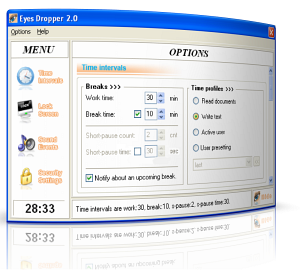 If like me you spend more time on the “puter” than you’d like to count then the software is something you should check out. It’s called Eyes Dropper. If like me you spend more time on the “puter” than you’d like to count then the software is something you should check out. It’s called Eyes Dropper.
It basically reminds you about rest-time and by so doing help save your eyesight. Does that sound ridiculous? Well, not really if you take your time to think about it. Staying glued to your pc all day is definitely not good for your eyesight, I should know, I wear thick lenses.
Now this software allows you to customize the duration of your work time and length of breaks. During the break you may exercise your eyes, look away or look at distant objects either in your office or outside, take a stroll outside your office. Sounds simple, right? But it’s very effective. Just one problem, I don’t agree with $20 price, this should be a freeware not shareware. But then give the trial version a shot and be the judge.
You can check it out http://duodimension.com/eyes_care_child_health/eyesdropper_1_overview.htm
Rating: Loading... No Comments »
|
|
|





