Ciaran Moore - March 11, 2008
 Normally when you want to make a quick note for future reference, it requires some effort. You have to grab a pen and paper, or maybe your PDA if you’re more technologically inclined. Normally when you want to make a quick note for future reference, it requires some effort. You have to grab a pen and paper, or maybe your PDA if you’re more technologically inclined.
With Jott, all you have to do is grab your cellphone and dial a special toll free number (which you can easily put on speed dial!) You then say who your message is for, such as “myself”, ” family”, or a work group or friends name for example. Now you can dictate up to 30 seconds of a message. This is then transcribed and emailed or texted to yourself as a reminder or to the chosen group.
At the moment its currently only available in the US and Canada, but is certainly an exciting idea which sounds like it could be very useful.
Sound interesting to you? Check out the website and test it out for yourself!
Rating:  Loading... No Comments »
O. James Samson - March 11, 2008
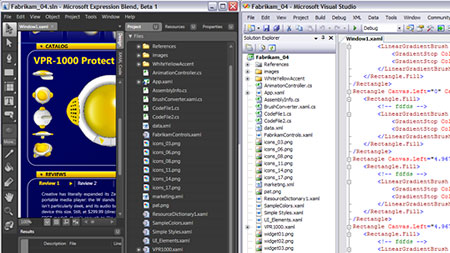 This is one of the previews of Microsoft Expression Blend, a piece of software that used to be known as the Expression Interactive Designer. This is a piece of software that is simply phenomenal in its execution and because the particular market that it caters to is so popular at the current moment in time, it appears as if the Expression Blend is going to be a hit in any form. This is one of the previews of Microsoft Expression Blend, a piece of software that used to be known as the Expression Interactive Designer. This is a piece of software that is simply phenomenal in its execution and because the particular market that it caters to is so popular at the current moment in time, it appears as if the Expression Blend is going to be a hit in any form.
If you are looking to design different applications and want a program that can help you make those applications great, then look no further than Microsoft Expression Blend. This software will help you design applications that are great to look at and it will help you utilize multiple tools to do that. Not only is there support for the creation of cinematic interfaces, but you will find that everything from pixel manipulation to vector dynamics is available on Microsoft Expression Blend, allowing you to get the job done in multiple ways.
This fully functional preview will allow you to get a full sense of what the program will be like when the full 2.5 version gets released later on this year and more information is available at http://www.microsoft.com/expression/.
Rating: Loading... No Comments »
Tilgore Kraut - March 11, 2008
Easy Time Logs is a time tracking, timesheet, and project management software product. It offers a web-based interface with timesheets and a variety of other features and reports.
Pros: Easy Time Logs is a time tracking, timesheet, and project management software product. While it is easy for the individual team members to enter time spent on tasks and the corresponding project, it is equally easy for supervisors to track time usage and monitor the progress of a specific project. As these projects/activities are based on time rates, the customer billing amounts based on the overall billing rate agreed with the customer is easily calculated. Customer invoicing becomes that much easier because the application keeps track of these. All members of your team can record their working hours per client and projects, use a web-based timesheet, and track their time throughout the day. The information is stored in a shared hosted or native database which is accessible to employees, managers and executives of the company. The program has many customizing options to suit the need for a particular organization, the developers recognize that everybody’s need is different.
The user interface is built on the styles of MS Outlook so that adds to the familiarity and ease of use. Consolidated reports can be generated quite easily by the supervisors from this interface. These can be summary reports or detailed ones including all clients, all tasks, all projects.
Cons: Some system messages are a little ambiguous which may due to unfamiliarity of developers with the language. The icons/buttons do not have labels that are shown on mouse over. Not enough system messages either to guide a user. On some combinations of inputs program debug system messages came on, meaning that they are not handled properly, some system messages should handle such exceptions.
On the billing front there are no ways to keep track of expenses chargeable to a customer as well as any traveling expenses that may be due.
{More Info and Download}
Rating: Loading... No Comments »
Tilgore Kraut - March 6, 2008
 Today almost everyone has the collection of their favorite videos and wants to have them loaded on their phones, iPod, etc. For one reason or the other, you may be required to have the video in different format other than the one you have. For the purpose if you’re looking for a tool that can help you in such video conversion then you might find the DigitalVideo Converter 1.5.0.20 worth using. The software supports variety of formats, and supports conversion from one format to another with easy steps. You can have the videos converted to the required format and you can play them in your car, phone, PC, etc. the software can be used by normal PC users and can prove to be a good assistant to the professionals. Today almost everyone has the collection of their favorite videos and wants to have them loaded on their phones, iPod, etc. For one reason or the other, you may be required to have the video in different format other than the one you have. For the purpose if you’re looking for a tool that can help you in such video conversion then you might find the DigitalVideo Converter 1.5.0.20 worth using. The software supports variety of formats, and supports conversion from one format to another with easy steps. You can have the videos converted to the required format and you can play them in your car, phone, PC, etc. the software can be used by normal PC users and can prove to be a good assistant to the professionals.
To start working with DigitalVideo Converter 1.5.0.20 you need to ‘Add’ video to the program and make the necessary selections. Following the simple process you can have not one but videos converted in batch mode. Add the videos by exploring from the folders and they would get listed on the screen of the program from where you can have the final selection made. When you’re done with the video selections, you need to select the aspects for the video conversion. While selecting the features for the Output file you need to select the Output format for the file to be AVI, WMV, MPEG, etc. Set the File Width and Height and the frame rate for the video. You can enable using the audio and video compressor, and select the codec. For having the surety that you have selected the right file you can have the file highlighted and played in the built in player of the program. After making the required selection you need to click on Convert Video for having the process to be started.
The DigitalVideo Converter 1.5.0.20 supports various input file such as MOV, ASF, AVI, MP4, DIVX, XVID, WMV, etc and turn them into different output format like MPEG-4, H264, MPEG-1, SVCD, VCD, DVD, WMV, QuickTime, iPod, PSP, 3GP, WAV, MP3 and so on. Rated with 4 points the software for its expansive range of options also, it also supports batch conversion and does the conversion with best performance.
{More Info and Download}
Rating: Loading... No Comments »
Tilgore Kraut - March 6, 2008
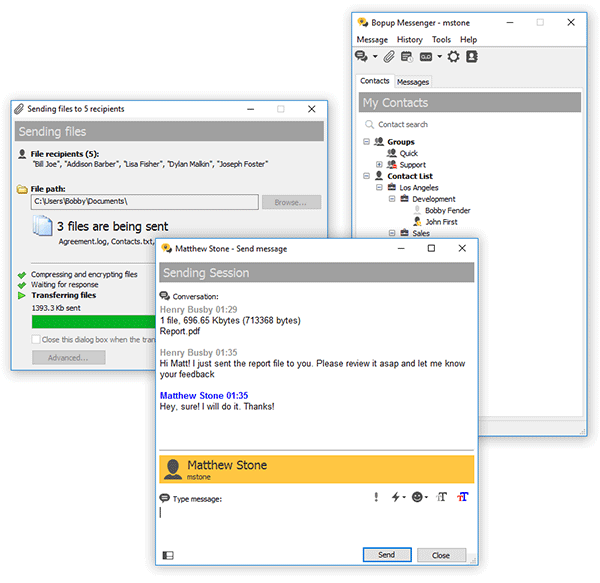 This clear, easy to use and light-weight IM client offers a set of corporate features. Based on a client/server architecture the messenger is fully managed from server-side software which provides IM logging, user grouping, offline messaging. This clear, easy to use and light-weight IM client offers a set of corporate features. Based on a client/server architecture the messenger is fully managed from server-side software which provides IM logging, user grouping, offline messaging.
Pros: Bopup Messenger is a secure instant messenger designed to communicate over LAN and enterprise-size networks. This clear, easy to use and light-weight IM client offers corporate features and answers many business needs.
Users can easily connect to others from different locations of the organizations to a common IM workspace and allows users the facility of instant message on urgent issues with full formatting, text fonts, color and emoticons. Contact lists can be organized to be accessible from anywhere on the corporate network and communicate with people who are online at a given moment.
The messenger encrypts messages with strong algorithms and thus the messages exchanged are quite safe even over the Internet. Messages are delivered even if the recipient is offline at the time of sending them. Server stores them and delivers when the user is ready. The application is simple to use and does not require any learning or previous experience to start using it. Notifications pop up and lets users to join in, in a few clicks. The messenger architecture allows even multiple users operating from the same machine even.
The centralized architecture makes some administrative options attractive for organizations. The central server can record all conversations and log user activities both of which are fully searchable and can be printed out. That includes reporting functions as well. Managing messaging groups and permissions related to sending and receiving messages and ability to view others are included. User accounts can be imported from active directories.
{More info and Download}
Rating: Loading... No Comments »
Tilgore Kraut - March 6, 2008
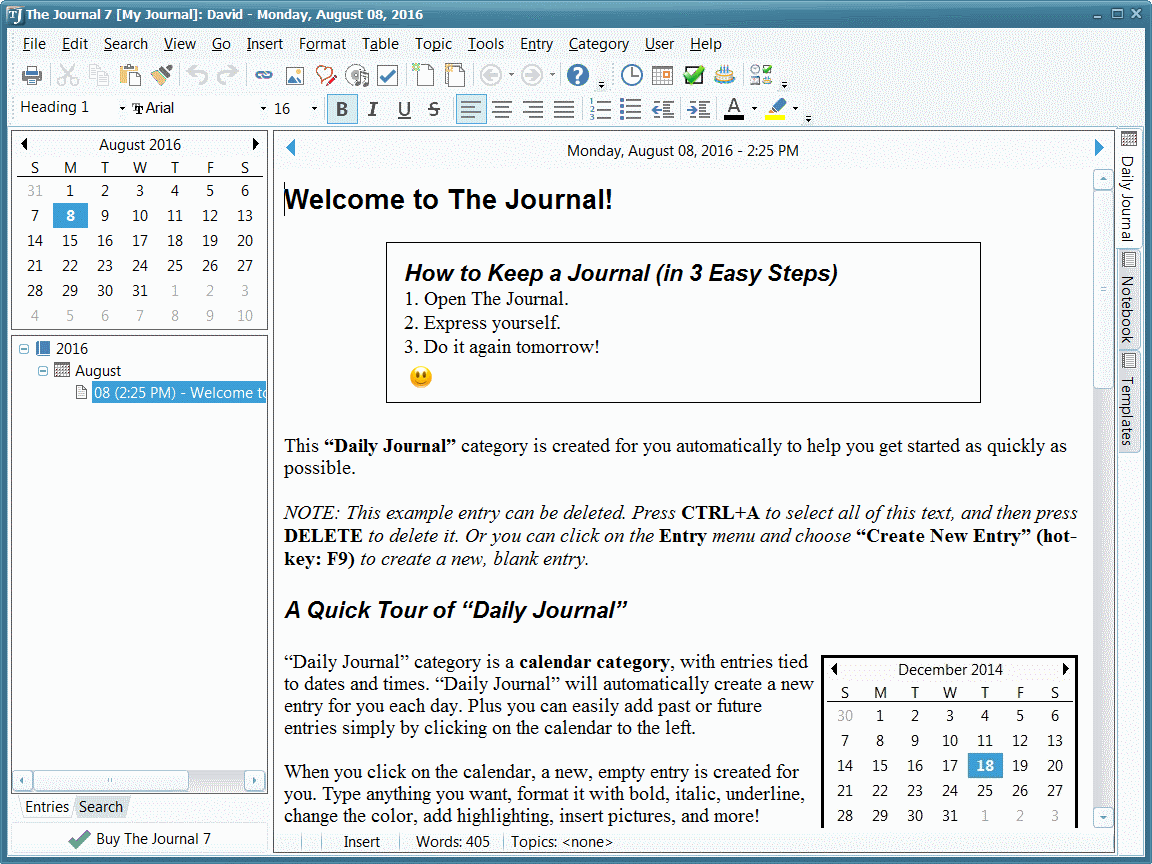 The Journal provides an easy-to-use mix of convenience, flexibility, and security to write, organize, remember, find things from a journal, whatever may be the journaling and writing needs. The Journal provides an easy-to-use mix of convenience, flexibility, and security to write, organize, remember, find things from a journal, whatever may be the journaling and writing needs.
Pros: The Journal application makes it easy to keep a daily journal, for both personal and professional use. Writing about thoughts and dreams or work notes and ideas or simply planning notes and decision details this application lets the user write & keep notes about just about anything. The Journal provides an easy-to-use mix of convenience, flexibility, and security.
One can create as many entries as he feels like. Dates get updated, then it is up to the user to add entries, sub entries or loose leaf entries as needed. Categorize the entries to completely custom categories, create them as you go. Helps search them later. Besides text, images could be added to the entries along with date, time, timer count or even a calendar charm. Calendar charms are small graphic icons to liven things up a little bit. The journal can sit in the system tray, always ready, always available and can be totally secure by password protection and encryption.
The interface is an augmented Word like interface. The interface additionally shows the hierarchical structure of the notes, the current calendar and a timer at option if needed. The timer could be set to be a count down one or a stop watch to indicate total elapsed time. These can be helpful with time based work. .Main work area is a tabbed area that shows, besides the journal work area, a notebook, templates, an address book etc. Reminder setting services are available for tasks set up, important dates and such items.
Cons: Notes, tasks and address book functionality are features available with Outlook too. So their duplication here could be questioned. In particularly since you have to maintain an address book anyway with the mail application anyway. But then viewed as an application that is open on the desktop all the time, these do have a place in the journal too.
{More Info and Download}
Rating: Loading... No Comments »
Tilgore Kraut - March 6, 2008
 ASP.NET app for editing photos through the web which includes such features as crop, red-eye removal, rotate, auto fix, borders, etc. This can be integrated easily into user applications, source code is provided. ASP.NET app for editing photos through the web which includes such features as crop, red-eye removal, rotate, auto fix, borders, etc. This can be integrated easily into user applications, source code is provided.
Pros: PhotoEditor is a web based software meant for integration in web sites by users for easy work with photos over the web. A sample application is provided to illustrate the workings of the application.
When integrated with a site, it allows visitors to edit a photo stored there – rotate, crop, remove red eye effect, apply most common artistic effects, etc. It does not require anything other than a regular browser.
Companies providing photo printing or online photo galleries/albums can easily utilize the edit features of this application by simply integrating the code with their own application.
Edit features include crop, red eye removal, rotation and flips. Color adjustments have automatic fix as well as user control of brightness, contrast and color saturation on a continuous basis. Tinting, borders and artistic effects add to edit options. While you can save the changes, it is equally possible the user wants to start over. One can simply revert to the original image.
As is necessary with anything that needs to integrate with other software, this package comes with easy tips on integration, customizable look and feel. The developers have kept the text strings/messages separated so that they can easily be localized. Source code in VB.NET is provided. Built on AJAX technology the package works with most browsers IE, Firefox, Safari etc.
Cons: Even though the sample application works locally the effects are quite slow. As you apply edits, effects, frames or whatever, it takes several seconds to update the sample image. The range of effects and number of frames, the amount of edits one can do on the photos are quite limited.
Overall a good jumping point for anybody implementing a photo based service over the web. Photo printing services is a good example. People would want to do some editing on the photos uploaded for prints and this editor is a very good starting point for that. Since over the web the operation speed is likely to get worse, one needs to worry about that.
{More Info and Download}
Rating: Loading... No Comments »
Ciaran Moore - March 5, 2008
 Fix8 is a free program for using with your webcam. It allows you to add in “special effects”. These consist of animated objects such as hats, etc, but can also consist of avatars. These follow your heads position so for example you can wear a virtual hat. The avatars face is controlled by your own facial movements. For example, if you wink, it winks, if your mouth moves, it’s mouth moves, etc. Fix8 is a free program for using with your webcam. It allows you to add in “special effects”. These consist of animated objects such as hats, etc, but can also consist of avatars. These follow your heads position so for example you can wear a virtual hat. The avatars face is controlled by your own facial movements. For example, if you wink, it winks, if your mouth moves, it’s mouth moves, etc.
This can lead to hours of enjoyment or just a few minutes, depending on how easily amused or creative you are I guess!
There’s a wide selection to choose from that come with the basic version, which is completely free, with the choice to upgrade if you feel like spending a little money at a later time. You can also record videos for you and your friend’s later amusement.
Sound interesting to you? All you need is your computer and webcam and to go here to see a video example and download it..
Rating: Loading... No Comments »
Tilgore Kraut - March 4, 2008
 You might have seen the pages that are password protected and require entering the required password for access to that page. Now if you have ever felt the need for creating such pages on your website then you will be glad to know that such pages can be made few simple step and selection with the CoffeeCup Password Wizard 5.0. For enabling the protection for the WebPages you need not to have any special knowledge of HTML or Flash. It supports you with the customization features to work, maintaining the look of your page. While you set the password protection, you can have the preview with the program or browser as you want. It also supports working in multiple framesets, and provides redirection for the incorrect logins. You might have seen the pages that are password protected and require entering the required password for access to that page. Now if you have ever felt the need for creating such pages on your website then you will be glad to know that such pages can be made few simple step and selection with the CoffeeCup Password Wizard 5.0. For enabling the protection for the WebPages you need not to have any special knowledge of HTML or Flash. It supports you with the customization features to work, maintaining the look of your page. While you set the password protection, you can have the preview with the program or browser as you want. It also supports working in multiple framesets, and provides redirection for the incorrect logins.
The CoffeeCup Password Wizard 5.0 has a neat user interface with clean contours to work with. You can open the New Project and select the features for enabling the password protection. You can make the selections for the Appearance option. Select the background color and enable the transparent feature. Enter the required Caption like Username and Password and set the image or text for the Submit feature. You can make the selections for the Users by defining the URL and adding or deleting the users. You can also set the features with My Sites. When you have made the required selections then you can have the Preview and Get the Code. You can even save the project for further use. The password protection function is easy to upload to the website with the built in FTP Uploader in the program.
The CoffeeCup Password Wizard 5.0 lets you protect the WebPages so that only authorized people can access it. It ensures safety of the content and helps you to apply the password protection to the pages with your desired customizations.
{More info and Download}
Rating: Loading... No Comments »
Tilgore Kraut - March 4, 2008
 Do you wish to have all the music and the videos that you ever wanted in your hard disk downloaded from different Internet radio stations? With the Audials One Music & Videos 2 software you can do just that by finding your favorite music and video by specifying the artists, albums, etc. The program just requires you to make some selections for searching for the music and videos of your choice. It also supports you with the search engine features that help you to search and get the required Mp3 file downloaded. You can also have the formats of the files converted to the one compatible to your mobile phone, MP4 player, etc. Do you wish to have all the music and the videos that you ever wanted in your hard disk downloaded from different Internet radio stations? With the Audials One Music & Videos 2 software you can do just that by finding your favorite music and video by specifying the artists, albums, etc. The program just requires you to make some selections for searching for the music and videos of your choice. It also supports you with the search engine features that help you to search and get the required Mp3 file downloaded. You can also have the formats of the files converted to the one compatible to your mobile phone, MP4 player, etc.
Audials One Music & Videos 2 launches with a screen that is pleasing on the eye and contains the features placed well on the screen. It provides you with the radio tracker from where you can record the music of your choice. With the videoraptor you can search for the music, download Mp3 and video clips, and even you can record the web videos. The “Tunebite” feature with the program is for the conversion of the files, removing the DRM protection and capture streams. You can search the music by entering the required text for carrying out the search. You would be shown on the search result on the main screen in the form of the list and even have the selected converted to the selected format. Search for the Web Videos easily and download them to your PC for enjoying anytime. You would see the files on downloading on the right side of the screen. You can open the folder and get them played for having check for the correct files.
Audials One Music & Videos 2 also helps you to Burn CD, Create Ringtones and Organize the MP3 files.
{More Info and Download}
Rating: Loading... No Comments »
|
|
|





