Ciaran Moore - October 11, 2007

Password Agent is a useful program for anyone who has trouble remembering passwords. It lets you have a safe, secure place to save passwords and associated information.
Also you can use the built in password generator to make difficult to guess passwords for additional security. No need to worry about forgetting these yourself, as you can store them in the program of course. They’ll be safe as the program supports strong 256-bit encryption, so your info is only accessible by your master password, just make sure you don’t make that one too hard for you to remember or to easy for anyone else to guess!
It also works as a place to safely and privately keep general notes. I like how the whole program is also USB thumbdrive compatible so you could use this on any computer!
Some features:
Read the rest of this entry »
Rating:  Loading... No Comments »
Ciaran Moore - October 11, 2007
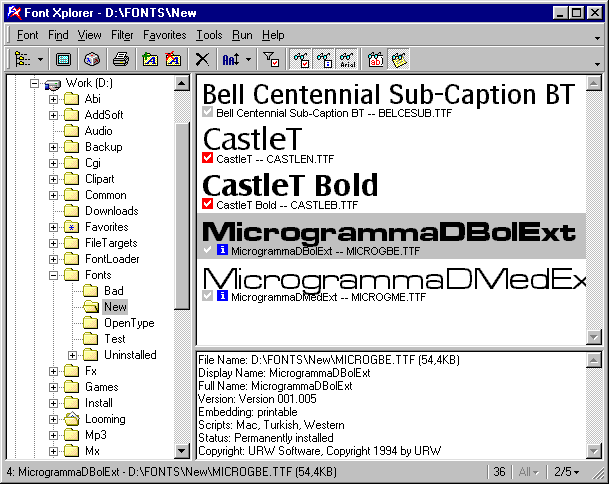 If you are into graphics or web design, chances are you work with fonts sometimes. If so, Font Xplorer is a cool program you might find useful. If you are into graphics or web design, chances are you work with fonts sometimes. If so, Font Xplorer is a cool program you might find useful.
It enables you to browse installed fonts on your computer and also non installed fonts. It lets you type some text and then compare it in various fonts until you finally find what looks right. It also lets you do a whole host of other things such as load, unload, install, uninstall fonts, and search for duplicate fonts. Detailed font info is available (such as full name, copyright, embedding info, available character sets etc.).
One feature I like is how you can choose to only view certain selected fonts,useful when making your final decision about what font best suits your needs. This is a useful tool for anyone who works with fonts! It’s also freeware!
Go here to download it and read more info.
Rating: Loading... No Comments »
Ciaran Moore - October 9, 2007
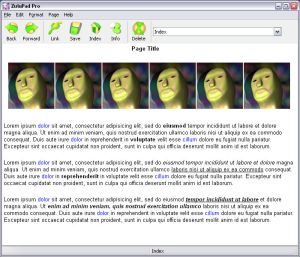 Described by its author as “notepad on crack”… Zulupad is a wiki-style program for helping you manage ideas, notes, etc. I’ll try to explain how it works. Described by its author as “notepad on crack”… Zulupad is a wiki-style program for helping you manage ideas, notes, etc. I’ll try to explain how it works.
It allows you to write notes and link the notes to each other. Each note you make is given a name. From that point on, anytime you type that word/name, it becomes a link to the page you first named. Also, adding a named note, will retroactively make all instances of that word/name throughout your document become links to that note. You can also select some text, and make it a link which automatically creates a new page with that name.
Just think of wikipedia and how it works,interlinked information based on linked keywords. This is very similar, but without having to learn wiki code.
Basically, this is potentially useful for anyone seeking to have a wiki-type “memo pad” for whatever reasons.
It comes in a free and pro version. Click here for more info
Rating: Loading... No Comments »
Ciaran Moore - October 8, 2007

Gliffy is a service that lets you create diagrams and flow charts online.
Everything is entirely web-based and built using Flash so you can access and create diagrams easily from any internet connected computer. The look and feel of the interface is much like a normal offline application, it has easy to understand and use symbols and drag and drop functionality making it very easy to get comfortable working with Gliffy.
It supports collaboration, so that other people can work on a project with you, as they’re allowed to edit your work if you choose so.
It’s also very easy to embed the diagrams you make for placing into a web page,blog,etc.
Check it out here.
Rating: Loading... 2 Comments »
O. James Samson - October 8, 2007
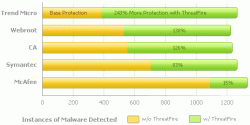 If you’ve had issues with malware and malicious applications destroying the flow data on your PC then this will definitely be good news for you, ThreatFire. If you’ve had issues with malware and malicious applications destroying the flow data on your PC then this will definitely be good news for you, ThreatFire.
ThreatFire is an application designed to protect your computer against malware such as trojans, spyware, rootkits, keyloggers, and buffer overflows by intelligently detecting and blocking behavior consistent with that of malware.
What I love about this software is that it does its great work by constantly monitoring your system, and analyzing programs and process activity.
Another good thing about this tool is that it automatically quarantines the malware [if it is a known threat] detected requiring no further action is required on your part. If the threat is unknown, or new, then ThreatFire will display an alert and prompt you to Allow or Quarantine the process. All alerts provide detailed information to help you make an informed decision.
Want to give it a shot? This is really worth checking out, believe me it works wonders.
http://www.threatfire.com/
Rating: Loading... 1 Comment »
Ciaran Moore - October 5, 2007
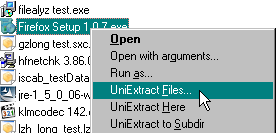
Universal Extractor is a neat little tool to extract files from archives. The most common File archive file formats you’re likely to find online are zip and rar, but there’s also many others too. This program lives up to its name by being able to extract them all.
Here are some of the more common formats it can handle: .7z, .exe, .bin, .cue, .tar.gz, .img, .deb, .rpm, .cab, .rar, .dll, .jar, .xpi. For the full list of all the formats it supports (quite a lot!) click here.
It’s a useful tool for peaking inside installer package files to see whats exactly in them before installing.
So this is a useful tool for people such as programmers and IT people who might be working with several different archive types from time to time.
More info and download available at the homepage here.
Rating: Loading... 1 Comment »
Ciaran Moore - October 5, 2007
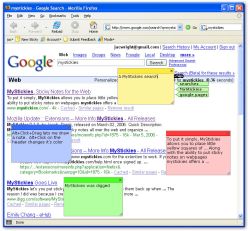 When you do a lot of web surfing it’s useful to bookmark webpages, but with today’s information overload of so many webpages, you can soon forget why you even bookmarked a page in the first place! Thats why something like MyStickies can be handy. It lets you add a “sticky note” to a webpage, so you can type a quick note on it. When you do a lot of web surfing it’s useful to bookmark webpages, but with today’s information overload of so many webpages, you can soon forget why you even bookmarked a page in the first place! Thats why something like MyStickies can be handy. It lets you add a “sticky note” to a webpage, so you can type a quick note on it.
No one else can see this but you, so next time you return to that page, you can see the note you left yourself about it! You can even see your notes when using other computers!
So if you’re the forgetful type, go check it out!
Rating: Loading... No Comments »
Ciaran Moore - October 5, 2007
 Abisoft is an open source, freeware word processing program that works in a similar fashion to Microsoft Word. It’s actually multi platform (currently available for Windows, Linux, QNX, FreeBSD or Solaris). Abisoft is an open source, freeware word processing program that works in a similar fashion to Microsoft Word. It’s actually multi platform (currently available for Windows, Linux, QNX, FreeBSD or Solaris).
This program is able to both read and write OpenOffice.org documents, Microsoft Word documents, WordPerfect documents, Rich Text Format documents, HTML web pages and much more.
What i like about it is the smallness of it and it doesn’t require a whole lot of resources to run it, which is a good thing at anytime, but especially if you’re on a somewhat older computer. This has all the features most people use and non of the unnecessary ones.
It’s worth checking out if you need the basic functions of this kind of software but without all the bloat of similar programs and without having to pay a penny!
Go to the homepage here.
Rating: Loading... No Comments »
Ciaran Moore - October 4, 2007
 Maya Personal Learning Edition is a cut down version of Autodesk’s Maya. For anyone who doesn’t know, Maya is a very well respected (and very expensive!) high end 3D graphics and animation program. Maya Personal Learning Edition is a cut down version of Autodesk’s Maya. For anyone who doesn’t know, Maya is a very well respected (and very expensive!) high end 3D graphics and animation program.
Chances are that whenever you see any of the latest 3D blockbuster cartoon (or special effects intensive) movies for example, Maya is probably one of the programs involved along the way, as it can do some very impressive stuff.
The problem is it takes a long time to master, if thats ever even possible! Also it’s very costly to purchase. So thats why they offer Maya Personal learning edition, which is basically free for non-commercial use!
For detailed info check it out here.
Rating: Loading... No Comments »
Ciaran Moore - October 4, 2007

Since you are reading this site, chances are you might be someone who downloads and tries out various software from time to time, right?
A downside to the Windows operating system is that when you uninstall programs, it doesn’t always remove everything, it can leave traces in the registry and also leftover files or folders here and there. These can clutter up and slow your system over time. There’s also the chance you might install something that just doesn’t agree with your system and messes it up.
Returnil virtual system is a program that lets you create a ‘virtual system’. This way, you can try out programs without really installing them, which means nothing can get messed up! Basically, what this means is that when it’s set to ON, any changes or installations you make will immediately be undone when you restart your computer. The home edition is free for personal use!
Check it out here for more details and the download.
Rating: Loading... No Comments »
|
|
|


 (2 votes, average: 4.00 out of 5)


