Ryan Kulla - February 27, 2007
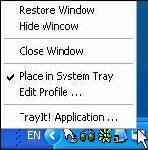 TrayIt! is a nifty tool for Windows 95/98/Me, NT/2000/XP. It lets you save Taskbar space for minimized windows by creating a small icon, for each application you apply to it, in the System Tray (The System Tray is the area is located near the Windows Clock). TrayIt! is a nifty tool for Windows 95/98/Me, NT/2000/XP. It lets you save Taskbar space for minimized windows by creating a small icon, for each application you apply to it, in the System Tray (The System Tray is the area is located near the Windows Clock).
All you need to do is start trayit1.exe, which becomes an invisible process on your machine, and then press and hold the Ctrl button on your keyboard whenever you minimize an application window. Instead of minimizing the application to your Taskbar, showing a rectangle with the application’s icon and title bar description, you’ll just see the application’s icon in the System Tray. You can then maximize the window by clicking the icon.
TrayIt’s Web site says: “this is particularly useful for background tasks you typically keep running on your PC all day long like your favorite E-mail client, Real Player, etc..” But, for myself anyway, I have a more important use for this tool: What I do is load Trayit! onto my USB drive that I take everywhere with me for use as an external hard drive. I plug this USB drive into computers that aren’t mine, such as my sister’s family room computer whenever I’m over at her place. Then I launch Trayit! from my USB drive which runs invisibly on her computer until the computer is reboot. Every time I run an application that I don’t want closed by another family member using the computer when I’m away, I minimize it with Trayit! before I leave. Now my young nieces won’t close any windows I have open that are perhaps performing a long download, system scan, or whatever, while I’m away. Very handy.
One issue I’ve come across is that some applications, such as mIRC, already implement a special feature when you hold the Ctrl key while minimizing the window (doing so in mIRC allows you to set a temporary password). This shouldn’t be a problem, as Trayit! should still minimize the application properly after your particular application runs it’s special feature.
Rating:  Loading... 1 Comment »
O. James Samson - February 27, 2007
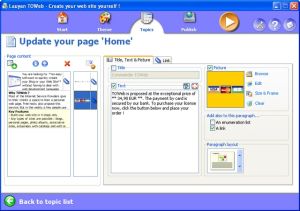 If you are seeking to create a blog or website without any web designing skill, I know something that will make it easy for you; TOWeb. If you are seeking to create a blog or website without any web designing skill, I know something that will make it easy for you; TOWeb.
TOWeb is a software that is very useful for people and organizations wishing to create a blog or a Web site without any Web designing skills. It’s really very useful to use; just enter your texts, add your pictures, and create your graphical theme using the random theme generator features.
Using TOWeb you can add any kind of Web page to your website; you can also enhance your pictures with frames and effects. What you will appreciate about this software is that it lets you protect any sensitive content with passwords, emails are automatically protected from spam, and click a single button to publish your Web site to your Web space using the provided list of hosts.
The latest version, TOWeb 1.71 has these changes:
- Bug fix : catalog item names were not displayed in the index pages when the item paragraphs are indented
- Improvement: the target of a link in a paragraph can now be specified. Default is the automatic mode but you may choose to open a link in the same web page or in a new web browser window
- Bug fix : the topic group presentation with just an image was also displaying the title and the “More…” link
- Bug fix : the option “Do not truncate texts and do not show the ‘More…’ links” located in the “Advanced topic settings” was not working for topic groups
- Correction : links to catalog item pages inside the shopping cart may have been pointing to wrong items especially on catalogs containing more than 10 items
Want to check it out! CLICK HERE! Or go to http://www.lauyan.com/en/tw-home/index.html
Rating: Loading... 1 Comment »
O. James Samson - February 27, 2007
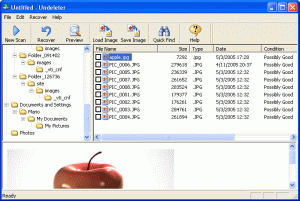 If you are still having problems with data recovery, you should check out this software, Smart Undelete. If you are still having problems with data recovery, you should check out this software, Smart Undelete.
Smart Undelete is a powerful file “unerase” or undelete and data recovery software that works very well in undeleting both hard drives and floppy discs. It’s so easy to use, offering many flexible and useful options that are sure to help get your precious data back as quick and as easy as possible.
Smart Undelete helps recover:
- Files emptied from the Recycle Bin, or those bypassing it.
- Files deleted by viruses or application programs
- Files accidentally deleted on a share network
- Files deleted using removed directories
- Files deleted prior to your Smart Undelete installation
- Files deleted using a DOS prompt command
If you’ve ever lost precious data by accidentally deleting them when you don’t intend to, you will appreciate this software.
Go check it out! CLICK HERE FOR TRIAL VERSION. Or go to http://www.smartundelete.com/
Rating: Loading... 2 Comments »
O. James Samson - February 27, 2007
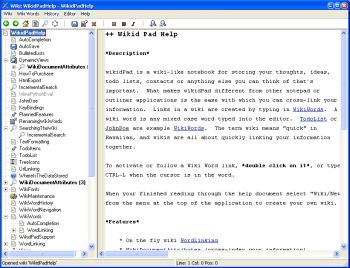 Are you familiar with that popular site, Wikipedia? Well if you are, how about having your own personal wikipedia. That’s what wikidPad aims to do for you. To help structure personal knowledge like Wikipedia helps structure global knowledge. Are you familiar with that popular site, Wikipedia? Well if you are, how about having your own personal wikipedia. That’s what wikidPad aims to do for you. To help structure personal knowledge like Wikipedia helps structure global knowledge.
WikidPad is a wiki-like notebook for storing your thoughts, ideas, to do lists, contacts, or anything else you can think of to write down. The reason why this tool is different from other notepad applications is the ease with which you can cross-link your information.
Yeah it’s so easy to cross link information. Links in a wiki are created by typing in what is called WikiWords. And what is a WikiWord? Any case word (also called CamelCase) typed into the editor e.g. TodoList.
It is worthy of note that wikidPad is not a wikipedia thing; the term wiki means “quick” in Hawaiian. Since wiki means quick, you can rest assured that you are going to enjoy quickly linking your information together.
The latest version, WikidPad 1.9 Beta 2 has these changes:
- Better support for creating new tabs
- Several bug fixes
Want to check it out? CLICK HERE!
Rating: Loading... 2 Comments »
Ciaran Moore - February 27, 2007
This is a cool “graffiti” program for those moments of creative boredom. Ever felt like getting out a can of spraypaint, shaking it up, and creating an urban masterpiece of spraypaint art across your computer screen? Maybe thats just me, but if you answered yes, then you might get some fun outta Desktop Graffitist.
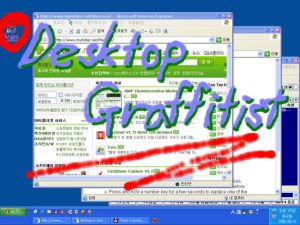
Don’t worry, it washes right off when you’re done or if you make a mistake! ; ) So try it out and unleash your creative side, all without breaking any vandalism laws and without the fumes! Its free and you can download it right over at the homepage here.
Rating: Loading... 1 Comment »
O. James Samson - February 26, 2007
 Here is a useful tool that comes highly recommended, it is called XAMPP. It is an easy-to-install Apache distribution containing MySQL, PHP and Perl. It is really very easy to install and to use: just download, extract and start. This tool is really easy to use. Here is a useful tool that comes highly recommended, it is called XAMPP. It is an easy-to-install Apache distribution containing MySQL, PHP and Perl. It is really very easy to install and to use: just download, extract and start. This tool is really easy to use.
Compared to many other software in its category like Apache2Triad, XAMPP is so much better as it is easier to use, has more features, and also allows you to switch between PHP versions in seconds. It is a complete web, database and FTP server package that’s so easy to install and use. Where does the name XAMPP come from? XAMPP’s name is an acronym for X (any of four different operating systems), Apache, MySQL, PHP and Perl.
One other great thing about this program is that no matter what your system runs on, Windows, Linux or Mac OS X, there is a version available for you.
If you are really serious about improving your web development productivity level, this cool tool is for you. Check it out HERE!
Rating: Loading... 1 Comment »
Editor - February 26, 2007
This post is dedicated to Kontera and Internet advertising frauds in general. Read the rest of this entry »
Rating: Loading... 16 Comments »
O. James Samson - February 26, 2007
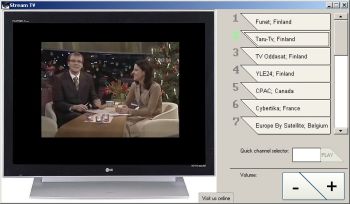 Want to watch hundreds of completely free live and prerecorded TV channels? Then you’ll need to check out Stream TV. With Stream TV, more than 700 completely free live and pre-recorded TV channels are available for fast streaming. The cool thing about this tool is that you don’t need a TV card to enjoy the channels. Want to watch hundreds of completely free live and prerecorded TV channels? Then you’ll need to check out Stream TV. With Stream TV, more than 700 completely free live and pre-recorded TV channels are available for fast streaming. The cool thing about this tool is that you don’t need a TV card to enjoy the channels.
How is that possible? The TV channels are streamed through your Internet connection.
Stream TV gives you an opportunity to enjoy popular TV channels from around the world: from the German 3-Sat to DW-TV and English channels such as BBC News and C-Span.
Want to check it out? Click HERE! or visit http://www.streamtofile.com/
Rating: Loading... No Comments »
Ciaran Moore - February 26, 2007
 McAfee AVERT Stinger is a small virus scanner specialised in hunting the viruses listed by McAfee. This is a very lightweight yet powerful antivirus application that can even be installed on a USB memory stick for quick antivirus scanning when on the go. McAfee AVERT Stinger is a small virus scanner specialised in hunting the viruses listed by McAfee. This is a very lightweight yet powerful antivirus application that can even be installed on a USB memory stick for quick antivirus scanning when on the go.
Just launch it, select your directory, press the scan now button, and wait for the results to come. The application is very basic but it can scan self-extracting executables and compressed files and will automatically remove viruses it comes across. To find out which viruses it recognizes just click on the list button.
You can’t update the virus list in the program, but instead you need to download the latest version of the program from time to time so that your scanner doesn’t become out of date and can still detect the latest threats. This is a small yet useful program to use as part of your computer security, especially if you have a USB memory stick and use strange computers. Its free and you can get it here!
Rating: Loading... 6 Comments »
Ciaran Moore - February 22, 2007
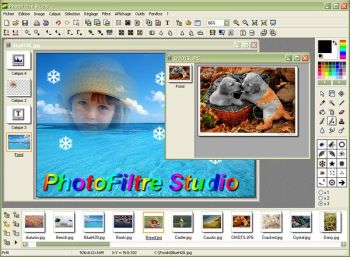 Although there are many image manipulation and photo editing programs out there. Some of us like finding a cheaper alternative that does the job well. Photofiltre Studio is a superb image and photo editor that will enable you to touch up your digital photos, add effects to images, quickly edit and grab sections of photos and it will handle your scanning and other image importing requirements.Best of all, it’s designed and presented in a well designed interface, along with a nice toolbar. As this program is plugin based, you can program and create your own modules or include some of the available modules, such as the red eye corrector and others, it also includes some cool filters. For a full list of its cool features that are too numerous for me to go into detail about here, go check out it out here. Although there are many image manipulation and photo editing programs out there. Some of us like finding a cheaper alternative that does the job well. Photofiltre Studio is a superb image and photo editor that will enable you to touch up your digital photos, add effects to images, quickly edit and grab sections of photos and it will handle your scanning and other image importing requirements.Best of all, it’s designed and presented in a well designed interface, along with a nice toolbar. As this program is plugin based, you can program and create your own modules or include some of the available modules, such as the red eye corrector and others, it also includes some cool filters. For a full list of its cool features that are too numerous for me to go into detail about here, go check out it out here.
Rating: Loading... 6 Comments »
|
|
|



 (356 votes, average: 3.90 out of 5)

