O. James Samson - April 8, 2014
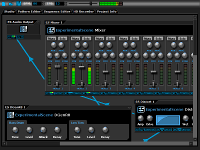 Are you looking for a digital audio workstation that is not only a freeware, but with lots of useful features as well? Do you want such program to have the kind of features that will allow you connect machines in an ad-hoc fashion? Then what you do need is DarkWave Studio. Are you looking for a digital audio workstation that is not only a freeware, but with lots of useful features as well? Do you want such program to have the kind of features that will allow you connect machines in an ad-hoc fashion? Then what you do need is DarkWave Studio.
What is DarkWave Studio all about?
DarkWave Studio is an open source (GPLv3) digital audio workstation / modular virtual studio for Windows. You can easily use the built in sequencer, bundled DarkPlug machines and third-party VST effects and VSTi instruments to create music. DarkWave Studio allows the connection of machines in an ad-hoc fashion. The installer ships with both a 32-bit and 64-bit version.
DarkWave Studio has some key features that include the following: native x64 and x86 Windows Platform Support; VST PlugIn Support – Limitlessly Expandable With Instrument and Effects PlugIns; Multi Core / Multi CPU Support; Full 64-bit Double Precision Floating Point Audio Processing; and low Latency ASIO And DirectSound Audio Output Support.
Recently, the publisher also made a number of changes to this version, and they include: improved Somoto Installer; and licence now changed to freeware.
Any downside?
DarkWave Studio has been improved in a lot of ways, and those issues identified with previous version have been taken care of.
Want to check it out? Visit: ExperimentalScene.com.
Rating:  Loading... No Comments »
O. James Samson - April 6, 2014
 Did you know that as an individual you could easily manage or publish or organize a variety of content on a website with Drupal? Did you know that as an individual you could easily manage or publish or organize a variety of content on a website with Drupal?
Drupal is a free software package that allows an individual or a community of users to easily publish, manage and organize a wide variety of content on a website. Tens of thousands of people and organizations are using Drupal to power scores of different web sites.
Drupal can be used to build everything from personal blogs to enterprise applications. Thousands of add-on modules and designs let you build any site you can imagine. It is an open source program, which gives you a lot of privileges that a commercial program won’t give.
The program has a wide active community that assists when it comes to driving innovation. It also has lots of in-built functionality, as well as thousands of freely available modules, that make it easy and cost-effective to deploy features that include the following: e-commerce; collaborative authoring environments; peer-to-peer networking; file uploads and downloads; newsletters; picture galleries; podcasting; forums; blogs; and newsletters.
Drupal is an excellent program that is absolutely useful for a lot of things. It doesn’t have any downside.
Want check it out? Visit Drupal.org.
Rating: Loading... No Comments »
Ciaran Moore - April 2, 2014
 If you have ever experienced the frustration that comes from using Windows Explorer to find specific videos out of a number of similar ones you’ll value the assistance of Media Preview. The default Windows utility performs rather poorly in terms of selecting previews of media files, which at times turn out to be more confusing than helpful. Performance issues occasionally eliminate thumbnails completely. For instance, whenever many big files are saved in the same folder or perhaps the remaining drive space is small, Windows Explorer shows icons in place of thumbnails. If you have ever experienced the frustration that comes from using Windows Explorer to find specific videos out of a number of similar ones you’ll value the assistance of Media Preview. The default Windows utility performs rather poorly in terms of selecting previews of media files, which at times turn out to be more confusing than helpful. Performance issues occasionally eliminate thumbnails completely. For instance, whenever many big files are saved in the same folder or perhaps the remaining drive space is small, Windows Explorer shows icons in place of thumbnails.
Media Preview features are numerous, such as compatibility with more than 25 file formats, detection of image relevance to prevent showing black thumbnails, ensuring the uniqueness of every file utilizing various media file sequences, and eradicating the constraints that cause unnecessary notifications.
The video thumbnail generator is simple to set up. You simply click the “Select All” tab under “File Formats” in the Media Preview Configuration panel. You then click “Apply,” “OK” and then “Exit” to finish the setup.
You can choose to make the program compatible with audio and image formats as well during setup by choosing their particular tabs and selecting all file types. The slider bar under the “Settings” enables you to adjust speed versus quality depending on your preferences. By default, the program selects the highest quality. The rendering of thumbnails occurs right away when you choose speed but takes a few seconds when you choose quality, with the delay dependent on the quantity of files in a folder and size of thumbnails. Read the rest of this entry »
Rating: Loading... No Comments »
Ciaran Moore - April 2, 2014
 Even though many people usually only look at system information tools once they encounter issues with their computers, these types of programs can assist in many different situations. For instance, the details may very well be useful when installing new hardware or software, fine-tuning a computer or planning upgrades. Even though many people usually only look at system information tools once they encounter issues with their computers, these types of programs can assist in many different situations. For instance, the details may very well be useful when installing new hardware or software, fine-tuning a computer or planning upgrades.
HWiNFO32 is one particular such tool, which is available absolutely free. It is developed to extract and show the maximum amount of information as possible about a computer system. HWiNFO32 supports the most recent standards and technologies as well as components within the industry.
The user interface is split into a couple of primary parts:
An Explorer-style window that shows all hardware info by category inside a tree-view on the left area and a floating System Summary box which shows all important system info in a compact view. Read the rest of this entry »
Rating: Loading... No Comments »
Ciaran Moore - April 1, 2014
 Baidu Spark Browser is a web browser which is based on Chromium and enhances the typical tools seen in other browsers and brings a few new ones in order to improve your ’ browsing experience. Baidu Spark Browser is a web browser which is based on Chromium and enhances the typical tools seen in other browsers and brings a few new ones in order to improve your ’ browsing experience.
One thing that makes the browser stand out is the capability to navigate using mouse gestures. You can use different functions when you move the mouse while holding the right button, including opening and closing tabs. This feature is particularly useful for people who frequently read web content. You’ll find the gestures you need to perform different tasks in the Tools submenu under Settings.
Another thing noticeable about the browser was the advantage that you dont need to install another program or extension in order to download videos or audio.You only need to click the Media button when navigating sites with relevant media to download whatever you want. You can also watch videos in their own pop-up window. In case you are interested in torrents, then you’ll discover a dedicated button for that.
Beside the two buttons is another button which has a scissor image , this is used for taking screenshots. You can either capture an entire page or click on the left mouse button and drag to select the area you want to capture. When you select a region to capture, the browser gives you a number of editing options, this includes the ability to add annotations. Read the rest of this entry »
Rating: Loading... No Comments »
Ciaran Moore - April 1, 2014
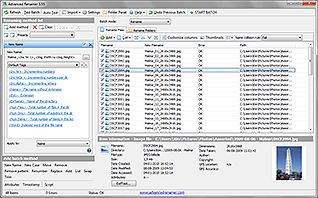 When you need to rename files, you’ll value the help of software that automates the process in some manner if you aren’t dealing with only a few files. Maybe you have a substantial collection of audio or image files, which frequently appear with pre-defined names that barely provide you with any kind of clue as to what they contain. If you wish to rename several files in order to have a good organized and consistent structure, then you should look at Advanced Renamer. This is a free of charge file renamer that will assist you in renaming many folders and files at the same time utilizing a wide selection of techniques. When you need to rename files, you’ll value the help of software that automates the process in some manner if you aren’t dealing with only a few files. Maybe you have a substantial collection of audio or image files, which frequently appear with pre-defined names that barely provide you with any kind of clue as to what they contain. If you wish to rename several files in order to have a good organized and consistent structure, then you should look at Advanced Renamer. This is a free of charge file renamer that will assist you in renaming many folders and files at the same time utilizing a wide selection of techniques.
You may use this software in order to rename various types of files, such as images, GPS info, audio, videos and TV shows. As well as modifying file names, it’s also possible to change attributes and timestamps. Some other good features include; Employing wildcards and regular expressions,real-time preview of new names,changing file extensions, putting in surfix as well as prefix to file names, saving batch presets, and even making use of multiple methods at the same time. Read the rest of this entry »
Rating: Loading... No Comments »
O. James Samson - April 1, 2014
Do you want to learn how to keep your ROM collection up to date, and with so much ease? Do you want a program or software that can help you do just that without taking much of your time? Maybe you should find out what ClrMamePro is all about in this review.
What is ClrMamePro?
ClrMamePro is a ROM-manager that helps you to keep your ROM collection up-to-date. Though, a few users have complained about its poor usability; this program remains one of the most outstanding. As if the publisher was listening to what a couple of users were saying about the program; a few changes have recently been made.
Some recent changes made to the program have ensured its stability and ease of use. Some new changes made to version 4.014 include the following: Misc: switched to 7z CPP SDK core now. Unpack operations and hash calculations are now done blockwise. So you should not run into memory issues with huge 7z files anymore; Misc: reenabled detection of unneeded folders within rar/7z files with safe handling on delete; Misc: updated unrar dll; Fixed: no more possible double file creations when using external packer’s rename command; and Fixed: possible assertion when not using external packer’s rename command.
Recent changes were made to the program that seems to correct problems of the past.
Want to check it out? Visit: Mamedev.emulab.it.
Rating: Loading... No Comments »
O. James Samson - March 31, 2014
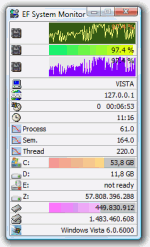 One of the basic things you need to keep your computer running and working as it should is information. It is important to have adequate information not just on your computer, but also on other systems on your network. That is why you need a tool like EF System Monitor, which has a lot of handy tools to provide you with basic information about your network. One of the basic things you need to keep your computer running and working as it should is information. It is important to have adequate information not just on your computer, but also on other systems on your network. That is why you need a tool like EF System Monitor, which has a lot of handy tools to provide you with basic information about your network.
What is EF System Monitor?
System Monitor is a comprehensive tool which provides you with information about all computers running on your network: memory space, hard disk usage, date, time, user name, etc. When you run it under Windows NT/2000/XP you can use the advanced sensors provided by Windows NT platforms: process and thread surveillance, advances IO ports monitoring, CPU times, etc. All items are displayed using suggestive graphical histograms and icons. It can collect and display the data from remote computers from a TCP/IP network.
This highly affordable and very useful tool supports Windows 8 as well as earlier versions of Windows. You won’t even have any problem with it when it comes to understanding how it works. It is easy to understand; but it is also important to observe it a little just to get a hold of it.
Want to check it out? Visit EFSoftware.com.
Rating: Loading... No Comments »
O. James Samson - March 30, 2014
 Have you by mistake deleted some files you never had intention of removing from your system? Are you looking for means to delete a particular file without much success? Then find out just how you can do this by using this program called Active@ UNDELETE. Have you by mistake deleted some files you never had intention of removing from your system? Are you looking for means to delete a particular file without much success? Then find out just how you can do this by using this program called Active@ UNDELETE.
What is Active@ UNDELETE all about?
Active@ UNDELETE is a data recovery software that helps you to undelete files and restore deleted partitions. This includes bootable CD image to recover data from dead PC. The program can recover files on FAT, NTFS, NTFS5 and EFS. It also comes with features that enable you to create a Disk Image for safe data restoration, deep disk scan and automatic data analyze, damaged RAID data recovery and reconstruction.
Recently a few changes were made to this version being reviewed. Some of these changes and updates include the following: added 64-bit executable for faster scan and better memory utilization on x64 platforms; More pre-defined file signatures added: 3FR, RW2, ERF, KDC, DCR, MOS, ODT, OLE, XPS, GZ, MTS, FMP, CAB and more; the latest Boot Disk Creator, and boot disk utilities for Professional & Enterprise editions; GUI tweaks and behaviour improvements; and better scan and search performance.
Any downside?
Active@ UNDELETE can only undelete or recover only one file per session.
Want to check it out? Visit Active-Undelete.com.
Rating: Loading... No Comments »
O. James Samson - March 29, 2014
 Want to save time as well as safely remove your USB from your computer? Then this review is for you because it has information about a program called USB Safely Remove. Want to save time as well as safely remove your USB from your computer? Then this review is for you because it has information about a program called USB Safely Remove.
What’s this program all about?
USB Safely Remove is a USB device manager. It saves time and extends user abilities on active work with flash-drives, portable drives, card readers. It provides a secure environment for removing USB flash disks from the computer unit without causing any damage in the process. USB Safely Remove is built with a nifty set of features that surpass the default options provided by Windows operating system.
As soon as you have installed USB Safely Remove on your system, it creates an icon in the system tray area and automatically detects pen drives already connected to the PC. USB Safely Remove has a wonderful response time and smoothly integrates into the operating system, without causing it to hang, crash or pop up error dialogs. So far, no serious issue has been reported by users since this version was released; which makes it highly dependable.
Any downside?
The program does not have any problems, and is in fact very easy to use even for the inexperienced user.
Want to check it out? Visit SafelyRemove.com.
Rating: Loading... No Comments »
|
|
|





