O. James Samson - December 5, 2013
 If you are thinking of using Linux, then I advice you seat back and read this review that tells you some of the things you need to know about CentOS. If you are thinking of using Linux, then I advice you seat back and read this review that tells you some of the things you need to know about CentOS.
What’s CentOS?
CentOS is an Enterprise-class Linux distribution derived from sources freely provided to the public by a prominent North American Enterprise Linux vendor. It conforms fully with the upstream vendors redistribution policy and aims to be 100% binary compatible. It is a project of the cAos Foundation. CentOS gives you access to several other opportunities you never thought existed before, which is one of several reasons to love it
It is developed by a small but growing team of core developers. In turn the core developers are supported by an active user community including system administrators, network administrators, enterprise users, managers, core Linux contributors and Linux enthusiasts from around the world. CentOS has a lot of advantages over some of the other clone projects including: an active and growing user community, quickly rebuilt, tested, and QA’ed errata packages, an extensive mirror network, developers who are contactable and responsive, multiple free support avenues including IRC Chat, Mailing Lists, Forum, and a dynamic FAQ.
Any downside?
There is absolutely nothing to complain about to the best of my knowledge.
Want to check it out? Visit Centos.org.
Rating:  Loading... No Comments »
O. James Samson - December 5, 2013
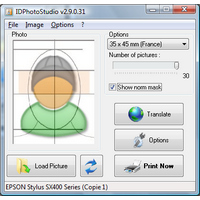 Are you looking for an easy to use ID Photo duplicator and printer? Then I think you might have found one especially when you read this review on IDPhotoStudio? Are you looking for an easy to use ID Photo duplicator and printer? Then I think you might have found one especially when you read this review on IDPhotoStudio?
What’s the big deal about IDPhotoStudio?
IDPhotoStudio is an easy to use but powerful program designed to help you adjust images to fit ID sizes for multiple countries across the globe, including Argentina, Austria, Canada, Hungary and Peru.
IDPhotoStudio has an easy to use interface that is just simple, which is one of the most attractive things about it. The application can be used by all types of users, including beginners or more experienced ones. IDPhotoStudio also provides a dedicated “Options” button that is nothing more than a printer configuration tool; thereby giving you the power to prepare the project for printing.
IDPhotoStudio is very straightforward, which means that the main window hosts the necessary tools for picking the country whose ID sizes you wish to use to adjust your photo, the number of pictures to be printed as well as a simple rotate tool for basic editing. IDPhotoStudio also includes several built-in languages, which means you can also use it in Chinese, Dutch, Romanian, Catalan or Arabic.
The program keeps improving, and that’s one of the best parts of it.
Want to check it out? Visit KCSoftwares.
Rating: Loading... No Comments »
O. James Samson - December 3, 2013
 Do you want an application that provides an up to date and complete software and hardware inventory of all your network p.c.s? Then keep reading this review because it has information that might do you some good. Do you want an application that provides an up to date and complete software and hardware inventory of all your network p.c.s? Then keep reading this review because it has information that might do you some good.
What’s DEKSI Network Inventory?
DEKSI Network Inventory provides a complete program and hardware inventory of all your network p.c.s. DEKSI Network Inventory is an extremely powerful, feature rich, advanced, but easy to use software system designed to provide network administrators with comprehensive and detailed reporting on all the application and hardware inventory installed on your networked computers.
You can view the Information remotely, generate a variety of different reports, as well as track the changes that occurred since your last inventory was run. With DEKSI Network Inventory you can export this valuable information into MS Access, MS Excel, CSV, and SQL.
Among its key features include the following: obtaining miscellaneous groups of hardware and software WMI data; 3 methods of gathering data: WMI, agents, clients; collecting configuration information from local and remote computers; tracking hardware and software changes on remote computers; offline computers are supported; generating various reports on network computers configuration (in HTML, MS Word, MS Excel, text file formats); etc.
Any downside?
After a 14 day trial period, you cannot enter more than three computers into an inventory database.
Want to check it out? Visit Deksoftware.
Rating: Loading... No Comments »
O. James Samson - November 30, 2013
 Do you want a program that can help you backup your important files even at no costs? Are you also interested in a program that does not come with those difficult to use features even for a newbie? Then you might need to read this review for more on FBackup. Do you want a program that can help you backup your important files even at no costs? Are you also interested in a program that does not come with those difficult to use features even for a newbie? Then you might need to read this review for more on FBackup.
What’s the big deal about FBackup?
FBackup is freeware backup program for Windows. FBackup protects your important files and folders from partial or total loss by automating backup tasks, password protecting and compressing it to save storage space. Using FBackup you can easily backup to any local or network drive or to external drives (such as USB drives).
FBackup has all the features that can help you backup open/locked files and can perform full and mirror backups (backup type that does not compress the files). When defining a backup you can also set file filters and schedule the backup for automatic execution.
Some of its key features include the following: it is a backup program that is free for both commercial and personal use; FBackup will automatically run backup at scheduled dates, so you have the benefit not only of having your data protected; it uses ZIP64 compression, which means that it can create zip files over 2GB in size; and many more.
Want to check it out? Visit Fbackup.com.
Rating: Loading... 2 Comments »
O. James Samson - November 30, 2013
 Do you want an application that will enable you to manage the plays posing problem with the processors multicores, and the throw on only one processor without having to worry about their management? Do you also want a program that makes it possible to create rules in order to indicate with which priority a program must be carried out, and which processors or cores it can use? Then I advice that you stick to this review since it contains information on a program called Bill2’s Process Manager. Do you want an application that will enable you to manage the plays posing problem with the processors multicores, and the throw on only one processor without having to worry about their management? Do you also want a program that makes it possible to create rules in order to indicate with which priority a program must be carried out, and which processors or cores it can use? Then I advice that you stick to this review since it contains information on a program called Bill2’s Process Manager.
What’s Bill2’s Process Manager?
Bill2’s Process Manager is a free application for Windows 2000, XP and Vista, for multicore PC. You can create rules to set priority and affinity for all processes. Rules are automatically applied when a process is detected. Include complete perfs and stats window, and many options in a clear and easy to use GUI.
Bill2’s Process Manager enables you to manage the plays posing problem with the processors multicores, and the throw on only one processor without having to worry about their management. However, it is important to let you know the program requires .Net Framework 2.0 before installation.
The publisher has been able to fix a couple of issues including typos in the “About,” and 2 new cases of crashes.
Any downside?
It takes up a lot of RAM.
Want to check it out? Visit Bill2-Software.
Rating: Loading... No Comments »
O. James Samson - November 30, 2013
 Are you looking for a feature-rich program for easy presentation of the list of data to users? Have you heard about TagCloud for VLC before now? TagCloud is a VCL implementation of a well known “tag cloud” navigation element that is widely used in an internet environment. You can read and find out more about how it works by reading the following review. Are you looking for a feature-rich program for easy presentation of the list of data to users? Have you heard about TagCloud for VLC before now? TagCloud is a VCL implementation of a well known “tag cloud” navigation element that is widely used in an internet environment. You can read and find out more about how it works by reading the following review.
What’s the big deal about TagCloud?
TagCloud is a VCL implementation of a well known “tag cloud” navigation element that is widely used in an internet environment. It has all the common features for easy presentation of the list of data to the user that you can expect from this kind of visual representation. This version comes with a couple of fixes as well as added support for Delphi XE4 and XE5.
Some of its unique features include the following: font size and/or the colour scaling (custom colour levels); support for linear, logarithmic and custom scales; settings for alignment and spacing between tags; transparent background; drawing over the Aero Glass effect on the parent controls; mouse hover and mouse click events for tags; multi-page views and an auto-sizing of the control; index labels can be displayed in various positions; etc.
Any downside?
The source code is only available after full purchase which will cost you 15 euros for a single license or 75 euros for a site license.
Want to check it out? Visit: TagCloud.
Rating: Loading... No Comments »
O. James Samson - November 30, 2013
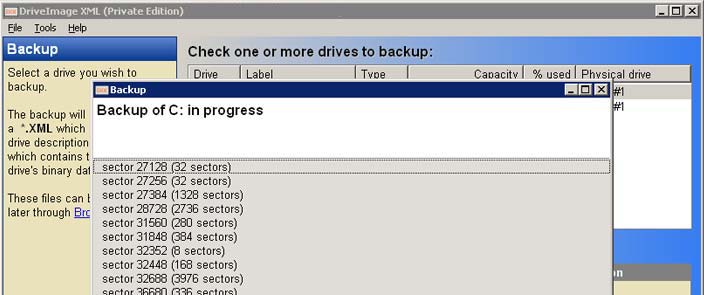 Do you want an application that will enable you backup your logical drives and partitions to image files, and to restore these images to the same or a different drive? Maybe you should you should consider DriveImage XML because it has some of the features you might like. Do you want an application that will enable you backup your logical drives and partitions to image files, and to restore these images to the same or a different drive? Maybe you should you should consider DriveImage XML because it has some of the features you might like.
What’s DriveImage XML?
DriveImage XML will backup logical drives and partitions to image files, and to restore these images to the same or a different drive. Browse these image files, view and extract files without having to restore the backup. Copy one drive directly to another.
DriveImage XML can also work in raw mode that creates an exact copy of the partition’s occupied space, but it generates a file that cannot be browsed. To view the content of the image you might need to extract the entire image. Unchecking the ‘Raw’ option enables you to browse the files from the image file and to also extract only a particular file.
DriveImage XML makes use of the Microsoft’s Volume Shadow Services in order to back up even the files that are currently in use which prevents corrupted disk snapshots.
Any downside?
DriveImage XML is one application you will love because it does what the publisher says it would do.
Want to check it out? Visit Runtime.org.
Rating: Loading... No Comments »
O. James Samson - November 29, 2013
 Most of the time we receive some emails that fall far short of our expectations. Spam emails have become serious issues for most people, and some email accounts with spam filter features have not sufficiently dealt with the situation. That is why a program like Spamihilator is worth a look. Most of the time we receive some emails that fall far short of our expectations. Spam emails have become serious issues for most people, and some email accounts with spam filter features have not sufficiently dealt with the situation. That is why a program like Spamihilator is worth a look.
What’s Spamihilator?
Spamihilator examines your Emails while downloading from the server and deletes unwanted advertising messages. It works between your Email-Client-Software and the Internet. Every time you receive messages, they will be checked. Useless spam mails will be filtered out. This process works completely in the background. It runs with almost every Email-Software such as Outlook 2000/XP/Express, Eudora, Pegasus Mail, Phoenix Mail, Opera, Mozilla, Netscape, etc.
The software works between your email client and the Internet in order to examine every message that comes in. Useless and unsolicited spam mails will be filtered out. In the background, the program is able to work to snuff life out of any unwanted email. Spamihilator uses a number of different filters in order to achieve the highest spam recognition rate possible. The program is highly configurable and can be extended by plugins.
Some of the key features of Spamihilator include the following; able to filter important mails from spam, saves all recognized spam mail to the Spamihilator recycle bin, able to process the widely used mail protocols POP3 and IMAP, etc.
Nice tool that helps you quite a bit in a fight against spam messages and emails.
Want to check it out? Visit Spamihilator.
Rating: Loading... No Comments »
O. James Samson - November 29, 2013
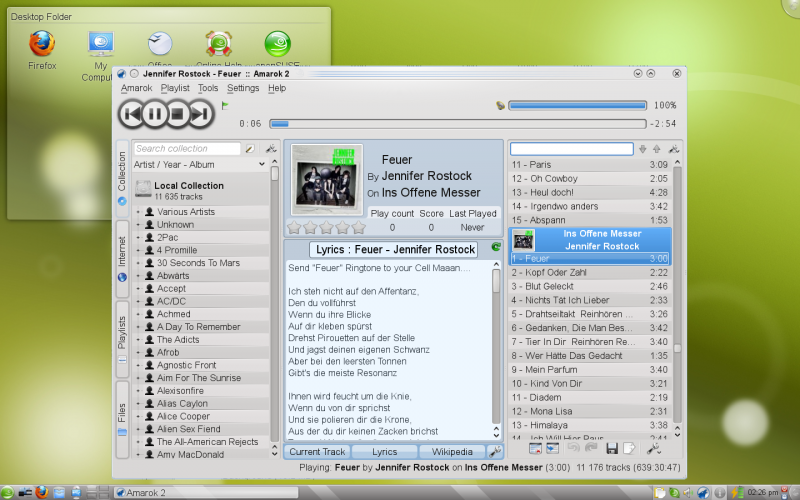 Do you want a high quality skin especially to give an original look to your favourite browser? Then you should read this review because it is going to tell you more about an application known as OpenSUSE. Do you want a high quality skin especially to give an original look to your favourite browser? Then you should read this review because it is going to tell you more about an application known as OpenSUSE.
What’s openSUSE?
OpenSUSE provides everything today’s Linux user needs for home computing and computing-on-the-go. This product includes a Linux operating system plus dozens of essential integrated tools that showcase the latest that open source has to offer.
It is aimed towards users and developers working on the desktop or server. It is great for beginners, experienced users and ultra geeks alike, in short, it is perfect for everybody! The latest release features new and improved versions of all useful server and desktop applications. OpenSUSE 13.1 comes with more than 1,000 open source applications.
Some of the features of OpenSUSE include the following: it allows you to play your music, podcasts, and videos with Banshee and Amarok; openSUSE works great on laptops and on personal handheld devices; openSUSE products are backed with software updates for 18 months; openSUSE products allow developers to retrieve the exact source code of each distributed binary package; and many more.
Want to check it out? Visit OpensUse.org.
Rating: Loading... No Comments »
O. James Samson - November 29, 2013
 There are not too many applications that can make data processing very easy these days; but of course, it doesn’t mean you won’t find one if you are lucky enough. Well, GMDH happens to be one program that could be of great help in terms of data processing and predictive analysis. Read more as we review what this program is actually all about, and what it has to offer in terms of features. There are not too many applications that can make data processing very easy these days; but of course, it doesn’t mean you won’t find one if you are lucky enough. Well, GMDH happens to be one program that could be of great help in terms of data processing and predictive analysis. Read more as we review what this program is actually all about, and what it has to offer in terms of features.
What’s GMDH Shell?
GMDH Shell is an advanced but easy to use tool for predictive analytics and data mining. The software makes processing of data much easier in many aspects. It is able to automatically detect usable data inside a file, transform data according to a problem type, drop irrelevant inputs and, finally, construct a set of predictive models at the base of optimal complexity detection and self-organization principals.
This version of GMDH has been updated to include the following: [new] “File > revert to saved” in the menu allows dropping all unsaved changes to the current project; [new] The label “Model fit” replaces “Learning”; [improved] Less requirements for automatic generation of future timestamps; [improved] Now GS suggests to save the current project before loading a new one; [improved] “Model fit” replaces “Learning” in the titles; and many more.
Want to check it out? Visit Gmdhshell.
Rating: Loading... No Comments »
|
|
|





