Archive for November, 2006
Monday, November 6th, 2006
 Are you looking for the best way to print your favorite online content without those annoying advertisements? Are you just tired of wasting your precious ink on unnecessary things? I’ve found the perfect solution. It’s Printer Friendly 1.4. I use to have the same issues; wanting to get some articles or mail printed but ending up wasting ink on unnecessary adverts, not being able to print in a nice format from certain sites because they don’t have a printer friendly link, until I discovered Printer Friendly. Are you looking for the best way to print your favorite online content without those annoying advertisements? Are you just tired of wasting your precious ink on unnecessary things? I’ve found the perfect solution. It’s Printer Friendly 1.4. I use to have the same issues; wanting to get some articles or mail printed but ending up wasting ink on unnecessary adverts, not being able to print in a nice format from certain sites because they don’t have a printer friendly link, until I discovered Printer Friendly.
Printer Friendly like the name suggests, helps you to print all of your favorite online content in a printer-friendly, reader-friendly format. The fact that the website itself doesn’t have to have a printer-friendly link makes this software a must have.
The pages printed through Printer Friendly retain all of the content you need, without any of the banner advertisement, or uncomfortable web page formatting. And above all you get to save hundreds of dollars a year on printer ink and paper.
No matter which Operating System you use, compatibility is no problem as it works well with Windows 98/ME/XP/NT/2000/2003 without any problem.
One thing is worthy of note though, for perfect installation you must make sure your Internet Explorer is closed during installation.
With Printer Friendly, you can enjoy printing your favorite online articles, blogs or news stories, or any other website content, in an easy to read format, without wasting paper or printer ink on the things you don’t want to print. Ready to check it out? Click here!
Posted in Main | No Comments »
Monday, November 6th, 2006
 Everybody knows what Wikipedia is, right? It’s an online encyclopedia in which anyone can submit and edit articles. So, for a long time it was useful and safe site until now, I guess. Everybody knows what Wikipedia is, right? It’s an online encyclopedia in which anyone can submit and edit articles. So, for a long time it was useful and safe site until now, I guess.
The German edition of Wikipedia was used as the vehicle to convince users to install what they thought was a “fix” for a new variant of the Blaster worm (Lovesan/MSBlast), which affected over 50,000 Windows computers in the summer of 2003. The attackers then sent out a German-language e-mail purporting to be from Wikipedia that told users to visit the page.
Thankfully Wikipedia’s superiors reacted almost immediately and thjse hijacked pages were removed, but still the fact that you can catch a virus down at Wikipedia sounds pretty scary. Serious impact on Wikipedia’s reputation. But I guess all’s well that ends well.
Posted in Main | 1 Comment »
Sunday, November 5th, 2006
 Paint.net is a free image editor which is much more powerful than Microsoft Paint Application which is inbuilt in Windows Operating System. You can fulfill most of your image editing tasks with it because it offers all the missing features like layers, unlimited undo, effects, history etc. You don’t have to spend money in buying application like Adobe Photoshop for your general image editing requirements. Project Leader Rick Brewster calls it ‘Photoshop for everyone’ & i completely agree with his statement after seeing at the power of this application. Paint.net is a free image editor which is much more powerful than Microsoft Paint Application which is inbuilt in Windows Operating System. You can fulfill most of your image editing tasks with it because it offers all the missing features like layers, unlimited undo, effects, history etc. You don’t have to spend money in buying application like Adobe Photoshop for your general image editing requirements. Project Leader Rick Brewster calls it ‘Photoshop for everyone’ & i completely agree with his statement after seeing at the power of this application.
It’s development was started by the Washington State University Students as an undergraduate senior design project in the year 2004. Paint.net is also mentored by Microsoft who otherwise don’t support Open Source applications. It has been downloaded over 2 million times since it’s launch.
Paint.net team is working on it’s third iteration which will offer many missing features already in Photoshop like Merge Layer Down, Gradient Tool supporting linear, radial, diamond, and conical gradient modes. Apart from these features, they are working on bug fixes, work flow improvement & other such areas.
For more info and download, click here.
Posted in Main | 2 Comments »
Sunday, November 5th, 2006
Adobe Soundbooth is a new audio application by Adobe for Video, Flash and other such visual professionals who are not comfortable with complexity of Applications like Adobe Audition. It will be included in Adobe Video Production Bundle next year replacing Audition. It’s a wonderful application for quick audio editing without going through the steep curve of an advanced Audio application which is basically designed for Audio professionals. But things are changed with the arrival of Soundbooth. It will make it a breeze to edit audio with very intuitive interface which will make all visual designers & audio novices to finish their audio related work with much ease without the trouble of learning the nuisances of complex audio applications which are good for Audio Experts only.
It is integrated with Flash Cue points and exports the markers as XML file. You will see ‘Edit in Soundbooth’ inside Adobe Premiere Features like these will make life much easier for video & interactive designers.
You can quickly do most common tasks like removing noise, rumbling sounds or click & pops which are under ‘Tasks’ tab. Extract Audios from avi, wmv files, apply effects. It can also prove to be a wonderful tool for podcasters to quickly record & enhance their podcasts & reach out to the world.
So, this is a new entrant in the Audio Market which will be launched in 2007 and hopefully, it won’t get cluttered like Advanced Audio Applications in the coming years. It will be interesting to watch the progress of Soundbooth which promises to finish our audio tasks quickly without dealing with complex set of tools.
You can download Soundbooth Beta from here.
Posted in Main | 4 Comments »
Sunday, November 5th, 2006
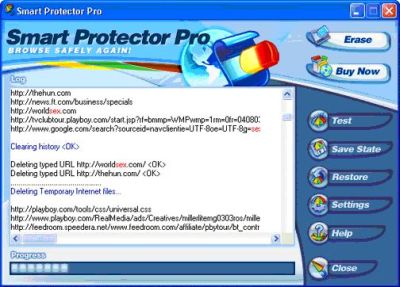 I’ve always believed that every man had a right to his privacy. That was why I had problems with Windows storing hidden records of everything I did on the Internet. I mean I do appreciate the fact that I could always go back and pick up certain things from where I left off through my history. But the issue was I wasn’t the only one with access to my PC and I needed my privacy safeguarded. Then came Smart Protector Pro and my problems were solved. You can safeguard your privacy, job, business secrets, and anything else you want to keep private with just one click in Windows with Smart Protector. I’ve always believed that every man had a right to his privacy. That was why I had problems with Windows storing hidden records of everything I did on the Internet. I mean I do appreciate the fact that I could always go back and pick up certain things from where I left off through my history. But the issue was I wasn’t the only one with access to my PC and I needed my privacy safeguarded. Then came Smart Protector Pro and my problems were solved. You can safeguard your privacy, job, business secrets, and anything else you want to keep private with just one click in Windows with Smart Protector.
It helps you to completely erase your Internet Explorer history, AutoComplete, recent document list, recycle bin, cookies, temporary files (cache), typed URLs (the drop down address list) You even get to choose what you want erased and what you want left alone.
The beauty of it all is that, unlike some other Internet erasers that work for specific programs, Smart Protector Pro is compatible with Internet Explorer, AOL, Netscape, MSN and CompuServe.
Smart protector comes in two different versions, Smart Protector Standard and Smart Protector Pro. The standard version just erases your history, Autocomplete, recycle bin, cookies etc but in addition to all the features of standard version, Smart Protector Pro provides: Scheduling, Stealth mode, Cookie Manager, Emergency key, Homepage protection, custom erase etc. For more details on the features of both versions click HERE.
The most important feature is that Smart Protector Pro protects your privacy. Smart Protector Pro dynamically configures itself for Windows 95, 98, NT, ME, 2000, XP. It cleans evidence from multiple user profiles. Take SP and clear history and other tracks with just one click! One major limitation though is the fact that it’s only free for 15 days, after which you must purchase it.
For trial version download and more info click here.
Posted in Main | 2 Comments »
Friday, November 3rd, 2006
 Okay, it’s time to put away Windows Explorer for good. xplorer2 lite is a very fast and innovative freeware file manager for Windows. Unlike Windows Explorer it has a tabbed interface–so you will no longer need to have multiple Windows Explorer’s open! Okay, it’s time to put away Windows Explorer for good. xplorer2 lite is a very fast and innovative freeware file manager for Windows. Unlike Windows Explorer it has a tabbed interface–so you will no longer need to have multiple Windows Explorer’s open!
What’s also great is that it remembers what folders/tabs you had open the last time you used it; so you won’t have to renavigate to them every time you start the program. xplorer2 lite has many other features such as favorites, file previews, mass renaming and many other features you can find listed on its homepage.
I used to use ExplorerXP but it’s buggy and doesn’t seem to be developed on very often. Dragging files often didn’t work, renaming by the typical 2-slow-clicks on a filename didn’t work, and it didn’t show my Gmail Drive, plus it seems to take twice the RAM to run than xplorer2 lite. I also tried other freeware file managers like FreeCommander, A43, JExplorer and others, but they either didn’t support tabs or just didn’t work as well as xplorer2 lite.
Posted in Main | 3 Comments »
Friday, November 3rd, 2006
 My computer was giving me a hard time, operating at snail speed, freezing every now and then until RegCure came to my rescue. RegCure is an advanced Registry Cleaner. Offering the most comprehensive feature set on the market, RegCure is the PC fix preferred by PC users. My computer was giving me a hard time, operating at snail speed, freezing every now and then until RegCure came to my rescue. RegCure is an advanced Registry Cleaner. Offering the most comprehensive feature set on the market, RegCure is the PC fix preferred by PC users.
RegCure uses the most sophisticated technology available to analyze your registry for missing, obsolete, and corrupt entries. It is compatible with all Microsoft products and third party applications. The fact that it seeks out those remnants left behind from failed installations, incomplete un-installations, disabled drivers, and spyware applications makes it a PC user’s delight.
Yeah, I think I can say RegCure is one of the best registry cleaners, the best in my rating, as it does its work error fixing quickly and accurately. Scan repair and optimize your PC using RegCure like I did mine. You get a free download to scan your PC but to actually fix the errors you will have to buy it.
Your frustrating Windows errors have met their match; it’s Regcure TO THE RESCUE.
For more info and free download for free scan, CLICK HERE
Posted in Main | 5 Comments »
Friday, November 3rd, 2006
 Tell me honestly how much time do you spend online? Well, if it’s even a half of my online time then you just love to dig into some new web-based services as much as into the downloadable freeware or shareware stuff. So, get ready to find out something interesting with me. Tell me honestly how much time do you spend online? Well, if it’s even a half of my online time then you just love to dig into some new web-based services as much as into the downloadable freeware or shareware stuff. So, get ready to find out something interesting with me.
The other day I was using my friends computer that lacks lot’s of useful tools and needed to convert some files from one format to another. To be honest that friend of mine becomes a little bit strange when it comes to his PC (you know, he doesn’t download nearly nothing ‘cause he’s afraid of viruses and doesn’t use any kind of Antivirus in principle). So I was left with no choice but to find some online converter that’ll do the trick. And I did!
You should check out Zamzar. It’s a free service that can convert nearly everything (you can choose from five image formats, 14 document formats, 11 audio formats and 9 video formats). It can convert many files at once (but only if you want to convert ‘em to the same format), up to 100MB. It works really simple: you select a file(-s) to convert, choose from the available formats to convert to, supply your e-mail address and click “convert” button. Then just check up your mail – it takes just a few seconds Zamzar to do it’s job – there you’ll find a letter with a link to your newly converted file.
If you want to find some ordinary (not web-based) freeware/shareware file convertors just check out this link.
Posted in Main | 1 Comment »
Thursday, November 2nd, 2006
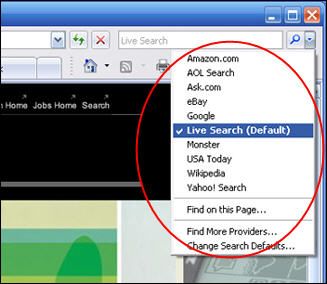 Internet Explorer 7.0 was finally released recently, the first update of IE in almost four years! About time huh? The internet has changed a lot in recent years. So its about time Microsoft caught up with the “better browsers” that are frequently updated, such as Firefox and Opera. Speaking of which, one of the first things you’ll notice when you try Internet Explorer 7, is the ideas they got from these browsers when designing it. First thing you notice is the search engine box in the top right corner. Hmmm! Now where have we seen that before? Also tabbed browsing, both these features long present in Firefox and Opera. Internet Explorer 7.0 was finally released recently, the first update of IE in almost four years! About time huh? The internet has changed a lot in recent years. So its about time Microsoft caught up with the “better browsers” that are frequently updated, such as Firefox and Opera. Speaking of which, one of the first things you’ll notice when you try Internet Explorer 7, is the ideas they got from these browsers when designing it. First thing you notice is the search engine box in the top right corner. Hmmm! Now where have we seen that before? Also tabbed browsing, both these features long present in Firefox and Opera.
Upon installing and running it for the first time, there’s a page with a couple of settings such as turning on the phishing filter (also available in the recent release of Firefox 2) and some other settings like setting your language and location, and joining the customer experience program.
I gotta admit, firefox is definitely my browser of choice, but i’m pleased to see they’ve finally given Internet Explorer this much needed update. Even though they seem to have lifted the main features from what a lot consider to be better browsers, as i mentioned before. So nothing too innovative here. They also have “add-ons” available, another idea from Firefox, although most of the IE ones aren’t free (or as useful as Firefoxes, who incidentally, now call their extensions “add-ons” too). It also has options for RSS feeds now, if thats your thing. Active X seems to be disabled by default, which is a good thing considering the IE security reputation in the past!
To sum it up, the new Internet Explorer is a step in the right direction, but i doubt they’ll be winning back any Firefox users, including me! : )
You can check it out here for more info or to download it (or just wait and windows update will install it anyway if it’s set to automatic updates)
Posted in Main | No Comments »
Thursday, November 2nd, 2006
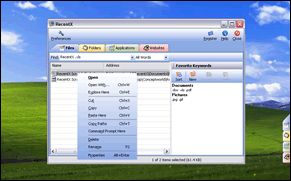 Normally when you want to launch a program, it can be a real time consumer. You first gotta click on the start menu and look through the long list of programs you may have aquired. Then when you finally find it you gotta click on its submenu and scan your eyes through it again, it can be a real pain. Similar thing when you gotta navigate through folders in order to find a file! Normally when you want to launch a program, it can be a real time consumer. You first gotta click on the start menu and look through the long list of programs you may have aquired. Then when you finally find it you gotta click on its submenu and scan your eyes through it again, it can be a real pain. Similar thing when you gotta navigate through folders in order to find a file!
Well with RecentX, you may never have to go through that on a daily basis ever again! It automatically tracks what programs and even files and folders you frequently use and keeps them in a list (which is also searchable) It can also track your favorites and history from both Internet Explorer and Firefox.
What i like is that it doesnt degrade the system performance since it doesn’t index your entire hard drive like certain programs. After all, what’s the point in indexing thousands of files you’ll never need to access? It just keeps track of the programs, files and folders that you most frequently use! You can also quickly perform frequent tasks such as copying and pasting. It even lets you access frequently used files on a networked computer! A lot better than clicking on network neighbourhood (“My Network Places”) and navigating your way to ’em.
Check it out here for more info and a free trial.
Posted in Main | No Comments »
|
|
|





