Author Archive
Wednesday, November 7th, 2012
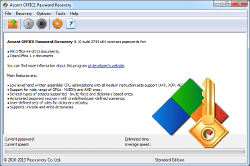 Accent Office is a tool that helps you to easily recover passwords or completely delete passwords quickly and effectively from all versions of Microsoft Office and OpenOffice files. Accent Office is a tool that helps you to easily recover passwords or completely delete passwords quickly and effectively from all versions of Microsoft Office and OpenOffice files.
It password recovery provides support for all file formats created in MS Office and OpenOffice. It can also recover passwords created to files created irrespective of the year the password was created. Its search speed is about 40 times faster due to its use of AMD and nVIDIA graphic cards. That means it can run on all modern AMD(ATI) and nVIDIA graphics cards. Using the latest GPUs and APUs significantly boosts its performance rate, improves its flexibility and scalability and thus makes Accent Office the software of choice for password recovery.
It deploys three types of attacks for password recovery: brute force, mask and dictionary attacks. Several types of attacks are also available to improve password recovery rates. It completely decrypts password-protected files and creates a password-free copy. This application is smart enough to evaluate the configuration of a computer and its performance before selecting a recovery method that balances recovery time and the number of passwords covered. It allows you to create your own password mutation rules for dictionary attacks.
The publishers, AccentSoft Utilities, have added the following new features: support for Microsoft Office 2013 (accelerate with AMD/nVIDIA) and decrypts Excel/Word files (accelerate with nVIDIA. It also comes with an uninstaller.
To find out more about this software, please do visit PasswordRecoveryTools.
Posted in Main | No Comments »
Wednesday, November 7th, 2012
 Are you tired of handling playlists? Would you want software that can help you better manage and handle your playlist while listening to your music tracks? 1by1 is it. Are you tired of handling playlists? Would you want software that can help you better manage and handle your playlist while listening to your music tracks? 1by1 is it.
What is the big deal about 1by1?
This freeware is a small, fast and handy audio player that plays whole directories and whole drives of MP3 without any playlist. It provides a smart and highly varied environment that allows you handle all your file collection and to listen to your audio tracks without any playlist or databases.
It can play music directly from your folder and its resume play feature allows you to resume the track right from the very position you left it. It his very portable and takes up a very small amount of your system resources. It also boasts of non-stop play, simple cross-fading and audio enhancer features.
The publishers, Martin Pesch, have added the following new features: hang on RSS download bug fixed, fixed the direct sound enumeration, and improved folder search/scan, time/info scan in background thread and system folders correctly shown on Win 7and fixed command line problems.
Other features include support for ACM (MP3) and MPGlib (MP2, MP3), rename tool and big title display. This freeware is compatible with Windows 2000/XP/Vista/Win& or Linux with Wine.
Any downsides?
Simple, fast and elegant. A wonderful tool for anything audio. Great application for audio books, music and other stuff.
To learn more about this amazing freeware, please visit Mpesch3.
Posted in Main | No Comments »
Wednesday, October 31st, 2012
 Intel Solid State Drive Toolbox will allow you to manage and keep your Intel SSD running properly with Intel SSD Toolbox. The program is built with so much useful functional capabilities that you can use even for free. Intel Solid State Drive Toolbox will allow you to manage and keep your Intel SSD running properly with Intel SSD Toolbox. The program is built with so much useful functional capabilities that you can use even for free.
What is Intel Sold State Drive Toolbox all about?
Intel Solid State Drive Toolbox gives you ability to do the following when installed on your system; accessing Intel SD management features (Intel SSD Optimizer, System Configuration Tuner and Secure Erase), reporting the drive identification data for Intel SSDs, as well as other drives, accessing the Self-Monitoring, Analysis, and Reporting Technology (SMART) attributes for Intel SSDs, as well as other drives, checking the SMART thresholds and viewing recommended actions for Intel SSDs, as well as other drives, and running diagnostic scans on Intel SSDs to check for any READ or WRITE errors.
Intel SSD Toolbox displays the following screen with the name and capacity of each drive on your PC, as well as the following options when opened; Intel SSD Management Tools that enables monitoring and managing of any Intel SSDs associated with this computer, View Drive Information that displays the model number, serial number and firmware number for each drive on the system, Run Fast Diagnostic Scan – Analyzes the first 1.5 GB of an SSD to determine whether there are any READ or WRITE errors, etc.
Downside
Intel Solid State Drive Toolbox is a bit advanced; that is why it is important to read the FAQ before installing.
Want to check it out? Visit Intel.com.
Posted in Main | No Comments »
Wednesday, October 31st, 2012
 Windows license cannot be copied the same way people copy and paste other license keys to secure locations. Windows keys would have to be written manually to the new file, which could cause it to be misspelt. Luckily there is an application that can do this automatically without any stress; and that program is WinGuggle. Windows license cannot be copied the same way people copy and paste other license keys to secure locations. Windows keys would have to be written manually to the new file, which could cause it to be misspelt. Luckily there is an application that can do this automatically without any stress; and that program is WinGuggle.
WinGuggle is a small application that can get your Windows XP, Windows Vista, Windows 7 and Office Product Key easily. No Installation is needed, just unzip the archive and launch the application.
WinGuggle users the possibility to simply press a button and get their Windows or Office suite keys straight into Windows clipboard. From there on, a simple paste in any text file will do the trick, and the unlock codes will be safe. The program also comes with a well structured interface where each of its functions is displayed in a new tab.
You can replace the default OEM (Original Equipment Manufacturer) logo with a picture of their liking, or they can even change the manufacturer name, website and phone number, all without affecting the stability of their computer.
In a nutshell, WinGuggle saves a lot of time on more than one level since it retrieves the serial number with no effort from the user, at the same time providing safe OEM changes.
Downsides
It is a fine program no doubt; but the interface needs to be worked on a little bit.
Want to check it out? Visit UnlockForus.
Posted in Main | No Comments »
Wednesday, October 31st, 2012
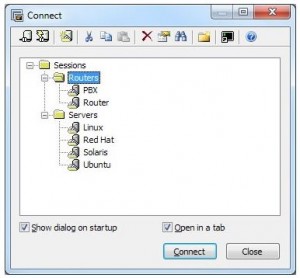 A program that simplifies the transfer of files from one server to another without an iota of doubt when it comes to safety and security won’t be a bad addition to your collections. You should be able to get that kind of guarantee with SecureCRT. A program that simplifies the transfer of files from one server to another without an iota of doubt when it comes to safety and security won’t be a bad addition to your collections. You should be able to get that kind of guarantee with SecureCRT.
What’s so special about SecureCRT?
SecureCRT software combines the secure login and data transfer capabilities of Secure Shell (SSH) with the reliability, usability and configurability of a proven Windows terminal emulator. SecureCRT is also a Windows terminal emulator that supports Secure Shell (SSH), Telnet, rlogin, serial, and TAPI protocols. SSH provides encrypted login, data transfer, and terminal sessions and is highly customizable and easy to use.
SecureCRT provides versatile solutions for business, network management, information security, and development tasks, from accessing host-based applications and administering servers to securely accessing behind-the-firewall network resources. The program also supports SSH1, SSH2, Telnet, Telnet/SSL, RLogin, Serial, and TAPI protocols and authentication via password, public-key, X.509 certificates, and Kerberos v5 via GSSAPI.
Some key features in SecureCRT include the following: securely access business applications on UNIX, Linux, or VMS from machines running Windows, Linux, and Mac; Configure, manage, and customize 1 to 5,000 sessions with full control over scrollback, key mappings, colours, fonts, and more.
Downsides
The program has a nag screen, and a 30-day trial.
Want to check it out? Visit Vandyke.
Posted in Main | No Comments »
Wednesday, October 31st, 2012
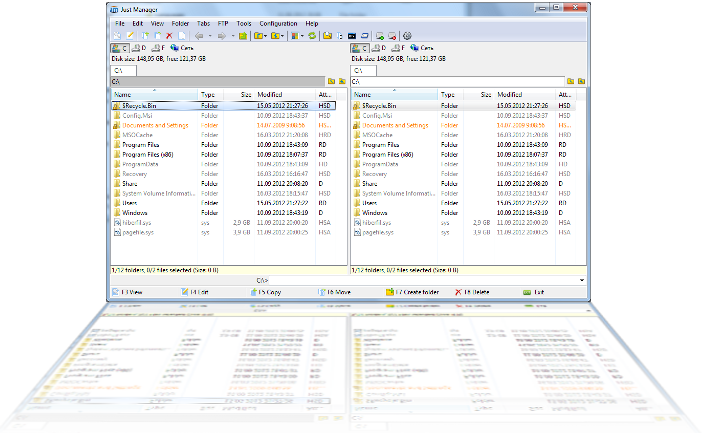 File renaming or management would be a lot easier when you can simply just download and install a program that can take care of all that. Just Manager is one of such programs; it comes with a couple of key features that are easy to use. File renaming or management would be a lot easier when you can simply just download and install a program that can take care of all that. Just Manager is one of such programs; it comes with a couple of key features that are easy to use.
Just Manager is a file manager for the Windows operating system. Features include Multi-panel interface, Panel tabs, File operations, File search, Quick search, Multi-rename tool, FTP, and a Customizable interface.
Just Manager has a multi-panel interface allows you to manage multiple folders at once. You can use the multi-renaming tool to batch rename files. Just Manager has a lot of key features that include the following; Multi-panel interface, Panel tabs, customizable interface, Multi-rename tool, FTP, file operations, quick search, and file search.
A few more changes have been made and added to Just Manager to also include the following; control panel menu added, advanced commands added to folder context menu, more correct why to identify system UI language introduced, lock tab icons now smaller, panel becomes active on tab creation, when tab removed or selected tab changed, and other bug fixes.
Any downsides?
This is a freeware program that has no limitation, and is also easy to use.
Want to check it out? Visit JustManager.
Posted in Main | No Comments »
Wednesday, October 31st, 2012
 Disc image management has gone really scientific these days with loads of applications being built with features that help to make things easier than before. Tons of such applications are not only capable of burning or converting files; they also have built-in features that can help even a newbie carry out several tasks. ISO Workshop is one of many freeware programs that have all it takes to carry out your burning tasks. Disc image management has gone really scientific these days with loads of applications being built with features that help to make things easier than before. Tons of such applications are not only capable of burning or converting files; they also have built-in features that can help even a newbie carry out several tasks. ISO Workshop is one of many freeware programs that have all it takes to carry out your burning tasks.
ISO Workshop is a free application specifically designed to facilitate disc image management, conversion and burning operations. The program has a very simple user interface that lets you focus on the most important aspects of the process, allowing the program to do the rest. Version 3.6 has been updated to include a few bug fixes and features such as; fixing of bug with detecting Pioneer BD recorders, updated disc burning SDK, and improved burning process.
The program’s interface enables you to make ISO images, extract specific files and folders from disc images, create disc backups by copying disc contents to an ISO or BIN image file, convert different disc image files into the ISO or BIN format and, of course, burn ISO and CUE images to blank discs.
Want to check it out? Visit Glorylogic.
Posted in Main | No Comments »
Wednesday, October 31st, 2012
 SnapTouch is an application that can serve as a digital photo album as well as a batch image processor. It is an application that enables photographers to easily connect to an image source (a digital camera, a flash disk or other source), view and sort photos, specify where to copy them to and import them to a computer. SnapTouch is an application that can serve as a digital photo album as well as a batch image processor. It is an application that enables photographers to easily connect to an image source (a digital camera, a flash disk or other source), view and sort photos, specify where to copy them to and import them to a computer.
With SnapTouch, you can group the photographs, while editing them too. This includes resizing, framing, labelling, and adding comments to any number of pictures simultaneously. Other features in this program include special effects, image mirroring, rotation and full-screen preview, and you will understand why Snap Touch is choice of so many amateur and professional digital photographers.
SnapTouch can also automatically rotate and/or rename photos while copying them. You can also specify rules for renaming files Snap Touch can also rename entire groups of photos. You can also rename digital photo files after they are copied.
SnapTouch also enables you to semi-automatically crop groups of files while maintaining their proportions. Key features included in SnapTouch are; smart importing photos from memory cards and cataloguing them automatically, creating collections of your photos and batch processing entire collections, folders, or selected shots rotating your photos without reducing their quality, etc.
Downsides
Limited functionality, watermark on the output files, and nag screen are some of the downsides of SnapTouch.
Want to check it out? Visit Snaptouch.
Posted in Main | No Comments »
Wednesday, October 31st, 2012
 A lot of computers and files are being damaged these days because of the number of malware and other potentially harmful programs invading privacies of users. Files are stolen faster than what we had in the past, which calls for installation of anti-theft applications like Moosoft’s The Cleaner. A lot of computers and files are being damaged these days because of the number of malware and other potentially harmful programs invading privacies of users. Files are stolen faster than what we had in the past, which calls for installation of anti-theft applications like Moosoft’s The Cleaner.
What’s The Cleaner?
The Cleaner is a high performance application that protects, prevents and recovers your computer from malicious software (malware) attacks, including; Trojans, spyware, adware and other harmful programs. The Cleaner also detects and removes malware that is often missed by anti-virus software. The program delivers one of the quickest and most thorough scans on the market. The Cleaner will scan your computer in under eight minutes making it an excellent addition to your computer’s defenses. It also has on-demand scanning for single drives, folders or files or it can scan the entire computer.
The Cleaner also works hand-in-hand with your anti-virus and firewall to complete your security. The fact that the software works or is compatible with regular antivirus programs installed on your PC is highly encouraging. There is actually no harm in going the extra mile when it comes to protecting your computer and files with additional application since it doesn’t clash.
Downside
The Cleaner has a 30 day limitation that also limits you to only a few of its features.
Want to check it out? Visit Moosoft.
Posted in Main | No Comments »
Tuesday, October 30th, 2012
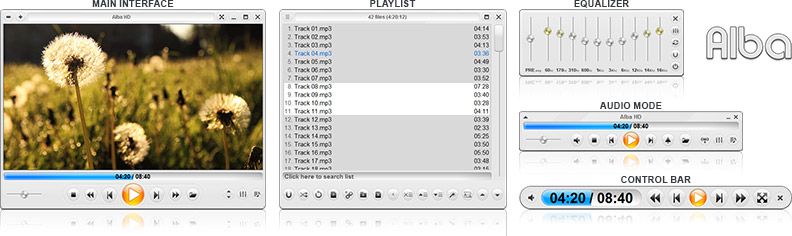
A media player that is truly easy to use, and with features that can be easily be handled by a first timer; and is that not what most people want? Zoom Player seems to have all the features every one likes, and that is one of the reasons you want to give it a try.
What about Zoom Player PRO?
Zoom Player is a robust media and DVD front-end player that was designed to be simple at first glance while being remarkably dynamic and flexible when used to its full potential. It works in two modes; a Media mode, which can play any file supported by DirectShow (any file which plays in MediaPlayer) and a DVD mode which uses pre-installed DirectShow DVD filters to play DVD content. Zoom Player supersedes media player in all its functions and provides several important functions that media player lacks. The media player provides special zooming functions to improve TV-output quality by eliminating overscan.
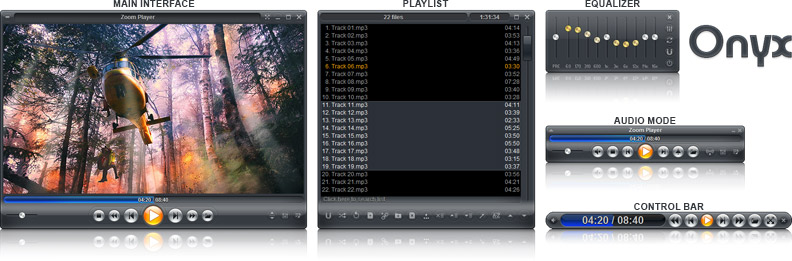
Zoom Player PRO was recently released with a few additional features such as; improved over-all stability and robustness, improved performance of several sub-systems by rewriting the systems from scratch using improved methodology, and a few others.
Downside
This program installs too many additional programs that users may not like. Also, there are a couple of freeware programs out there that can match its features.
Want to check it out? Visit Inmatrix.
Posted in Main | No Comments »
|
|
|






