Author Archive
Saturday, August 6th, 2011
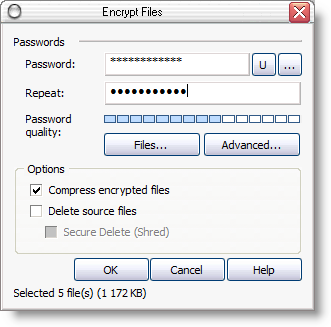 Advanced Encryption Package is an advanced, but flexible and easy to use program. The program enables you to encrypt files for your own protection and also easily create “self-decrypting” versions of your files that others can run without needing it or any other software. Advanced Encryption Package includes a file shredder that wipes the contents of your original files. The program also integrates nicely with Windows Explorer, thereby allowing you to use Explorer’s context menus and avoid having another window clutter your screen. It also uses military grade encryption for protecting your private files. Program supports strong encryption algorithms Blowfish with 448 bit key and DES with 128 key. This shareware has a couple of changes that include; significantly improved clipboard/text encryption assistant, and now looks like Windows 7 Print Picture Wizard. Advanced Encryption Package is an advanced, but flexible and easy to use program. The program enables you to encrypt files for your own protection and also easily create “self-decrypting” versions of your files that others can run without needing it or any other software. Advanced Encryption Package includes a file shredder that wipes the contents of your original files. The program also integrates nicely with Windows Explorer, thereby allowing you to use Explorer’s context menus and avoid having another window clutter your screen. It also uses military grade encryption for protecting your private files. Program supports strong encryption algorithms Blowfish with 448 bit key and DES with 128 key. This shareware has a couple of changes that include; significantly improved clipboard/text encryption assistant, and now looks like Windows 7 Print Picture Wizard.
Some of the key features of Advanced Encryption Package include the following; easy to use even for novices, strong and proven to protect your sensitive documents (20 encryption algorithms), file and text encryption, symmetric and asymmetric algorithms (17 data destruction algorithm), secure file deletion, using USB flash drives to store decryption keys, complete command line support to fully automate decryption tasks, creating encrypted self-extracting file to send it as email attachment, and many more.
Want to check it out? Visit Aeppro.
Posted in Main | No Comments »
Friday, August 5th, 2011
 Packmage is a CAD application for packaging carton box design; and has dieline and box structure predefined in the library with parametric design and 3D box modeling features, designers can work more efficiently. This new, but unique software costs $110.00 per download, enables you to carry out structural design for corrugated and folding cartons. Packmage is also an architectural program that combines the best of web technology with a desktop application. Packmage is a CAD application for packaging carton box design; and has dieline and box structure predefined in the library with parametric design and 3D box modeling features, designers can work more efficiently. This new, but unique software costs $110.00 per download, enables you to carry out structural design for corrugated and folding cartons. Packmage is also an architectural program that combines the best of web technology with a desktop application.
With Packmage 3D, you can increase productivity and communication through virtual prototyping. With a rich database of predefined design shapes, you only need to modify the parameters on the existing shapes to get the final structural design done. You can also export the final design as many different file formats and can be imported into other graphic design applications.
Some of the more advanced things you can utilize Packmage for include the following; quickly change the designer’s idea to a 3D view, significantly improve customer communication and efficiency, shorten design cycles, reduce the number of repeated sampling, more rapid, intuitive creative feedback to clients and win more orders, designers and graphic designers can work more efficiently without having too many headaches when carrying out their tasks.
Want to check it out? Visit Packmage.
Posted in Main | No Comments »
Friday, August 5th, 2011
 RSSOwl is a free RSS and RDF newsreader written in Java using SWT as graphic library. RSS (“Really Simple Syndication” or “Rich Site Summary”) is a document specification that empowers users to collect and organize Web-based news and information in a more efficient manner. Applications that collect data from RSS-compliant sites are called RSS readers or “aggregators”. RSSOwl for Windows is an application that also lets you gather, organize, update, and store information from any compliant source in a convenient, easy to use interface. RSSOwl for Windows also gives you opportunity to save selected information in various formats for offline viewing and sharing, and much more. RSSOwl is a free RSS and RDF newsreader written in Java using SWT as graphic library. RSS (“Really Simple Syndication” or “Rich Site Summary”) is a document specification that empowers users to collect and organize Web-based news and information in a more efficient manner. Applications that collect data from RSS-compliant sites are called RSS readers or “aggregators”. RSSOwl for Windows is an application that also lets you gather, organize, update, and store information from any compliant source in a convenient, easy to use interface. RSSOwl for Windows also gives you opportunity to save selected information in various formats for offline viewing and sharing, and much more.
Some of the latest changes included in this version reveal how hard the publishers have been working behind the scene to improve on this open source program. Users of RSSOwl for Windows can look forward to the following changes; layout can now quickly be changed from feed toolbar, new option to open links from articles in a new tab instead of embedded, new action in attachment menu to copy the link of an attachment, automatic clean up is avoided for current active feed, Javascript can now be turned off globally or for specific websites (Linux, Mac), and many more.
Want to check it out? Visit RssOwl.
Posted in Main | No Comments »
Friday, August 5th, 2011
 SQL Examiner is a professional solution that guarantees the optimization of the synchronization process. This advanced program finds and analyzes differences in schemas of different versions of databases no matter how complex their schemas, and provides you with a detailed description of differences. As a matter of fact, SQL Examiner generates a script which synchronizes the compared databases. Enjoy new additions that include the following; full support of 64-bit operating systems, improved support of Oracle databases, improved user-interface, and a few others. SQL Examiner requires .NET Framework 2.0, MDAC 2.6. SQL Examiner is a professional solution that guarantees the optimization of the synchronization process. This advanced program finds and analyzes differences in schemas of different versions of databases no matter how complex their schemas, and provides you with a detailed description of differences. As a matter of fact, SQL Examiner generates a script which synchronizes the compared databases. Enjoy new additions that include the following; full support of 64-bit operating systems, improved support of Oracle databases, improved user-interface, and a few others. SQL Examiner requires .NET Framework 2.0, MDAC 2.6.
Key features or benefits of SQL Examiner include the following: simplifies database schema versioning, allowing you to save a database schema to a version control system, storing a database scheme in the source control system makes it easy to deploy, update and maintain databases with little or no manual work involved; makes database deployment and maintenance a hands-free operation, with a command-line tool supplied with SQL Examiner you can perform single-click database comparison, or schedule fully automatic comparison and synchronization of databases; customize the database schema comparison and synchronization according to your needs; it also offers HTML and plain-text reports, highlighting any changes the comparison has discovered with advanced, easy to read reports, you can quickly review the differences between the two databases. Exporting of the reports to XML format allows using third-party tools to analyze the comparison results; and many more.
Want to check it out? Visit SQL_Examiner.
Posted in Main | No Comments »
Friday, August 5th, 2011
 App Sketcher lets you build prototypes how you build PowerPoint slides. The program enables you to Drag and Drop to create, set properties to add styles and interactions. App Sketcher produces HTML/CSS/JS prototypes that can run in any browser without viewers/plugins. With App Sketcher, project managers, analysts, designers, developers and clients can work together to quickly iterate over interface designs and application flows. Users are required to have Adobe AIR 2.6 installed on their systems to enjoy this program. Already, the publisher has made a couple of changes and added a dew other features that include the following; addition of jQuery vertical slider component, addition target option for opening link in a new window or tab, show delete confirmation dialog when removing a page, allow moving component to a different container in outline view, and many more. App Sketcher lets you build prototypes how you build PowerPoint slides. The program enables you to Drag and Drop to create, set properties to add styles and interactions. App Sketcher produces HTML/CSS/JS prototypes that can run in any browser without viewers/plugins. With App Sketcher, project managers, analysts, designers, developers and clients can work together to quickly iterate over interface designs and application flows. Users are required to have Adobe AIR 2.6 installed on their systems to enjoy this program. Already, the publisher has made a couple of changes and added a dew other features that include the following; addition of jQuery vertical slider component, addition target option for opening link in a new window or tab, show delete confirmation dialog when removing a page, allow moving component to a different container in outline view, and many more.
App Sketcher is easy to-use, and can be used by a business analyst or UX designer to flesh out the initial concept and wireframes, or by a developer to quickly build a clickable prototype to demonstrate application flow and validate it with clients. Simply put, App Sketcher ensures that everyone shares a common understanding of how the upcoming application should behave and look.
Want to check it out? Visit AppSketcher.
Posted in Main | No Comments »
Wednesday, July 27th, 2011
 MultiMi is a cool new desktop program created to make sharing and socializing across your email accounts and social networks a breeze. Users can chat, swap photos, update their status, check their email inboxes and calendar; all in a single place. All you need to do install MultiMi for free, connect to your accounts and networks, and you’re good to go. Leave multiple logins and switching between browser tabs behind. MultiMi is not the first and only program that has all the features mentioned earlier, but it has potential to be one of the best. Units emails, Facebook, Twitter, LinkedIn, and one in one free app. Lets you drag and drop to share content across accounts. MultiMi is a cool new desktop program created to make sharing and socializing across your email accounts and social networks a breeze. Users can chat, swap photos, update their status, check their email inboxes and calendar; all in a single place. All you need to do install MultiMi for free, connect to your accounts and networks, and you’re good to go. Leave multiple logins and switching between browser tabs behind. MultiMi is not the first and only program that has all the features mentioned earlier, but it has potential to be one of the best. Units emails, Facebook, Twitter, LinkedIn, and one in one free app. Lets you drag and drop to share content across accounts.
With MultiMi application, you can do a lot of things that include the following; unite email, Facebook, Twitter, and a lot more, drag and drop to share contents across accounts, and check all links with integrated AVG link scanner. For a freeware application that lets you synchronize, manage, as well as share all your contacts; you are in for a great time.
MultiMi is a freeware, and runs on Windows 7, Windows 2003, Windows 2008, Windows Vista, and Windows XP.
Want to check it out? Visit Multimi.
Posted in Main | No Comments »
Wednesday, July 27th, 2011
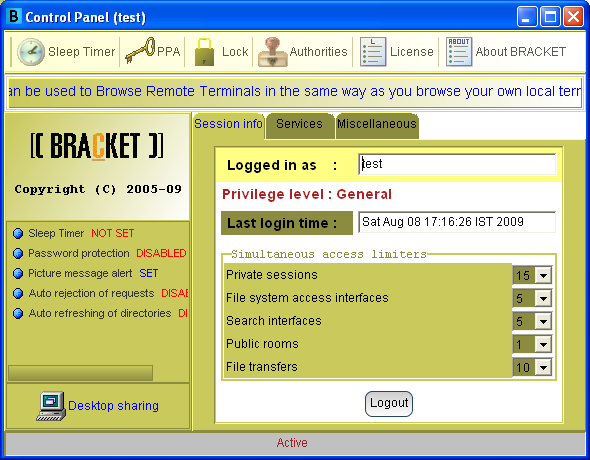 Bracket is a program that supports full Desktop Sharing with recordable sessions. The software works across all platforms as it is platform independent, and also supports Web hosting on local system, which is an “Innovation Concept.” The website can be hosted on local system but will be accessible on internet. Other features available in Bracket include the following; IM, Hotlink based access to network files, File transfers, File System Access, Platform Independence, No installation required, shipped as ready to run binaries. The product is a complete collaboration suite. Bracket is a program that supports full Desktop Sharing with recordable sessions. The software works across all platforms as it is platform independent, and also supports Web hosting on local system, which is an “Innovation Concept.” The website can be hosted on local system but will be accessible on internet. Other features available in Bracket include the following; IM, Hotlink based access to network files, File transfers, File System Access, Platform Independence, No installation required, shipped as ready to run binaries. The product is a complete collaboration suite.
Bracket is designed to erase the line between the Local System and the Remote System. The software allows you to perform all such operations over the network (remotely) that you could have performed if you were sitting in front of the remote system. Desktop sharing, file system access, file transfers and messaging are only a few to mention here. The latest updates allow you to host your website right on your local system, and still make it live on the internet. Bracket is an amazing program that is just right for both small and medium businesses and organizations.
This nice network application includes a couple of key features that may not take much time to get familiar with. Key features include the following; web hosting on local system, platform independent, full support for file transfer, P2P file sharing, etc.
Want to check it out? Visit Bracket.
Posted in Main | 1 Comment »
Tuesday, July 26th, 2011
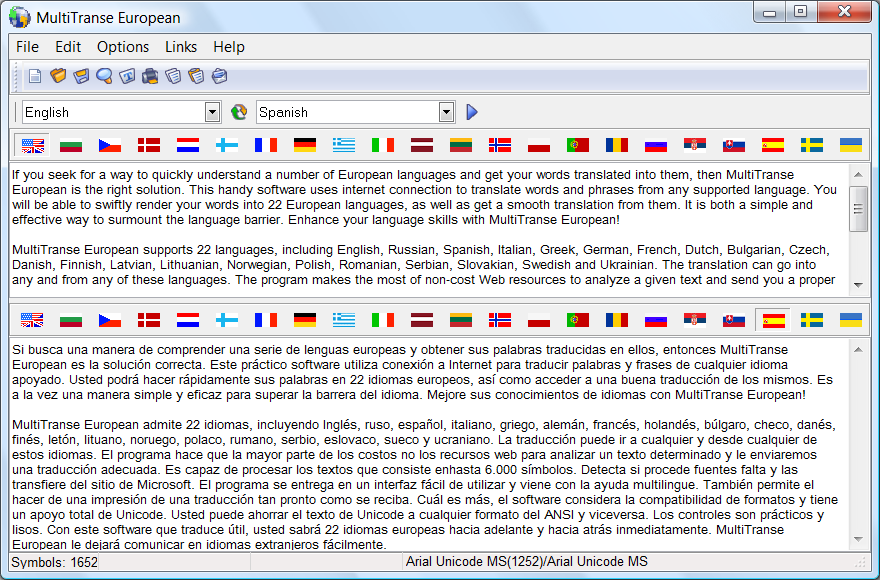 MultiTranse European supports is an application that supports eight different languages, including English, Russian, Spanish, Italian, Greek, German, French and Dutch. The translation can go into any and from any of these languages. MultiTranse European makes the most of non-cost Web resources to analyze a given text and send you a proper translation. The program is capable of processing texts consisting of up to 6,000 symbols, and can detect if required fonts are missing and downloads them from the Microsoft site. MultiTranse European supports is an application that supports eight different languages, including English, Russian, Spanish, Italian, Greek, German, French and Dutch. The translation can go into any and from any of these languages. MultiTranse European makes the most of non-cost Web resources to analyze a given text and send you a proper translation. The program is capable of processing texts consisting of up to 6,000 symbols, and can detect if required fonts are missing and downloads them from the Microsoft site.
MultiTranse European is a program for users who seek for a way to quickly understand a number of European languages and get have their words translated into them. MultiTranse European uses internet connection to translate words and phrases from any supported language. Users will be able to use the online translator to swiftly render their words into 22 different European languages, and also get a smooth translation from them. Definitely, this program is a simple and effective way to surmount the language barrier.
MultiTranse European is delivered in an easy-to-use interface and comes with Multilanguage support; and you can also make a print of a translation as soon as it is received. MultiTranse includes a full Unicode support; taking into account the compatibility of formats.
Want to check it out? Visit Multitranse.
Posted in Main | No Comments »
Tuesday, July 26th, 2011
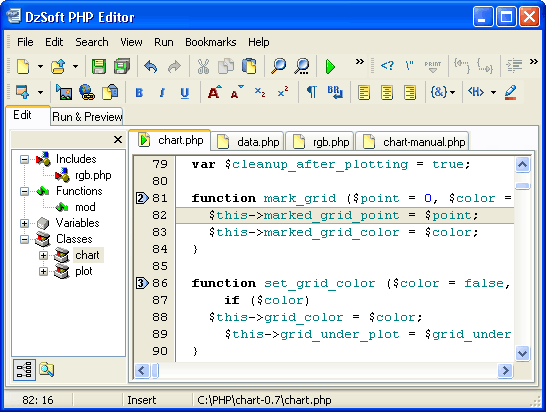 DzSoft PHP Editor is a tool for writing, editing, and debugging PHP scripts and HTML pages. DzSoft PHP Editor has a built-in FTP client and browser, Code Explorer, File Explorer, customizable Code Templates, and a host of others. The tool is also easy to use, and is very powerful with easy to use interface specially designed for PHP programmers. Users are not required to have a web server on your computer to test your PHP scripts. DzSoft PHP Editor is a tool for writing, editing, and debugging PHP scripts and HTML pages. DzSoft PHP Editor has a built-in FTP client and browser, Code Explorer, File Explorer, customizable Code Templates, and a host of others. The tool is also easy to use, and is very powerful with easy to use interface specially designed for PHP programmers. Users are not required to have a web server on your computer to test your PHP scripts.
DzSoft PHP Editor has a lot of quality key features that include the following; PHP and HTML/XML Syntax Highlighting, Built-in FTP Client (it now supports FTP over SSL), the code explorer, the file explorer, project manager, file search utility, one-click run and preview, Syntax checking, full reporting of errors and warnings, full control of the input data and environment variables, supports testing scripts than output images and other content types, PHP extensions supported, quick insertion of PHP functions, features for quick navigation in the code, customizable code templates, possibility to export the source code to HTML and print it with syntax highlighting, bookmarks, tabbed multi-document interface, PHP help support with quick keyword search, and many more.
DzSoft PHP Editor runs on Windows 2000, XP, Vista, and Windows 7.
Want to check it out? Visit Dzsoft.
Posted in Main | No Comments »
Tuesday, July 26th, 2011
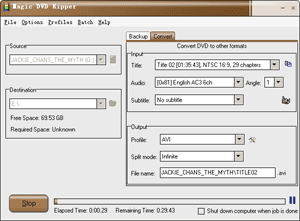 Magic DVD Ripper is an easy-to-use DVD backup software that can copy protected DVD to hard drive with 4 optional mode (disc fully, main movie, split DVD-9 into DVD-5, files). This application can also convert DVD to VCD, SVCD and AVI(DivX) formats. The converted files can be enjoyed anytime without DVD discs, or burn them to blank discs by burning software. With optimized for Intel CPU, Magic DVD Ripper provides fast ripping speed and wonderful output quality, supports batch converting and has many settings that you can customize. Magic DVD Ripper automatically detect DVD-ROM and select appropriate settings for beginner, so you can get started with just one click. Magic DVD Ripper is an easy-to-use DVD backup software that can copy protected DVD to hard drive with 4 optional mode (disc fully, main movie, split DVD-9 into DVD-5, files). This application can also convert DVD to VCD, SVCD and AVI(DivX) formats. The converted files can be enjoyed anytime without DVD discs, or burn them to blank discs by burning software. With optimized for Intel CPU, Magic DVD Ripper provides fast ripping speed and wonderful output quality, supports batch converting and has many settings that you can customize. Magic DVD Ripper automatically detect DVD-ROM and select appropriate settings for beginner, so you can get started with just one click.
Magic DVD Ripper is one fine program that can also copy any DVD movie to blank DVD or hard drive without any loss of quality, or compress a DVD9 movie to fit on a 4.7 GB DVD. All you need to do is insert your DVD movie and a blank DVD then press Go, everything will happen automatically and complete within 20-60 minutes.
Some of its key features include the following; convert DVD to Xvid, DivX or other AVI formats, convert DVD to WMV, convert DVD to MP3, convert DVD to VCD or SVCD, easy to use, and many more.
Want to check it out? Visit MagicDVDRipper.
Posted in Main | 1 Comment »
|
|
|




