Author Archive
Sunday, July 10th, 2011
 Ivan Image Converter is a solution for instant batch image processing, which allows you to convert multiple graphics file formats at the click of a button. You can edit images directly in the program with a range of handy tools (resize, rotate, flip, mirror, crop, filters, watermarks, morphing effects, color enhancements, etc.) Ivan Image Converter is the most comprehensive program of its kind on the market today, and can open images in virtually any format: it currently supports over 170 file types. Version 3.0 includes a couple of updates, which include the following; Microsoft Windows 7 support, improved effects (masks, automatic enhancement, autocrop), new filters and tools, improved support of popular CameraRaw data (50+new cameras), and 100+ new image formats. Ivan Image Converter is a solution for instant batch image processing, which allows you to convert multiple graphics file formats at the click of a button. You can edit images directly in the program with a range of handy tools (resize, rotate, flip, mirror, crop, filters, watermarks, morphing effects, color enhancements, etc.) Ivan Image Converter is the most comprehensive program of its kind on the market today, and can open images in virtually any format: it currently supports over 170 file types. Version 3.0 includes a couple of updates, which include the following; Microsoft Windows 7 support, improved effects (masks, automatic enhancement, autocrop), new filters and tools, improved support of popular CameraRaw data (50+new cameras), and 100+ new image formats.
In terms of features and performance, Ivan Image Converter is one of the most effective programs of its kind on the market today, and can open images in virtually any format. Ivan Image Converter currently supports over 170 file types. As a user, you have a choice of 44 different types to which they can convert the source images. The conversion process itself is fast, and takes only a very short time to complete. The user interface is also impressive; the publishers used icons for as many tasks as possible to reduce the need to endlessly navigate menus.
Want to check it out? Visit IvanView.
Posted in Main | No Comments »
Friday, July 8th, 2011
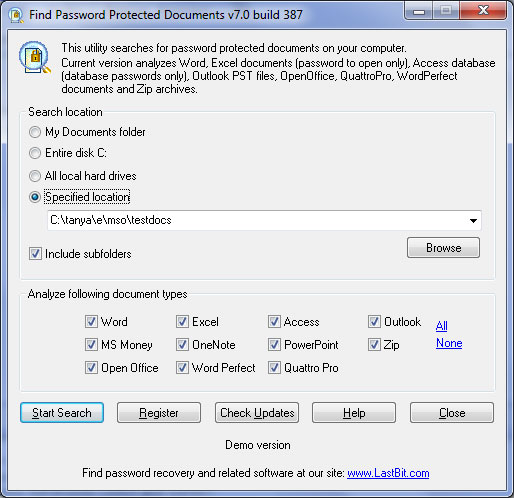 Find Password Protected Documents for password protected files on your computer. Find Password Protected Documents generates HTML and XML reports with a list of discovered password protected files and appropriate password recovery methods. All you need to have on your system is to have LastBit password recovery software installed in your system, and you can recover found password-protected documents. Find Password Protected Documents for password protected files on your computer. Find Password Protected Documents generates HTML and XML reports with a list of discovered password protected files and appropriate password recovery methods. All you need to have on your system is to have LastBit password recovery software installed in your system, and you can recover found password-protected documents.
LastBit Find Password Protected Documents program offers IT professionals the ability to control if password protection is used properly in their company. Find Password Protected Documents could be used for the forensic computer examinations. LastBit Find Password Protected Documents has been updated to include support for WordPerfect, Quattro Pro, as well as addition of Open Office.
LastBit Find Password Protected Document also supports Outlook PST files, OneNote, PowerPoint, OMS Money files and Zip archives, and Office 2007/2010. Document types supported by this program include the following: doc*.dot – Word documents, .docx, *.docm, *.dotx, *.dotm – Word 2007, Word 2010 documents, .xl* – Excel documents, .xlsx, *.xlsm, *.xlsb, *.xlam, *.xltx, *.xltm – Excel 2007, Excel 2010, .pst – Outlook personal folders (all versions through Office 2010), .pptx, *.pptm, *.posx, *.potm, *.potx, *.ppsx – PowerPoint 2007, PowerPoint 2010, .zip – Zip archives, and many more.
Want to check it out? Visit Lastbit.
Posted in Main | No Comments »
Thursday, July 7th, 2011
 KeyCue is an application that helps you to use your Mac OS X applications more effectively by displaying a concise table of all currently available menu shortcuts. There is no longer need to memorize and remember key combinations; all you need to do is press the command key and KeyCue tells you what you want to know. Some of its new features include the following; optional legend explaining the meaning of symbols used in the shortcut table, improved responsiveness, improved compatibility with iKey, Eclipse, iChat, and many more. KeyCue is an application that helps you to use your Mac OS X applications more effectively by displaying a concise table of all currently available menu shortcuts. There is no longer need to memorize and remember key combinations; all you need to do is press the command key and KeyCue tells you what you want to know. Some of its new features include the following; optional legend explaining the meaning of symbols used in the shortcut table, improved responsiveness, improved compatibility with iKey, Eclipse, iChat, and many more.
KeyCue enables you to do a lot of things that include the following; KeyCue helps you to use your Mac OS X applications more effectively by displaying a concise table of all currently available menu shortcuts. Besides, you no longer need to memorize and remember key combinations; just press the command key and KeyCue tells you what you want to know.
Users who download this application can also get instant overview of the overall functionality of any application, as well as automatically start working more efficiently by making use of menu shortcuts. They can automatically remember frequently used shortcuts and start working more efficiently than before.
KeyCue is a shareware and cost $29.71 per licence.
Want to check it out? Visit Ergonis.
Posted in Main | No Comments »
Thursday, July 7th, 2011
 Hamster Free Video Converter is a new video converter that turns video conversions into fun. This application supports MPEG, AVI, FLV, WMV, 3GP, XviD, DivX, MKV, M2TS. With Hamster Free Video Converter, you can easily convert video for any DVD player, iPod, iPhone, iPad, Archos, Zune, PSP, HTC, or Nokia in 3 clicks. Hamster Free Video Converter also has support for Blackberry smart phones. You can customize its interface, and you can tune it to suit your taste. Hamster Free Video Converter is a new video converter that turns video conversions into fun. This application supports MPEG, AVI, FLV, WMV, 3GP, XviD, DivX, MKV, M2TS. With Hamster Free Video Converter, you can easily convert video for any DVD player, iPod, iPhone, iPad, Archos, Zune, PSP, HTC, or Nokia in 3 clicks. Hamster Free Video Converter also has support for Blackberry smart phones. You can customize its interface, and you can tune it to suit your taste.
Some of the key features included in Hamster Free Video Converter include the following: converts to 3GP, MP3, MP4, AVI, MPG, WMV, MPEG, FLV, HD, DVD, M2TS and others; integrated video player; easy-to-use, including drag-n-drop and does not require special knowledge; Wizard support for beginners, change codec/system type/de-interlaces your video file; converts many video files in batches, adjust audio video bit rate, frame rate; supports 40 different languages including English, French, Spanish, German, Japan, Russian, Portuguese, Chinese, Arabic, Korean, and many others; supports YouTube; converts any video to iPod, iPad, iPhone, PS3, PSP, Blackberry, xBox, Zune, Apple TV, iRiver, and many more.
You can use the batch conversion mode to save time and effort; simply select the video files to be converted, and adjust the settings, and click.
Want to check it out? Visit Hamstersoft.
Posted in Main | No Comments »
Wednesday, July 6th, 2011
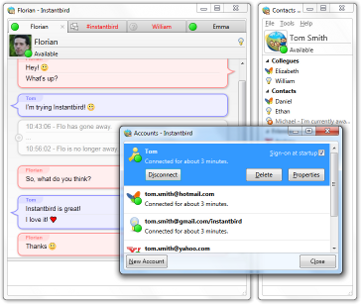 Instantbird is a multi-protocol Instant Messaging client that can connect to all your different IM accounts. Instantbird for Windows uses the Mozilla rendering engine to display IMs, and the Pidgin libpurple to connect to the different networks. Instantbird is a freeware and open source software available for free download and installation. This new version of Instantbird has a lot of newly added features that include the following; a feature that lets you combine a person’s usernames from each network into a single contact if you talk to that person on multiple IM networks (when opening a new chat, the username that is online will be chosen), tags will be used to replace the groups in the buddy list, tags can be hidden by clicking the “x” on the right side of the buddy list, all buddies from this tag will go into an “Other Contacts” tag automatically, the contact windows can now be closed on Mac without quitting Instantbird, minimize to tray on Windows and Linux, and many more. Instantbird is a multi-protocol Instant Messaging client that can connect to all your different IM accounts. Instantbird for Windows uses the Mozilla rendering engine to display IMs, and the Pidgin libpurple to connect to the different networks. Instantbird is a freeware and open source software available for free download and installation. This new version of Instantbird has a lot of newly added features that include the following; a feature that lets you combine a person’s usernames from each network into a single contact if you talk to that person on multiple IM networks (when opening a new chat, the username that is online will be chosen), tags will be used to replace the groups in the buddy list, tags can be hidden by clicking the “x” on the right side of the buddy list, all buddies from this tag will go into an “Other Contacts” tag automatically, the contact windows can now be closed on Mac without quitting Instantbird, minimize to tray on Windows and Linux, and many more.
Some of the popular chat applications you can connect with include; IRC, Gtalk,Yahoo! Messenger, Facebook, Twitter, ICQ, AIM, and a few others. Instantbird can be downloaded for free; cause it is an open source program.
Want to check it out? Visit InstantBird.
Posted in Main | No Comments »
Wednesday, July 6th, 2011
 Speckie is an add-on to Internet Explorer that provides an inline spell checking capability similar to that found in other web browsers such as Firefox. Speckie works on Windows XP, Vista and 7 running Internet Explorer versions 6, 7 or 8. It is available for both the 32 bit and 64 bit versions of Internet Explorer. For now, Speckie is and only real time dedicated spell checking solution for IE. Now battle hardened by thousands of users. Among its key features are; it is a spell checker that can use one or more dictionaries simultaneously, helps to improve productivity, and no more waiting until you’re done typing and clicking buttons to spell check, works with CRM systems like Microsoft Dynamics CRM, translated to 30 different languages and with 30 dictionaries available, add and manage words in per-language user dictionaries, and many more. Speckie is an add-on to Internet Explorer that provides an inline spell checking capability similar to that found in other web browsers such as Firefox. Speckie works on Windows XP, Vista and 7 running Internet Explorer versions 6, 7 or 8. It is available for both the 32 bit and 64 bit versions of Internet Explorer. For now, Speckie is and only real time dedicated spell checking solution for IE. Now battle hardened by thousands of users. Among its key features are; it is a spell checker that can use one or more dictionaries simultaneously, helps to improve productivity, and no more waiting until you’re done typing and clicking buttons to spell check, works with CRM systems like Microsoft Dynamics CRM, translated to 30 different languages and with 30 dictionaries available, add and manage words in per-language user dictionaries, and many more.
This latest version of Speckie is out with a lot of new features and additions that include the following; added the ability to specify the installed dictionary directory (for licenced users only), added the ability to select which user dictionary a word is added to when using more than one dictionary for spell checking, and a couple of others.
Want to check it out? Visit Speckie.
Posted in Main | No Comments »
Tuesday, July 5th, 2011
 WebsiteChat.net Live Support is a service that allows you have a chat with your website visitors, enabling you to give instant online customer support and pro-actively sell your product. WebsiteChat.net is a hosted system which means there is no need for you to worry about server capacity, bandwidth usage, system upgrades and other issues. With user-friendly features that allow you easily understand how this service works, WebsiteChat.net Live Support may not be difficult to understand for a first-timer. WebsiteChat.net Live Support is a service that allows you have a chat with your website visitors, enabling you to give instant online customer support and pro-actively sell your product. WebsiteChat.net is a hosted system which means there is no need for you to worry about server capacity, bandwidth usage, system upgrades and other issues. With user-friendly features that allow you easily understand how this service works, WebsiteChat.net Live Support may not be difficult to understand for a first-timer.
WebsiteChat.net Live has some user-friendly features that include the following: ease of use, improved customer satisfaction, instant sales leads, know your website visitors in real time, iPhone and Android devices ready, turn your visitors into clients, better first impression, and single application to chat with your website visitors and other instant messenger networks (Google Talk, MSN, AIM, ICQ, Yahoo, and Jabber).
You can start to have a first hand experience of what this service is all about by creating a free 30 days account. Log into your account once you have created it, copy and paste live chat button HTML code into your website, and you are ready to start chatting with your visitors. You can start chatting with your visitors with the free chat operator software or a web browser based operator application.
Want to check it out? Visit WebsiteChat.
Posted in Main | 1 Comment »
Tuesday, July 5th, 2011
 RationalPlan Project Server by Stand by Soft is a project management platform capable of handling multiple interrelated projects and concurrent user modifications. It is no doubt one of the most popular project management software solutions for those that need to work as a team on common tasks and projects. RationalPlan Project Server by Stand by Soft is a project management platform capable of handling multiple interrelated projects and concurrent user modifications. It is no doubt one of the most popular project management software solutions for those that need to work as a team on common tasks and projects.
RationalPlan Project Server provides a centralized management solution for company’s projects while offering concurrent/controlled access for different users. This shareware application requires Java Runtime Environment 1.5.; and runs on Windows Linux, Mac, and all Windows versions. Version 3.22.3 includes a list of new features and updates that include the following; addition of rights and permissions, possibility to create custom roles, addition of TimeZone notion, possibility to create task details reports, addition of more filters, and possibility to clear history.
RationalPlan Project Server module requires Java 1.6 or higher and needs to be deployed into a Web server (basically it works on any Web server which implements Java Servlet Container, however, the current version was tested on Apache Tomcat). RationalPlan Project Server ‘s web-based interface is supported on any browser including the major ones; Firefox, Internet Explorer, Opera and Chrome. However, for increase usability and wonderful experience, it is recommended that you use Firefox.
Want to check it out? Visit RationalPlan.
Posted in Main | No Comments »
Monday, July 4th, 2011
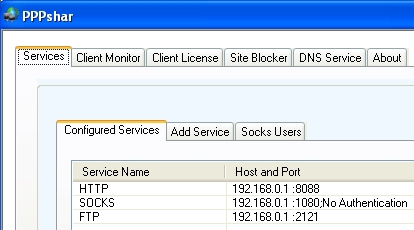 PPPshar Pro is a proxy server program that lets you share a single Internet connection among several computers in your home or office network. All the Internet services are pre-configured. You can run minimized as an icon in system tray, and this requires no configuration. PPPshar Pro also allows or blocks access to IP addresses, thus protecting ADSL/cable modem users from attacks on their computers. This new version of PPPshar Pro includes a few updates such as; a new interface, and a website blocker. PPPshar Pro is a proxy server program that lets you share a single Internet connection among several computers in your home or office network. All the Internet services are pre-configured. You can run minimized as an icon in system tray, and this requires no configuration. PPPshar Pro also allows or blocks access to IP addresses, thus protecting ADSL/cable modem users from attacks on their computers. This new version of PPPshar Pro includes a few updates such as; a new interface, and a website blocker.
PPPshar pro is allows for easy internet connection sharing, wireless internet sharing, wireless network, cable modem connection sharing, DSL connection sharing, AOL satellite & DSL connection sharing, direcway, one-way/telco return connection sharing, two-way satellite connection sharing, PPPoE and PPPoA connection sharing and more, possible with PPPshar. The best part of PPPshar Pro is that you can now easily run AOL v8.0plus on multiple computer systems simultaneously via your wireless Local Area Network (LAN), straight to your satellite connection.
PPPshar Pro is a shareware, and runs on the following operating systems: Windows 2000, Windows 2003, and Windows XP. You can download the trial version that allows you to use up to 5 client computers simultaneously.
Want to check it out? Visit Pppindia.com.
Posted in Main | No Comments »
Friday, July 1st, 2011
 dbExpress is a database-independent layer that defines a common interface to provide fast access to SQL database servers. dbExpress provides a driver as an independent library that implements the common dbExpress interfaces for processing queries and stored procedures for each supported server. As a thin and simple data-access layer, dbExpress provides high performance database connectivity and is easy to deploy. Version 2.70.29 has a 30 day timeout limitation, and also includes the following changes; bug with processing Unicode symbols in BLOB fields is fixed, as well as fixing of bug with getting fields of primary key. dbExpress is a database-independent layer that defines a common interface to provide fast access to SQL database servers. dbExpress provides a driver as an independent library that implements the common dbExpress interfaces for processing queries and stored procedures for each supported server. As a thin and simple data-access layer, dbExpress provides high performance database connectivity and is easy to deploy. Version 2.70.29 has a 30 day timeout limitation, and also includes the following changes; bug with processing Unicode symbols in BLOB fields is fixed, as well as fixing of bug with getting fields of primary key.
dbExpress driver also comes with a lot of advantages in comparison with the standard drivers supplied by Embarcadero. Along with advanced stability, functionality, and efficiency they present the most optimal way to access data of all similar solutions available on the market, and also the ability to connect through native protocol without using client software.
dbExpress also offers the following benefits; optimal data access with the use of native libraries, drivers for Oracle, MySQL, and PostgreSQL. These are able to connect easily through the native protocol without using client software. The performance is also a bit encouraging; especially with this new version.
Want to check it out? Visit Devart.
Posted in Main | No Comments »
|
|
|




