Author Archive
Wednesday, December 29th, 2010
 Softros Messenger is a secure network messenger application for LAN, WAN and Intranets. The program does not really require a server and is one of the easiest messengers to install and to use on a system. Softros Messenger correctly identifies all Windows NT/2000/XP user accounts and works in any TCP/IP network. Some of the features include; notification alarms, WinXP theme support, intuitive interface, instant messaging with LAN chat ability, secure LAN messaging, group broadcast messaging, offline messaging, message logging, user grouping, serverless architecture, does not require an internet connection, terminal services support, Multilanguage user-interface, import and export your LAN settings, full Windows/Vista support, and many more. Softros Messenger is a secure network messenger application for LAN, WAN and Intranets. The program does not really require a server and is one of the easiest messengers to install and to use on a system. Softros Messenger correctly identifies all Windows NT/2000/XP user accounts and works in any TCP/IP network. Some of the features include; notification alarms, WinXP theme support, intuitive interface, instant messaging with LAN chat ability, secure LAN messaging, group broadcast messaging, offline messaging, message logging, user grouping, serverless architecture, does not require an internet connection, terminal services support, Multilanguage user-interface, import and export your LAN settings, full Windows/Vista support, and many more.
Softros Messenger is good for corporate instant messaging, and helps most organizations to get by with group and corporate chatting easily. The program can be configured by each individual or group within an organization without requesting for any assistance from the IT unit or system administrator. As a matter of fact, all settings can be easily saved and transferred to a different computer if the need arises. Once installed, it is ready for use; and may not require any further technical skill. Version 4.5 comes with an addition of active directory integration.
Softros Messenger is not a freeware, but has a limited trial period of 30 days.
Want to check it out? Visit Softros.com.
Posted in Main | No Comments »
Tuesday, December 28th, 2010
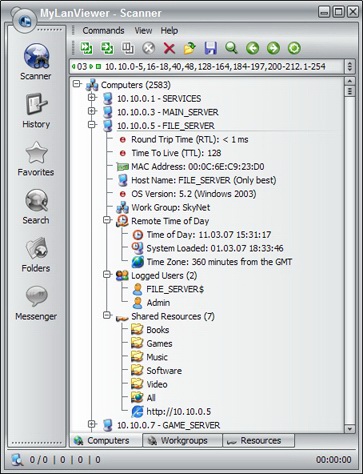 MyLanViewer is an application designed for scanning network computers, navigating their shared resources and for monitoring local shared resources on your computer. The program is very light, and easy to install with a user-interface that is so easy to understand. MyLanViewer is an application designed for scanning network computers, navigating their shared resources and for monitoring local shared resources on your computer. The program is very light, and easy to install with a user-interface that is so easy to understand.
The application also works as an IP and NetBIOS Scanner, whois and traceroute tool, remote shutdown and wake-on-LAN manager, LAN messenger and network monitor. MyLanViewer scanner displays your network computers in an easy to read, buddy-list style window that provides the machine names, IP addresses, MAC addresses, shared resources and other technical details for each computer.
MyLanViewer supports the following features: remote wake up; lock; log off; sleep; hibernate; reboot; shutdown; power off; terminate user sessions and disable shared resources; view and access shared folders; and is fast when it comes to network scanning.
The download price is put at $15.00; not a high amount to pay, but are you really sure one can’t get some other programs even better than this for free? Not really top-notch compared to other commercial and freeware programs around. However, users still have the opportunity to try it out for a limited period of 30 days. MyLlanViewer 4.4.3 did not come with an uninstaller.
Want to check it out? Visit MyLANviewer.com.
Posted in Main | 2 Comments »
Tuesday, December 28th, 2010
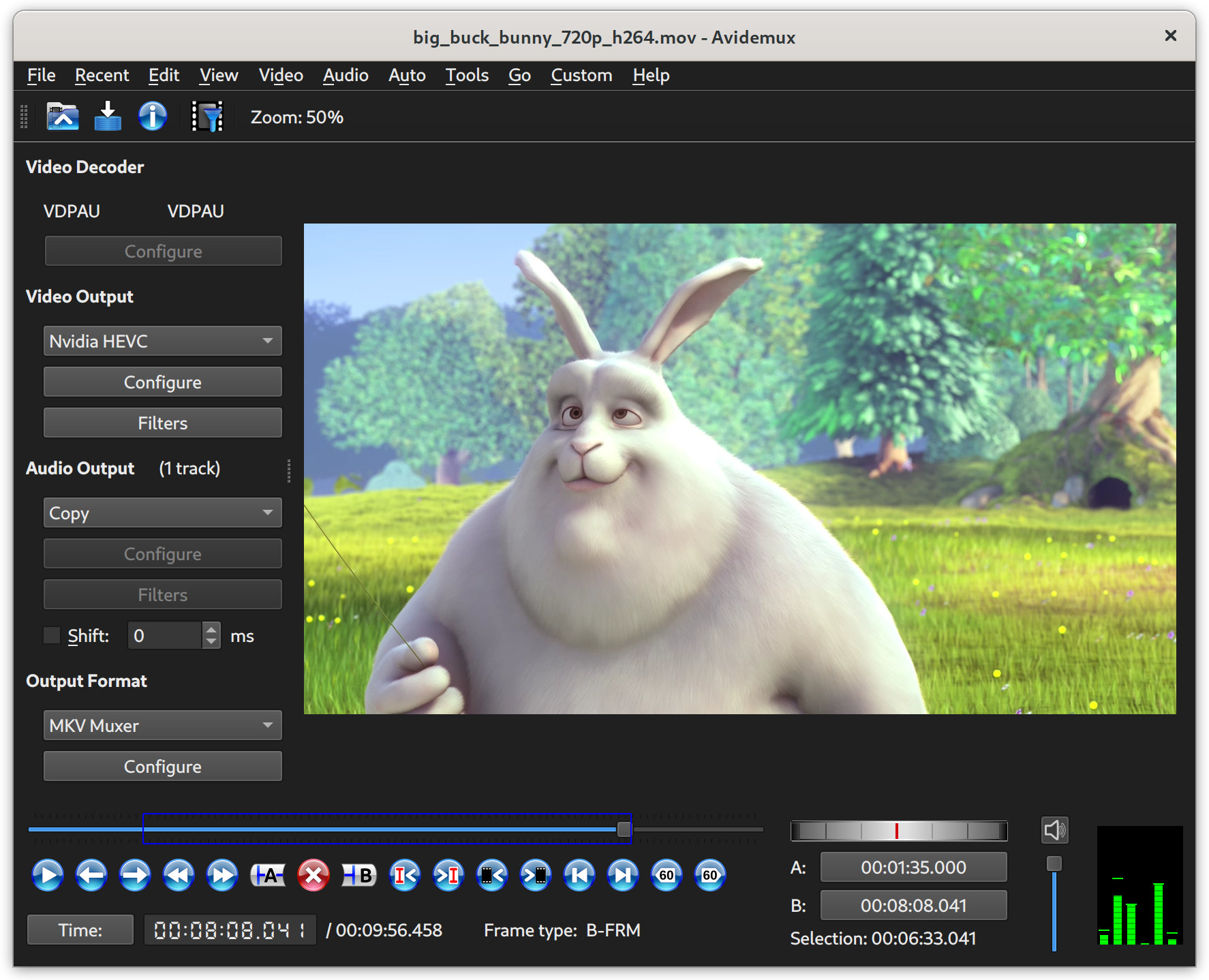 Avidemux for Windows is a free video editor built for easy cutting, filtering as well as encoding tasks. The program supports various file types, which include the following; AVI, DVD compatible MPEG files, MP4 and ASF. Avidemux uses a variety of codecs; and tasks can be automated using projects, job queue and powerful scripting capabilities. Avidemux for Windows is a free video editor built for easy cutting, filtering as well as encoding tasks. The program supports various file types, which include the following; AVI, DVD compatible MPEG files, MP4 and ASF. Avidemux uses a variety of codecs; and tasks can be automated using projects, job queue and powerful scripting capabilities.
Avidemux is one of the simplest video editors on the internet, yet it is very effective, and rates also as one of the best freeware editor available. It is so amazing how a freeware program could have so much use; it has so much potential and could possibly compete favorably with some commercial programs because of its ease of use and features.
Similarly, the user-interface is so simple to understand; and you might not even have to go through the help menu to find your way around its features or functions. It works well with all your simple edits and file type-conversions, and works right out of the box. It has definitely witnessed so much in terms of improvements over the years; and I just have to say that the publishers have been able to keep up the good work they started in previous versions.
Want to check it out? Visit Avidemux.
Posted in Main | 1 Comment »
Tuesday, December 28th, 2010
 One problem many of us never take note of as we use our computers everyday is how the speed gradually reduces. When we install and latter uninstall some programs on our systems, it affects the speed; causing a lot of fragmentation and sometimes leading to registry errors. These errors must be fixed, and our system defragmented to enhance the speed, and bring it back to optimal level in terms of speed. One problem many of us never take note of as we use our computers everyday is how the speed gradually reduces. When we install and latter uninstall some programs on our systems, it affects the speed; causing a lot of fragmentation and sometimes leading to registry errors. These errors must be fixed, and our system defragmented to enhance the speed, and bring it back to optimal level in terms of speed.
Registry Life is a freeware program with different features that can be used to speed up your system, and fix different registry errors, compression and defragmentation of the registry for better performances. One of the features of this cleaner is the registry cleanup, which can be used to search and repair a lot of registry problems plaguing your computer system. Registry Life works a bit different from other programs because it performs a registry optimization on system startup. You can set the defragmentation and compression in automatic mode in order for registry optimization to be performed at specific time.
Latest changes to version 1.26 include; you no longer need to close the program to install a new version, it closes automatically, and updates are now easier than it was in older versions.
However, it is advisable to have a fair knowledge of how to use a program like this to perform a cleanup in order not to mess your system up.
Want to check it out? Visit RegistryLife.
Posted in Main | No Comments »
Tuesday, December 28th, 2010
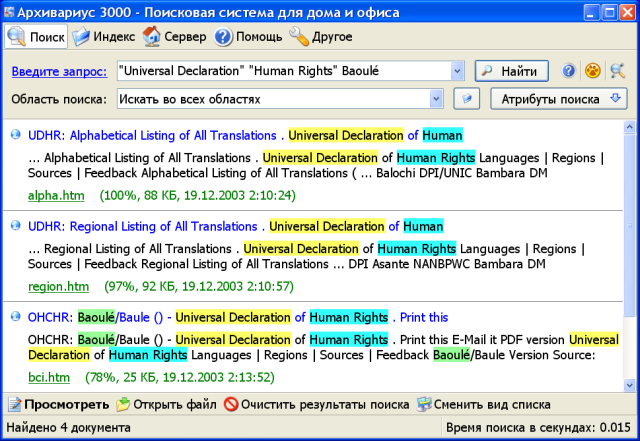 Archivarius 3000 is a program built with lots of features to help you search and email on computer, local network and removable drives. Documents can be searched by keyword or simply by using query language, just as it is done on most internet search engines. The program provides full-text documents in eighteen different languages; this takes place while searching. Archivarius 3000 is a program built with lots of features to help you search and email on computer, local network and removable drives. Documents can be searched by keyword or simply by using query language, just as it is done on most internet search engines. The program provides full-text documents in eighteen different languages; this takes place while searching.
Even when document is not physically accessible, Archivarius 3000 will find it by keywords and determine which disk is the required file located on. The program has a query builder that allows one to organize complicated query without any special knowledge. The Search Wizard is also able to find documents by size, date and type in only a few steps.
Archivarius 3000 has a Quick View function that allows speeding up of documents overview with highlighting query words, finding and printing needed fragments, even when documents are not physically accessible. However, found documents can be exported to text file or sent as an email.
Some of the latest changes made to Archivarius 3000 include; support for AIX file system, support for Sun Raster images, support for Quattro Pro spreadsheets, and some other minor changes.
Archivarius 3000 is a shareware, but has a 30 days trial period.
Want to check it out? Visit LikaSoft.com.
Posted in Main | No Comments »
Tuesday, December 28th, 2010
 Freemake Video Downloader is a handy and easy-to-use free video downloader that can be used to download videos from Youtube and many other video sharing websites around the world. Some of the video portals supported by Freemake Video Downloader 2.0.1 include: Facebook, Vimeo, MetaCafe, and many more. Freemake Video Downloader is a handy and easy-to-use free video downloader that can be used to download videos from Youtube and many other video sharing websites around the world. Some of the video portals supported by Freemake Video Downloader 2.0.1 include: Facebook, Vimeo, MetaCafe, and many more.
Freemake Video Downloader 2.0.1 works with the .NET Framework 4.0 client profile, and comes with an uninstaller. Among the latest changes or addition to this version include; additions of support for full episodes download from Hulu, ComedyCentral, SouthPparkStudios, and the DailyShow. Addition of support for YouTube RTMP-based videos download, convert to AVI, MKV, MP3, iPod, PSP, and Android, and support for over 40 sites.
Other features that have been a part of Freemake Video Downloader before this version and are also a part of version 2.0.1 include: extract lossless Audio; fast download speed; Youtube downloader and converter; HD and 4K Video downloader; Facebook video downloader; download friends’ private videos; free video downloader; etc.
This is definitely a great program with a lot of wonderful free features that is a delight to have on your system. Though, it is a freeware program; Freemake Video Downloader has so many features to make you stick with it.
Want to check it out? Visit Freemake.com.
Posted in Main | No Comments »
Tuesday, December 28th, 2010
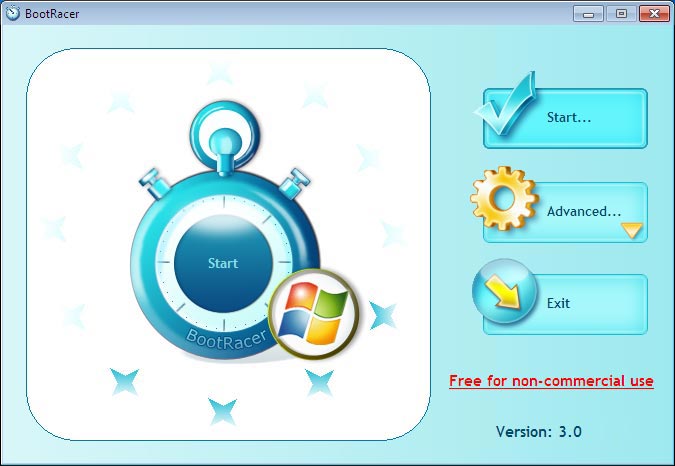 BootRacer is a Windows boot speed meter, which helps to race your Windows boot. BootRacer allows you have a say in the speed of your Windows; especially because you can speed up the speed if the information from the meter is not impressive enough. BootRacer is a bit easy to understand and to use, and new users who have very little understanding of how things like these works can still manage to understand some of its features. Its strength lies in its ability to detect the time to user logon and the full computer boot time as well. The program also has the capacity to calculate the best boot time and write the results to the Windows event log. BootRacer is a Windows boot speed meter, which helps to race your Windows boot. BootRacer allows you have a say in the speed of your Windows; especially because you can speed up the speed if the information from the meter is not impressive enough. BootRacer is a bit easy to understand and to use, and new users who have very little understanding of how things like these works can still manage to understand some of its features. Its strength lies in its ability to detect the time to user logon and the full computer boot time as well. The program also has the capacity to calculate the best boot time and write the results to the Windows event log.
Some of its new features include the following: new method of calculating “time to desktop”; user login/logoff detection, also supporting user switching; running under administrator account; new history report with ability exporting to the HTML, DOC, Excel, CSV formats; measure the user logon waiting time (logon timeout) under Windows Vista/Seven; and a few others.
BootRacer is free for non commercial use. Once you install this application on your computer, click on the start button as soon as the main window appears, then restart your computer.
Want to check it out? Visit Greatis.com.
Posted in Main | No Comments »
Tuesday, December 28th, 2010
 AlbumMe is a program that can be used to create photo slideshows from your digital photos, complete with ready-to-use animated templates, stunning transition effects, text captions, music, and so much more. With AlbumMe installed on your system, you can publish your slideshows in local disk, send as email to your friends or embed your favorite published flash into your blog or any other webpage in order to show off. Some of the other things you can do with this software include; animated flash photo album, flash slideshows with transition effects, thumbnail flash photo gallery, photo screensaver, and slideshow on the internet. AlbumMe is a program that can be used to create photo slideshows from your digital photos, complete with ready-to-use animated templates, stunning transition effects, text captions, music, and so much more. With AlbumMe installed on your system, you can publish your slideshows in local disk, send as email to your friends or embed your favorite published flash into your blog or any other webpage in order to show off. Some of the other things you can do with this software include; animated flash photo album, flash slideshows with transition effects, thumbnail flash photo gallery, photo screensaver, and slideshow on the internet.
Some of the major features included in this version include: share photo album online; select from more than 70 transition effects to make your flash slideshow look stunning; add up to over 500 images in a single photo album; support wav, mp3, wma format audio as a background music, publish as flash movie, EXE, screensaver and video files, decorate your slideshows with text effects, clip art, and funny sound, and over 70 animated templates with preloader, photo frames, and control buttons.
AlbumMe is a shareware and has a 30 days trial period. However, for a complete download and unlimited use; users can have it for $39.95 per download. Not too difficult to understand, but requires a little time to catch up with some of its features all the same.
Want to check it out? Visit Flash-photo-album. (more…)
Posted in Main | No Comments »
Thursday, December 23rd, 2010
 Renoise for windows is a shareware program that features full ReWire support, FX and instrument VST/AU plug-in support, automation plug-in delay compensation, multi-core load balancing MIDI I/O, audio recording, flexible audio output, graphical and numerical parameter automation, and modular routing among others. Renoise also comes in other versions for besides the Windows operating system. These include the Linux and the Mac operating systems. Renoise for windows is a shareware program that features full ReWire support, FX and instrument VST/AU plug-in support, automation plug-in delay compensation, multi-core load balancing MIDI I/O, audio recording, flexible audio output, graphical and numerical parameter automation, and modular routing among others. Renoise also comes in other versions for besides the Windows operating system. These include the Linux and the Mac operating systems.
Renoise for Windows draws its strength basically from mod trackers; which are usually characterized by displaying and editing music in grid known as pattern that can be easily understood. These patterns bear similarities with sheet music; this time around, they are displayed in alphanumerically fashion instead of musical notation. The program lacks nothing in quality features that will enable you enjoy installing it on your system.
Renoise for Windows helps you to create loops, beats and melodies efficiently one step after the other. This is a one-stop expandable Digital Audio Workstation (DAW) with a twist that is a bit different from other versions earlier released by the publishers. At $79.00 per download; Renoise appears to be a bit on the high side. However, the features and minor bug fixes make this version worth the price placed on it.
Want to check it out? Visit Renoise.
Posted in Main | 1 Comment »
Thursday, December 23rd, 2010
 SBMAV Disc Cleaner is an hard disk cleaner for Windows operating system that can safely clean and delete unwanted files from your disk. The program has been designed to clean hard drive of different kinds of trash with little or no relevance, which are responsible for cluttering your hard disk, and slowing down your system. SBMAV is a user-defined tool that can be used to search for and delete all temporary files including folders from your computer (and files left behind after uninstalling a particular program from your computer). SBMAV Disc Cleaner is an hard disk cleaner for Windows operating system that can safely clean and delete unwanted files from your disk. The program has been designed to clean hard drive of different kinds of trash with little or no relevance, which are responsible for cluttering your hard disk, and slowing down your system. SBMAV is a user-defined tool that can be used to search for and delete all temporary files including folders from your computer (and files left behind after uninstalling a particular program from your computer).
Other features included in this tool include; ability to delete unwanted cookies from your computer, find and remove all duplicate files taking up space on your computer system, uninstall software, work with user-files, detect and delete old backup copies and documents, perform searches for file duplicates using different parameters, detect and delete files you no longer need on your computer.
The problem with most computers is that they get slower and perform less than the normal speed as we continue to use them everyday. This can be attributed to junks and cookies that clutter the hard disk as we continue to download install and uninstall programs on the system. SBMAV Disk Cleaner is one of such programs built to handle such clutters and free your computer hard drive from many unwanted files that take up space on the system.
This program comes with a 30 days trial that enables you verify some of its features before going for an unlimited version.
Want to check it out? Visit Sbmav.
Posted in Main | No Comments »
|
|
|




