Author Archive
Thursday, June 24th, 2010
 Flock for Windows 2.6.0 can best be described as a social Web browser, cross platform, open source and based on Mozilla Firefox technologies. As it stands today, the browser implements support for Flickr. Flock for Windows 2.6.0 can best be described as a social Web browser, cross platform, open source and based on Mozilla Firefox technologies. As it stands today, the browser implements support for Flickr.
Users can also install alternative hosted bookmarks or photo sharing services can be installed be users of this software with relative ease. Flock provides users with a number of choices in the search box and blog manager and this comes with the ability to install other services using open standards.
Flock has built in add-ons already installed and it is very compatible with Facebook, MySpace, Twitter, Yahoo, Youtube and Digg. Flock allows users to know the number of contact they have online and gives them the opportunity of chatting with their contacts.
In terms of speed and performance, Flock main feature is its speed and performance which obviously stands it out from other software in this category. It is a must have for users who are interested in getting the best performance when it comes to social networking sites.
Flock has much quicker load times then other browsers and it is very easy to install and uninstall. The only reason why Flock is not as good as other software is only because of the add-ons.
Want to check it out? Visit Flock
Posted in Main | No Comments »
Thursday, June 24th, 2010
 Data Crow is designed to allow users to create a large database that contains all their collected items. Data Crow can be used to online to retrieve information instead of typing all the information. With Data Crow download page, a user can get a recipe module thereby helping to keeping track of recipes as well as books, DVD, CD and many more. Data Crow is designed to allow users to create a large database that contains all their collected items. Data Crow can be used to online to retrieve information instead of typing all the information. With Data Crow download page, a user can get a recipe module thereby helping to keeping track of recipes as well as books, DVD, CD and many more.
It main features includes the following: it creates new modules (for instance, it maintains stamp collection); PDF and HTML reporting; loan registration; retrieve information from services like Amazon.com, Imdb.com, Softpedia and MusicBrainz; optional internal web server and web GUI; import file information (mp3, DivX and XVID).
Data Crow is an ultimate cataloger (Platform independent and complete) and media organizer that manages user’s collections in one product and it is designed to customize user’s needs. Data Crow is feature rich, runs very well on system and is highly customizable.
Data Crow runs on any system where Java 1.6 (or higher) from SUN is installed. It can be downloaded with paying a fee and 100% free of ads, viruses and spyware. Data Crow is user-friendly and has been translated in various languages like Italian, Dutch, German, English, French and Spanish.
Want to check it out? Visit Datacrow
Posted in Main | No Comments »
Thursday, June 24th, 2010
 GFI MailArchiver is a very important email archiving software that is the single solution source for email management problems on Exchange Server. GFI MailArchiver for Exchange provides user-friendly corporate email archiving, which enables users to centrally archive all internal and external email with ease. GFI MailArchiver is a very important email archiving software that is the single solution source for email management problems on Exchange Server. GFI MailArchiver for Exchange provides user-friendly corporate email archiving, which enables users to centrally archive all internal and external email with ease.
GFI MailArchiver comes with enhanced a tool which allows users to archive past, present and future emails into one or multiple databases, providing both the network administrator and employees with a number of benefits.
The noticeable changes in GFI MailArchiver are: an Outlook Connector that supports Microsoft Outlook 2010 (32-bit and 64-bit), increased loading speed of the Access Control page within the GFI MailArchiver Web Configuration UI, GFI MailArchiver Indexes will no longer get stuck in a pending state, which used to make them unusable, Copybix does not stop when there are a lot of files in MAIS\Pickup folder, Folder Structure Synchronization and EEWIZ creates separate “Deleted Items” folders, and GFI MailArchiver no longer pulls emails from journaling mailbox after approximately 5 minutes (IMAP provider times out and e-mails stop archiving).
The Client Area is available in various languages for ease of use, while the administrator Console is available in: English, Italian, German, Japanese and Russian.
Want to check it out? Visit GFI
Posted in Main | No Comments »
Thursday, June 24th, 2010
 This version, as do all versions past 186.18, the latest version introduces a problem where certain games are not getting a full listing of usable resolutions in 32-bit mode. While some games can see options for 1600×1200, 2048×1536 and 2560×1600, other games see nothing beyond 1280×96 in 32-bit mode. This version, as do all versions past 186.18, the latest version introduces a problem where certain games are not getting a full listing of usable resolutions in 32-bit mode. While some games can see options for 1600×1200, 2048×1536 and 2560×1600, other games see nothing beyond 1280×96 in 32-bit mode.
Some of the noticeable features of this version are: support for Blu-Ray 3D with NVIDIA 3D Vision technology, increased performance for GeForce GTX 400 Series GPUs in several computer games, PhysX System Software have been upgraded to version 9.10.0223, it supports OpenGL 4.0 for GeForce GTX 400 Series GPUs, and support for new extreme Antialiasing modes for 3-way SLI PCs, including up to SLI48x AA for GeForce 200 series GPUs and up to SLI96x AA for GeForce GTX 400 series GPUs.
 It is important to note that the above mentioned SLI features are only NVIDIA 3D supports Windows Vista and Windows 7: Quad SLI technology using GeForce GTX 295 or GeForce 9800 GX2, 3-way SLI technology, SLI multi-monitor support and Hybrid SLI. It is important to note that the above mentioned SLI features are only NVIDIA 3D supports Windows Vista and Windows 7: Quad SLI technology using GeForce GTX 295 or GeForce 9800 GX2, 3-way SLI technology, SLI multi-monitor support and Hybrid SLI.
This version also provides language options for users who may not understand US English by simply downloading International language driver. With the provision of this option, it has become all the easier for users who may wish to install this version themselves.
Want to check it out? Visit NVVIDIA
Posted in Main | No Comments »
Thursday, June 24th, 2010
 Microsoft Kodu is a visual programming language made specifically for creating games that was only released recently. It is designed in such a way that it is readily accessible for children and enjoyable for everyone. Microsoft Kodu is a visual programming language made specifically for creating games that was only released recently. It is designed in such a way that it is readily accessible for children and enjoyable for everyone.
Microsoft Kodu is supported by Windows 7, Vista and XP. The requirement for use of Microsoft Kodu is graphics card that supports DirectX 9.0c and Shader Model 2.0 or higher, NET Framework 3.5 or higher and XNA Framework 3.1 Redistributable.
Microsoft Kodu come with a visual nature of the language which provides rapid design iteration using only an Xbox game controller for input (mouse/keyboard input is also supported).
To take full advantage of Microsoft Kodu, it is highly recommend that users run the “Configure Kodu” application and choose lower-quality graphics settings should they encounter problem running it or want better graphics performance at cost of some visual detail. It allows users to export functions so that they can publish games to a file which they can then e-mail or post on their websites.
The set back with Microsoft Kodu is basically associated with problems faced by most software that are only just released into the market with. One good example is the fact that most of the built-in content is designed for play using a game controller.
Want to check it out? Visit Microsoft.com
Posted in Main | 2 Comments »
Thursday, June 24th, 2010
 Creative Sound Blaster X-Fi is good news for Vista users because it fixes the SPIDF issue from the beta drivers. With this tool, Vista users have full surround-sound capabilities and usage of an SPDIF out for bit stream audio if they want. This software is a beta driver which provides Microsoft Windows Vista 32-bit and 64-bit, Beta 2 Build 5384 and Build 5456 support for Creative Sound Blaster X-Fi. Creative Sound Blaster X-Fi is good news for Vista users because it fixes the SPIDF issue from the beta drivers. With this tool, Vista users have full surround-sound capabilities and usage of an SPDIF out for bit stream audio if they want. This software is a beta driver which provides Microsoft Windows Vista 32-bit and 64-bit, Beta 2 Build 5384 and Build 5456 support for Creative Sound Blaster X-Fi.
Creative Sound Blaster X-Fi main features are; PCM stereo output through optical out, Headphone detection, EAX Effect, Smart Volume Management, MIDI Playback, X-Fi Crystalizer and AC-3/DTS decoding (only in Windows Vista 32-bit).
There are three basic steps to be followed during installation. The first step is to download the .exe file into your local hard disk. After this first step, the next step is to double-click the downloaded file before proceeding to the last step which is to follow the instructions as it appears on the screen. One thing should be noted and that is the fact that simple as these steps may look on paper, it is advisable to employ the services of professional before installation.
Finally, Creative Sound Blaster X-Fi does not work very well with PowerDVD when setting it up to SPIDF as the soundcard decoder and video does not produce any audio sound.
Want to check it out? Visit Creative.com
Posted in Main | No Comments »
Wednesday, June 23rd, 2010
 Reg Organizer provides a variety of tools required for effective System Registry and configuration files management. What this software does is simply that it allows the user view, edit, fix errors in the system, improve computer performance, maintain registry, clean the Registry and preview the registry files they may wish to import. Reg Organizer provides a variety of tools required for effective System Registry and configuration files management. What this software does is simply that it allows the user view, edit, fix errors in the system, improve computer performance, maintain registry, clean the Registry and preview the registry files they may wish to import.
Reg Organizer helps users to edit registry files and also view file content directly from Windows Explorer. It also comes with a built-in application uninstaller, allowing users the freedom to uninstall unused applications from the system.
The main features of Reg Organizer are as follows: can find all keys related to a certain application and delete them, if necessary; viewing and editing the system registry, manipulating the registry keys and values, exporting, importing, copying them; increase the performance of the registry and consequently the overall performance of your system; allowing users to edit keys and values, add and delete data containing in the reg files; it offers users a variety of options for searching the registry and replacing the records matching the specified criteria; has the capacity to take snapshots before and after application installs and eradicate; it automatically remove unnecessary files from the hard drive of your computer, and to search for and fix invalid shortcuts.
Want to check it out? Visit Chemtable
Posted in Main | No Comments »
Wednesday, June 23rd, 2010
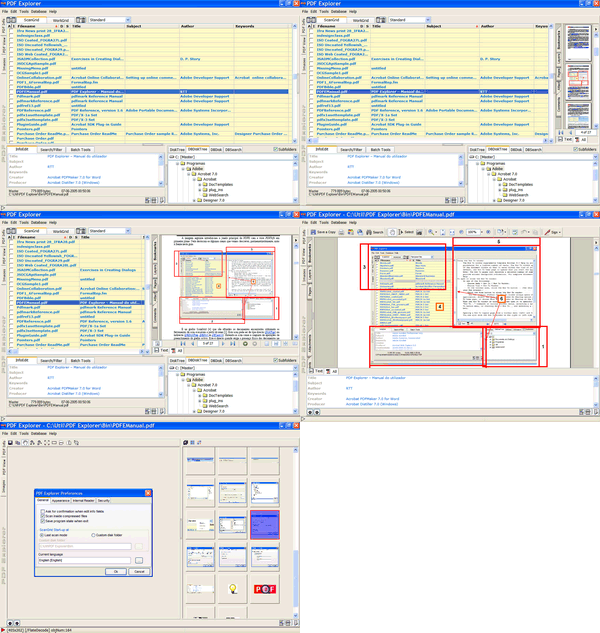 PDF Explorer 1.5 is a CHM and PDF files management software and image extraction tool. What it does is to provide users with the opportunity of easily gather and add all their CHM and PDF documents to a database file, which displays an overview of Filename, Subject, Creation Date, Producer, Title, and Author, Number of Pages, Modification Date and a maximum of 100 custom fields to enter custom data. PDF Explorer 1.5 is a CHM and PDF files management software and image extraction tool. What it does is to provide users with the opportunity of easily gather and add all their CHM and PDF documents to a database file, which displays an overview of Filename, Subject, Creation Date, Producer, Title, and Author, Number of Pages, Modification Date and a maximum of 100 custom fields to enter custom data.
With the introduction of this tool, users can search through all the files, have a chance to view them, batch rename them and do much more. PDF Explorer 1.5 can also be used to scan within ZIP files and so much more.
What differentiate PDF Explorer 1.5 from the past versions are: a context-sensitive help system; the database editor shows now an improved database tree; Rename Files, Copy Files, Move Files and Delete Files functions added to the web interface API; import wizard can now open, more easily, very big .CSV files; PDF Creator tool can set some of the standard metadata fields, supports drag and drop of image files from applications other than the Shell.
The sad part of this tool is that it actually does not extract the images with the proper color settings.
Want to check it out? Visit Rttsoftware
Posted in Main | No Comments »
Wednesday, June 23rd, 2010
 This is for all those who love books, and who love giving out books. All My Books helps you to organize your book collection; acting like the library you have always wanted. It helps you to organize your bookshelves, making a better library that is very easy to browse, and search at the same time. You can decide to group and browse your collection of books by title, publisher, author, and even run a quick search by any field. As a user, you can define your own fields to label your books, such as memos or comments, coming back to search them at your convenience. This is for all those who love books, and who love giving out books. All My Books helps you to organize your book collection; acting like the library you have always wanted. It helps you to organize your bookshelves, making a better library that is very easy to browse, and search at the same time. You can decide to group and browse your collection of books by title, publisher, author, and even run a quick search by any field. As a user, you can define your own fields to label your books, such as memos or comments, coming back to search them at your convenience.
The publishers have made some few changes and additions to this version; these include: displaying book titles that has no cover images in the virtual bookshelf mode; addition of up and down keys moves to previous/next match while cursor is in quick book search field; addition of volume field to the list of additional columns; and fixing of book details import from Bol.com Bol.de, Powells.com, and Barnesandnoble.com.
All My Books 1.9 Build 1118 is a Shareware, and goes for $34.95 per download, but users can download a free trial for 30 days. The feature I love so much is the support for “Audiobooks,” which allows users to start playback from the program in just one click.
Want to check it out? Visit Bolidesoft
Posted in Main | No Comments »
Wednesday, June 23rd, 2010
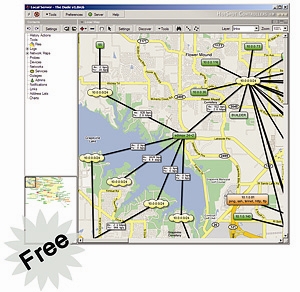 The Dude is a network monitor application that helps to improve the way users manage their network environment. It is built to automatically scan every device specified under subnets. It also draws and completely layout a map of the network of users; monitors the devices and alerts users in case of any problem developed in some of the services. The Dude is a network monitor application that helps to improve the way users manage their network environment. It is built to automatically scan every device specified under subnets. It also draws and completely layout a map of the network of users; monitors the devices and alerts users in case of any problem developed in some of the services.
It is a great program, considering it is a freeware; the publishers have indeed put together a fairly good program. The publishers, which are also well-known for manufacturing of routers, have added some nice features to this program. Some of the features include: discovers any type or brand device; auto network discovery and layout; easy installation and usage; inclusion of SVG icons for devices, and supports custom icons and background; device, link monitoring, and notifications.
For easy configuration of the Dude 4.0 Beta 1, users may have to hire a Dude expert to help them handle their configuration. The Dude is built to handle a lot of things, and users can enjoy all the support from any of the Dude online experts.
Interestingly too, Dude comes with an uninstaller each time you download it from the publisher’s page.
Want to check it out? Visit mikrotik
Posted in Main | No Comments »
|
|
|




