Author Archive
Friday, May 7th, 2010
 This is supposed to be a program to help the speed of your computer, and hope it sticks to just that. It is capable of repairing multiple problems, which include missing desktop icons; missing taskbar; missing drives; no audio and denied access to both task manager and control panel. This is supposed to be a program to help the speed of your computer, and hope it sticks to just that. It is capable of repairing multiple problems, which include missing desktop icons; missing taskbar; missing drives; no audio and denied access to both task manager and control panel.
I tried the registry cleaner to see how it was going to help me delete or remove old and unwanted items from my system, and I was not too disappointed. The system is able to remove obsolete items from your system registry in order to speed up your system and increase manageability of your registry. Sometimes we find out that most of the files on our hard drive are unwanted, SysCheckUp is able to help clean it up.
A quick glance of what you can have this program do for you at $$19.95 include: repairs of problem such as: Windows installer; missing taskbar; missing CD drives; malfunctioning CD autorun; video/audio codecs; malfunctioning printing among others. Also, you can use it to analyze your registry and compact your registry to speed up registry access times and possibly increase your system performance.
The only problem I have with SysCheckUp 2.14.1 is the way it slows down a system at reboot.
Want to check it out? Visit Syscheckup
Posted in Main | No Comments »
Thursday, May 6th, 2010
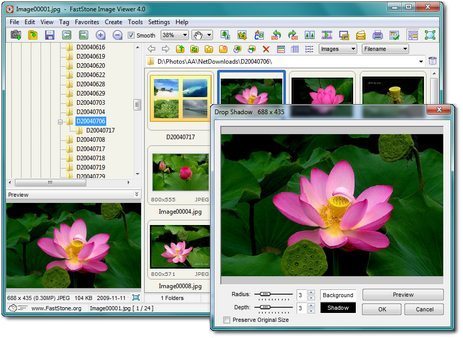 How the publishers manage to keep this program running for free and still able to provide such great software is quite commendable? Flashstone Image viewer is an image browser, combining other features like a converter and editor. It also has an easy to handle user interface, resizing, renaming, colour and image cropping among others. How the publishers manage to keep this program running for free and still able to provide such great software is quite commendable? Flashstone Image viewer is an image browser, combining other features like a converter and editor. It also has an easy to handle user interface, resizing, renaming, colour and image cropping among others.
Users can also take advantage of the intuitive full-screen mode that provides them quick and easy access to EXIF information and thumbnail browser. Users can also take full benefits of the high quality magnifier and inbuilt full-slideshows with 60+ transitional effects.
It also has supports for most major graphic formats including BMP, GIF, PCX, TIFF, ICO and TGA. Rarely would a freeware application have so many features packed into one whole lovely program. It just keeps getting better each time a new version comes out, and that probably explains why more people are using it for their image resizing and cropping.
Users who are yet to have a feel of what a good program like this is can download and install it for their optimum use. You may never get an equally competitive program elsewhere on the internet. To think that it costs nothing to use FastStone Image Viewer makes it an awesome program.
Want to check it out? Visit Faststone.org
Posted in Main | No Comments »
Thursday, May 6th, 2010
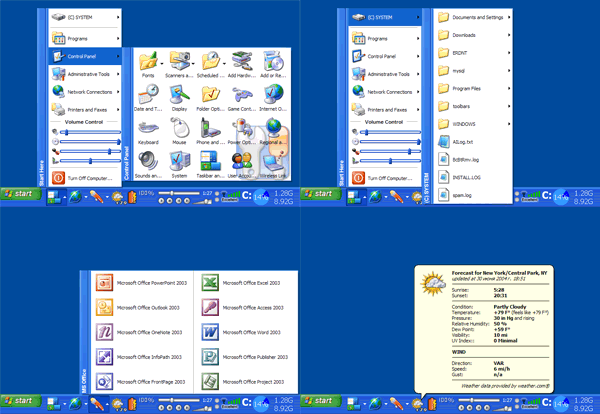 True launch is just like the standard Quick Launch bar, with functions presented in ways similar to Quick Launch. The program is also compatible with Quick Launch because it also uses the same folder for shortcuts. Perhaps, the major difference I noticed in True Bar is that it allows users to combine shortcuts into groups. At least users can enjoy a fast improvement in shortcuts, thereby saving a lot of working space on their desktop. True launch is just like the standard Quick Launch bar, with functions presented in ways similar to Quick Launch. The program is also compatible with Quick Launch because it also uses the same folder for shortcuts. Perhaps, the major difference I noticed in True Bar is that it allows users to combine shortcuts into groups. At least users can enjoy a fast improvement in shortcuts, thereby saving a lot of working space on their desktop.
At $19.90 per download, those who want to enjoy all the features of this software should just go ahead to do so because I do not think the price is a problem. For all the wonderful benefits of using this program, I do not believe the price is too high to complain about.
True Launch Bar 4.4.8 Beta has some settings that are flexible to handle for users; users who are a bit skeptical about how to handle it should try it for 30 days before buying it. It also supports Windows Drag and Drop technology among others.
Want to check it out? Visit Truelaunchbar
Posted in Main | No Comments »
Thursday, May 6th, 2010
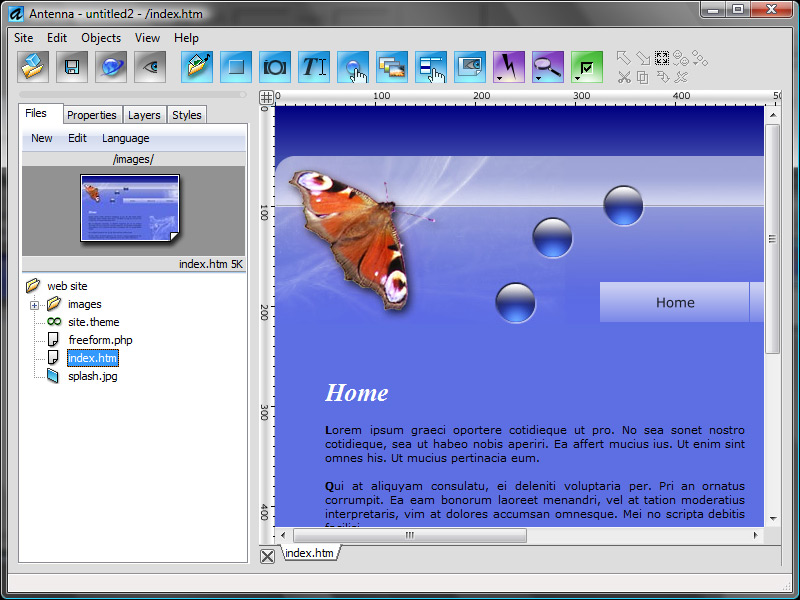 Antenna 3.4.438 Beta is a program that enables you to design a professionally looking website even when you are not a professional web builder. Users of this program do not need any coding or HTML skill before they can help themselves to using this program to build a website of their choice. Antenna 3.4.438 Beta is a program that enables you to design a professionally looking website even when you are not a professional web builder. Users of this program do not need any coding or HTML skill before they can help themselves to using this program to build a website of their choice.
Antenna 3.4.438 Beta is a shareware and costs $59.99 per license, but users can get to try it out for a period of sixteen days before making up their minds. Version 3.4.438 Beta is packed with some new features that include the following: new custom texture option in button lab; new synch option speeds up button design by auto-mirroring changes to the button; compatibility changes to core buttons among others.
Antenna 3.4.438 makes web building a very rich and virtual experience that makes users to always look forward to using it. Users can even get to concentrate more on other things like aesthetics and design, rather than wasting time on trying to make their HTML codes work.
Users can also create their photo and user galleries in matter of minutes without much technical know-how. It has a rich and effective editor that is almost entirely visual, and pixel accurate.
Want to check it out? Visit Stormdance.net.
Posted in Main | 1 Comment »
Friday, April 30th, 2010
 At $26.90 per download, Mediaraptor 4.2.7800.0 is worth every cent of your money. It is capable of recording so many MP3 from the Web radio stations and music videos from the internet. Users do not need to pay for subscription, once they are able to license this program just once, then the process of using it for a life time begins. At $26.90 per download, Mediaraptor 4.2.7800.0 is worth every cent of your money. It is capable of recording so many MP3 from the Web radio stations and music videos from the internet. Users do not need to pay for subscription, once they are able to license this program just once, then the process of using it for a life time begins.
It is one of the most advanced programs of its category, offering one of the best solutions for targeting and music recording at ultra high speed. This is comes with a speed that is very high and not easily compared to some other programs. At least users can get to record music from any social music platform of their choice.
I feel that the 5 days trial period allowed for those who want to have a go at this program is rarely enough. There is nothing wrong with extending the number of days just for users to have enough knowledge of how it works.
Every time you log on to YouTube or even listen to songs in most of the online social media sites, Mediaraptor records it straight for you. It is one convenient way of enjoying your favourite music, yet not missing out on anything.
Want to check it out? Visit Mediaraptor
Posted in Main | No Comments »
Thursday, April 29th, 2010
 The publishers describe it as a must have add-on, but I really have a contrary view about that. Though not a bad application to have alongside your Internet Explorer 1E7 pro 2.4.9, this program still has some few works to do. I think the publishers need to do some few work on the online service and get it back to work. The last time I visited that website, it was still not working, and I think something needs to be done about that, and urgently too. The publishers describe it as a must have add-on, but I really have a contrary view about that. Though not a bad application to have alongside your Internet Explorer 1E7 pro 2.4.9, this program still has some few works to do. I think the publishers need to do some few work on the online service and get it back to work. The last time I visited that website, it was still not working, and I think something needs to be done about that, and urgently too.
Some of the features include: tabbed browsing management; inline search; crash recovery; proxy switcher; mouse gesture; tab history browsing among others. Users can customize their favourite browsers, this means that IE7 pro 2.4.9 is not limited to Internet Explorer alone.
IE7 pro 2.4.9 also has features that enrich your browsing experience; some of which include the following: addition of inline search bar the same way it is with Firefox; blocking of all forms of advertising; save page to image features that lets you convert HTML from any URL to image; enhanced browsing capabilities that lets you double click to close mouse, hide search bar and enable and disable crash recovery. The publishers have been able to fix some minor bugs, and even if it is a freeware, they have to do a more especially on their website.
Want to check it out? Visit IE7Pro
Posted in Main | No Comments »
Thursday, April 29th, 2010
 Kaspersky Internet Security 2011 11.0.0.187 has one of the most essential security components needed to enjoy some online security. It represents a platform for creating applications that are specifically designated for protections of personal computers. This version though still in Beta stage, is well improved and comes with the improved functional abilities of Kaspersky 5.0 Lab protection products with state of the art innovations. Kaspersky Internet Security 2011 11.0.0.187 has one of the most essential security components needed to enjoy some online security. It represents a platform for creating applications that are specifically designated for protections of personal computers. This version though still in Beta stage, is well improved and comes with the improved functional abilities of Kaspersky 5.0 Lab protection products with state of the art innovations.
The features mentioned above are just a few new innovations introduced by the publishers of Kaspersky Internet Security 2011 11.0.0.187. Kaspersky Internet security therefore offers its numerous users excellent opportunities of having their computers protected from different kinds of electronic threats, including programs that are considered as malware.
Kaspersky is not new to both home and office protection and users have come to identify it with a lot of positive comments recently. The problem Kaspersky has been facing for so many years is related to place of purchase. A lot of people frown at the publishers’ policy of limiting its purchase centers to include only a few sites. Any attempt by users to purchase this program from some websites not registered by Kaspersky attracts some problems for the users. I think something must be done to make their purchase system more flexible, with more purchase centers being registered.
Want to check it out? Visit Kaspersky.com
Posted in Main | 2 Comments »
Wednesday, April 28th, 2010
 This is a all-in-one application that helps you to locate and delete most unwanted programs like: spyware; Trojans; rootkits; viruses as well as other unwanted programs. Hitman Pro 3.5.5.97 has an executable version that can be run directly from your USB Flash Drive, including local network attached to your computer hard drive. This is a all-in-one application that helps you to locate and delete most unwanted programs like: spyware; Trojans; rootkits; viruses as well as other unwanted programs. Hitman Pro 3.5.5.97 has an executable version that can be run directly from your USB Flash Drive, including local network attached to your computer hard drive.
Just like Panda Cloud antivirus program, Hitman Pro uses cloud computing technology to identify and remove programs that are potentially harmful to your computer. When Hitman is installed on your computer, it saves it a lot of space because downloads and updates are not necessary because of its cloud technology.
Amazingly too, this program works with other antivirus programs installed on your system. It just sits there and complements the efforts of other security applications already installed. Users would love to download and use this program can either try it out for 30 days or go for a paid subscription, which covers all malware removal either now or in the future.
Hitman Pro 3.5.5.97 has an innovative early warning feature that allows users who are not connected to the internet to remove malware. It comes with an uninstaller and has the following features: users can choose quick scan from the split button; improved overall scan performance on systems protected by an active on-access AV scanner; fixing of memory leak among others.
Want to check it out? Visit Surfright.nl
Posted in Main | 1 Comment »
Wednesday, April 28th, 2010
 Floola for Windows 5.7 is a fine freeware program that helps you to effectively manage your Mtorola mobile phones; no matter the model of iTunes under Linux. It also helps to manage your iPod, Mac OS X as well as Windows. Floola needs no further installation because it can be run directly for a user’s iPod. Floola for Windows 5.7 is a fine freeware program that helps you to effectively manage your Mtorola mobile phones; no matter the model of iTunes under Linux. It also helps to manage your iPod, Mac OS X as well as Windows. Floola needs no further installation because it can be run directly for a user’s iPod.
Virtually all iPod features works on Floola, and they include: artwork, podcasts, and smart playlists. Users can also find it useful when it comes to converting both audio and video incompatible with the iPod, making it easy for copying virtually any file directly to it.
The fact that Floola for Windows now supports Nano5G makes it more feature-rich and wonderful to use. Users who have this standalone application can also keep their Google calendars synched, add videos from YouTube and MySpace with just one click.
Some other unique features that users can begin to enjoy once they have the benefit of using this application include the following: copy and extract songs to and from iPod; easily find duplicated songs on iPod; availability in various languages; create HTML files containing list of iPod files belonging to users.
At least this application is free and does no harm to anyone who decides to give it a try; a fair enough program to use.
Want to check it out? Visit Floola
Posted in Main | No Comments »
Wednesday, April 28th, 2010
 Microsoft Windows Home Servers is a program for those with multiple home-based businesses, and also with multiple computers. It assists them to share, organize and back up their files automatically. Users can also backup their photos, important documents and even create backups for their videos and music files easily. Microsoft Windows Home Servers is a program for those with multiple home-based businesses, and also with multiple computers. It assists them to share, organize and back up their files automatically. Users can also backup their photos, important documents and even create backups for their videos and music files easily.
Microsoft has a lot of registered online users, and users might not have much problem in finding people to connect with online. This community of Windows users is registered to help improve the Windows Server Software online.
Microsoft Windows Home Server v2 Beta is weak when it comes to wireless connection. As a matter of fact, it does not work over a wireless connection, and this will create a lot of wireless users. If most routers can be wirelessly connected, why should it be different with Microsoft Windows Home Servers? Though still in Beta stage and some weaknesses can be excused, the publishers must know how important a factor this wireless issue is. (more…)
Posted in Main | No Comments »
|
|
|




