Author Archive
Tuesday, November 24th, 2009
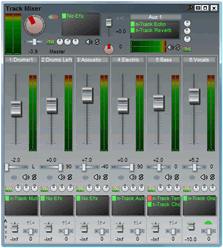 This software turns your computer system into a complete record studio. Just imagine that you have to record and playback almost unlimited number of audios and midi tracks of course this depends on your computer and the speed it has. You can adjust the effect settings and listen to the outcome in real time. This software turns your computer system into a complete record studio. Just imagine that you have to record and playback almost unlimited number of audios and midi tracks of course this depends on your computer and the speed it has. You can adjust the effect settings and listen to the outcome in real time.
n-Track Studio 6.0.7.2527 Beta has native effect and supports a third party DirectX and VST 2.0 plug-ins. It works with almost any standard or multichannel 16 and 24 bit soundcards at sampling frequencies of up to 192 KHZ. The built in effects includes: compression, reverb, Auto volume, chorus, multiband compression and others.
The other basic features of n-Track Studio 6.0.7.2527 Beta are: it enables you to import and export wav, mp3, mid, ogg cda and sgw audio files, import and export EDL multitrack song files for exchange of songs with other multitrack programs, mix down of all tracks into a single wav file after recording has been made. It can also be used to record an audio CD track using a CD recorder or to distribute the songs via the internet making use of the inn built mp3 encoder.
n-track Studio 6.0.7.2527 Beta is a shareware and cost $45 which is moderate and not too expensive for the value it gives you.
You can check it out at ntrack.com
Posted in Main | 1 Comment »
Tuesday, November 24th, 2009
 This application is built to help you back up your data and to synchronize your Computer, Notebooks and Servers. Super Flexible File Synchronizer 4.80 comes with features that allows you the ability to select according to your desire files and folders across the folder just like a hierarchy in a Tree view, also supports e-mail notification and various filters. This application is built to help you back up your data and to synchronize your Computer, Notebooks and Servers. Super Flexible File Synchronizer 4.80 comes with features that allows you the ability to select according to your desire files and folders across the folder just like a hierarchy in a Tree view, also supports e-mail notification and various filters.
As a user of this software, you can choose the user interface that best suits you. Some of these include: the wizard mode or the advanced mode. These settings are stored in multiple profiles. Super Flexible File Synchronizer 4.80 is fully supports FTP and secure FTP servers, data encryption as well as a scheduler for automated backups.
The publishers have introduced some new features in this version 4.80 which makes it more feature rich. For instance, there is an improvement in the real-time logic with emphasis on circular set ups among other minor changes and improvements. Super Flexible File Synchronizer 4.80 is not a freeware program but has a thirty (30) days trial period after which you may choose to purchase it.
Want to check it out? Visit Superflexible.com
Posted in Main | No Comments »
Tuesday, November 24th, 2009
 A solution for uninstalling software you no longer want on your computer. Your Uninstaller 6.3.2009.12 works as a capable replacement for the original Windows Add/ Remove program already on your system. The advantage of having this program installed on your computer includes the user- friendly way it uninstalls unwanted programs and the speed it does that. A solution for uninstalling software you no longer want on your computer. Your Uninstaller 6.3.2009.12 works as a capable replacement for the original Windows Add/ Remove program already on your system. The advantage of having this program installed on your computer includes the user- friendly way it uninstalls unwanted programs and the speed it does that.
Your Uninstaller 6.3.2009.12 starts much faster than your add or remove program and is easy to understand. It is built in a way that even the icons of installed software are displayed which makes it a quick way to locate the applications you want to delete or uninstall. Another key feature of this version is that it gives you the ability to look up any application you want through a handy function.
With Your Uninstaller, detecting unwanted keys in your registry is automatic. As soon as it detects unwanted programs or keys, it goes ahead to delete them and of course this is not done without your knowledge and permission.
Your Uninstaller 6.3.2009.12 is a shareware, even though I have used Revo uninstaller before and it served me well, I still think Your Uninstaller 6.3.2009.12 is non the less a good program.
You can check it out at: ursoftware.com
Posted in Main | 1 Comment »
Monday, November 23rd, 2009
 This is an email content checking software. It helps you to exploit detections, threat analysis and anti-virus solution that remove all types of email borne threats before they begin to cause damages to your computer. Usually when you send and receive email on the net, you are exposed to all manner of threats that can lead to devastating effects on your computer and in order to minimize your online risk, some measures have to be taken and installing the GFI Mail Security For Exchange/SMTP 10.1 Build 20091103 Beta 1 is a step in the right direction. This is an email content checking software. It helps you to exploit detections, threat analysis and anti-virus solution that remove all types of email borne threats before they begin to cause damages to your computer. Usually when you send and receive email on the net, you are exposed to all manner of threats that can lead to devastating effects on your computer and in order to minimize your online risk, some measures have to be taken and installing the GFI Mail Security For Exchange/SMTP 10.1 Build 20091103 Beta 1 is a step in the right direction.
The key features of this program are: email content and attachment checking to quarantine all dangerous emails, multiple virus engines to enhance the security status of your computer, email threat engine to analyze and defuse HTML scripts, exe files among others. It has two versions namely: SMTP and Gateway. The Gateway version is deployed at the perimeter of the network as mail relay server which makes it possible to scan all mails coming and going out. The other version integrates with exchange server and scans the exchange 2000 information store.
This software is however not a freeware but that is not the problem I have with it. The problem I have with has to do with the cost which in my opinion is too high at $450. Though I find this annoying, it however does not take anything away from it in terms of performance.
Want to check it out? Visit gfi.com
Posted in Main | 1 Comment »
Monday, November 23rd, 2009
 I am not the type to condemn other people’s effort but one thing I sure do and do very well is criticize constructively and in the process help improve on your weaknesses. This software could do better than it is doing if one or two changes can be introduced by the publishers. I am not the type to condemn other people’s effort but one thing I sure do and do very well is criticize constructively and in the process help improve on your weaknesses. This software could do better than it is doing if one or two changes can be introduced by the publishers.
There is no one out there who does not care about online security and in this area I am not pleased that the publishers decided to add ad-ware in the application installer which makes your system open to threats. Though it can be unchecked, I just thought it should not have been there in the first place.
Honestly it is not all bad news as far as this software is concerned. Taking a look at some of its features, Digsby Build 73 Beta as a multifunctional tool lets you chat with all your friends on msn, yahoo, google talk, icq and others. Digbsy also has email notification tool which alerts you new mails and you can customize it to your choice. This software not only alerts you of new mails, but informs you of what your friends are up to in terms of giving you live feeds.
Digbsy comes to you as a freeware and to me is a good program but for the adware that is attached to it even if it can be unchecked.
Want to check it out?
Visit digsby.com
Posted in Main | No Comments »
Saturday, November 21st, 2009
 Win7codecs 2.1.5 is a video and audio codec package for Windows 7. This software is designed in a way that you do not need to make any adjustments or even tweaks to have a full benefit of its media contents. It recognizes all your files as playable once you want to make use of it. The only thing is it automatically uninstalls other codec releases from your computer before it installs this version as it was the case in mine. Win7codecs 2.1.5 is a video and audio codec package for Windows 7. This software is designed in a way that you do not need to make any adjustments or even tweaks to have a full benefit of its media contents. It recognizes all your files as playable once you want to make use of it. The only thing is it automatically uninstalls other codec releases from your computer before it installs this version as it was the case in mine.
Installing Win7 codec enables you to use any media player of your choice because it does not contain a media player neither does it associate file- types. The challenge you may have is that the player that you have on your system may be limited in capacity to play all movies and video clips.
Win7codes 2.1.5 supports video streaming in several formats in virtually all the popular browsers I tried it in including Firefox and windows. You have the right to choose where you want to install it and can also be redistributed. When installation is complete, Win7codecs 2.1.5 you can even remove some portions even with the rest of the package intact.
Want to check it out? Visit Win7codecs
Posted in Main | No Comments »
Saturday, November 21st, 2009
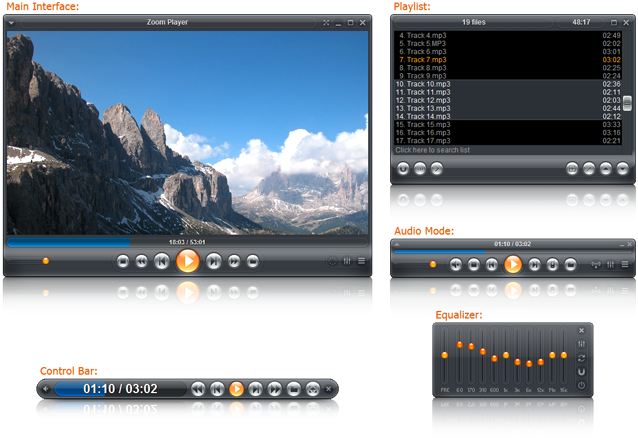 At first glance, Zoom Player Max 7.00 looks like that wonderful software that will be worth every thing you ever expect it to be and to be honest it is. Zoom Player Max 7.00 works in two modes, a media mode that can work and play almost any file supported by direct show and a DVD mode which uses pre-installed direct show DVD filters to play DVD content. At first glance, Zoom Player Max 7.00 looks like that wonderful software that will be worth every thing you ever expect it to be and to be honest it is. Zoom Player Max 7.00 works in two modes, a media mode that can work and play almost any file supported by direct show and a DVD mode which uses pre-installed direct show DVD filters to play DVD content.
Zoom Player Max 7.00 supersedes a media player in all the features that it has built into it. It provides so many useful zooming functions to improve TV output quality by simply eliminating an over scan of your system. This software version is a remarkable front end media player designed to serve you well.
In this latest version of Zoom Player Max, the publishers have taken time to introduce some new changes. These are: an improved Blue Ray main movie detection which is quite better than the older version, also bugs noticed in the last versions have been fixed and worthy of note is that it now works better on Windows 7 which was not the case with the older version of it.
Want to check it out? Visit Inmatrix.com/zplayer
Posted in Main | No Comments »
Friday, November 20th, 2009
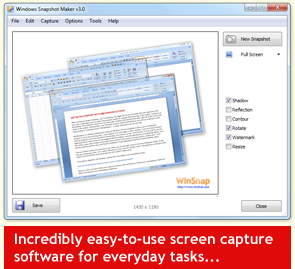 A small but wonderful and useful utility that you could use to edit screen shorts. Winsnap (32-bit) 3.1.4 captures windows of non- rectangular form with any background of your choice, performs automatically very simple canvas transformations and coloring effects, add professional smoothing shadows in Photoshop style and much more. A small but wonderful and useful utility that you could use to edit screen shorts. Winsnap (32-bit) 3.1.4 captures windows of non- rectangular form with any background of your choice, performs automatically very simple canvas transformations and coloring effects, add professional smoothing shadows in Photoshop style and much more.
Version 3.1.4 now has an improved windows capture especially when the taskbar is active. I like this because it means that once the taskbar becomes active I get all the captures even while my eyes may be off doing some other things on my system. Also there is an improvement in Clear Aero background in Windows 7 features.
Winsnap v3.1.4 gives you the privilege to simultaneously select and capture multiple objects (e.g. windows, dialogs, buttons and controls). A few windows can be placed on the screen and easily combined into one screenshot image. To select multiple windows or objects, all you need to do is to hold CTRL or SHIFT and you are good to go. You can configure Winsnap (32-bit) 3.1.4 to work with any custom visual styles including modern windows blind 6 skins with rounded corners and per- pixel transparency.
Want to check it out? Go to ntwind.com
Posted in Main | No Comments »
Friday, November 20th, 2009
 Do you feel like changing the present look of your desktop? Do you crave for something that is beautiful and makes your Desktop look different from what you have always known it to be? Then Windows Blinds 7.0 is the software program you need. Do you feel like changing the present look of your desktop? Do you crave for something that is beautiful and makes your Desktop look different from what you have always known it to be? Then Windows Blinds 7.0 is the software program you need.
Windows Blinds 7.0 is a good program that present you with all the opportunity you need to achieve all the above. Your computer look is changed and you determine the way you want it to look like. You are in charge of customizing your desktop by changing the style of the title bars, buttons and tool bars. All you have to do is to check the relevant boxes by assigning each of them skins or personalities and you can go as far as assign buttons that launches the program tool bars.
The publishers also built it in a way that allows you choose from the four skins that are included in the program and even download some more skins if you feel like. Your control of this program is also extended to the ability to exclude some programs from the Window.
Blinds if you choose to have their appearances remain as they already are.
Want to check it out? Visit Windowblinds
Posted in Main | No Comments »
Friday, November 20th, 2009
 I have been using Google Chrome for over a year and I still find it to be one of the most interesting and fast browser around. Since the first time I decided to download and give it a try, I have had no cause to regret it and I doubt if I am going to because it certainly is one of the best browser around. I have been using Google Chrome for over a year and I still find it to be one of the most interesting and fast browser around. Since the first time I decided to download and give it a try, I have had no cause to regret it and I doubt if I am going to because it certainly is one of the best browser around.
Google Chrome combines a minimal design with a technology that is advanced and sophisticated to make your surfing experience a delight. Browsing with Google Chrome is safer, faster and quite easier when you begin to compare it with others. When you type in words in the address bar, it gives you suggestions both for search and web pages making it much easier for you to do your job.
Actually I love Firefox and Opera browsers but I don’t look too far each time I want a quick one online. I like the rate at which it opens up pages and the ease and flexibility of accessing all my favorite web pages from new tabs. This version in review is just as good as other versions even though it is still in Beta stage.
Want to check it out? Visit Chrome
Posted in Main | No Comments »
|
|
|




