Author Archive
Thursday, August 13th, 2009
 The Aimersoft iPhone Ringtone Maker is designed specifically to create and convert ringtones for the iPhone. It is a versatile tool and is compatible with various sound and video formats including WMV, MPEG, AVCHD, WMA, MP3, MP4, and possibly with every commonly used multimedia format today. This means you can convert your favorite video and audio music into a ringtone and transfer it straight to iTunes or your iPhone. The Aimersoft iPhone Ringtone Maker is designed specifically to create and convert ringtones for the iPhone. It is a versatile tool and is compatible with various sound and video formats including WMV, MPEG, AVCHD, WMA, MP3, MP4, and possibly with every commonly used multimedia format today. This means you can convert your favorite video and audio music into a ringtone and transfer it straight to iTunes or your iPhone.
What will you get from the Aimersoft iPhone Ringtone Maker? Below are the 5 basic and rather important features of this application.
- It supports common audio and video formats so you will not have a hard time converting files. There is no need for you to download some kind of converter software for this purpose.
- It works for the iPhone 3G as well as the iPhone 3Gs.
- It is fully adjustable, which means that you can specify which part of the video or audio clip you want to use as a ringtone. All you need to do is to set the start and end time, and adjust the settings.
- It enables ease of management for the ringtones. You can simply add and remove ringtones without a problem.
- Transfer of ringtones can be done directly to your iPhone.
Overall, the Aimersoft iPhone Ringtone Maker is a fun tool to use when you want to customize your phone. With just a few clicks, you can already create and transfer your very own ringtones, or personalize your favorite audio or video clips and make these your ringtones.
This nice application is tagged at $14.95, which is relatively cheap. Even better – you get a free trial download so you can experience it before deciding to purchase. For more information, check it out at aimersoft.com.
Posted in Main | No Comments »
Wednesday, August 12th, 2009
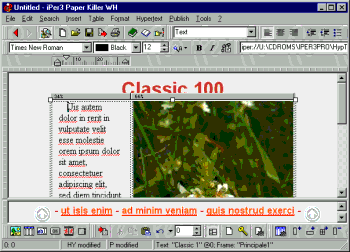 Paper Killer is an application used to edit, create, and even publish hypertexts. It is a smooth virtual editor that basically does the function of a word processor minus the coding. It enables you to make web pages, CDs, manuals, HTML help, Online Help, as well as WinHelp. Paper Killer is an application used to edit, create, and even publish hypertexts. It is a smooth virtual editor that basically does the function of a word processor minus the coding. It enables you to make web pages, CDs, manuals, HTML help, Online Help, as well as WinHelp.
With the Paper Killer, you get to choose from ready-to-use templates which you can opt to customize. Moreover, it features setting up font sizes and styles, image maps, and links, and it also allows you to create clip-arts and set up a photo gallery.
When you use the Paper Killer, you can easily create technical and training manuals, user guides, hand outs, format for minutes, and most documents you use for home, school, and office. You can also add audio and video options.
When utilizing this application for the first time, you do not need to be technically inclined as it is fairly simple to use. It aims to reduce the time and effort needed to create documents. Its editor feature allows easy revisions, search, and browsing; its organizer feature makes updating and archiving of documents very quick and efficient.
A feature that differentiates the Paper Killer from other similar applications is that it can set a single hypertext file from one whole manual which keeps you from having to load pages every now and then, and save each one thereafter. Additionally, you can edit and browse at the same time and allows for visual linking. You also get to edit one file and once done, you can have the HTML, CHM, or RTF formats with just a click of a mouse- made possible through the WYSIWYG feature.
The Paper Killer is a very efficient tool for regular people who want to make use of a better word processor utility. You can check it out at paperkiller.com.
Posted in Main | No Comments »
Wednesday, August 12th, 2009
 A tool designed to take images from your webcam and directly upload them to your site, the ConquerCam proves to be very handy, especially if you are one to prefer setting up effects on images. It is compatible with all Windows OS, and gives nothing but the best quality to ensure user satisfaction. A tool designed to take images from your webcam and directly upload them to your site, the ConquerCam proves to be very handy, especially if you are one to prefer setting up effects on images. It is compatible with all Windows OS, and gives nothing but the best quality to ensure user satisfaction.
What makes ConquerCam even more appealing is that it can be customized according to user preferences. You can set it up in terms of frequency of grabbing and uploading images, which basically allows you to upload these at any time you set it to; you can also choose from a wide variety of overlay effects such as those found in Adobe Photoshop; and you can also utilize tags for as many as you like.
Other special features that we love about ConquerCam are:
- It has the ability to upload an offline image
- It is equipped with motion-detection.
- It warns the user of any upcoming grabs.
- It is able to connect to proxy servers.
- It allows you to view thumbnails of the images you have uploaded.
- It utilizes timestamp details.
- It has a list of several FTP websites.
The ConquerCam is perfect for use as a security camera. It is user-friendly, and easy to set up. In fact, you could have it working in as quickly as 3 minutes. A very effective surveillance tool that does not disappoint, ConquerCam even offers a 30-day trial period for people who are not convinced with what this tool can do.
Overall, the ConquerCam is a nifty package that every webcam user should have. For more information, check it out at theill.com.
Posted in Main | No Comments »
Wednesday, August 12th, 2009
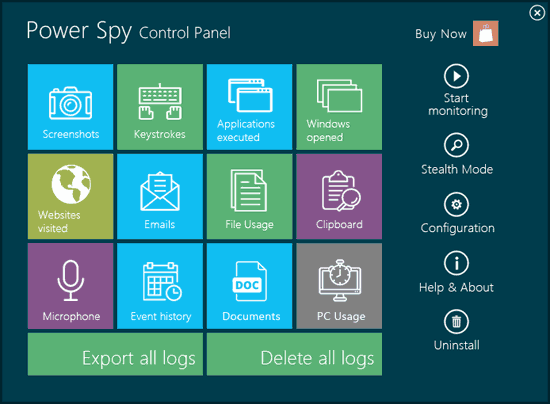 Power Spy 2009 is an excellent tool that lets you know what activities are being done on your PC without your knowledge. What it does is to log keystrokes, and save chat and instant messages from various IM programs like Windows Live, AOL, ICQ, and Yahoo! It also logs emails opened and read, visited websites, passwords, and basically everything that a person can do on a computer. Power Spy 2009 is an excellent tool that lets you know what activities are being done on your PC without your knowledge. What it does is to log keystrokes, and save chat and instant messages from various IM programs like Windows Live, AOL, ICQ, and Yahoo! It also logs emails opened and read, visited websites, passwords, and basically everything that a person can do on a computer.
What is even more amazing about the Power Spy 2009 is that it has the ability to take screenshots so it also works like a surveillance camera. Simply put, you get to see the activities via images.
The Power Spy 2009 can be made invisible to anyone except you when it is set up in Stealth Mode. It is great for spying on cheaters, keeping an eye on employees, and it also works well to monitor children’s computer activities. No one else will have to know other than you because the program has a hot key feature that allows you to be the only person to unhide it from the Control Panel window. You can view reports of activities through the PC or via email, which you can customize to send reports as often as you wish. You can set it up to send reports hourly, daily, or weekly- it is entirely up to you. Other people will likewise be unable to remove the program or stop it unless they know the hot key or the password. What’s more, you can get a trial version of the Power Spy 2009, if you are not ready to purchase it just yet.
A helpful tool that can surely give you the peace of mind you need. Check out ematrixsoft.com for more information.
Posted in Main | No Comments »
Tuesday, August 11th, 2009
 Plato DVD to MP3 Ripper is probably one of the most convenient ways of converting all of DVD audio files into a more portable and more organized mp3 audio file. As the world of technology evolves, portability is one of the better developed features and has become a necessity. That is why Plato DVD to MP3 Ripper will play a big role especially for those who want to extract audio files, convert files to mp3 files, and save it to their portable multimedia storage devices. Plato DVD to MP3 Ripper is probably one of the most convenient ways of converting all of DVD audio files into a more portable and more organized mp3 audio file. As the world of technology evolves, portability is one of the better developed features and has become a necessity. That is why Plato DVD to MP3 Ripper will play a big role especially for those who want to extract audio files, convert files to mp3 files, and save it to their portable multimedia storage devices.
Plato DVD to MP3 Ripper is one of the best DVD audio ripper today. The vast options of custom settings that the user can choose is just one of the proof that Plato DVD to MP3 Ripper can easily rip all of the other DVD audio converters in the market. By purchasing and installing Plato DVD to MP3 Ripper, the user will be assured of glitch-free and hassle-free operation. The user can even set parameters like on which specific point of the DVD movie exactly he or she wants Plato DVD to MP3 Ripper to extract the audio files. In this manner, unwanted audio clips will be mitigated for better management of the computer’s storage capacity and for easier post editing of the clips.
Extracting DVD audio files is one of the wisest innovations in today’s modern world and Plato DVD to MP3 Ripper should be the only option of today’s multimedia users. Plato DVD to MP3 Ripper can fully handle all the extracting and concerting tasks that users demand, with all DVD regions covered by Plato DVD to MP3 Ripper, it is clearly the all-in-one solution when it comes to DVD audio to mp3 conversion!
Visit dvdtompegx.com for more details.
Posted in Main | No Comments »
Tuesday, August 11th, 2009
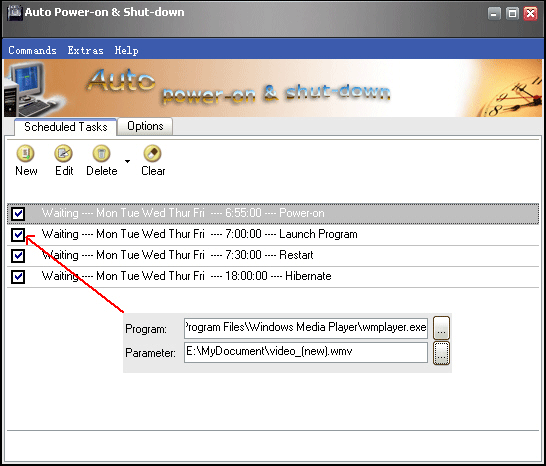 Auto Power-on Shut-down is a breakthrough utility that enables the computer user or administrator to assign or define a specific time when to shut down, hibernate, or close the computer system. It also allows the user to set predefined time and day when to turn on, wake up from hibernation, and open the computer or network of computers automatically. Auto Power-on Shut-down is a breakthrough utility that enables the computer user or administrator to assign or define a specific time when to shut down, hibernate, or close the computer system. It also allows the user to set predefined time and day when to turn on, wake up from hibernation, and open the computer or network of computers automatically.
Auto Power-on Shut-down allows the user to better manage and maintain the computer or network of computers because of its predefined scheduling of whatever action the user wishes to execute. Also, Auto Power-on Shut-down allows the user to automatically execute actions like open a certain program, suspend, or terminate an action or launch a website on a specific schedule without having to physically turn on or turn off the computers. Users can enjoy the luxury of having their computer units automatically powered on even before they sit down or they can just leave the computer and it will automatically shut down or finish a certain application once the task is done.
Auto Power-on Shut-down allows energy efficiency which in turn will benefit not only the pockets of individuals but big companies too, especially those who rely heavily on computer technology. Using Auto Power-on Shut-down 2.30 will definitely help prevent errors due to mismanagement of computer use and will promote efficiency in the workflow.
Auto Power-on Shut-down is the way to go to fully maximize computer operations and the best way to manage one’s work and professional lifestyle.
For more product information, visit lifsoft.com
Posted in Main | 3 Comments »
Tuesday, August 4th, 2009
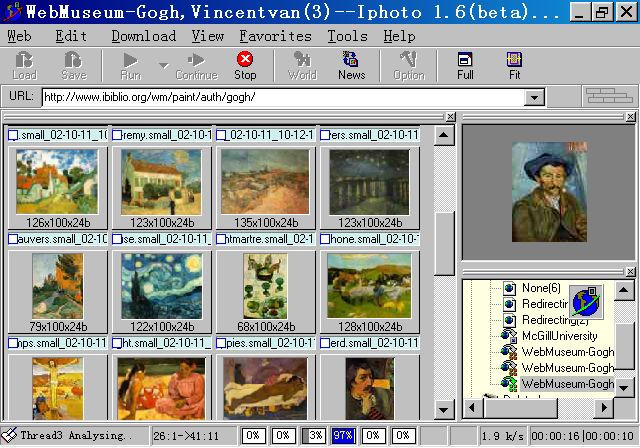 Iphoto is the latest software developed by Keronsoft.com for capturing multiple website images in just a single command. This very useful utility was designed by the engineers of Keronsoft.com for the convenience of businesses and professionals who want to download multiple images in one website, thereby saving a lot of time and effort. Iphoto has a fully customizable option for the user to select the specific file size or the dimension of the images to filter those images that need not be included in the batch. In this manner, memory space will be maximized. Iphoto is the latest software developed by Keronsoft.com for capturing multiple website images in just a single command. This very useful utility was designed by the engineers of Keronsoft.com for the convenience of businesses and professionals who want to download multiple images in one website, thereby saving a lot of time and effort. Iphoto has a fully customizable option for the user to select the specific file size or the dimension of the images to filter those images that need not be included in the batch. In this manner, memory space will be maximized.
With Iphoto, saving multiple images in a website by just a click of the mouse is possible. No need to go through the hassle of saving each photo one by one which anyone finds a tedious routine to do. With Iphoto, downloading and managing photos from the web has never been this easy. All the user has to do is to set the parameters, set the folder in which he wants the images to be saved, and he’s done! With just a click of a mouse, Iphoto will automatically download all the images within the user’s preferences and parameters.
Iphoto utilizes an innovative and the first of its kind software, the “Web Picture Preview”, a utility that lets the owner see a preview of all the images that will be downloaded and saved. In this manner, images will be thoroughly checked by the user if those are really what he wants to save. Iphoto is truly a breakthrough product!
For more details, visit: keronsoft.com
Posted in Main | No Comments »
Tuesday, August 4th, 2009
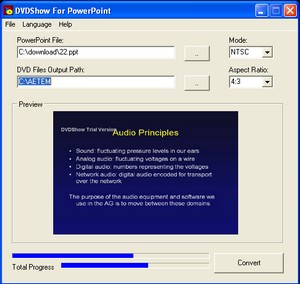 DVDShow for PowerPoint is one of the latest programs that were developed by Kerensoft.com that allows individuals or groups of professionals to convert their PowerPoint presentations into DVD formats for a more portable and convenient way of presenting those market facts and overview, data analysis, recommendations, or simply, just any type of PowerPoint presentation. DVDShow for PowerPoint is one of the latest programs that were developed by Kerensoft.com that allows individuals or groups of professionals to convert their PowerPoint presentations into DVD formats for a more portable and convenient way of presenting those market facts and overview, data analysis, recommendations, or simply, just any type of PowerPoint presentation.
DVDShow for PowerPoint provides all those busy professionals, businessmen and self-employed individuals to conveniently bring with them all those precious presentations for an even more professional appeal. They can even create multiple DVD copies of their presentations for the members of the panel or for their clients, an impressive gesture that will surely earn a lot of praises.
Not only for impressing those demanding clients and those hair-raising panel members that DVDShow for PowerPoint will be helpful but by also making backup copies of those precious presentations for future modifications and references.
Since the advent of technological advances, the DVD file format has proven its position in being one of the formats that have optimum performance when it comes to quality, resolution, and fidelity. Aside from the fact that the DVD format is fully compatible with almost any type of players today, it can also be accommodated by the simple and proven medium of that round silver thing called the compact disc. DVDShow for PowerPoint is just perfect for allowing the users to save those PowerPoint presentations into these readily available DVD discs and they are all set to go!
For more details, log on to keronsoft.com
Posted in Main | No Comments »
Monday, August 3rd, 2009
 Alchemy Network Monitor PRO is the all-in-one software when it comes to network administration, monitoring, security, and maintenance. It is an excellent program when keeping a bird’s eye-view on what is happening in the computer network. The Alchemy Network Monitor PRO also provides access of individual computers for routine check-up and monitoring to see if these computers are functioning properly. Alchemy Network Monitor PRO is the all-in-one software when it comes to network administration, monitoring, security, and maintenance. It is an excellent program when keeping a bird’s eye-view on what is happening in the computer network. The Alchemy Network Monitor PRO also provides access of individual computers for routine check-up and monitoring to see if these computers are functioning properly.
The Alchemy Network Monitor PRO can be fully modified by the administrator to achieve the optimum level of monitoring. The program can send error reports, regular activities, and level or performance of an individual computer in the workstation. In this way, the administrator can assess the problem immediately and make an action.
Alchemy Network Monitor PRO makes business operations smooth and running in tip-top shape. Especially suited for companies that deal with high information technology and computer equipment, Alchemy Network Monitor PRO is not just an option but a must in every business.
For a relatively cheap price, getting Alchemy Network Monitor PRO is one of the wisest moves for every company in order to prevent damages and malfunctions that may cost the business their whole operating capital. Alchemy Network Monitor PRO is like having a software program that completely monitors each computer in the network, its activities, its state and performance level, and other functions. And not only that, Alchemy Network Monitor PRO can be set to command computers in the network to self-reboot, and to refresh its systems in order to run smoothly in parallel with other computers in the network.
Visit mishelpers.com for more information.
Posted in Main | No Comments »
Monday, August 3rd, 2009
 Emco Remote ShutDown Professional is the latest innovation from emco.is. It is a software program that enables the computer administrator or anyone who is in-charge of the computer systems and networks to: shut-down, log off, power off, or restart all the computers with just a click of a mouse or a simple command. Emco Remote Shut down Professional allows a hassle-free and seamless operation when the administrator wants to control the computers attached to its network. In this manner, efficiency will definitely be assured and all of the computers in the networks will be effectively monitored. Emco Remote ShutDown Professional is the latest innovation from emco.is. It is a software program that enables the computer administrator or anyone who is in-charge of the computer systems and networks to: shut-down, log off, power off, or restart all the computers with just a click of a mouse or a simple command. Emco Remote Shut down Professional allows a hassle-free and seamless operation when the administrator wants to control the computers attached to its network. In this manner, efficiency will definitely be assured and all of the computers in the networks will be effectively monitored.
What is good about Emco Remote ShutDown Professional is that the computer or network administrator can fully customize all the options and filter those computers that he wants to control. He can also administer custom messages such as sending notice to individuals connected to computers before an action is executed. The fully customizable functions and options will surely benefit not only the efficiency of the work load of the computer network administrator but the whole company as well, its costs in electricity, maintenance and routine check-ups will be positively affected.
Emco Remote ShutDown Professional also allows custom security functions like executing a lock down on all keyboards and mouse. In this manner, all unauthorized users and actions will be mitigated.
Emco Remote ShutDown Professional is truly one of the best innovations today especially when it comes to total control of computer networks and Emco Remote ShutDown Professional is no doubt the most user-friendly program that can be implemented into all computer systems of all types of businesses.
For further information, please visit emco.is
Posted in Main | No Comments »
|
|
|




