Author Archive
Friday, April 17th, 2009
 This application is a distraction preventing tool for writers. This is a blunt writing application that you could launch instantly and write. With less than 2MB in memory, WriteMonkey is a virtual typewriter that you can use to write without being bugged of italics, bold, wrong spelling prompts and more. Although it requires .Net Framework before it could be used, downloading the framework for this application could be worth it. This application is a distraction preventing tool for writers. This is a blunt writing application that you could launch instantly and write. With less than 2MB in memory, WriteMonkey is a virtual typewriter that you can use to write without being bugged of italics, bold, wrong spelling prompts and more. Although it requires .Net Framework before it could be used, downloading the framework for this application could be worth it.
The interface of WriteMonkey is very unique. Instead of the interface that you see on MS Office or OpenOffice, the interface is pretty simple. It has a DOS-Like background and the fonts almost look like DOS but could be customized. The choices of fonts are little bit limited but they are geared towards faster writing and easy reading. On the right side of the application you’ll see the first sentences of each paragraph that you have written. They also serve as shortcuts so that you’ll be able to access the paragraph without any problem.
Running the application is very easy. Since it’s very lightweight, you’ll never have any trouble launching the application. Writing is also very encouraging since you will never be distracted.
There are other simple document creators that you can choose aside from WriteMonkey. But what makes this application different is that you can minimize the window. The full screen mode is highly recommended but if you’re researching while writing, the windowed mode is very useful. You don’t even need to install the application. Just click on the .exe file and the application will run.
Check it out at http://writemonkey.com/download.php
Posted in Main | No Comments »
Friday, April 17th, 2009
 Q10 is an innovative application developer for those who wanted to focus on writing. It’s a very simple application that works like a regular typewriter except that you can do it in your desktop. Installing is very easy as the application is less than 1MB in size. A portable version for flash disks is also available so you’ll be able to transport your work to any computer as long as they are on windows. Q10 is an innovative application developer for those who wanted to focus on writing. It’s a very simple application that works like a regular typewriter except that you can do it in your desktop. Installing is very easy as the application is less than 1MB in size. A portable version for flash disks is also available so you’ll be able to transport your work to any computer as long as they are on windows.
The interface of Q10 is very simple. As soon as you launch the application, it will proceed to full screen mode. As indicated, this application will help you write which means there will be no distractions. The look of the application is very simple. You’ll have black background and the text will be in white. There is even an interesting clicking sound that emulates the sound of a regular typewriter. Hit “enter” and another typewriter-like sound will be heard. If you have worked on a typewriter during your high school or college years, the sound is nostalgic that it will really help you speed up your writing process.
Since the interface is very basic, the only prompts that you will see are the advisory that you can hit F1 for the commands, word count and character count. Hit “F1” and you’ll see the list of commands.
Commands for opening, creating and saving your work are based on standard MS Office application. The created document will be saved in the same folder of the application in the form of text (.txt) file.
For more info and download visit http://www.baara.com/q10/
Posted in Main | No Comments »
Friday, April 17th, 2009
 LittleFox is a simple add-on to your Firefox browser that will definitely change the way you interact with this very popular browser. The popularity of small laptops or “netbooks” featuring 7-inch screens has made this browser a little bit cramped. Firefox could be integrated with toolbars which are very important but could easily take space in a small laptop. With LitteFox, the browser will be automatically minimized to barebones. Since it’s an add-on, it will require little to no disk space as this will be integrated to your Firefox browser. LittleFox is a simple add-on to your Firefox browser that will definitely change the way you interact with this very popular browser. The popularity of small laptops or “netbooks” featuring 7-inch screens has made this browser a little bit cramped. Firefox could be integrated with toolbars which are very important but could easily take space in a small laptop. With LitteFox, the browser will be automatically minimized to barebones. Since it’s an add-on, it will require little to no disk space as this will be integrated to your Firefox browser.
After successful installation, the Firefox browser will become smaller in terms of available functions. Shortcuts and notification to some online applications are added such as Gmail, RSS Reader, and StumbleUpon will be available while offline applications such as download status and calendar are also integrated. Basically, everything you need in your browser is there except that the screen will be relatively larger.
There are two downsides for LittleFox. First is that is only geared for very specific users. To be able to fully appreciate what this small application could do you need to have the following: a small laptop (preferably a 7-inch), use the Firefox as your default browser and uses Gmail as your default email application. The second problem in the application is that it’s only being developed by one person that means upgrades and adaptation to the recent version of Firefox may not be implemented fast.
If you’re looking to save some space in your browser, this little application will greatly help. It might be challenging to customize but it’s very efficient in its main function.
For more info and download, visit http://www.geocities.com/alfredkayser/mozilla/littlemozilla.htm
Posted in FireFox, Main | No Comments »
Friday, April 10th, 2009
 DirEdit is one of the many batch renaming tools you can download for free. It’s a pretty basic application wherein you can batch select the files and rename them faster through the utility. DirEdit is one of the many batch renaming tools you can download for free. It’s a pretty basic application wherein you can batch select the files and rename them faster through the utility.
But what makes this application different from other batch renaming tool is on strings. The rules on renaming the files are very impressive. For example, users can create a rule deleting the first letter of the filename or replace them with their preferred character. This is also the possible for characters at the end of the file name where deletion as well as replacement is possible.
The interface of the application is also impressive. You’ll be working with two panels wherein the old file name will be displayed on the right and the new filename will be displayed on the other side. Users can manually edit the filename and see the actual results before they are implemented. File renaming will be completed only when the user clicks on the “Perform Action”. This prevents impulsive renaming which could be a great inconvenience.
The only downside of the application is that you have to manually enter each filename that you want to edit. The batch renaming is only possible if you have written the filename on a text and paste them in the application.
This tool is highly recommended for those who wanted to have a small application that could help them in renaming small number of files in their computer. Because it’s lightweight, installation is easy and will never use up your computer’s resources.
Check it out at http://www.bartgroot.nl/diredit/
Posted in Main | No Comments »
Thursday, April 9th, 2009
 Eyes Relax is a very simple but a very effective tool in reminding you to relax your eyes. This application will inform the user that it’s time to rest the eyes by looking away from the computer monitor. Users can set the time of work and break time and the application will work as a timer wherein it will pop-up and produce a sound as a signal. After installation, Eyes Relax could be placed in the desktop and could be minimized to the notifications area. It’s presence in the notifications area will also help users customize the application without really opening it. Eyes Relax is a very simple but a very effective tool in reminding you to relax your eyes. This application will inform the user that it’s time to rest the eyes by looking away from the computer monitor. Users can set the time of work and break time and the application will work as a timer wherein it will pop-up and produce a sound as a signal. After installation, Eyes Relax could be placed in the desktop and could be minimized to the notifications area. It’s presence in the notifications area will also help users customize the application without really opening it.
The application also comes with a parental control. Parents can prevent their children from staying too long in front of their computers through this application. After installation, the application will forcibly lock the computer. The computer will stop working unless the right password is entered. Because it can be customized, parents can use this as a reward system application wherein they can extend or limit the computer time of their kids. The interface is very simple for everyone to understand even on first use.
The application is installed as a systems utility in XP and Vista. That means it will require Microsoft .Net 2.0 before the application could run. Although the application is less than 2mb in size, the additional requirement is more than 200mb which could take a long time to download. But if you already have the framework, this is a great addition for your computer. The application is not intrusive and very simple to use.
Check http://themech.net/eyesrelax/ for more info.
Posted in Main | No Comments »
Thursday, April 9th, 2009
 TTSReader is a free application that helps users listen to text as they are read by the application. A relatively small application (less than 3mb) but comes with very useful and powerful functions to help users listen to texts with full understanding. TTSReader is a free application that helps users listen to text as they are read by the application. A relatively small application (less than 3mb) but comes with very useful and powerful functions to help users listen to texts with full understanding.
The interface is very easy to understand. As it uses the standard shortcuts, copy and paste of text is possible in the interface. Text and Rich Text Files (.rtf) could be imported in the application and would be accordingly read. The tone of the reader can be customized through the pronunciation manager interface. You can instruct the reader on how to read a word by matching the specified word with another word that has the same sound. Sentence and paragraph skip is also added and you can follow what the application reads as it highlights every word while reading the document.
There are two unique features rarely found in most text to speech applications – the first feature is the additional output available in the application. Aside from the common .wav output, the output could be on .mp3 with full bitrate control. This means you can easily transfer the files to your chosen mp3 player and listen to them wherever you go.
The second feature of the application is the option for expansion. Users can opt to download “commercial voices” from AT&T and NeoSpeech for a more “human” voice. The application already comes with a male and female voice and there are also free voices that could be added from Microsoft.
More info at http://www.sphenet.com/TTSReader/index.htm
Posted in Main | No Comments »
Thursday, April 9th, 2009
 Eagle’s View is a very powerful bible study guide that will not only provide you with commentaries on the scriptures but educational interactions as well. The application could be connected online so that users could access Google Earth for a more detailed interpretation of the scriptures. With the help of Google Earth, users will have an idea of the geographical situation when the scriptures were written. Aside from Google Earth, Flickr.com could also be used as resource for photos. Eagle’s View is a very powerful bible study guide that will not only provide you with commentaries on the scriptures but educational interactions as well. The application could be connected online so that users could access Google Earth for a more detailed interpretation of the scriptures. With the help of Google Earth, users will have an idea of the geographical situation when the scriptures were written. Aside from Google Earth, Flickr.com could also be used as resource for photos.
The study guide that comes with the application will help the user understand every word. Commentaries and data are available for each book as well as verse. Important words in the verses would have significant interpretation of the application. Searching for the right verse is also easier as the application’s search engines will automatically search the word or the phrase in the Old and New Testament. The number of occurrence of the word in the bible is also displayed with corresponding maps to show which book has the most occurrence.
The unique feature of Eagle Eye is its spreadsheet. Almost every word used in the bible has a corresponding Greek meaning and description to help you further understand every word. Even the mood of the author or speaker is added in the spreadsheet. A Chinese version is also available with the same interface.
Because it also uses the internet for additional data to the user, the application is smaller than expected (less than 20mb). The bible used in the application is the New American Standard (NAS) version.
Check it out at http://www.biblewordtour.com/EN-EV_1-7-5/download_EN.htm
Posted in Main | No Comments »
Wednesday, April 8th, 2009
 Weezo is undoubtedly one of the most powerful free applications today. Through this application, you can transform your computer into a server. As a server, everyone that has the right credentials could access your computer through any major web browser. Through this application, you or anyone you allow can take a look at your pictures; listen to music and stream videos. Advanced features of the application can enable account owners to remotely control the application. Access to webcam is even possible so that you can take real time pictures of your computer. Weezo is undoubtedly one of the most powerful free applications today. Through this application, you can transform your computer into a server. As a server, everyone that has the right credentials could access your computer through any major web browser. Through this application, you or anyone you allow can take a look at your pictures; listen to music and stream videos. Advanced features of the application can enable account owners to remotely control the application. Access to webcam is even possible so that you can take real time pictures of your computer.
Using Weezo is surprisingly easy. Of course, it will require a fair amount of familiarity with basic computer concepts but as soon as you have created an account and downloaded the application, you can create groups with specific persons who can access specific folders. After you have set up the account and your computer, you can target which folders that could be accessed by specific users. Some of them could only see the photos while others could watch videos. Of course, the speed of data transmission is based on internet speed of both parties (the native computer and the remote computer).
But aside from streaming photos, videos and music, users can also chat when they are logged on at the same time in the account. A blog could even be integrated in the application. Last but not the least, your computer with the Weezo account could become a server for small, HTML based websites so you don’t have to sign up to any web hosting service to set up a small website.
Check it out at http://www.weezo.net
Posted in Main | No Comments »
Friday, April 3rd, 2009
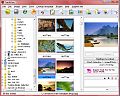 Most of the media libraries that’s available for download are usually only for photos. Although they can catalog other media types, their role is practically limited to storing the data in the right place. If you have a lot of pictures as well as music and videos, you will end up with a simplified library without good functionalities to ease you access to these media files. Most of the media libraries that’s available for download are usually only for photos. Although they can catalog other media types, their role is practically limited to storing the data in the right place. If you have a lot of pictures as well as music and videos, you will end up with a simplified library without good functionalities to ease you access to these media files.
Fresh View, on the other hand, tries to be unique from other media libraries by focusing on other media types. Aside from effectively classifying your pictures, videos and music; users can play music, watch videos and photos through a slideshow. More than 80 file formats are supported by this application. Fresh View is not just your average media library – it’s also your multimedia player.
Unfortunately, this form of multimedia player has limitations. Because it focuses on audio and video files, it has left out some features found in most media library applications. One of those functions not there is the batch renaming of photos.
But a single function will not diminish the beauty of the application. Aside from a powerful media player, it can convert files as long as they are supported by the application. Users can even create an HTML file wherein it automatically catalogs your media for easier access.
Even with all the features found in the application, Fresh View remains a small application. The file size of the application is less than 2mb which means downloading is a breeze and installation is fast. Fresh View is your media library if you have lots of audio and video files in your computer.
Check it out at http://www.freshdevices.com/freshview.html
Posted in Main | No Comments »
Friday, April 3rd, 2009
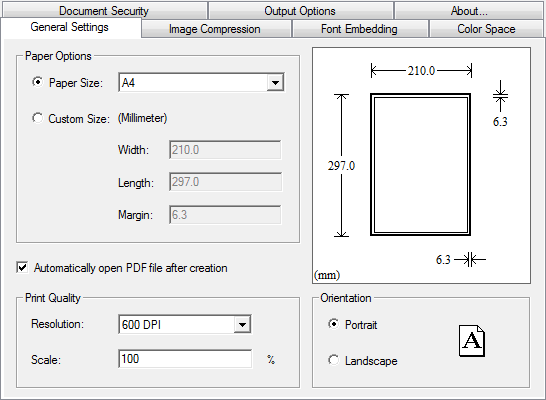 Creating PDF documents has become a lot easier with the MagicPDF. This application is a free PDF creator that converts basic document formats into PDF. The application works as printer wherein it could be chosen as an output of the document. Users could select MagicPDF as their printer after they have created their document in various office tools. Creating PDF documents has become a lot easier with the MagicPDF. This application is a free PDF creator that converts basic document formats into PDF. The application works as printer wherein it could be chosen as an output of the document. Users could select MagicPDF as their printer after they have created their document in various office tools.
Aside from being a printer option, the application could also be started as a standalone wherein a specific document could be converted. The application is not just a simple converter tool since it provides options for users before the final document is created.
MagicPDF 2.0 is not like any other PDF creator since the free version is offered without any strings attached. The output document in PDF by MagicPDF will not have any watermarks in every page and the number of pages is never limited. This version is the first version to be fully compatible with Vista operating system.
The free version of MagicPDF comes with two important customization options – the image compression and font control. These options are tabbed so you can easily access the functions and see the results immediately. Image compression allows users to easily embed photos in the document while font control will help users maintain the font when they are transferred as PDF document.
If you’re interested in the pro version, you’ll be able to enjoy more conversion features, customization on sizes of documents and security encryption that prevents copying of data in the created PDF file. But if you’re looking for a simple converter, the free version should be more than enough.
Check it out at http://www.magicpdf.com/
Posted in Main | 1 Comment »
|
|
|




