Author Archive
Tuesday, March 24th, 2009
 Areca is a program written in the language of java and for that reason it is universally compatible with Windows systems just so long as you have the latest runtime environments installed. It is extraordinarily user-friendly as a result of this and for that reason many people have already downloaded it since its release on March 22, 2009. Areca is a program written in the language of java and for that reason it is universally compatible with Windows systems just so long as you have the latest runtime environments installed. It is extraordinarily user-friendly as a result of this and for that reason many people have already downloaded it since its release on March 22, 2009.
The latest version of the program is the best one yet and has many different features to assist you with your file backup processes. For starters, you can not only backup the data on your drive, you can also compress that data and encrypt it in order to ensure that the data takes up less space and is harder to access for people that do not have the decryption protocols.
Very few software programs have the power to make guarantees, but Areca Backup is one of them because of the inclusion of mechanisms of transaction that check integrity at every step of the compression and encryption processes. If you have worries about how good they work, you can test them out before actually using them in the backup simulator that comes with the software package.
More information about Areca Backup 7.0.8 can be found through the publisher’s website at http://areca.sourceforge.net/
Posted in Main | No Comments »
Tuesday, March 24th, 2009
 Creating a JPEG image file is a relatively simple process, but something that is not often that simple is finding a way to change the orientation of the image without losing a large amount of information in the process. The main reason for this has to do with how image editors work. The majority of them will work on the process of decoding the image from JPEG to bitmap, rotating the bitmap and then recoding it for JPEG format. While there is nothing inherently wrong with this process, the double conversions from and to JPEG both carry with them minor calculation errors that when combined result in the loss of a little bit of image quality. Creating a JPEG image file is a relatively simple process, but something that is not often that simple is finding a way to change the orientation of the image without losing a large amount of information in the process. The main reason for this has to do with how image editors work. The majority of them will work on the process of decoding the image from JPEG to bitmap, rotating the bitmap and then recoding it for JPEG format. While there is nothing inherently wrong with this process, the double conversions from and to JPEG both carry with them minor calculation errors that when combined result in the loss of a little bit of image quality.
What makes the JPEG Lossless Rotator 6.3 so good as an image editing program is the fact that it does not utilize the conventional method for changing JPEG orientations. Instead, it applies a shell integration transformation to the entire image and as a result does nothing except change the orientation. This keeps the image quality the same and since the program itself is downloadable for free, anyone that wants to maintain the best quality JPEGs possible should certainly grab the latest version of this program which was released on March 22, 2009.
Features:
- Shell integration (this allows you to rotate your JPEG photos by a right-click on the file)
- Command line
- Automatic rotation
- Batch rotation
- EXIF-data display
- Multilingual interface: Catalan, Chinese (simpl), Czech, Danish, Dutch, English, Finnish, French, German, Greek, Hungarian, Italian, Korean, Polish, Portuguese, Romanian, Russian, Slovak, Spanish and Swedish.
More information is available at Annystudio.
Posted in Main | No Comments »
Monday, March 23rd, 2009
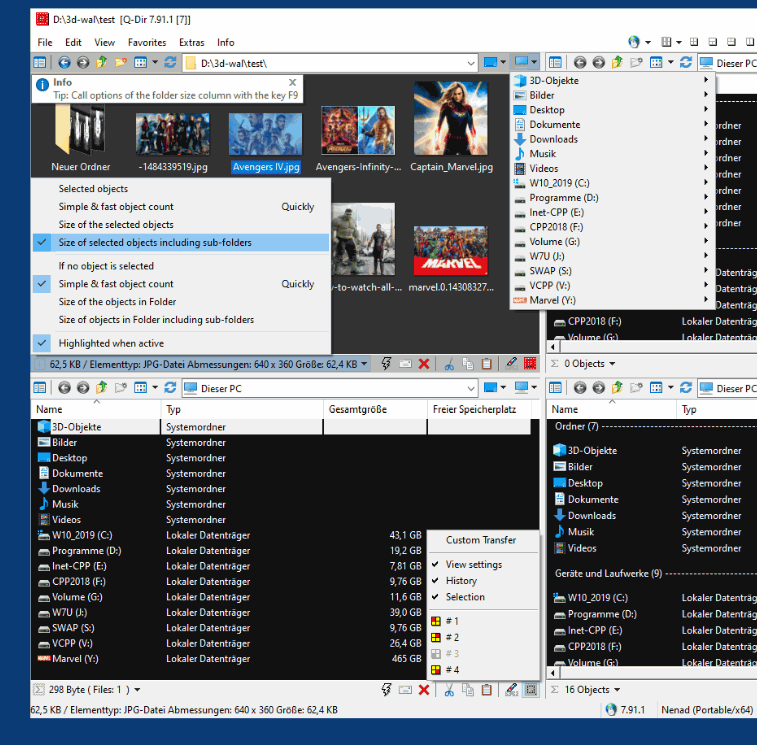 Q-Dir is a bit of an oddity when it comes to freeware because of the fact that it is not really something new. The functions of Q-Dir to a large extent are already available in Windows, but the program makes those functions a lot easier to apply and in doing so increase the level of convenience that the average user can experience. Q-Dir is a bit of an oddity when it comes to freeware because of the fact that it is not really something new. The functions of Q-Dir to a large extent are already available in Windows, but the program makes those functions a lot easier to apply and in doing so increase the level of convenience that the average user can experience.
For example, Q-Dir has pioneered a concept known as Quadro-View which allows you to actually utilize quadrants of the screen in order to organize your files into different folders and categories. You can bring up favorites in different parts of the view and of course you can drag and drop from one view to another in order to move different files around. With many different functions in addition to these basic ones, the most recent version of Q-Dir released on March 22, 2009 is definitely loaded for bear.
You could certainly accomplish the functions of Q-Dir with four different explorer Windows, but anyone that has tried to use even two different Windows at the same time knows how difficult and inconvenient it can be. With Q-Dir however, those problems are solved.
More information is available from http://www.softwareok.com/.
Posted in Main | No Comments »
Monday, March 23rd, 2009
 If you are a wrestling fan and love to number crunch and go through a number of what if scenarios in your head, you are absolutely going to love this extraordinary piece of freeware available online. Pro Wrestling Nexus: Complete was released as an update to the previous version of the game with the same name and now includes an interface that allows you to simulate wrestling matches between many different wrestlers from across the ages. Support for 350 different wrestlers exists within this game, allowing you to pick people that might never have fought in real life and go through the ultimate what if scenarios in order to see who the best wrestler of all time actually is. If you are a wrestling fan and love to number crunch and go through a number of what if scenarios in your head, you are absolutely going to love this extraordinary piece of freeware available online. Pro Wrestling Nexus: Complete was released as an update to the previous version of the game with the same name and now includes an interface that allows you to simulate wrestling matches between many different wrestlers from across the ages. Support for 350 different wrestlers exists within this game, allowing you to pick people that might never have fought in real life and go through the ultimate what if scenarios in order to see who the best wrestler of all time actually is.
You can create different championships with this game and even get the wrestlers that win those championships to defend their titles time and time again. You can even create new wrestlers of your own and match them against the best the world has ever seen. With extensive statistical tracking, you can even know exactly what is going on with each wrestler at any given time.
More information about this simulator can be found at http://geocities.com/exeventgames/index.html
Posted in Games, Main | No Comments »
Saturday, March 21st, 2009
 Easy2Sync is a unique software developed for those who have two or more computers at home. This type of application lets users sync files in different devices for easier access of users. Although this practice sounds redundant since the same files will be available in different computers, this is a highly recommended practice to ensure that the files will be available in case one of the computers doesn’t work as expected or the hard disk in a device is destroyed. Easy2Sync is a unique software developed for those who have two or more computers at home. This type of application lets users sync files in different devices for easier access of users. Although this practice sounds redundant since the same files will be available in different computers, this is a highly recommended practice to ensure that the files will be available in case one of the computers doesn’t work as expected or the hard disk in a device is destroyed.
The difficulty of syncing files in different devices is usually on the initial set-up. But Easy2Sync deals with the problem by automatically searching for devices it can sync with. A LAN or even a WLAN should be more than enough to get you started in automatic syncing. The application also supports FTP (File Transfer Protocols) in case one of your computer functions as the server.
But even with heavy task in syncing two devices with gigabytes of files, Easy2Sync will not drag the computer to a halt. The application will just work in the background without using most of your computer’s resources. The time of syncing could also be configured depending on your preferences.
The best feature of the application is its start-up wizard. If you are not familiar with the application or even in syncing, this tool should be give you a mini-crash course and guide on how to use the application. This application is highly recommended for home and educational use since it could help preserve the most important files no matter what happens.
Check it out at http://www.easy2sync.de
Posted in Main | No Comments »
Friday, March 20th, 2009
 A tool for optimizing your computer is already a must for most users. Although computers are rapidly improving in terms of hardware which will significantly upgrade their performance, there are users who wanted to squeeze more processing power from their gadgets. As a result, they use optimizing tools to remove unnecessary files applications in their computers. A tool for optimizing your computer is already a must for most users. Although computers are rapidly improving in terms of hardware which will significantly upgrade their performance, there are users who wanted to squeeze more processing power from their gadgets. As a result, they use optimizing tools to remove unnecessary files applications in their computers.
If you’re looking for an efficient optimizer, consider using PCAnalyzer. This application is remarkably small (less than 1mb) which eases the installation. Running the application will not even take up a lot of processing power so you can still run other small applications while this small tool does its task.
Because of its small size, the application can only do three things: registry fix, task management options and assistance on undeletable files. If you carefully think about it, these are the only processes you would actually need from your optimizer. Your registry could be fixed, managing processes would be a lot easier and the files that stay in your computer could be properly management. Other tools such as file defrag and virus scan are already found in your local computer and are better off with independent software.
The downside of PCAnalyzer is the required familiarity on part of the user. The interface might look complicated to the first time user especially those that are not really familiar to these type of tools. But after using the tool twice or three times, the entire application would be easier to use. PCAnalyzer is a good alternative if you don’t want to pay (it’s free) or experience computer lag from any optimizer.
Check it out at http://www.pcanalyzer.altervista.org/
Posted in Main | 1 Comment »
Friday, March 20th, 2009
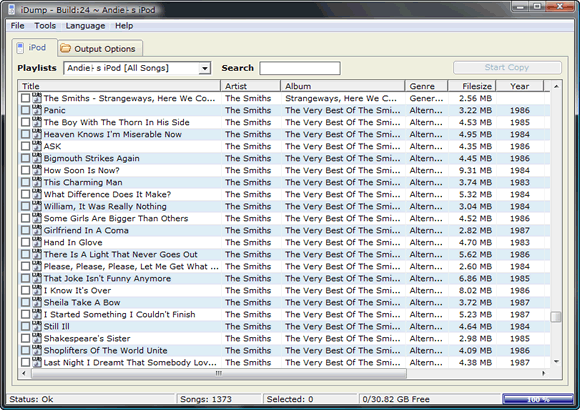 Before the iPhone and iPod Touch, the iPod is the most popular mobile device from Apple. As the gadget that boasts of hard disk storage, you can store thousands of music in a single player. With the onslaught of different iPod Video (now iPod Classic) versions, users have a good variety of gadgets to choose from for their music and video player. Before the iPhone and iPod Touch, the iPod is the most popular mobile device from Apple. As the gadget that boasts of hard disk storage, you can store thousands of music in a single player. With the onslaught of different iPod Video (now iPod Classic) versions, users have a good variety of gadgets to choose from for their music and video player.
But iPod Video and other Apple mobile devices has a huge drawback. Your gadget could only be synced with one device. After you synch your gadget with one computer, you can’t attach it with another device. If you attach your iPod to a computer with iTunes, the iTunes in another device will change the files based on the new computer. Transferring files from your iPod to another computer is also impossible.
Fortunately, these drawbacks could be taken cared of by a small application called iDump. Using the application is relatively easy – just place .exe file in your iPod and click on it if you want to transfer the files from your iPod to another computer. Since the application is less than 1mb in size, downloading and using iDump is very easy.
But remember that installing this file could destroy your warranty. It’s highly recommended to use this file after the store warranty to make sure your gadget will work as expected. Unfortunately, the application is yet to be updated so that it could work in iPod Touch and iPhone. If you have an old iPod lying around, this application should encourage you to use the former popular gadget once again.
More info and download available iDUMP
Posted in Main | No Comments »
Friday, March 20th, 2009
 Avira is undoubtedly one of the most powerful anti-virus software in the world. Aside from being free, it’s an application that runs silently in the background, updates are automatic and best of all it will screen virtually everything without even you knowing it. Avira is undoubtedly one of the most powerful anti-virus software in the world. Aside from being free, it’s an application that runs silently in the background, updates are automatic and best of all it will screen virtually everything without even you knowing it.
The challenge for most anti-virus applications is almost the same – the ability to be updated with the latest list of viruses for proper detection. The solution most anti-virus applications do is to automatically download the updates while informing the user about it. Although this process is ok, it will become obtrusive since it will slow down the computer until the update ends. Avira AntiVir Personal on the other hand, will silently run in the background. You’ll just be informed that your “virus database has been updated” without slowing down your computer.
The free version of the application could go a very long way. Everything is protected – from your instant messenger to P2P transactions. Anything malicious would trigger the alarm. Although the sound would be annoying sometimes, this is done to give you a very stern warning that something malicious in your computer is happening. Even the interface is very easy as it only rests in the task bar. Just right click on the logo and control the application from there.
The latest version of Avira AntiVir Personal now comes with anti-adware. This will protect your computer from malicious ads from popping up in your screen. This application is a must download even for new computers to prevent intrusion.
Check it out at http://www.avira.com/
Posted in Main | No Comments »
Wednesday, March 18th, 2009
 Generally, a personal computer or a laptop is not a power hog. If you stick to simple computer usage without the very expensive peripherals (simple speaker, no plasma screen monitors), another computer or laptop at home can’t increase anyone’s computer bill by double digit percentage. Generally, a personal computer or a laptop is not a power hog. If you stick to simple computer usage without the very expensive peripherals (simple speaker, no plasma screen monitors), another computer or laptop at home can’t increase anyone’s computer bill by double digit percentage.
The problem comes in when you’re using the computer for the most parts of the day. Sometimes, the computer stays on even without anyone using them since switching your computer on and off could easily destroy some of your computer’s components. Even if your computer has low power requirement, you might end up increasing your power bill because of your continued use.
But saving energy through your computer could be done with an application named Edison. Named after the great inventor, Edison is an application that could help you save energy by providing data and functions that could assist you in saving electricity. Aside from helping you save energy, its primary goal is to help save the earth by minimizing your energy consumption in your computer.
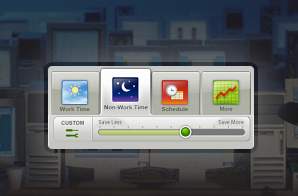
The application works in two ways: first it will gather data from your computer and will inform you of your computer usage behavior. After two or three days, you should have a decent data the time of the day you use your computer the most. This should give you a chance to schedule your computer usage. The second feature of the application is the power usage settings. The application can switch off your computer when you’re not using it after sometime and would implement power reduction settings if you choose to do so. You’ll even have updated information on how much energy you have saved so far.
Unfortunately, the application is only available in XP and Vista. But since they just released the Vista Version, it’s a good guess that they will come out with Mac or Linux versions later.
Interested? Check it out at http://www.verdiem.com/edison.aspx
Posted in Main | No Comments »
Wednesday, March 18th, 2009
 Because of the increasing power of personal computers, setting up a music studio at home is almost a breeze. Aside form a computer, everything else could be found at home or too inexpensive to purchase – a decent microphone, speakers and few changes in the room to make it virtually soundproof. Because of the increasing power of personal computers, setting up a music studio at home is almost a breeze. Aside form a computer, everything else could be found at home or too inexpensive to purchase – a decent microphone, speakers and few changes in the room to make it virtually soundproof.
But the core of the advancement of home studio is based on software. Instead of purchasing very expensive mixers, everything could be controlled from a computer. As long as the user is familiar with the application, everything else is a lot easier.
A good application that you can consider using is the DarkWave Studio. DarkWave Studio is one of the few audio editing applications that will let you control live input. The application has a virtual mixer wherein you can make some small tweaks to the sound until you achieve your desired sound quality. Multi-track control is also possible which also gives the user control over recorded sound and mixing them according to the user’s preferences.
Aside from this feature, there are two more impressive features, making this software an impressive addition. First is the HD recording ability. Instead of going through regular recording quality wherein there is no full-surround sound experience, HD sounds provides more crisp and quality. The second feature is the unlimited support for different VST (Virtual Studio Technology) plug-ins. Most audio applications only have limited support to different types of VST plug-ins but almost anything could be integrated with DarkWave. Improving the application or modifying it according to users’ preferences is almost unlimited.
Check out http://www.experimentalscene.com/darkwave/ for more info
Posted in Main | No Comments »
|
|
|




