Author Archive
Tuesday, October 14th, 2008
 Internet security is a hot button issue today and it is likely to continue to be a hot button issue for a very long time to come. The internet has meant easy access to personal information and documents and for that reason there are many people around that have become very paranoid about how online internet security works. While this is justified in some sense, you don’t have to live your internet life in the online equivalent of a hermitage if you just take some basic steps to secure your computer. Internet security is a hot button issue today and it is likely to continue to be a hot button issue for a very long time to come. The internet has meant easy access to personal information and documents and for that reason there are many people around that have become very paranoid about how online internet security works. While this is justified in some sense, you don’t have to live your internet life in the online equivalent of a hermitage if you just take some basic steps to secure your computer.
A piece of software that can do that insofar as files are concerned is Kruptos. This handy piece of software will allow you to encrypt all of your sensitive documents so that they can not be accessed by people that might infiltrate your computer. Kruptos can not only generate documents that encrypt themselves, it can also shred documents so that your hacker receives nothing but nonsense when they get the file back. If you protect all of your sensitive documents in this manner, Kruptos will ensure that your sensitive documents do not fall into the wrong hands. The majority of hackers are looking for easy kills and Kruptos will ensure that your computer is not easy. The end result in most cases is that a potential hacker would get bored and look for someone else to bother.
More information about Kruptos is available at http://www.kruptos2.co.uk/
Posted in Main | No Comments »
Monday, October 13th, 2008
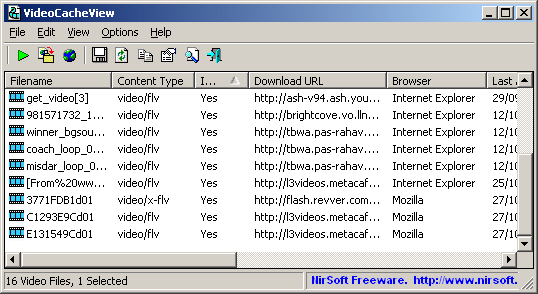 There are many excellent things stored in the cache files of your browser. Everything that you visit from your computer’s browser will be stored in the cache and for this reason everything you view online in terms of multimedia will be stored there as well. If you’re like most people that browse the internet, chances are pretty good that you have multimedia video files that you look at all the time and if you are like most people you have to go look up the site each time just because you didn’t bookmark it when you had the chance. There are many excellent things stored in the cache files of your browser. Everything that you visit from your computer’s browser will be stored in the cache and for this reason everything you view online in terms of multimedia will be stored there as well. If you’re like most people that browse the internet, chances are pretty good that you have multimedia video files that you look at all the time and if you are like most people you have to go look up the site each time just because you didn’t bookmark it when you had the chance.
If you invest in Video Cache View however, this is going to be a problem of the past. No bookmarking and no more searching is necessary when you have this piece of software because you can use the software package to go into the cache of your browser and extract the video file to a filename on your hard drive. This will allow you to simply go to the hard drive and view the videos from there with no web involvement necessary. On the other hand, if you have a web browser that has the ability to play FLV files, you can use the software to go directly to the website and get the files there also. In both cases you will just be clicking within the software as opposed to searching through your bookmarks or through the internet for a video you want to watch.
More information is available at http://www.nirsoft.net/utils/video_cache_view.html
Posted in Main | No Comments »
Monday, October 13th, 2008
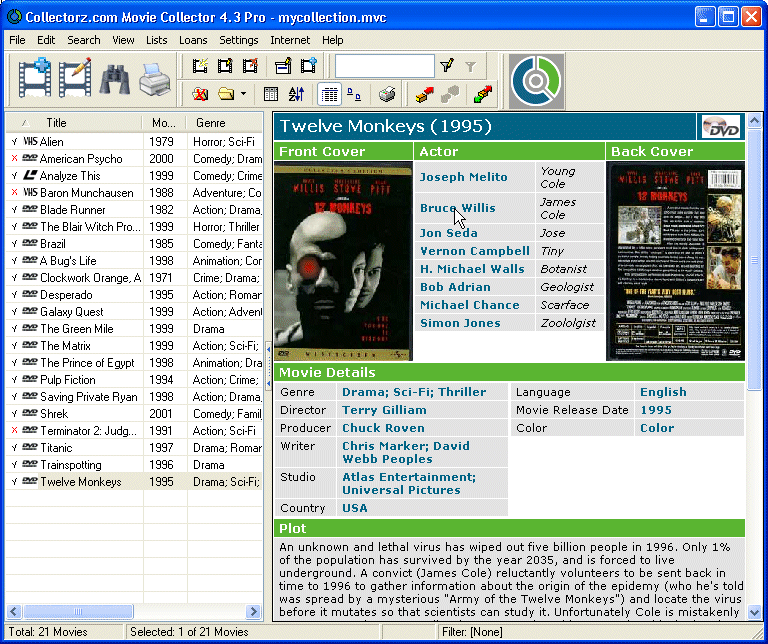 Here is another good movie collector for your database of movie collections. Collectorz.com Movie Collector is a movie database to catalog your collection of movies including DVDs, DivX files, VHS tapes, etc. Here is another good movie collector for your database of movie collections. Collectorz.com Movie Collector is a movie database to catalog your collection of movies including DVDs, DivX files, VHS tapes, etc.
You will enjoy adding movies to the database because it is really quick and easy. I love the fact that all you have to do is type the movie title and the software automatically downloads all information from various sources on the Internet (IMDb and DVD Empire), including the cover image.
It is not just about adding movies the database can be easily browsed, sorted and searched in various ways. Movie lists can be printed and exported to HTML, CSV files or XML.
One other feature I really like is the integrated Loan Manager which basically helps you keep track of you movies and who you lend them to.
Check it out at http://www.collectorz.com/movie/
Posted in Main | No Comments »
Monday, October 13th, 2008
 If you love pool, you will definitely love this game. I’m talking about PoolStars Multi-Player Online. If you love pool, you will definitely love this game. I’m talking about PoolStars Multi-Player Online.
PoolStars is a 3D multi-player pool game. It is realistic, fun, and s safe place to play pool with people from all over the world. The really cool thing about this game is that it is developed with the input from 6-time World Snooker Champion Steve Davis. So you get the Steve Davis experience…
The latest version which just hit the market days ago is PoolStars Multi-Player Online Pool 1.11.640 and it came with certain additions and changes in features. These include…
Added:
- Ultimate tournament (new type with groups)
- ‘Camera-Cue collision’ option (in settings)
Fixed:
- Ball reflection disappear bug
- First loading screen (blinking)
Want to check the game out? Go to http://www.poolstars.com/
Posted in Main | No Comments »
Tuesday, October 7th, 2008
 M4a is a popular audio format but can’t be read by most audio players manufactured today. The audio players that could interpret this format are usually expensive. On the other hand, MP3 is a popular format that could play in almost any audio player. That is why M4a files are often converted to MP3 for compatibility. M4a is a popular audio format but can’t be read by most audio players manufactured today. The audio players that could interpret this format are usually expensive. On the other hand, MP3 is a popular format that could play in almost any audio player. That is why M4a files are often converted to MP3 for compatibility.
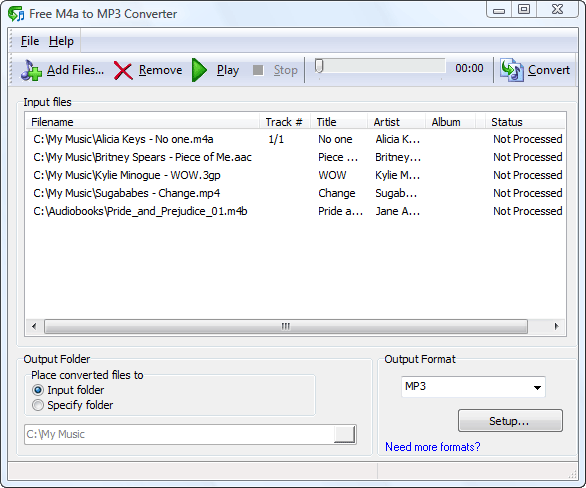
If you’re looking for a converter, try Free M4a to MP3 Converter 6.0 from Maniac Tools. As the name suggests it’s a free application that will allow you to convert your M4a audio files to MP3. Aside from the widely popular MP3 format users could also convert M4a files into WAV. Other files such as 3GP, M4b and AAC could be converted into MP3 or WAV. The 3GP file is usually in video format but the audio could be extracted and converted into your preferred format.
The interface of the application is very simple. You don’t need to specifically search the file for conversion from the application. There is a drag and drop functionality which improves interaction. The application also allow files to be converted in batches as M4a files are small and would be very inconvenient if you have to convert them one by one.
Aside from being an audio converter, the application could also be used as an audio player. Although it lacks interactivity compared to most audio players, it does the basic job of playing different audio file format. The application also comes in different languages which you can change at will after installation.
If there’s one thing you could ask from the developers of the application, it should be in the increased interface. The bit rate should be part of the front page of the interface. The setup in the lower right side of the application could be easily missed which will not improve the quality of the application.
Check out http://www.maniactools.com/soft/m4a-to-mp3-converter/index.shtml for more info…
Posted in Main | 1 Comment »
Tuesday, October 7th, 2008
 Mobile entertainment is slowly becoming an important part of everyone’s lives. Their music, movies and pictures have to be with them most of the time because of the constant need to travel. Because of iPod and other mobile entertainment devices, mobile entertainment has become possible. Mobile entertainment is slowly becoming an important part of everyone’s lives. Their music, movies and pictures have to be with them most of the time because of the constant need to travel. Because of iPod and other mobile entertainment devices, mobile entertainment has become possible.
But movies bought in online stores for mobile products are sometimes too expensive it’s not worth it. That is why most have opted to convert DVDs into mobile gadget friendly format such as 3GP (mobile phones) and MP4 (iPod).
ABC 3GP/MP4 is a highly recommended video converter for different reasons. The best reason for downloading this software is on being a freeware. Not a single cent is asked of you to have this software. Originally, this software is released only for 3GP and 3GPP2 format for compatibility for simpler mobile phones. However, the latest version added the MP4 format as mobile phones especially those running with Windows Mobile 5 and beyond could play MP4 files clearer.
The compatible files for the converter have also increased. It is now compatible to almost any video format including the very recent H264. The options for frame rate, video size as well as kbps have also been increased. You could convert your video to as much as 768 kbps. Additional options are still available such as trimming the videos so that you’ll have your preferred clips that would fit in your mobile phone. But in a 3GP format, you can reduce your movies up to 10% and still enjoy the movie with almost the same quality. But even with this update, the interface did not change one bit. You still can preview the videos you are about to convert and view them during conversion. The only small addition is the recommended software from the same maker of the application. You won’t even notice it if you are busy converting your videos.
Check it out at http://www.abcmedia.tv/3gp-converter.htm
Posted in Main | 2 Comments »
Monday, October 6th, 2008
 NotePro is a tool that helps in creating and editing of text files with more options than the default Notepad/WordPad programs that come with Windows. NotePro is very relevant when you are not in need of the power and complexity of a full-fledged word-processor despite the fact that it has many powerful features typically found in a word-processor. This application is simple to use. NotePro is a tool that helps in creating and editing of text files with more options than the default Notepad/WordPad programs that come with Windows. NotePro is very relevant when you are not in need of the power and complexity of a full-fledged word-processor despite the fact that it has many powerful features typically found in a word-processor. This application is simple to use.
NotePro creates and saves Rich Text Format, Word, Windows Write, and HTML files used by Microsoft Word and other word-processors and it handles standard text files. With NotePro, you can have multiple documents open at a time.
The basic Features of NotePro include:
- Absolute control over text appearance.
- Use any TrueType font installed on your system and control the font size and attributes (bold, italic, underscore, or strikethrough)
- Use colored text, including background fills.
- Onscreen, you can quickly increase or decrease text size, add super- or subscript text, and change the text alignment.
- Just like word-processor, NotePro lets you create custom “styles” for your text – define a font, face, attributes, color, and alignment.
- NotePro also has a built-in Spelling Checker,
In general, NotePro is easy-to-use and offers a lot of features. In a little package it possesses nearly all of the most-used features of a word-processor.
Want to check it out? Go to www.crystaloffice.com/notepro
Posted in Main | No Comments »
Monday, October 6th, 2008
 WinLock is a security program for personal or publicly accessible computers running all versions of Windows from 95 to Vista. WinLock ensures that only authorized people can have access to sensitive information on your computer. WinLock is a security program for personal or publicly accessible computers running all versions of Windows from 95 to Vista. WinLock ensures that only authorized people can have access to sensitive information on your computer.
This security tool allows you to put a limit on your users from accessing system resources like Control Panel, Desktop, and system registry, disable Windows hotkeys (such as Alt-Ctrl-Del, Alt-Tab, Ctrl-Esc, etc.), hide the Start button and Taskbar.
WinLock allows you to control the duration of people on your computer. It runs from the system tray and requires a password for access to be granted to the available settings.
This program loads automatically with Windows and allows you to add an optional start up message, provide audio notification, and set the time limit.
WinLock does so many other things like denying unauthorized users access to selected files, applications, and Explorer windows (Recycle Bin, My Computer, etc.), usb and hard drives. It filters Internet content and prohibits access to questionable Web sites.
When this program is enabled, access is denied for unauthorised users except with the use of password.
WinLock can be controlled and configured remotely by means of WinLock Remote Administrator application. WinLock Remote Administrator is the network security solution for Windows networks. It helps quickly configure remote WinLock clients via network, lock remote workstations, and apply security profiles by means of easy-to-use interface.
Below are the functions of WinLock:
- • System restrictions – disable command prompt, Control Panel, Safe Mode, and more…
- • Time-limited access – control how long other users can use the computer
- • Restrict Start Menu – hide the selective Start menu items, block context menus
- • Control Internet access – allow access only to the trusted sites only, and block all others
- • Sofware filter – block access to the downloaders, games, messaging clients, or CD burners
- • Hide drives – hide your system and network drives in Windows Explorer
- • Logging – monitor changes to the Windows shell and writes these changes to the log file
To get more details, browse: www.crystaloffice.com/winlock
Posted in Main | No Comments »
Wednesday, October 1st, 2008
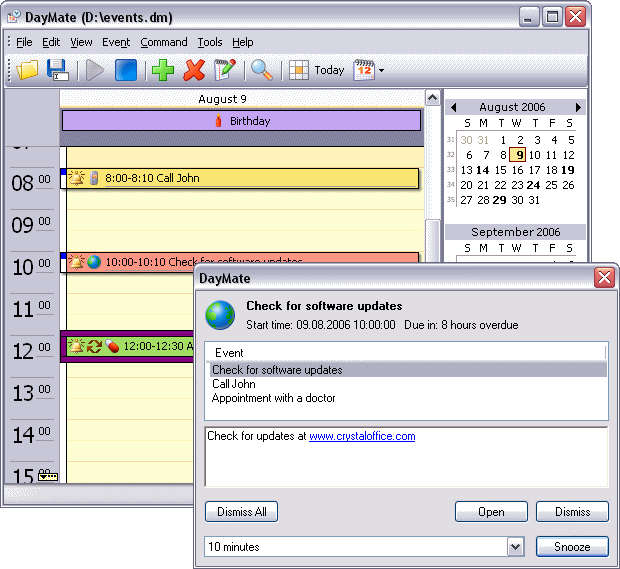 DayMate is an application that serves as a versatile intuitive day planner. It is professionally developed and designed to create and schedule reminders than can pop up messages with optional sound effects; start applications or open documents; and shut down, reboot, or power down your system. DayMate is an application that serves as a versatile intuitive day planner. It is professionally developed and designed to create and schedule reminders than can pop up messages with optional sound effects; start applications or open documents; and shut down, reboot, or power down your system.
This software can also check for new e-mail, dial phone numbers, synchronize system time via the Internet, send messages, and open specified Web sites. It helps to create single or recurring appointments, color-code different item types, set reminders for upcoming appointments, and more. It has a drag and drop feature which allows you to easily reschedule an appointment or adjust its time.
DayMate makes it possible for you to view all your appointments in a daily, weekly, monthly, or yearly overview and get a quick look at the appointments of a single day in any calendar view.
With DayMate, it becomes impossible to forget birthdays, anniversaries, holidays, meetings, and other important occasions.
Basic features of DayMate are:
- • Easy-to-use
- • Timed, all-day, and multi-day appointments
- • Recurring appointments
- • Configurable clock
- • Current time announced by real human voice
- • Checking the time in different time zones all over the world
- • Powerful alarms with custom messages and sounds
- • Customizable calendar
- • Backup and restore
For more details, check www.crystaloffice.com/daymate
Posted in Main | No Comments »
Tuesday, September 30th, 2008
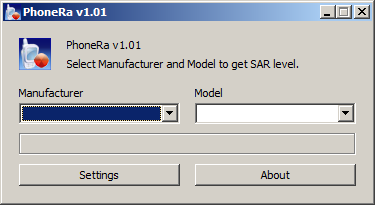 PhoneRa is a simple tool that gives you the Scientific Absorption Rate (SAR) of your next cell phone. Recent scientific research has shown that radiation from cell phones could have a negative effect on your body. PhoneRa is a simple tool that gives you the Scientific Absorption Rate (SAR) of your next cell phone. Recent scientific research has shown that radiation from cell phones could have a negative effect on your body.
This radiation in amount varies per phone, but the higher the radiation emitted, the higher the quantity absorbed in to your brain while using the phone.
The Specific Absorption Rate is the maximum amount of energy absorbed by a unit mass of exposed tissue of a person using a cell phone. The lower the SAR values of your phone, the lesser your risk. PhoneRa is the tool that helps you discover the SAR of your phone. All you have to do is to input the name of the maker of the phone in the appropriate boxes and you will get the SAR value of your phone.
PhoneRa will be constantly updated to give you the values of new models of phones as they are being released into the market. The European council recommends maximum exposure of 2.0 W/Kg of SAR while the Federal Communications Commission (F.C.C.) in the USA recommends maximum exposure of 1.6W/Kg.
For more information on PhoneRa check www.raproducts.org
Posted in Main | No Comments »
|
|
|




