Author Archive
Sunday, April 6th, 2014
 Did you know that as an individual you could easily manage or publish or organize a variety of content on a website with Drupal? Did you know that as an individual you could easily manage or publish or organize a variety of content on a website with Drupal?
Drupal is a free software package that allows an individual or a community of users to easily publish, manage and organize a wide variety of content on a website. Tens of thousands of people and organizations are using Drupal to power scores of different web sites.
Drupal can be used to build everything from personal blogs to enterprise applications. Thousands of add-on modules and designs let you build any site you can imagine. It is an open source program, which gives you a lot of privileges that a commercial program won’t give.
The program has a wide active community that assists when it comes to driving innovation. It also has lots of in-built functionality, as well as thousands of freely available modules, that make it easy and cost-effective to deploy features that include the following: e-commerce; collaborative authoring environments; peer-to-peer networking; file uploads and downloads; newsletters; picture galleries; podcasting; forums; blogs; and newsletters.
Drupal is an excellent program that is absolutely useful for a lot of things. It doesn’t have any downside.
Want check it out? Visit Drupal.org.
Posted in Main | No Comments »
Tuesday, April 1st, 2014
Do you want to learn how to keep your ROM collection up to date, and with so much ease? Do you want a program or software that can help you do just that without taking much of your time? Maybe you should find out what ClrMamePro is all about in this review.
What is ClrMamePro?
ClrMamePro is a ROM-manager that helps you to keep your ROM collection up-to-date. Though, a few users have complained about its poor usability; this program remains one of the most outstanding. As if the publisher was listening to what a couple of users were saying about the program; a few changes have recently been made.
Some recent changes made to the program have ensured its stability and ease of use. Some new changes made to version 4.014 include the following: Misc: switched to 7z CPP SDK core now. Unpack operations and hash calculations are now done blockwise. So you should not run into memory issues with huge 7z files anymore; Misc: reenabled detection of unneeded folders within rar/7z files with safe handling on delete; Misc: updated unrar dll; Fixed: no more possible double file creations when using external packer’s rename command; and Fixed: possible assertion when not using external packer’s rename command.
Recent changes were made to the program that seems to correct problems of the past.
Want to check it out? Visit: Mamedev.emulab.it.
Posted in Main | No Comments »
Monday, March 31st, 2014
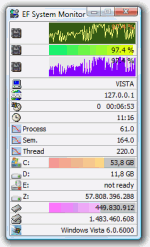 One of the basic things you need to keep your computer running and working as it should is information. It is important to have adequate information not just on your computer, but also on other systems on your network. That is why you need a tool like EF System Monitor, which has a lot of handy tools to provide you with basic information about your network. One of the basic things you need to keep your computer running and working as it should is information. It is important to have adequate information not just on your computer, but also on other systems on your network. That is why you need a tool like EF System Monitor, which has a lot of handy tools to provide you with basic information about your network.
What is EF System Monitor?
System Monitor is a comprehensive tool which provides you with information about all computers running on your network: memory space, hard disk usage, date, time, user name, etc. When you run it under Windows NT/2000/XP you can use the advanced sensors provided by Windows NT platforms: process and thread surveillance, advances IO ports monitoring, CPU times, etc. All items are displayed using suggestive graphical histograms and icons. It can collect and display the data from remote computers from a TCP/IP network.
This highly affordable and very useful tool supports Windows 8 as well as earlier versions of Windows. You won’t even have any problem with it when it comes to understanding how it works. It is easy to understand; but it is also important to observe it a little just to get a hold of it.
Want to check it out? Visit EFSoftware.com.
Posted in Main | No Comments »
Sunday, March 30th, 2014
 Have you by mistake deleted some files you never had intention of removing from your system? Are you looking for means to delete a particular file without much success? Then find out just how you can do this by using this program called Active@ UNDELETE. Have you by mistake deleted some files you never had intention of removing from your system? Are you looking for means to delete a particular file without much success? Then find out just how you can do this by using this program called Active@ UNDELETE.
What is Active@ UNDELETE all about?
Active@ UNDELETE is a data recovery software that helps you to undelete files and restore deleted partitions. This includes bootable CD image to recover data from dead PC. The program can recover files on FAT, NTFS, NTFS5 and EFS. It also comes with features that enable you to create a Disk Image for safe data restoration, deep disk scan and automatic data analyze, damaged RAID data recovery and reconstruction.
Recently a few changes were made to this version being reviewed. Some of these changes and updates include the following: added 64-bit executable for faster scan and better memory utilization on x64 platforms; More pre-defined file signatures added: 3FR, RW2, ERF, KDC, DCR, MOS, ODT, OLE, XPS, GZ, MTS, FMP, CAB and more; the latest Boot Disk Creator, and boot disk utilities for Professional & Enterprise editions; GUI tweaks and behaviour improvements; and better scan and search performance.
Any downside?
Active@ UNDELETE can only undelete or recover only one file per session.
Want to check it out? Visit Active-Undelete.com.
Posted in Main | No Comments »
Saturday, March 29th, 2014
 Want to save time as well as safely remove your USB from your computer? Then this review is for you because it has information about a program called USB Safely Remove. Want to save time as well as safely remove your USB from your computer? Then this review is for you because it has information about a program called USB Safely Remove.
What’s this program all about?
USB Safely Remove is a USB device manager. It saves time and extends user abilities on active work with flash-drives, portable drives, card readers. It provides a secure environment for removing USB flash disks from the computer unit without causing any damage in the process. USB Safely Remove is built with a nifty set of features that surpass the default options provided by Windows operating system.
As soon as you have installed USB Safely Remove on your system, it creates an icon in the system tray area and automatically detects pen drives already connected to the PC. USB Safely Remove has a wonderful response time and smoothly integrates into the operating system, without causing it to hang, crash or pop up error dialogs. So far, no serious issue has been reported by users since this version was released; which makes it highly dependable.
Any downside?
The program does not have any problems, and is in fact very easy to use even for the inexperienced user.
Want to check it out? Visit SafelyRemove.com.
Posted in Main | No Comments »
Friday, March 28th, 2014
 Are you searching for a handy piece of software that can perform quality analysis for any audio equipment connected to your computer? Then this might just be the review you need because it’s about a program called RightMark Audio Analyzer. Are you searching for a handy piece of software that can perform quality analysis for any audio equipment connected to your computer? Then this might just be the review you need because it’s about a program called RightMark Audio Analyzer.
What’s the deal with this program?
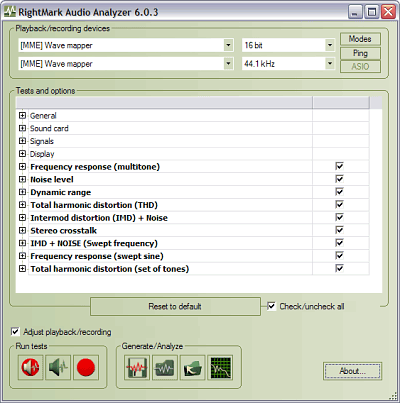
RightMark Audio Analyzer is an independent audio measurements open-source project. The test suite performs various tests of electroacoustical performance of sound cards and other real-time audio devices. Testing is accomplished by playing the test signals and recording them after they pass through the testing chain. There are several tests that you can perform. Frequency response and total harmonic distortion allow speaker system testing, but you also have tests for your system subwoofer and other devices.
All the playback or recording devices are automatically detected by RightMark Audio Analyzer and displayed in a drop-down menu, allowing you to choose the item you want to test, as well as the sampling modes (rate and capacity). The main user interface of the program bundles all the configuration options and the test lists. Before playing the test signals, you can choose to normalize them, in order to eliminate different signal levels.
Any downside?
The program’s user interface is a bit difficult to understand.
Want to check it out? Visit Audio.RightMark.org.
Posted in Main | No Comments »
Friday, March 28th, 2014
 Are you looking for a program or media player that has all the features that you need, with the ability to play virtually everything that you need? Are you also looking for a program that won’t give you any problem when it comes to understanding its interface? Then Media Player Classic is one program you should take a look at. Are you looking for a program or media player that has all the features that you need, with the ability to play virtually everything that you need? Are you also looking for a program that won’t give you any problem when it comes to understanding its interface? Then Media Player Classic is one program you should take a look at.
Media Player Classic – BE is a free and open source audio and video player for Windows. It is based on the original “Media Player Classic” project (Gabest) and “Media Player Classic Home Cinema” project (Casimir666), but contains additional features and bug fixes.
The publisher has done a lot of work to this new version, and it now includes a number of updates such as the following: Renumbered versions – now it consists of three digits (MAJOR.MINOR.PATCH); MPCVideoDec – disable DXVA for WMV3 Complex profile; libpng 1.7.0 b35 git-3ac960f1; Fixed crash when closing a window settings file associations when called from a UAC; fixed changing settings interface; and some menu items are not marked as active.
Media Player Classic is lightweight, and easy to use. It does not have any downside.
Want to check it out? Visit SourceForge.net.
Posted in Main | No Comments »
Friday, March 28th, 2014
 Do you own a cyber cafe and desire a program that comes complete with management features? Maybe you should read this review about TrueCafe because it might just be what you have been looking for! Do you own a cyber cafe and desire a program that comes complete with management features? Maybe you should read this review about TrueCafe because it might just be what you have been looking for!
What’s the big deal about TrueCafe?
TrueCafe is a friendly cyber cafe software with a complete set of features for cyber cafe management: Wi-Fi billing, thin clients support (NComputing, Windows Terminal Server), tickets, license keys, pre-paid and post-paid sessions, point-of-sale, a terminal protection, print charging, URL log and traffic calculation, reports, etc.
You can even charge the customers of your cafe, club, shop, hotel, etc. when they use your Wi-Fi hotspot from their Wi-Fi laptops. The software also allows you to cut down your game licensing expenses using the license key (CD-key) management system, automatically charge your customers for monochrome and color printing, organize a chat between operator and customers, browse a terminal screenshot, task manager and volume control. Sell items to walk-in customers, and make your unique receipt design.
You can also use TrueCafe Client software to lock cyber cafe terminals and display customer session info, remotely turn on, shutdown or restart terminals, start or terminate any application on a terminal, configure a list of applications that a user can start. Once you have it installed on your system, it allows a customer to order items from a terminal. Setup any imaginable pricing model.
Any downside?
TrueCafe for 1 PC costs $30. The upgraded version for 4 PCs and up to 10 Wi-Fi connected devices will cost you nearly a hundred bucks ($99.90).
Want to check it out? Visit TrueCafe.net.
Posted in Main | No Comments »
Thursday, March 27th, 2014
 Are you searching for an easy to use program designed for the creation and burning of ISO files, as the name implies. But it packs other useful features as well? Then you should consider a program like ISO Workshop; and you can find out more by reading the review. Are you searching for an easy to use program designed for the creation and burning of ISO files, as the name implies. But it packs other useful features as well? Then you should consider a program like ISO Workshop; and you can find out more by reading the review.
What’s the big deal about ISO Workshop?
ISO Workshop is a free application specifically designed to facilitate disc image management, conversion and burning operations. The program has a very simple user interface that lets you focus on the most important aspects of the process, allowing the program to do the rest.
ISO Workshop’s user interface is represented by a common window with a well-organized layout which enables you to create ISO images from local files and folders, by specifying a name, output directory and type (CD, DVD, Blu-ray disc, Bridge, DVD-Video, or Boot). To burn an ISO image to disc, all you have to do is select the destination drive (in case you have multiple CD/DVD writers), as well as finalize the disc (a requirement by most media players) and make it eject automatically when the task is done.
Does the program have any downside?
The program offers to change or install software or components such as browser toolbars that users may not require.
ISO Workshop is free for private use, still the Business Edition would cost you $19,95.
Want to check it out? Visit GloryLogic.com.
Posted in Main | No Comments »
Tuesday, March 25th, 2014
 Want a program that will easily help you rename multiple files in one swoop? Do you also want such a program to come with all the features that can easily be customized just for your use? Then what you need is a program known as EF Multi File Renamer. Want a program that will easily help you rename multiple files in one swoop? Do you also want such a program to come with all the features that can easily be customized just for your use? Then what you need is a program known as EF Multi File Renamer.
What is EF Multi File Renamer?
EF Multi File Renamer a versatile tool for comfortable renaming of numerous files or whole directories (including subfolders) in a processing step. Select the rule(s) you need for the current task from an extensive set of predefined rules. Each rule has its individual settings. Renaming tasks can be implemented clearly with a minimum of efforts.
With EF Multi File Renamer, defined rules sets can be saved and used again; and because you can deactivate individual rules, EF Multi File Renamer offers a great variety of flexibility and function. The position of each rule in a set can be easily changed. Some of the important features in the program include the following: clear, easily understood definitions, from simple to complex renaming rules, with multiple options. Rule sets can be saved and used again later; undo the last renaming operation; recursive processing of subfolders and the files contained in them; etc.
Any downside?
EF Multi File Renamer has a 30 day trial limitation. Full version license would cost you $15.
Want to check it out? Visit Efsoftware.com
Posted in Main | No Comments »
|
|
|




