Author Archive
Friday, October 11th, 2013
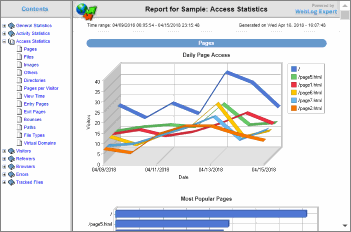 When it comes to hitting it big as a website or blog owner, one thing you can’t afford to ignore is traffic. When it comes to attracting traffic to your website or blog, one thing that can also help you is the rate of traffic. It is important to have vital information about number of people that visit your site daily in order to track the progress of your site; and that is why WebLog Expert is just one of those programs you need. Let’s find out if the program has some of the basic features needed by a website or blog owner. When it comes to hitting it big as a website or blog owner, one thing you can’t afford to ignore is traffic. When it comes to attracting traffic to your website or blog, one thing that can also help you is the rate of traffic. It is important to have vital information about number of people that visit your site daily in order to track the progress of your site; and that is why WebLog Expert is just one of those programs you need. Let’s find out if the program has some of the basic features needed by a website or blog owner.
What’s WebLog Expert?
WebLog Expert is a powerful access log analyzer designed to give you information about your site’s visitors: activity statistics, accessed files, paths through the site, information about referring pages, search engines, browsers, operating systems, and more. The program produces easy-to-read HTML reports that include both text information (tables) and charts.
Recently, a lot of updates have been made to this program to include the following: improved support for Windows 8.1 and Windows Server 2012 R2; search rankings and .NET Framework reports have been removed as they cannot show accurate information anymore; jsessionid path parameter is excluded by default the same way as usual query parameters; support for anonymized IPs like 123.123.123.x; Most report files in the HTML reports are saved to a separate subfolder (for compatibility with Internet Explorer 11); and a few others.
Please note that the trial program is limited to 30 day. Full version would cost you $99 (for the Standard version).
Want to check it out? Visit WebLogExpert.com.
Posted in Main | No Comments »
Friday, October 11th, 2013
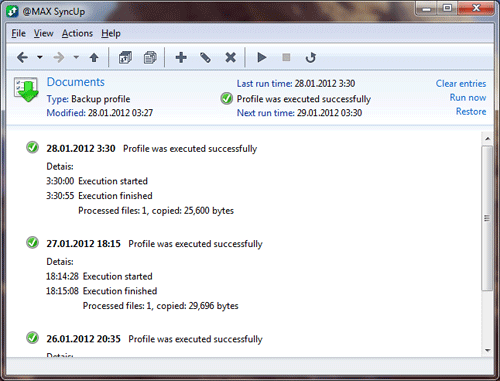 Want to sync and back up data between two PCs? Then you should probably use @MAX SyncUp. Want to sync and back up data between two PCs? Then you should probably use @MAX SyncUp.
What is this program all about?
@MAX SyncUp is an advanced utility for backup and data synchronization over Internet or in a local network. It allows you to create backups or synchronize your files to a local folder, removable USB drive, networked computer or NAS, (S)FTP or WebDAV server or Google Drive cloud storage – all completely automatically.
With @MAX SyncUp, you will able to: back up and restore important data from accidental deletion or system crash, transfer and sync files and folders, Sync website updates to (S)FTP or WebDAV server, synchronize two computers directly over Internet or in a local network by using the effective RSync-like algorithm which detects and transfers only the changed parts of files, easily browse the contents of the archive, search and select files and restore them in the original location or to another place and several other functionalities.
This program provides you with the easiest way to back up and restore important files or keep your documents up to date on your desktop and laptop computers.
Some of the features of this program are: Allows the use of an archive (@MAX SyncUp or Zip archive) as one of the sides for bi-directional synchronization. Creates an internal archive for files that are changed or deleted during the profile execution. The program also allows you to undo these changes; Provides a tray popup window that gives you an easy way to view the status and results of synchronization, start a profile manually, and restore previously saved data by way of a click.
You can download the trial version at MaxSyncUp.com. Full version would cost you $24.75.
Posted in Main | No Comments »
Friday, October 11th, 2013
 Wouldn’t it be cool to be able to be able to make high quality videos from anything playing on your PC? Now with Replay Video capture you can. Wouldn’t it be cool to be able to be able to make high quality videos from anything playing on your PC? Now with Replay Video capture you can.
What is Replay Video Capture?
Replay Video Capture makes it easy to capture anything you can watch on your PC’s screen as a production-quality video. It’s the best way to make professional-looking videos from hard-to-capture web sites, DVD’s, webcams, chat sites, and more. It supports dual monitors. Record your screen activity on one monitor while working on the other.
With Replay Video Capture, you can readily create DVDs of your recorded files in a jiffy. Whatever the source, this application captures and converts it into video with perfect quality. It is very easy to use. And because it does not violate DRM or any copy protection technology, it’s 100% legal globally. Replay Video Capture is the ONLY screen capture application that allows you to capture videos using Background Mode.
Some of the features of this program include: Screen Record ANY Online Video Feed, Background Mode records from hidden windows. It is ideal for Webcams, Chat Sites and Webinars. Supports Dual Monitor Setups. Super High Quality – Up to 50 FPS. Run from USB/Thumb drives.
To learn more about this program, please see Applian.com.
Posted in Main | No Comments »
Friday, October 11th, 2013
 Do you want to install an application that easily allows you to do a lot of things on your computer? Do you want to convert your PDF files or documents into Microsoft Word, WordPad, NotePad or any other software? Then you can try doPDF because it has all the features already mentioned, and more. Do you want to install an application that easily allows you to do a lot of things on your computer? Do you want to convert your PDF files or documents into Microsoft Word, WordPad, NotePad or any other software? Then you can try doPDF because it has all the features already mentioned, and more.
What’s the big deal about doPDF?
doPDF installs itself as a virtual PDF printer driver so after a successful installation will appear in your Printers and Faxes list. To convert to PDF, you just have to print the document to doPDF, the free pdf converter. Open a document (with Microsoft Word, WordPad, NotePad or any other software), choose Print and select doPDF. It will ask you where to save the PDF file and when finished, the PDF file will be automatically opened in your default PDF viewer.
doPDF does precisely what it advertises, and users won’t struggle or have any challenges when it comes to installing and making use of it. The application gives you the opportunity to select what document to convert and where to save it and subsequently makes the PDF way before you finish saying supercalifragilisticexpialidocious.
With doPDF, you can enjoy the following features: you can define your own custom size for the resulting document by entering the desired width and height; you can choose to have all measurements displayed in millimeters, inches or points, this way you don’t have to do any conversions of your own; and many more.
Any downside?
doPDF gives you no reason to worry about since it does exactly what it is advertised for.
Want to check it out? Visit doPDF.com.
Posted in Main | No Comments »
Friday, October 11th, 2013
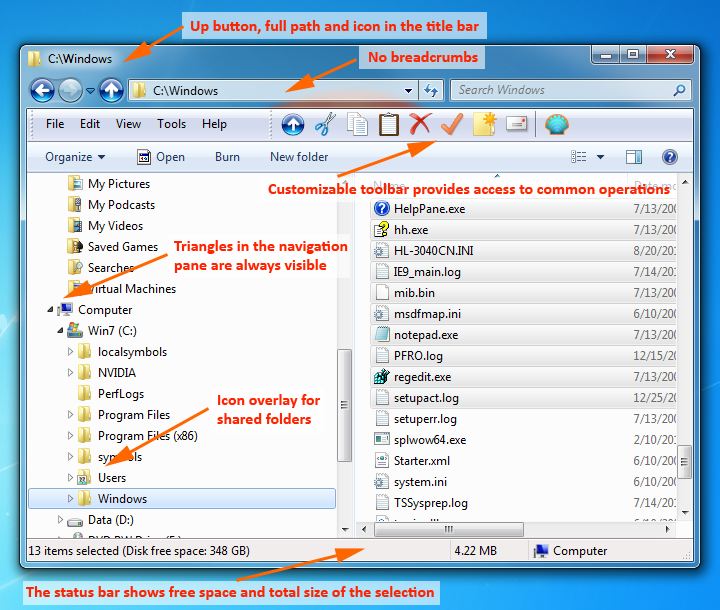 Do you want an application that will easily help you migrate to a newer OS after Windows XP while retaining the same configurability? Do you also want a program that will restore familiar settings and customization to Windows, allowing you to configure your OS exactly the way you want? Then one of the applications you can try is Classic Shell? Do you want an application that will easily help you migrate to a newer OS after Windows XP while retaining the same configurability? Do you also want a program that will restore familiar settings and customization to Windows, allowing you to configure your OS exactly the way you want? Then one of the applications you can try is Classic Shell?
What’s the big deal about Classic Shell?
Classic Shell is a collection of features that were available in older versions of Windows but which are removed after Windows XP. It restores familiar settings and customization to Windows, allowing you to configure your OS exactly the way you want. It will help you migrate to a newer OS after Windows XP while retaining the same configurability.
Some latest changes already made to this version include the following: improved support for downloading and installing language files; the first official release of Classic Shell 4.0; and Improved compatibility with Windows 8.1.
Classic Shell also retains its older features, which include the following: highly customizable start menu with multiple styles and skins; quick access to recent, frequently-used, or pinned programs; find programs, settings, files and documents; toolbar and status bar for Windows Explorer; caption and status bar for Internet Explorer; and start button for Windows 7, Windows 8 and Windows 8.1.
Any downside?
Classic Shell doesn’t have any issue that you can worry about.
Want to check it out? Visit: ClassicShell.net.
Posted in Main | No Comments »
Thursday, October 10th, 2013
 Do you want an easy to use program that helps check your system against the current version of Adobe Reader, Adobe Acrobat, Flash, Firefox, Java, and Quicktime? Then you might want to do yourself a big favor by reading the rest of this review because it has a couple of things to tell you about a program known as Patch My PC. Do you want an easy to use program that helps check your system against the current version of Adobe Reader, Adobe Acrobat, Flash, Firefox, Java, and Quicktime? Then you might want to do yourself a big favor by reading the rest of this review because it has a couple of things to tell you about a program known as Patch My PC.
What’s Patch My PC?
Patch My PC is a portable and reliable utility designed to check your system against the current version of Adobe Reader, Adobe Acrobat, Flash, Firefox, Java, and Quicktime.
When started it will scan your computer for the latest version of this software if your system doesn’t have the latest version it will show up as red, and when you click update it will download and install the latest available updates for the software found on your computer. With the aid of this application, you will be always up to date.
Patch My PC is an awesome program with special ability to let you update it by yourself. It will also check for Windows update for you, and check a couple of other applications or you. One other thing you will love about Patch My PC is how it won’t take up a lot of space on your system.
Patch My PC is not a bad program since it contains very nice features.
Want to check it out? Visit PatchMyPC.net.
Posted in Main | No Comments »
Thursday, October 10th, 2013
 Having acute problems with Windows event log analysis? Are you searching for a program that keep your system safe and help track logon attempts? Then what you should go for is Event Log Explorer. Having acute problems with Windows event log analysis? Are you searching for a program that keep your system safe and help track logon attempts? Then what you should go for is Event Log Explorer.
What is Event Log Explorer?
Event Log Explorer is an advanced program for viewing, monitoring and analyzing events recorded in Security, System, Application and another logs of Microsoft Windows. This program helps you to quickly browse, find and report on problems, security warnings and all other events that are generated within Windows.
Trying to constantly trace valid and invalid logon attempts, events related to resource use, such as creating, opening, or deleting of files, etc requires a lot of time and this is what this program is designed to handle on your behalf. Event Log Explorer helps you to quickly browse, find and report on problems, security warnings and all other events that are generated within Windows.
Unlike standard Windows Event Viewer, Event Log Explorer can print event logs or even separate events. You can also export your event logs to other formats. At the time, Event Log Explorer supports export to HTML, Microsoft Excel and tab-separated text files. For effective event analysis, Event Log Explorer features advanced reporting tools — Analytical Reports allowing you to build different summary tables and summary diagrams.
Some of the features of this program include: Access Windows event logs and event log files on local and remote servers and workstations, Support of both classic Windows NT event log format (EVT files) and new (Crimson) event log format (EVTX files), High performance — all events are loaded either into memory or into an optimized internal local database, Active monitoring and alerting — get informed about problems immediately and several others.
The publishers, FS ProLabs, have added the following changes to this version: Filtering by description params (for security logs), Alerter may compare events by source (not only by source+event id) and lots of UI bugs were fixed.
To learn more about this program, please visit Eventlogxp.
Posted in Main | No Comments »
Thursday, October 10th, 2013
 Accidents are an inevitable part of life. What happens if you accidentally delete a very important file? What if your PC becomes infected with virus and you lose all your documents? How do you recover the files? With Auslogics File Recovery, you do not have to worry any more. Accidents are an inevitable part of life. What happens if you accidentally delete a very important file? What if your PC becomes infected with virus and you lose all your documents? How do you recover the files? With Auslogics File Recovery, you do not have to worry any more.
What is Auslogics File Recovery?
Auslogics File Recovery is a program that would help you to recover deleted files, or those files deleted by virus attacks and software faults. With this program, you can restore a file back into the same directory it was deleted from or onto any accessible disk on your computer. It is very easy to use with a clean and intuitive interface.
With Auslogics, you will be able to: recovers all types of files, securely erases confidential data, supports all hard drives and flash memory cards, restores files even from deleted partition, and much more. Its search and scanning is fast.
Some of the features of this application include the following: recover any file type, it has a flexible search system to minimize recovery time, ability to restore data from lost partitions, safely erase files, support for all types of drives and devices, wipe free disk space and a lot more.
Downsides?
This program takes up quite a lot of system resources.
To know more about this application, please do visit ·Auslogics.com.
Posted in Main | No Comments »
Wednesday, October 9th, 2013
 Did you know that Gmail has an add-in designed for Outlook? Of course, you can use the add-in to easily synchronize your Outlook and Gmail accounts and address books. You can find out more about this add-in by reading the review below. Did you know that Gmail has an add-in designed for Outlook? Of course, you can use the add-in to easily synchronize your Outlook and Gmail accounts and address books. You can find out more about this add-in by reading the review below.
What’s the big deal about Outlook4Gmail?
Outlook4Gmail is a free Outlook add-in providing easy contacts synchronization of your Outlook and Gmail accounts and address books. This add-in uses the maximum correspondence of Outlook and Gmail contact details: Name, Company, Phones, Emails, Addresses, Dates, Persons, Notes, etc. You define the direction of synchronization/update: you can sync or update either the Outlook or the Gmail address book (one-way synchronization) or choose to update both accounts simultaneously (two-way synchronization).
Recently, a lot of changes have been made to Outlook4Gmail to include the following: one and two way syncing of calendars from multiple Google accounts in Outlook, syncing existing calendars, creating new calendars; automatically sync contacts and calendars on a regular interval, between certain hours of the day or when Outlook starts; added support of multiple Gmail accounts, synchronization supports ‘one-to-many’, ‘many-to-one’ and ‘many-to-many’ relationships; two-way Outlook Contact Categories Sync with Google Groups; Contact Picture Sync: simple way to sync contacts with profile photos; improved application ribbon that exposes application features (Outlook 2010 or higher is required); and a few others.
Any downside?
The free version has a lot of limitations.
Want to check it out? Visit Scand.com.
Posted in Main | No Comments »
Saturday, October 5th, 2013
 Are you a leader of a group of people thinking of what app to use in managing the activities of your group? Why not try out LeaderTask Company Management. Are you a leader of a group of people thinking of what app to use in managing the activities of your group? Why not try out LeaderTask Company Management.
What is this program all about?
This program is designed to help you manage your employees over the internet. It enables you to quickly get information about the current state of affairs regarding projects, tasks, and employees. With this application, you could get a handle over fulfillment of your assignments, organize team work of an apportioned team, Allocate your employees by concrete tasks and projects and Follow the fulfillment of your assignments in real time! You could also see who does what, who has done what. Another interesting thing about this software is that it allows you to continue working even if there is no Internet connection! All necessary data will be always uploaded on your local computer!
Employees within an organization can communicate with one another quickly and easily, reliable and easy to use application that correspond with the company’s business, and access any company information as needed.
Organizations and other users that installed this application on their computers can also solve the following problems: managing tasks, managing projects, CRM: customer database, history of relationships, controlling delegated tasks, corporate information space (centralized place for storing documents, files reports, contacts, and more). They can also fight time hogs, prevent loss of corporate data, increase productivity of the team, and many more.
A very nice utility if you hope to effective mange your team as a leader.
Want to try it out? Do visit LeaderCommand.
Posted in Main | No Comments »
|
|
|




