Author Archive
Friday, August 16th, 2013
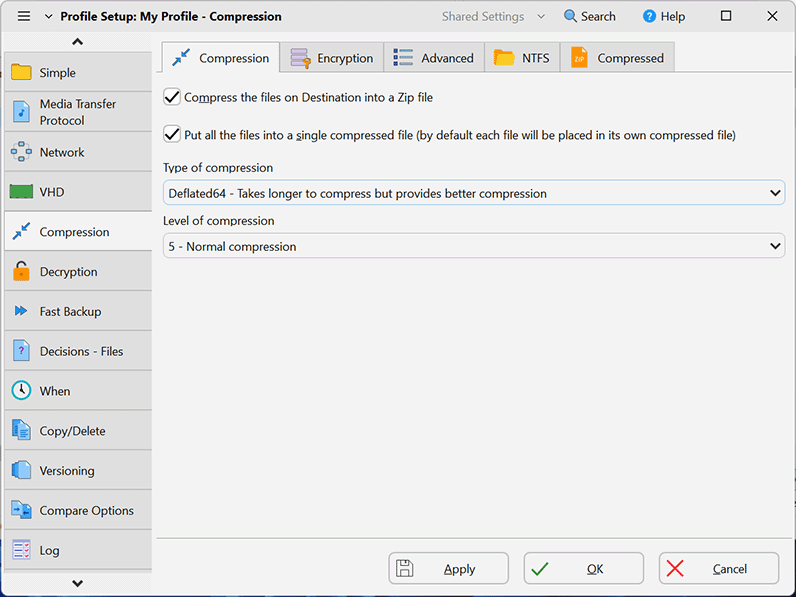 Do you wish to easily backup or synchronize your files that are very important to you? Do you want a program that has a couple of cool features that won’t be a big problem when trying to open it? Maybe you should check out SyncBackSE? Do you wish to easily backup or synchronize your files that are very important to you? Do you want a program that has a couple of cool features that won’t be a big problem when trying to open it? Maybe you should check out SyncBackSE?
What’s SyncBackSE?
SyncBackSE is an application that can easily backup or synchronize your important files to another drive, directory, or network. Highly configurable, but extremely simple to use. Integrated with Windows Scheduler to automate backups.
SyncBackSE is highly configurable, SyncBackSE includes: open/locked file copying; file versioning; fast backup option; true synchronization; Zip64 support; compression filtering; detailed and easy to read log files; email results; simulated backups and restore; file filters; sub-directory selection; copy verification; background backups; auto-close of programs; profile groups; compare files, and an extensive context sensitive help file.
SyncBackSE also provides a very reliable way of ensuring digital files are safe with a simple interface that enables the first time user to backup and save their valuable data within minutes. As well as an ‘Easy Mode’ for essential backup, restore, and synchronization tasks, SyncBackSE has an ‘Expert Mode’ that delivers advanced functionality. This is one of the best applications you need when it comes to backing up to an FTP server or network and email; though, you’ll fine-tune it a bit.
SyncBackSE has an annoying nag screen, and a 30 day limitation.
Want to check it out? Visit SyncBack.
Posted in Main | No Comments »
Friday, August 16th, 2013
 Ever experienced the ‘blue screen of death’ crashes? That awkward moment when what you’re working on suddenly disappears from the screen and is replaced by a blue screen indicating that the Windows has crashed? If yes, you’ve got a solution – BlueScreenView. Ever experienced the ‘blue screen of death’ crashes? That awkward moment when what you’re working on suddenly disappears from the screen and is replaced by a blue screen indicating that the Windows has crashed? If yes, you’ve got a solution – BlueScreenView.
What is BlueScreenView?
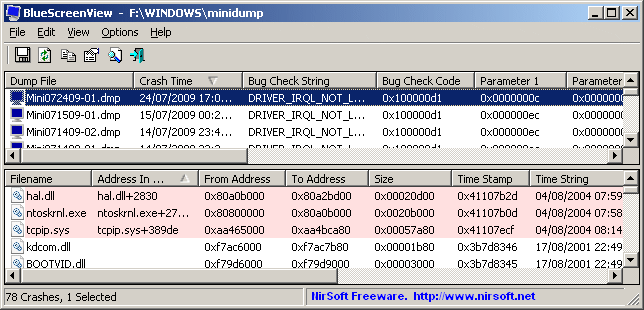
For each crash, BlueScreenView displays the minidump filename, the date/time of the crash, the basic crash information displayed in the blue screen (Bug Check Code and 4 parameters), and the details of the driver or module that possibly caused the crash (filename, product name, file description, and file version).
After each crash, you can view the details of the device drivers loaded during the crash in the lower pane. BlueScreenView also mark the drivers that their addresses found in the crash stack, so you can easily locate the suspected drivers that possibly caused the crash. It scans the minidump files created when your system crashes and displays a BSOD, collecting them all in a single list view displaying all kinds of information you can use to debug whatever it is that’s crashing your computer in the first place.
The program is designed to read minidump files and help you identify the source of the problem and thus prevent crashes from occurring again in the future. BlueScreenView will automatically scan the computer and display the available minidump files, along with crash time, so you will know for sure which one to open. The interface is very easy to use and does not require much configuration.
Nirsoft, the author of this program added these changes to this version: Added ‘Google Search – Bug Check’ and ‘Google Search – Bug Check + Parameter 1’ options.
To learn more please visit Nirsoft.
Posted in Main | No Comments »
Thursday, August 15th, 2013
 Do you actually know the specification of your Windows PC? If you don’t but would like to, then get System Spec. Do you actually know the specification of your Windows PC? If you don’t but would like to, then get System Spec.
What is System Spec?
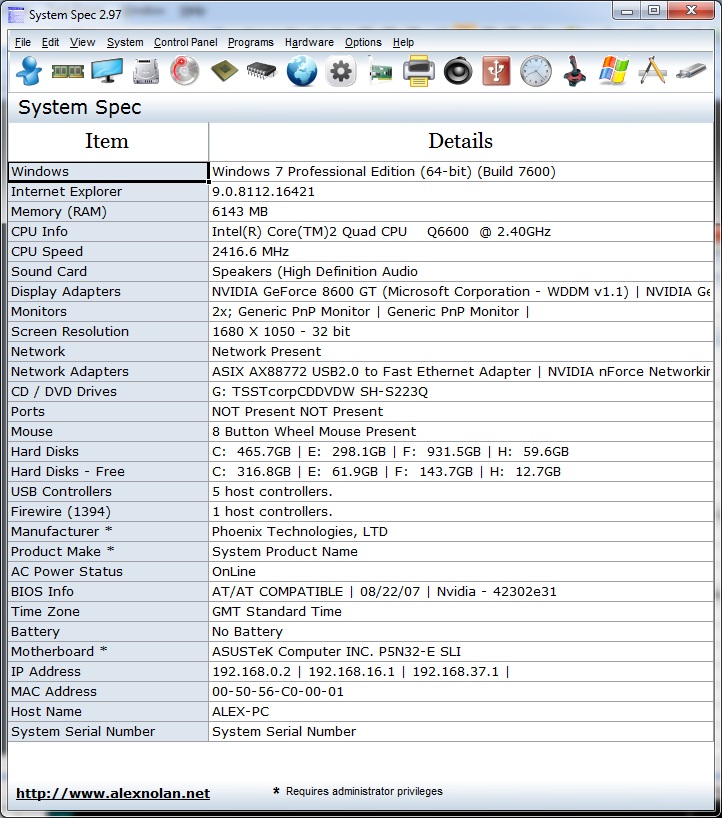
System Spec is a freeware system information utility that lists a specification of your Windows PC without listing lots of useless memory address and unnecessary information. It does not require installation. All of your information is laid out in an easy-to-read fashion. This freeware is also easy to navigate. Its command buttons represent different system features, such as memory, display, drive, and CPU, among others.
Some of the additional advanced info it provides includes CPU, display, memory, drives, and apps. It can also be used to compare the specs of various machines. You can easily manage your Control Panel and Hardware from the same window. The program uses a low amount of system resources.
Some of the features of this program include: 3D Now! Extensions, Enhanced MMX extensions, SIMD instructions, FXSAVE/FXRSTOR instruction, MMX extensions, Serial number, 36bit Page Size extension, Page Attribute Table, CMOVcc(+FCMOVcc/F(U)COMI(P) opcodes and Machine Check Architecture, Page Global Extension. It also includes Memory Type Range Registers among several others.
Alex Nolan, the publisher of this software, has added the following new features to this version:
New printer window which displays information about your installed printers and virtual printer drivers. New process window and new task window. System Spec now works a lot better with Windows 98. The CPU usage and meters now work on Windows 98.
To find out more about this freeware, AlexNolan.net.
Posted in Main | No Comments »
Thursday, August 15th, 2013
 Did you know you can download and install a simple, but feature-rich application that supports TV channels, subtitles and skins for free? The competition out there is amazing even for free applications. You can get a free application with some advanced features; and it doesn’t really matter if it’s free these days. Did you know you can download and install a simple, but feature-rich application that supports TV channels, subtitles and skins for free? The competition out there is amazing even for free applications. You can get a free application with some advanced features; and it doesn’t really matter if it’s free these days.
What’s Daum PotPlayer?
Daum PotPlayer is a video and audio player that also supports TV channels, subtitles and skins. It is a much improved/faster version of KMP, including ffdshow and some other stuff to connect to a Korean-only video/chat network. It supports seamless playback, auto-resume on the last 200 opened files, has fully configurable XML skin files, and D3D exclusive mode.
Daum PotPlayer has a couple of new features, and fixes including the following; addition of the ability to set mouse wheel left/right actions, Improved touch feature, fixed an issue where certain DVD subtitles doesn’t show up, improved game capture function, and a couple of others.
Daum PotPlayer has quality picture quality that enriches your viewing experience unlike several other applications out there. You can use Potplayer by running PotPlayerMini64.exe and no other programs, just download the zip.
This is a great program with some of the most amazing picture qualities I have seen recent times.
Want to check it out? Visit PotPlayer.
Posted in Main | No Comments »
Tuesday, August 13th, 2013
 Are you looking for a 3D application that is easily customizable, easy to use, and with a lot of amazing features? Then Stellarium might just be waht you have been looking for. It is loaded with lots of amazing benefits that will enrich your 3D experience. Are you looking for a 3D application that is easily customizable, easy to use, and with a lot of amazing features? Then Stellarium might just be waht you have been looking for. It is loaded with lots of amazing benefits that will enrich your 3D experience.
What’s Stellarium?
Stellarium renders 3D photo-realistic skies in real time with OpenGL. It displays stars, constellations, planets, nebulas and others things like ground, landscape, atmosphere, and many more. Stellarium is a free open source planetarium for your computer. It shows a realistic sky in 3D, just like what you see with the naked eye, binoculars or a telescope. Stellarium is being used in planetarium projectors; and all you need to do is set your coordinates and go.
Stellarium also contains some very powerful features including the following; extra catalogues with more than 210 million stars, asterisms and illustrations of the constellations, constellations for 15 different cultures, images of nebulae (full Messier catalogue), very realistic atmosphere, sunrise and sunset, a powerful zoom, equatorial and azimuthal grids, plugin system adding artifical satellites, ocular simulation, telescope configuration and more, add your own deep sky objects, landscapes, constellation images, scripts, ability to add new solar system objects from online resources, and many more.
Want to check it out? Visit Stellarium at SourceForge.
Posted in Main | No Comments »
Tuesday, August 13th, 2013
 Do you want to download videos from YouTube and save it to your local computer? Do you also want to download and convert videos into avi video format or to mp4 (compatible with iPod, iPhone)? Then Youtube Downloader HD is the application you need. Do you want to download videos from YouTube and save it to your local computer? Do you also want to download and convert videos into avi video format or to mp4 (compatible with iPod, iPhone)? Then Youtube Downloader HD is the application you need.
What’s Youtube Downloader?
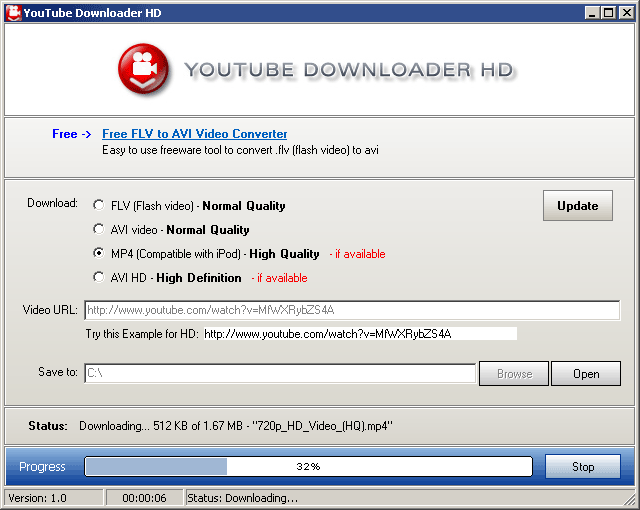
Youtube Downloader HD is a free tool to download videos from YouTube and save it to your local computer. The videos can be converted to avi video format or to mp4 (compatible with iPod, iPhone). The main distinguishing feature of Youtube Downloader HD: you can download High Quality videos and High Definition videos from YouTube.
Youtube Downloader HD supports a few video types for the output, namely FLV (240p, HQ 360p or HQ 720p) and MP4 (medium quality, HD 720p or full HD 1080p). This application is very low-demanding when it comes to the CPU and system memory, so it doesn’t interfere with the runtime of other active applications. It Youtube Downloader HD finishes a download and conversion job rapidly, and delivers clips with a very good image and sound quality. No error dialogs have been shown in our tests and the tool did not freeze or crash. All in all, Youtube Downloader delivers very good results in regard to downloading YouTube clips in HD.
Any downside?
Youtube Downloader HD offers to to change the homepage for web browsers installed in the system.
Want to check it out? Visit YoutubeDownloaderHD.
Posted in Main | No Comments »
Tuesday, August 13th, 2013
 Having an application that displays your important tasks while you concentrate on other things is a big step towards getting things done on time. If you want such application that displays your calendar and task items on the desktop; then you should check out DeskTask. Having an application that displays your important tasks while you concentrate on other things is a big step towards getting things done on time. If you want such application that displays your calendar and task items on the desktop; then you should check out DeskTask.
What’s DeskTask?
DeskTask is a program that connects to Microsoft Outlook and displays your calendar and task items on the desktop. It displays Calendar items in the current week (next 14 days) and the items you may have in your Outlook task list. The window is pinned to your desktop and is transparent, having no impact if you have a wallpaper.
The publisher has introduced a couple of changes including; fixing of lock position that was not working in previous edition, and some other minor bug fixes. This version also retains some of the good old features you have always enjoyed when using the application such as; your tasks will always be visible, saving precious time to launch or switch to Outlook; minimize every window, and see what are the items due for today or tomorrow; displays the whole week so you can be prepared to organize your work; Besides the calendar items, and the Outlook to-do list (Folder Tasks) is also displayed if you work with Outlook, DeskTask is for you.
DeskTask is a very useful program that has no visible downsides; especially now that the publisher has introduced a few bug fixes and changes.
Want to check it out? Visit CarthagoSoft.net.
Posted in Main | No Comments »
Tuesday, August 13th, 2013
 RJ TextEd is a web development tool and a Unicode text editor with features like syntax highlighting, advanced column mode and code folding. Below is a small list of features available. RJ TextEd is a web development tool and a Unicode text editor with features like syntax highlighting, advanced column mode and code folding. Below is a small list of features available.
What is this product all about?
RJ TextEd is a full featured text and source editor with Unicode support. It supports the following powerful web development editors: (PHP, ASP, JavaScript, HTML and CSS). The functionality of this freeware goes way beyond mere text files and includes support for CSS/HTML editing with integrated CSS/HTML preview, spell checking, auto completion, HTML validation, templates and more. The program also has a dual pane file commander, as well as a (S)FTP client to upload your files. Below is a small list of features available.
Some of the main features of this application includes: Auto completion, Code folding, Column mode, Multi edit and multi select, Advanced sorting, handles both ASCII and binary files, CSS and HTML wizards, CSS and HTML preview using internal IE, Firefox 4 and Chrome browsers, FTP and SFTP client with synchronization, File explorer, text clips, code explorer, project manager, Convert between code pages, Unicode formats and text formats spell checking, e-mail support, advanced search with regular expressions among several others.
RJ, the author of this freeware has added the following new features in this version: Version 8.64 includes Quick block select (Shift+Alt+Selection) which allows simple editing after selection and fixes in few code explorer issues. Small update to the AutoIt syntax highlighter, Minor update to the CSS syntax, Auto completion is not triggered if a text is selected when you hit e.g. (.)-dot, Auto brace and bracket completion is not triggered if a text is selected, and CSS auto completion.
All in all a very good text editor to have.
To find out more about this program, please do go to RJ-Texted.
Posted in Main | No Comments »
Monday, August 12th, 2013
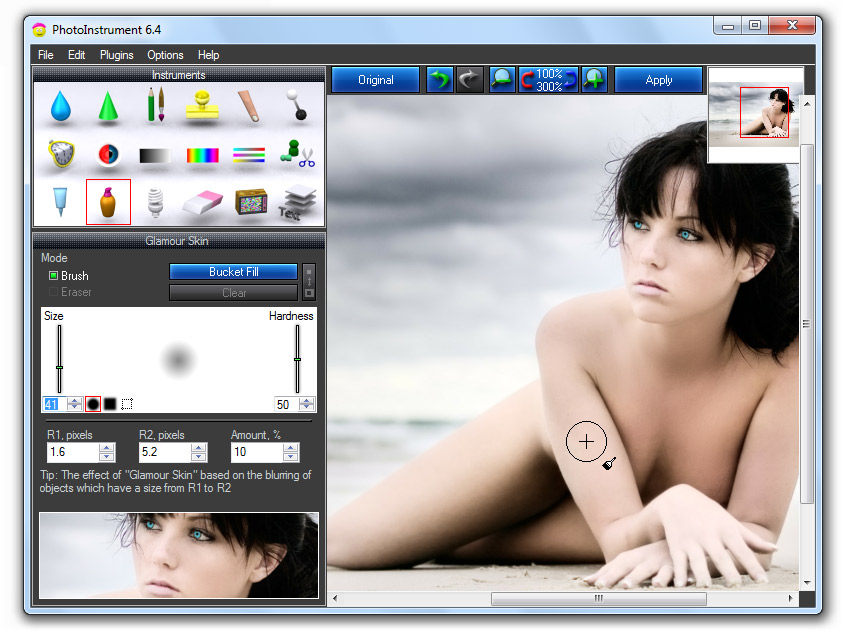 Need an easy to use tool for editing and processing your favorite digital photos? Check out PhotoInstrument. Need an easy to use tool for editing and processing your favorite digital photos? Check out PhotoInstrument.
What is PhotoInstrument?
This is a powerful photo editor that quickly and easily allows you to adjust and process digital photos. PhotoInstrument is a small tool that helps you edit image files. It is a handy utility that can be used by anybody – novice or experts. Its user interface is easy to use even if you don’t have any experience in digital photography. The software comes with a video tutorial that will teach you how to use PhotoInstrument in just a few minutes.
PhotoInstrument can help you to create glamor skin, remove unwanted objects from a picture, create multiple clones of yourself, clean skin impurities, and many more. It’s all about being creative.
It’s various tools can help you fix the common issues associated with digital photos such as blur, sharpen, brush (select color, size and hardness), clone (or healing brush), smudge, dodge and burn, liquify (move, push left, grow, shrink, remove), red eye removal, brightness and contrast, colorize, levels, rotate, scale and crop, skin cleaner, glamor skin, glow, object removal, noise removal, and layers.
Some of the main features of this program are: Save as Animated Gif, Support Photoshop-compatible plugins, Add text to an image. Other features include: Overlay two and more images, Drag and drop to open photos in this photo editor, Copy/Paste image from Clipboard and several others.
This current version contains the following g new features: Liquify, Clone, Smudge, Skin Cleaner, Glamor Skin, Dodge / Burn, Brush, Blur, Sharpen, Colorize, Scale, Rotate, and several others more.
To know more about this program, please visit PhotoInstrument.com
Posted in Main | No Comments »
Sunday, August 11th, 2013
 These days on the internet, we continue to see the launch of new applications everyday to enable us enjoy the way we do things. In the browser category, there are lots of applications to look out for. In case you haven’t heard of Sleipnir before; it is a freeware that enables you do a lot of things with ease. These days on the internet, we continue to see the launch of new applications everyday to enable us enjoy the way we do things. In the browser category, there are lots of applications to look out for. In case you haven’t heard of Sleipnir before; it is a freeware that enables you do a lot of things with ease.
What’s Sleipnir?
Sleipnir is designed to be grounded in concept; in other words, the publishers just want to provide Best Browser to accommodate individualized needs. You can produce your best browser via changing design, and skin to change visual appearance, and adding plug-ins, and other useful scripts to make Sleipnir more useful. This high level performance of customize find favor with advanced user.
Sleipnir’s latest changes include the following: create tab group per search result” added to Customize|Tab group|Tab group, actions when opening bookmarks in search result tab groups modified, “Search result tab group” added to Customize|Tab group, “Speed up Initial start up” added to Customize|Start/home|Start up, and Blink updated (Chrome/28.0.1500.95).
Sleipnir is also available for Windows phone, Android, iPhone and iPad among others. Most of the versions are available with features that enable you to take total control of your internet experience.
Downside
Sleipnir takes too long to launch.
Want to check it out? Visit Fenrir-INC.
Posted in Main | No Comments »
|
|
|




