Author Archive
Thursday, July 4th, 2013
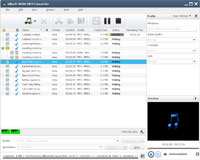 Are you looking for an application that will allow you to encode media files of various formats (including AVI, MOV, 3GP, VOB, FLV and MKV) to the MP3, MP2, WAV or WMA extensions? Then you might want to try Xilisoft WMA MP3 Converter. Are you looking for an application that will allow you to encode media files of various formats (including AVI, MOV, 3GP, VOB, FLV and MKV) to the MP3, MP2, WAV or WMA extensions? Then you might want to try Xilisoft WMA MP3 Converter.
What’s Xilisoft WMA MP3 Converter?
Xilisoft WMA MP3 Converter, an exclusive MP3 and WMA encoder, can convert MP4, M4A, MP2, WAV, MP3, WMA, OGG, AAC, FLAC, APE, VQF etc. to the most popular audio formats MP3, WMA and MP2. The software is also able to extract audio tracks from video formats like AVI, MPEG, WMV and ASF and save them as MP3, MP2 or WMA format.
Xilisoft WMA MP3 Converter supports copying ID3 tag between formats, to easily transfer all of the most useful tag fields from one format to another. Xilisoft WMA MP3 Converter supports batch conversion, and features adjustable audio quality output (i.e. when converting to MP3, bitrate, VBR or CBR, stereo or mono are selectable; and when converting to WMA, Bitrate is selectable).
Xilisoft WMA MP3 Converter has a very plain and simple user interface that enables you to import files by using the file browser or the drag and drop method (batch processing is supported).
Downsides
Just 2 minutes of each file will be converted with the trial version. Full version will cost you $19.95
Want to check it out? Visit Xilisoft.
Posted in Main | No Comments »
Wednesday, July 3rd, 2013
 Searching for an application that turn or convert videos into AVI, MPEG and WMV formats or prepares them for iPod devices (MP4 format)? Perhaps, you should give Replay Converter a try because of the inclusion of various features to suit your music needs. Searching for an application that turn or convert videos into AVI, MPEG and WMV formats or prepares them for iPod devices (MP4 format)? Perhaps, you should give Replay Converter a try because of the inclusion of various features to suit your music needs.
What’s Replay Converter?
Replay Converter is the easiest way to convert video and audio files. You simply pick the files to convert, choose an output format, and click a button to start the process. Everything happens automatically. Replay Converter can also encode audio into MP3 or WMA for CDs, as well as extract the audio stream from video clips and save them to the aforementioned file types.
With Replay Converter, you can also encode audio into MP3 or WMA for CDs, as well as extract the audio stream from video clips and save them to the aforementioned file types. The application is wrapped in a standard interface with a well-organized layout. The program also supports or includes browser (“drag and drop” is not supported), audio and video files can be imported into the workspace. Working with multiple items in a single session is possible.
With Replay Converter, you can focus on burning data to an audio or data CD or DVD (with the NTSC or PAL TV system type). The application also enables you to create an ISO image on the hard drive.
Any downside?
Free Converter has an annoying nag screen, and the add DVDs feature is disabled. Also, watermark will be added to converted videos.
Want to check it out? Then visit Applian.com.
Posted in Main | No Comments »
Wednesday, July 3rd, 2013
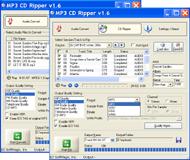 Do you want an application that has enough advanced features to help you extract songs from CDs and convert music to several formats, including MP3, WAV, OGG, WMA and FLAC? Then you should try MP3 CD Ripper; which has the kinds of features needed to make your dream come true. Do you want an application that has enough advanced features to help you extract songs from CDs and convert music to several formats, including MP3, WAV, OGG, WMA and FLAC? Then you should try MP3 CD Ripper; which has the kinds of features needed to make your dream come true.
What’s MP3 Ripper?
MP3 CD Ripper is an application that enables you to rip your favorite audio CD tracks and save directly to MP3, WMA, WAV, and OGG files, as well as convert audio formats from one format to another. It supports the most popular audio formats MP3, WMA, WAV, OGG. With support to retrieve disc album information from freedb, the built-in CD ripping engine is featured with jitter correction to compensate reading errors.
MP3 CD Ripper’s interface is clean and intuitive. It also allows you to import music by using either the file browser or “drag and drop” method. Batch processing is supported but limited in the unregistered version. In the queue, you can check out the name, length, size, status and information of each audio track. With this application, you can also make some audio modifications when it comes to the quality (e.g. HiFi, CD, FM radio, telephone), sample frequency rate, bit rate, channel, bits per sample VBR, normalization, and others.
Downsides
MP3 CD Ripper is only able to convert up to 5 file at once; and has a 15 day trial limitation.
Want to check it out? Visit MP3 CD Ripper.
Posted in Main | No Comments »
Wednesday, July 3rd, 2013
 These days, the internet provides us various options to do a lot of things especially on the musical front. If you are one of millions of music or song lovers searching for an easy to use encode or decode application; then this review is for you. These days, the internet provides us various options to do a lot of things especially on the musical front. If you are one of millions of music or song lovers searching for an easy to use encode or decode application; then this review is for you.
What’s Lame Front-End?
Lame Front-End is Graphical interface (GUI) for the popular and very fast MP3 encoder & decoder – LAME. It offers easy access to all LAME parameters without the need for command line usage. The program offers a simple mode and an advanced mode which reveals additional expert options.
Portable Lame Front-End is a handy application that will allow you to encode or decode music files with the high-quality LAME encoder. The program will enable you to set the bitrate and quality settings for the output, add ID3v2 Tag information and tinker with advanced LAME options before performing the conversions.
Portable Lame-Front has a couple of key and unique features that include the following: ability to encode RAW, AIFF, PCM and WAV files into MP3 format; lets you add ID3v2 tags to the output MP3s; Supports decoding MP3, MP2 and MP1 files into WAV audio; and many more.
Any downsides?
A couple of fixes have been made, and there seems to be a bit of improvements over past versions.
Want to check it out? Visit Lame-Front-End.
Posted in Main | No Comments »
Tuesday, July 2nd, 2013
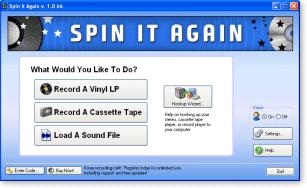 Not every program or application you find online combine all the features you always dream of’ some are however, very impressive in terms of what they offer. When it comes to transferring songs or music from cassettes to CDs; one program everyone is highly recommending it Spin It Again. Not every program or application you find online combine all the features you always dream of’ some are however, very impressive in terms of what they offer. When it comes to transferring songs or music from cassettes to CDs; one program everyone is highly recommending it Spin It Again.
What’s Spin It Again?
Spin It Again lets you easily record your old vinyl records and cassettes to CD. Not only will it make the whole recording and track dividing process child’s play, but it will also clean your recordings by getting rid of click and pop record noise, or by removing hiss and hum off old cassette recordings. You can also record your records and cassettes directly to your iPod or portable MP3 player.
Spin It Again has a couple of newly added features and fixes that include the following: CD Text enhancement – now burning more CD text fields; fix for rendering to poorly formatted folder, bad chars would get changed into a space. Now trimming spaces; now launching default browser on install completion; fix for loading large files (bigger than 2 Gb); fix or mysteriously created folders on start-up; and a couple of others.
Any downsides?
Spin It Again is a unique program with lots of great features. The program seems to work very well.
Want to check it out? Visit Acoustica.com.
Posted in Main | 1 Comment »
Monday, July 1st, 2013
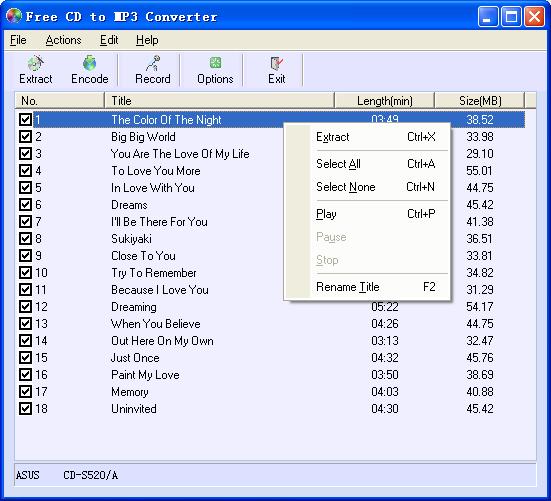 Are you searching for an application that is cost-free, and can also help you convert audio tracks into a more versatile audio format, such as MP3, WAV, OGG or WMA files? Let me introduce you to Free CD to MP3 Converter; a freeware that has a lot of useful features. Are you searching for an application that is cost-free, and can also help you convert audio tracks into a more versatile audio format, such as MP3, WAV, OGG or WMA files? Let me introduce you to Free CD to MP3 Converter; a freeware that has a lot of useful features.
What’s Free CD to MP3 Converter?
Free CD to MP3 Converter is an easy to use CD ripper that allows you to extract audio files from a CD and convert them to MP3, Wav or Ogg format. It can automatically retrieve title information from the CDDB database or rename the CD tracks title and remember them, normalize the output files and supports additional LAME options. You can also use the software to record to MP3 with your microphone, or to convert WAV files to MP3 or Ogg format. Free CD to MP3 Converter also features an easy to use interface that allows you to rip tracks of your Audio CD just by several clicks.
Free CD to MP3 Converter has an easy-to-use interface that even a newbie can easily understand. You can easily perform a lot of operations with just a few clicks.
Want to check it out? Visit CDRipper.
Posted in Main | No Comments »
Saturday, June 29th, 2013
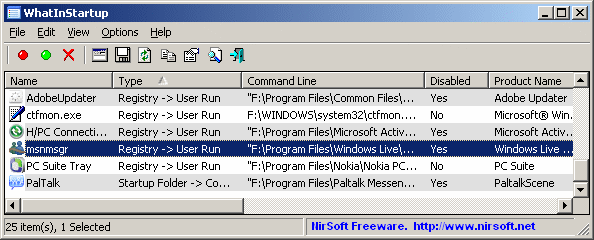 Information they says is power; and that is why you can enjoy the use of your computer if you have enough information on some of the files on it. There are already several applications to that effect; and one of them is WhatInStartup. Information they says is power; and that is why you can enjoy the use of your computer if you have enough information on some of the files on it. There are already several applications to that effect; and one of them is WhatInStartup.
What’s WhatInStartup?
WhatInStartup displays the lists of all applications that are loaded automatically when Windows starts up. For every application, the following information is displayed: Startup Type (Registry/Startup Folder); Command-Line String; Product Name; File Version; Company Name; Location in the Registry or File system; and many more. WhatInStartup allows you to easily disable or delete unwanted programs that run in your Windows Startup.
WhatInStartup can be used on your currently running instance of Windows, as well as use it on external instance of Windows in another drive. WhatInStartup also supports a special Permanent Disabling” feature- if a problem that you previously disabled added itself again to the Startup lists of Windows; the program will automatically detect the change and consequently have it disabled one again.
Any downside?
Virtually all issues relating to past or previous versions have been fixed and a couple of updates and changes made. WhatInStartup is now more stable, and performs better than previous versions.
Want to check it out? Visit Nirsoft.
Posted in Main | No Comments »
Friday, June 28th, 2013
 Most people would love to get the most out of their fonts; but actually don’t know how to go about doing it. However, you can put that challenge behind you because one application or tool that can help you achieve that is PopChar. PopChar makes typing of uncommon characters quite easy without the need to remember keyboard combinations. Most people would love to get the most out of their fonts; but actually don’t know how to go about doing it. However, you can put that challenge behind you because one application or tool that can help you achieve that is PopChar. PopChar makes typing of uncommon characters quite easy without the need to remember keyboard combinations.
What’s PopChar?
PopChar is a utility tool that allows you to insert special characters, assented and foreign letters, and many more from all installed fonts into your documents. There is no need to search or try to remember keystrokes any longer. All you need to do is to simply pop up the PopChar window, click the desired character, and the character appears in your current document. If a font contains Unicode characters, you can view every one of them, all neatly arranged in the standard Unicode categories.
Latest changes made to version 6.3 of PopChar include the following: improved capability with clipboard utilities; and informs about the location of the font file. This tool is compatible with virtually all modern applications supporting Unicode. Navigating and searching within fonts that contain thousands of characters are much easier with PopChar.
Downside
Sometimes PopChar doesn’t recognize the font in use in the font application. However, this is indeed a great program.
Want to check it out? Visit Ergonis.
Posted in Main | No Comments »
Friday, June 28th, 2013
 No doubt, there are lots of photo editing software out there to choose from; and this could sometimes make the job of choosing one a bit difficult. However, one of the very good ones you can download for free is PhotoScape. No doubt, there are lots of photo editing software out there to choose from; and this could sometimes make the job of choosing one a bit difficult. However, one of the very good ones you can download for free is PhotoScape.
What’s PhotoScape?
PhotoScape is an all-in-one style photo editor with fun and ease of use. The program’s features include viewer, editor, batch editor, page, combine, animated GIF, print, screen capture, color picker, rename, raw converter, resizing, brightness/color/white-balance adjustment, backlight correction, frames, balloons, text, drawing pictures, cropping, filters, red eye removal and blooming. The publisher has been able to make a lot of improvements on the application since it first came out; and this version says it all in terms of performances.
Among some of its latest changes and fixes are the following: improvement of filter speed of Sharpen, Blur, Fake Till-Shift, Color Engraving, Smart Blur, Bloom, etc; inclusion of new filter, color Temperature; JPEG quality option improved; addition of more Crop-Ratios; and a couple of minor bug fixes.
Users will find the clone stamp in this application very useful because it is one of the best you can find in any application. The application doesn’t give you much option when it comes to size option; and this could simply have to do with the fact that PhotoScape is a freeware.
Downside
PhotoScape is a freeware, which could possibly explain the reason why a couple of features are not present just like you would normally find when you download premium applications. All the same, it is a great program.
Want to check it out? Visit Photoscape.org.
Posted in Main | No Comments »
Friday, June 28th, 2013
 Looking for an application that will help you transform your data into tables and quickly look up and information you need with minimal effort? Then you might want to check out GS-Base. It is an application that has the ability to organize your photo album, mp3 files, and icon collections and manage both your business and personal contacts. Looking for an application that will help you transform your data into tables and quickly look up and information you need with minimal effort? Then you might want to check out GS-Base. It is an application that has the ability to organize your photo album, mp3 files, and icon collections and manage both your business and personal contacts.
What’s GS-Base?
GS-Base is a flexible database that can be used to organize your photo albums, mp3’s, icon collections, and to manage your personal and business contacts. With GS-Base, you can also effectively analyze extremely large data sets using complex yet fast pivot tables with up to 12 minutes records, perform cross-table multi-core calculations and searches, print serial forms, letters/reports and any type of mailing labels, send personalized e-mail messages with customized attachments, publish HTML pages, convert databases to PDF files, edit/create/convert text and DBF files.
GS-Base also offers around 300 built-in calculation functions and filtering based on regular expressions. Database files can also contain any number of tables with up to 12 minutes records and 2047 fields.
A couple of minor changes, improvements and fixes have also been made to version 11.1 to include the following: improved automatic field data conversion after the field type has been changed; improved field statistics/break-down display; and a few bug fixes among others.
Downsides
Trial period for GS-Base lasts only 30 day. Full version with 12 month updates period goes for $19.95.
Want to check it out? Visit Citadel5.com.
Posted in Main | No Comments »
|
|
|




