Author Archive
Tuesday, May 7th, 2013
 Got a nice collection of digital photos that you would want to use to create easy to use, animated photo slideshows? Then it is time to check out Album Me. Got a nice collection of digital photos that you would want to use to create easy to use, animated photo slideshows? Then it is time to check out Album Me.
What is the big deal about this program?
This software allows you to create photo slideshows from your digital photos, complete with ready-to-use animated templates, stunning transition effect, text captions, music etc. You can then embed your favorite published slideshow into your blog, MySpace, or other web pages for your friends and fans to see.
Some of the key features of this program are: it has 70+ animated templates with preloader, photo frames, control buttons, select from 70+ transition effects to make your flash slideshow look stunning, Add up to 500+ images in one photo album, import segments of video, beautify your slide show with Text effects, Clip art, Funny Sound, it provides support for wav, .mp3, .wma format audio as a background music, Publish as Flash movie, EXE, screensaver and video files, Share your photo album or slideshow online and Publish HTML5 video slideshow.
Thundersoft, the publisher of this program, has added a few changes to this version: Add BGM config when playing videos and Optimized html5 output.
Downsides?
It has a nag screen.
To find out more about this software, go to Flash-Photo-Album
Posted in Main | No Comments »
Tuesday, May 7th, 2013
 Seeking for powerful and yet easy-to-use query tool for your Oracle database? Look no further as Universal SQL Editor helps you achieve that and more. Seeking for powerful and yet easy-to-use query tool for your Oracle database? Look no further as Universal SQL Editor helps you achieve that and more.
What is Universal SQL Editor?
This powerful and yet very easy to use utility allows you to connect any ODBC supported databases like Oracle, DB2, SQL Server, Sybase, etc., and edit SQL queries and scripts with code completion, syntax highlighting, SQL formatting. It also includes several other useful features that allow you to work more efficiently. Its query report supports grouping, filtering, searching, and can also be exported to Excel spreadsheet or as a set of SQL statements.
Here are some of the key features of this program: its flexible connectivity allows support for ODBC compliant databases, such as Oracle, DB2, SQL Server, etc, its easy database makes for database object manipulation such as supports scripting database objects, long script execution, powerful SQL editor, support SQL formatting, line revision marks, split view, full screen edit, drag-and-drop edit, column selection, multiple levels of undo and redo, Unicode and DOS/UNIX/MAC formatted files
It is very light on system memory, conveniently view information on dependencies between database objects and its additional features can be implemented as plug-in DLLs.
Downsides?
None that I’ve encountered. It is a cool utility with great features.
To know more about this application, please do visit
MingSoftware
Posted in Main | No Comments »
Tuesday, May 7th, 2013
 You maybe very busy as a businessman and you have quite a lot of tasks to carry out, meetings to attend, projects and employees to manage that it can be quite overwhelming and confusing. Not to worry. With Leadertask Personal Organizer, you can have a handle of all these and more. You maybe very busy as a businessman and you have quite a lot of tasks to carry out, meetings to attend, projects and employees to manage that it can be quite overwhelming and confusing. Not to worry. With Leadertask Personal Organizer, you can have a handle of all these and more.
What is LeaderTask Personal Organizer?
It is a business organizer that enables you to plan your tasks, meetings, manage projects and employees and process your email messages. It helps you plan your work improves your efficiency. It helps you arrange and manage your tasks, LeaderTask allows you to conveniently plan your appointments, meetings, briefings, etc. by placing them within the “calendar Grid”. It also enables you to efficiently organize your work on real projects, its reminder will help you remember important, upcoming events: birthdays, meetings, tasks, etc. With this application, you no longer need paper notes for your shopping list or “to do” list. It has powerful encryption that securely protects your data.
Some of the key features of this program are: Displaying tasks in the form of a tree, displaying tasks in a calendar, Priorities. It is possible to assign priority (importance) to every task. It is possible to define your own set of priorities, Reminders. It is possible to set reminders about some events, tasks, Comfortable navigation. LeaderTask allows you to store absolutely any information in its database: documents, images, diagrams, texts, all kinds of data. Moreover, you can store both links to files and files themselves.
Time management, the author of this program, has added some changes to this version.
New in version: Reset button in Projects/Categories/Contacts/Tag libraries (added); In contact properties tabs “Personal” and “Work” combined in one tab, Improved: Speed up of work of LeaderTask in general and Property “Save mail in backup” moved to the Mail tab (updated).
Downsides?
It’s a pretty powerful task manager.
To know more, please visit LeaderTask.
Posted in Main | No Comments »
Sunday, May 5th, 2013
 How would you like to have your personal, real-time Windows desktop weather station? How about a quick access to current weather conditions right off the Windows system tray of your computer? Well this and more is what Weather Watcher Live helps you achieve. How would you like to have your personal, real-time Windows desktop weather station? How about a quick access to current weather conditions right off the Windows system tray of your computer? Well this and more is what Weather Watcher Live helps you achieve.
What is the big deal about this program?
This application allows you to view real-time weather conditions in your neighborhood from NWS, WeatherBug and Weather Underground weather stations, automatically retrieve the current conditions, hourly forecast, daily forecast, severe weather alerts from NWS (US only), and weather maps for thousands of cities world-wide. You can access the current conditions quickly by holding your mouse pointer over the Weather Watcher Live system tray icon.
This program also gives you an idea of what the weather would likely be later in the day as it offers you hourly and daily weather updates. This helps you know how to dress and whether or not you would need an umbrella.
With this program you could quickly access your favorite weather maps, keep a record of your observed weather condition. Its user interface is very friendly, you can import additional maps, view world weather statistics (e.g. current conditions and winds, sunshine, satellite), and uses system resources moderately.
Some of the main features of this application are: forecasts are available for thousands of cities around the world, daily and hourly weather updates, severe weather alerts, easy and quick access to weather news, cameras and photos, locally export and log weather data, skinned interface/forecasts and so on.
The publishers of this program have added some changes to this version. They are: When using a Weather Underground weather station, the real-time weather will update more often if the selected weather station is updating frequently, FIXED: When using a Weather Underground weather station, the current conditions were sometimes being pulled from a nearby weather station when multiple weather stations are very close together.
In this version several bugs were fixed:
- When installing Weather Watcher Live for the first time, the slider in the “NOW” views at the bottom of the main Weather Watcher Live window was not toggling through the daily/hourly/moon views on click.
- Tray icon color was sometimes not displaying the correct below/above freezing background color.
- Various display issues in the splendid skin.
Downsides?
Well I’m just wondering why I would want to have a weather monitor on my PC. Good application though.
If you want to familiarize yourself with this program, go to
Singerscreations.
Posted in Main | No Comments »
Wednesday, May 1st, 2013
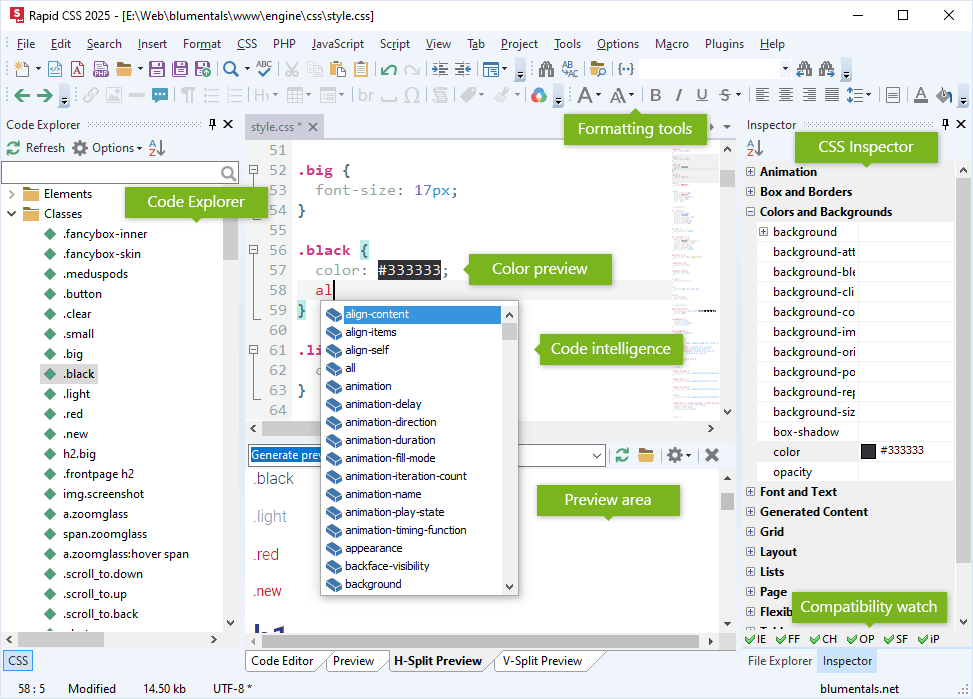 Looking for an easy way to create, design and edit style sheets irrespective of the size or complexity? Then check out Rapid CSS. Looking for an easy way to create, design and edit style sheets irrespective of the size or complexity? Then check out Rapid CSS.
What is Rapid CSS?
It has several helpful features that make it easy for you to quickly create, edit and deploy CSS based websites. You can either write the CSS code manually or let the program do it for you. Some of these features include: including CSS validator, CSS formatter, auto complete and code inspector, and CSS checker and instant built-in multi-browser preview. This program helps to save you time and significantly improves your efficiency.
With this application, you can set up configuration parameters with the help of a wizard. Rapid CSS 2014 supports plenty of other file types aside from CSS and HTML, such as PHP, XML and JS, Unicode and, of course, the latest HTML5 and CSS3 standards. It has a beautiful and intuitive interface and has multi tabs so you can work on several files at the same time. In addition to the Code Editor workspace, you can preview the output files, or split the Code Editor and Preview sections horizontally and vertically, as well as toggle the File Explorer pane between Project, Folders and FTP.
Some of the main features of this program are: advanced, fully customizable text editor, HTML and XHTML editing features, syntax highlighting, CSS checker and validator, CSS code explorer, code auto complete for CSS and HTML, project and site management and FTP publishing among several other quality features.
Blumentals Software, the publisher of this program, has added a few changes to this version. They are: improved custom screen font size support, improved code explorer filter usability, fixed bug with CSS preview profile dropdown, fixed some CSS syntax highlighting and some other changes.
Downsides?
This program is not meant for beginners. A very useful tool for CSS and HTML editing.
To learn more, visit RapidcssEditor.
Posted in Main | No Comments »
Sunday, April 28th, 2013
 Having an internet connection that is unstable or unreliable can be very frustrating sometimes if you are the type that enjoys regular downloads. That is why most people these days would rather install download managers that have pause and resume capabilities. One of such applications or download managers is EagleGet. Having an internet connection that is unstable or unreliable can be very frustrating sometimes if you are the type that enjoys regular downloads. That is why most people these days would rather install download managers that have pause and resume capabilities. One of such applications or download managers is EagleGet.
What’s EagleGet?
EagleGet is a free download manager that makes it easy to grab web videos and other contents online. EagleGet integrates easily with Internet Explorer, Firefox, and Chrome; intercepting all the regular download links you click on. The application can also help you download videos from major sites including YouTube, Facebook, Dailymotion, Vimeo, and many more.
EagleGet 1.0.5.0 Beta has a couple of new changes such as; addition of download scheduler feature, addition of function to skip, addition of download dialog when URL is clicked, addition of the function to hibernate or sleep computer after completing all transfers, addition of a countdown timer for automatic shutdown/hibernate/sleep, and improved silent mode function.
This version also features an improved keyboard operation for task list, task monitor bar now displays the overall progress of all active tasks, as well as a couple of minor changes and fixes introduced by the publisher.
Any downsides?
EagleGet is still in Beta version, and is still not stable. However, the program seems to have all it takes to help a newbie understand its features without stress.
Want to check it out? Visit Eagleget.
Posted in Main | No Comments »
Saturday, April 27th, 2013
 Are you a developer looking to test your application from your Windows screen or a user who owns an application for Android without Windows alternative? Then you might want to check out BlueStacks App Player for Windows. Are you a developer looking to test your application from your Windows screen or a user who owns an application for Android without Windows alternative? Then you might want to check out BlueStacks App Player for Windows.
What’s BlueStacks App Player for Windows?
BlueStacks App Player for Windows lets you play Android applications fast and full-screen on your computer. Push your favorite applications from your Android phone to your computer by using BlueStacks Cloud Connect. Run using 10 pre-loaded applications “out of the box.” Install up to 26 more of your favorite applications.
BlueStacks App Player is one of the early production software that gives you the chance to use your favorite mobile applications on Windows PC. You can download applications like Angry Birds, Temple Run, Evernote, Space, and Documents to Go straight into BlueStacks or synchronize the applications from your phone using the BlueStacks Cloud Connect Android applications.
Downsides
BlueStacks App Player for Windows is a bit heavy, and may slow down the speed of your computer. A few users have also complained of how installing this application on Win 7 made their computer to crash. The beta version should be used with absolute caution or not without a backup first.
Want to check it out? Visit Bluestacks.
Posted in Main | No Comments »
Friday, April 26th, 2013
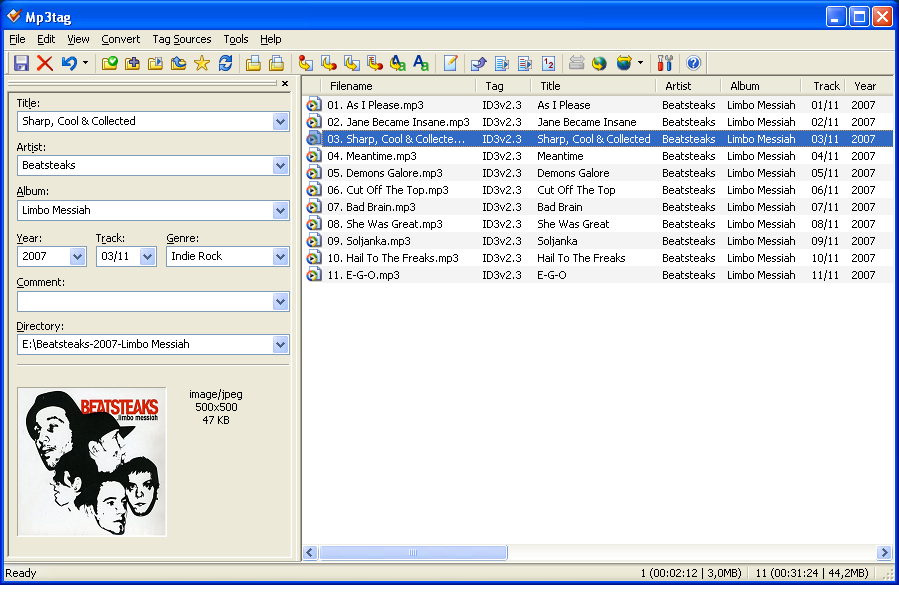 An all-in-one application that enables you achieve a lot in a very short time will always attract the attention of millions of users online. A program that gives you opportunity to carry out batch export of embedded album covers and other features like Mp3tag is definitely something to look forward to. An all-in-one application that enables you achieve a lot in a very short time will always attract the attention of millions of users online. A program that gives you opportunity to carry out batch export of embedded album covers and other features like Mp3tag is definitely something to look forward to.
What is Mp3tag?
Mp3tag can rename files based on the tag information, replace characters or words from tags and filenames, import/export tag information, create playlists, and many more. Mp3tags supports online freedb database lookups for selected files, allowing you to automatically gather proper tag information.
This latest version adds support for the IETF Opus codec and also comes with several improvements. The publisher has also been able to fix a couple of bugs that plagued previous version. One of the bugs fixed in this version is “where Mp3tag did not run on computers with older CPUs.”
Mp3tag is loaded with some outstanding features that include the following: enables you to write ID3v1.1, ID3v2.3, ID3v2.4, MP4, WMA, APEv2, Tags and Vorbis comments to multiple files at once; download and add album covers to your files and make your library even more shiny; save typing and import tags from online databases like Amazon, discorgs, freedb, MusicBrainz, and more; replace strings in tags and filenames (with support for regular expressions); create and manage playlists automatically while editing; rename files based on the tag information and import tags from filenames; and many more.
Any Downside?
Does exactly what it is designed for.
Want to check it out? Visit MP3Tag.
Posted in Main | No Comments »
Friday, April 26th, 2013
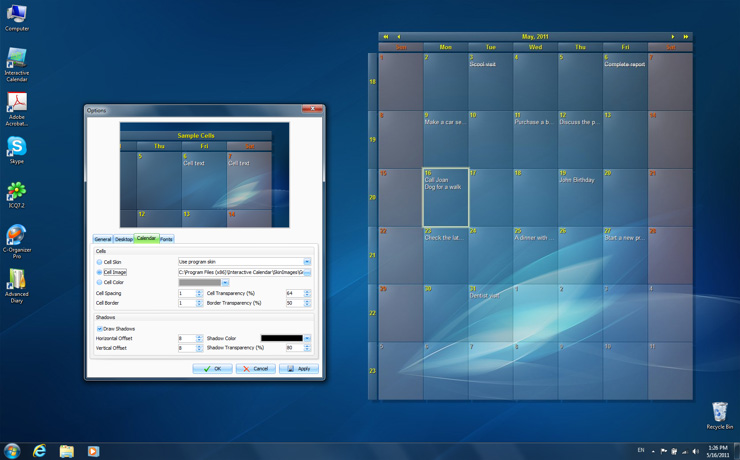 Did you know you can download an application that can be easily customized just to make your desktop look even more beautiful and attractive? That’s one of the features of Interactive Calendar. Did you know you can download an application that can be easily customized just to make your desktop look even more beautiful and attractive? That’s one of the features of Interactive Calendar.
What’s Interactive Calendar?
Interactive Calendar is a freeware program that has a lot of features. The program can be customized, which makes it very easy to use. This application also renders the calendar grid right on the wallpaper, which is a clear departure from how other competing programs are built. This departure allows it to be extremely fast when it comes to updates, and seamless integration of your Windows theme.
Another benefit of Interactive Calendar is the degree of visual customization it supports. You can control virtually every aspect of the calendar’s appearance including the following: position on the screen; colour; opacity; and a couple of others. You can also use dozens of skins that come with the program or simply load your own images to serve as background for the calendar.
Interactive Calendar supports three different interactive variations that allow it to blend perfectly with any Windows theme. Also, the program features several views, and allows you to easily create and manage tasks, specifying their duration, order, start, end days, description and other parameters.
Task description supports RTF formatting; thereby allowing you to easily create properly formatted and well structured Word-like documents, if necessary
Any downsides?
Interactive Calendar is a nice addition to your desktop; and doesn’t look like a program that has any issue. Moreover a couple of bugs noticed in previous versions have been taken care of in this update.
Want to check it out? Visit Csoftlab.
Posted in Main | No Comments »
Thursday, April 25th, 2013
 Do you want an easy to use application that lets you copy your desired data directly from clipboard into an SQL Server table? Then this review is for you because it says a lot about a simple program that can truly help you out; and that program is ClipTable. Do you want an easy to use application that lets you copy your desired data directly from clipboard into an SQL Server table? Then this review is for you because it says a lot about a simple program that can truly help you out; and that program is ClipTable.
What’s ClipTable?
ClipTable allows you to copy any desired data straight from your clipboard into an SQL Server table. You can easily get data from any source including the following; HTML tables, Word, Excel, Text, PDF, and many more.
ClipTable 1.0.3.7 is out with some new changes and bug fixes that include the following: new drag and drop support that enables you to mark any tabular data and drag it onto ClipTable’s grid; fixed data truncation message in some cases; x64 version is also available online when you check the official website of the publisher; and a couple of other changes.
Also, the special clipboard analyzer automatically determines the accurate delimiters, encoding, field names, and many more with minimum-to-none required user input. The program enables you to save time and connect any data to any server quickly and easily.
ClipTable is an easy to use program that won’t give a newbie any technical challenge when it comes to using it for the first time.
Any downsides?
No downside since it does exactly what the publisher says it does. The program is also very easy to understand, and is free for use.
Want to check it out? Visit Doccolabs.
Posted in Main | No Comments »
|
|
|




