Author Archive
Tuesday, April 23rd, 2013
 Looking for a FTP server that allows you to easily share your files across the Internet? Serv-U is such an application. Looking for a FTP server that allows you to easily share your files across the Internet? Serv-U is such an application.
What is Ser-U?
It is an easy-to-use FTP server that you can use to share your files across. It is wholly compliant with the current FTP standard, and has rich features that make it an ideal file sharing application for both new beginners and advanced users. Some of the things that Serv-U does for you include: Restrict directory & file rights, Deny or allow IP addresses, Monitor user actions in real-time, and Log all commands from users. Security settings are customizable for each user and group.
It supports SFTP (SSH), secure FTP (FTPS), web transfers, and remote admin. This program helps you to access files from anywhere via mobile devices, share files with employees, secure file transfer, and automate file transfers.
Some of the main features of this program are: Event-driven automation such as send email, sun program, brandable interface which allows you to use your company logo, Virtual folders permit use with local storage and remote shares, Multiple authentication sources, File integrity checks, Advanced web clients support drag-and-drop, thumbnails, synchronization, two-panel transfers and many more.
All in all a great value for your time and money.
To learn more, go to Serv-U.
Posted in Main | No Comments »
Tuesday, April 23rd, 2013
 If you want an application that helps you manage your personal finance, keep track on your expenses and does not require you to be an accounting guru, AceMoney Lite was designed for you. If you want an application that helps you manage your personal finance, keep track on your expenses and does not require you to be an accounting guru, AceMoney Lite was designed for you.
What is AceMoney Lite?
AceMoney Lite is a program designed for regular people who do not have special accounting knowledge to keep track of your personal finances quickly and easily. It supports all the features required for home or even small-business accounting needs. AceMoney Lite is considered as a very good alternative to Quicken or Microsoft Money personal finance software by several people the world over. It is also compatible with QIF file format most banks use to provide data online.
It is very easy and simple to use. Using this program, you can easily organize and track spending, build budgets, track investment performance, set up payment reminders and recurring bill payments, create reports and pie charts, and so much more, for free. It has a beautiful and easy to use interface. It has all the features of the other version: AceMoney except multiple accounts management.
Some of the main features of this program are: it helps you to keep tabs on your spending habits, create and manage your home budget, track performance on investments, enjoy the convenience of online banking, notifies you of when your bills are due, plan your debt and mortgage payments etc.
Downsides?
You can only manage one account on this version. This is certainly one of the best programs on personal finance management.
To learn more about this program, please go to Mechcad.
Posted in Main | No Comments »
Monday, April 22nd, 2013
 Got a Mac computer and thinking of how best to enjoy playing your favorite movies and music on your computer? Check out Aurora Blu Ray. Got a Mac computer and thinking of how best to enjoy playing your favorite movies and music on your computer? Check out Aurora Blu Ray.
What is the deal about Aurora Blu Ray?
This is about the best and most powerful Blu Ray player for Mac systems. It is specifically designed to allow Mac users to enjoy movies and music. It supports Mac systems excellently well particularly the Lion system. Been a universal media player, it not only plays Blu Ray HD movies on Mac but also provides support for all formats of movies, music or photo or even the ISO format. You can also add subtitles to the movies, share information about the movie with your friends or review the movie or music.
Some of the main functionalities of this program are: it is highly compatible with all models of Mac computer- Mac OS Lion, Mac OS X, MacBook Air, MacBook Pro, Mac mini, Mac Pro and iMac. It also supports all playing formats such as Blu Ray, DVD movie, Video CD, HD, 1080P, RMVB, MKV, MOV, AVI, FLV, MP3, WMA, AAC, etc.
It can play both the protected BD disc and the unprotected ones. It has share buttons that allow you to share your reviews of the movie or music with friends on social media.
Downsides?
This is one nice piece of utility every Mac user should have.
To learn more about this program, please do visit Bluray-Player-Software.
Posted in Main | No Comments »
Monday, April 22nd, 2013
 Batch & Print Pro is for batching documents as retainable lists which can be automatically printed in document sequence of your choice. It supports all associated shell printable documents such as PDF, MS Word, HTML, Text Files, Image formats, Excel Spreadsheets, PowerPoint Presentations, and many more. Batch & Print Pro is for batching documents as retainable lists which can be automatically printed in document sequence of your choice. It supports all associated shell printable documents such as PDF, MS Word, HTML, Text Files, Image formats, Excel Spreadsheets, PowerPoint Presentations, and many more.
What is Batch & Print Pro?
It is a useful and reliable application that will help you monitor the queue of your current printer for seamless sequence printing.
Some of the main features of this program include: Directory monitoring, FTP & POP3 Email monitoring, Print scheduler, printer load balancing, pre-processing for converting PDF to Postscript without using Acrobat, internal direct printing of native printer formats like PS, PCL, PRN, drag & drop of files for ease of use, save, load, append batch lists for later use and list ordering options.
Other features are refresh lists to pickup new files, separator pages between each file options, batch file replication, DOS & VBS scripts within list, zip & rar file support, logging & reporting, email notifications, can run as an NT service, full command line support and it also recognizes number of pages in PDF files, Append and print groups of PDF’s for printing as one job file, quick job setup for printing lists of files quickly by task name, PDF color/bw splitting option to different printer setups/different printers + lots more features.
Traction Software, the publisher of this software, has added quite some changes to this version. These changes are: Added premium upgrade protection to licensing, In monitor mode it now checks every 5+ minutes after a doc or docx print for process hangs MSWORD.EXE and kills them, Added option in general setup options to try to reprint the files with errors one more time that we’re detected in a process hang state before among other changes.
If you want to know more about this program, please go to Traction-Software.co.uk.
Posted in Main | No Comments »
Sunday, April 21st, 2013
 Want an application that gives you information about your video card and GPU? What ypou need is GPU-Z. Want an application that gives you information about your video card and GPU? What ypou need is GPU-Z.
What is the big deal about this program?
This is a lightweight program that is designed to give you all information about your video card and GPU such as the card name, GPU, release date and transistors, BIOS version, ROPs, memory type, and memory size. GPU-Z provides you snapshots of your video card and GPU. This freeware displays the following info- adapter, GPU, and display information, overclock, default clocks, 3D clocks (if available), and validation of results.It does not require any installation- it’s an executable file you can run directly. It supports Nvidia and ATI cards and is very fast.
Some of the main features of this program are: Support NVIDIA and ATI cards, Displays adapter, GPU and display information, Displays overclock, default clocks and 3D clocks (if available), Includes a GPU load test to verify PCI-Express lane configuration, Validation of results, No installation required, and Support for Windows XP / Vista / Windows 7 (both 32 and 64 bit versions are supported).
Techpowerup.com, the author of this program ahs added a few changes to this version: they include: Added support for AMD Radeon HD 7990, HD 8550M, HD 7340, HD 7290, HD 8670D, Added support for NVIDIA GeForce GT 740M, 680MX, 675MX, GT218 based 9400 GT, Fixed TMU count for RV620 and Fixed voltage monitoring on HD 7790.
Downsides?
Yet to discover any. A very small and useful utility that provides you all the relevant info about your video card and GPU.
To find out more, please go to TechPowerup.
Posted in Main | No Comments »
Saturday, April 20th, 2013
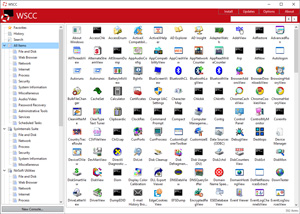 If you seek an application that allows you to install, update, execute and organize the tools from Windows Sysinternal Suite, the n check out WSCC. If you seek an application that allows you to install, update, execute and organize the tools from Windows Sysinternal Suite, the n check out WSCC.
What is the big deal about WSCC?
It is a potable freeware that allows you to install, update, execute and organize the utilities from various system utility suites. It can install and update the supported utilities automatically. On the other hand, it can use the http protocol to download and run the programs. It is light weight and does not require installation. Simply extract the content of the downloaded zip archive to any directory on your computer. WSCC uses the included WSCC Console to execute command line applications.
WSCC 2.1.1.1 supports the following utility suites: Windows Sysinternals Suite (including support for Sysinternals Live service) and NirSoft Utilities.
Some of the key features of this program include: simple and intuitive user interface, update manager which checks for newer versions and a console which is used to execute command line applications.
Downsides?
A very brilliant way to use Windows Sysinternals Suite and NirSoft Utilities. It makes it a whole lot easier and faster to use and manage these utilities.
To familiarize yourself with this program, please visit KLS-Soft.com.
Posted in Main | No Comments »
Saturday, April 20th, 2013
 Is your iPhone running unnecessarily slow? It is more likely that your storage space has been cluttered with several things. When your iPhone is processing complex calculations and data exchanges, iOS Apps will produce temporary files, which will be hardly be used again once they these purposes are accomplished. These one-off data are supposed to get removed as soon as you quit the Apps. Sadly some Apps leave these behind which takes up storage space and slows down your phone. To effectively clean up your iPhone and reclaim your storage space, get PhoneClean. Is your iPhone running unnecessarily slow? It is more likely that your storage space has been cluttered with several things. When your iPhone is processing complex calculations and data exchanges, iOS Apps will produce temporary files, which will be hardly be used again once they these purposes are accomplished. These one-off data are supposed to get removed as soon as you quit the Apps. Sadly some Apps leave these behind which takes up storage space and slows down your phone. To effectively clean up your iPhone and reclaim your storage space, get PhoneClean.
What is the real deal about this program?
This freeware helps you to clean up your iPhone fast and easy. It cleans up App caches, cookies and off-line files, sweep off media temp files and reclaim other storage space on all your iOS devices. Its fast engine can reach and scan every part of your iPhone to get rid of unwanted files created by Apps or iTunes.
It can also delete cache and offline files such as images, snapshots, video/audio media info, etc thus making your phone run faster. For some of your Apps like Facebook, Twitter, it has an option that allows you to save your documents, photos, PDF files. PhoneClen can also be used to clean up cookies and script files on your iPhone or iPad and back them up to iTunes or iCloud.
When iTunes syncs fail or are terminated, it creates temporary or corrupt media files. These constitute the Others on your iPhone. This is particular worse for iOS4 devices. But PhoneClean can help you get rid of these corrupt files and free up the space.
Some of the main features of this program are: quickly delete hidden junk files, clear cache and offline files, removing cookie and script files and cleans up corrupt media files among several other features.
To find out more about this program, please visit Imobie.
Posted in Main | No Comments »
Friday, April 19th, 2013
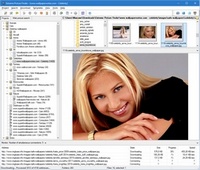 Thinking of how to download your favorite pictures from web galleries? Not to worry. Just allow Extreme Picture Finder handle it for you. Thinking of how to download your favorite pictures from web galleries? Not to worry. Just allow Extreme Picture Finder handle it for you.
What is Extreme Picture Finder?
This portable tool allows you to download all your favorite pictures from web galleries with a simple click of the button. It can download images, music, video or any other files from any website instantly and save them automatically. Simply enter the website address, choose what files to download and where to save them and let Extreme Picture Finder do the rest for you. And you can instantly view the downloaded files in the built-in image viewer.
it can be set to download pictures even from websites that are password protected. Its advanced settings allow it to skip certain parts of the website or whole folders thus making the download a lot faster. Even if you don’t know where to start downloading from, it has a built-in online projects database containing several thousands of web addresses already sorted into various categories to help you know where to begin from. You can use it to search for and find pictures. Simply enter the keyword of what you ant and Extreme Picture Finder will download thousands of pictures for you.
Some of the main features of this program are: Download your choice of images, music, video or any other files from websites automatically, Download from TGP and password-protected sites, Download list of URLs, Built-in web picture finder, Up to 30 simultaneous downloads – you’ll have your files very fast, Built-in database with thousands of website addresses and Built-in picture viewer with thumbnails and slide-show mode.
Extreme Internet Software, the publisher of this program has added just a little change to this version. They’ve added Command line parameters support: start/update/restart any project or search from command line.
Downsides?
It is a nice program, easy to use and fast.
To know more about this program, please visit ExiSoftware.
Posted in Main | No Comments »
Friday, April 19th, 2013
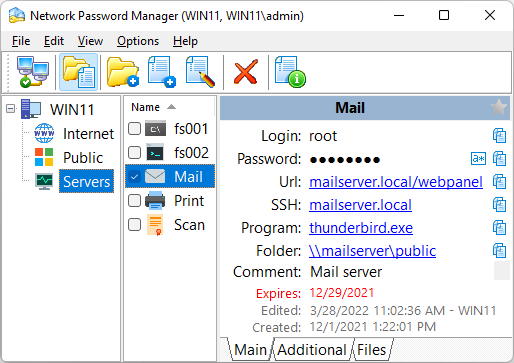 How valuable are your files and other important documents stored on your computer? This is the kind of question you should be asking when next you leave the files on your computer unprotected. To ensure your files are well protected, and stored in a secure environment; you might want to check out Network Password Manager. How valuable are your files and other important documents stored on your computer? This is the kind of question you should be asking when next you leave the files on your computer unprotected. To ensure your files are well protected, and stored in a secure environment; you might want to check out Network Password Manager.
What’s Network Password Manager?
Network Password Manager is a multi-functional program for storage, management and protection of valuable information that contains passwords. This program is different from other similar desktop programs because it supports the multi-user mode. Network Password Manager provides common information environment and can also create centralized data backup.
Network Password Manager is also built to include a number of key features such as; one multi-user database for all employees, support for Windows security, strong 256 bit AES encryption, ability to keep all standard fields, advanced password generator, backup, export/import, flexible configuration, multilingual support, and a few others.
Network Password Manager also guarantees a reliable protection of your vital data by using 256-bit AES encryption. It also helps to store additional information such as URLs, custom fields, comments, and files. This version also contains a number of updates and that include the following; addition of security administrator (new user), addition of new access rights (private, create, and navigation), addition of expiration for the access rights, addition of free license for only one user, improved interface with folder tree, and addition of description, expiration and file attachments for folders.
Please note that trial version of the Network Password Manager will be locked after a 60-day period.
Want to check it out? Visit UsefulSoft.
Posted in Main | No Comments »
Friday, April 19th, 2013
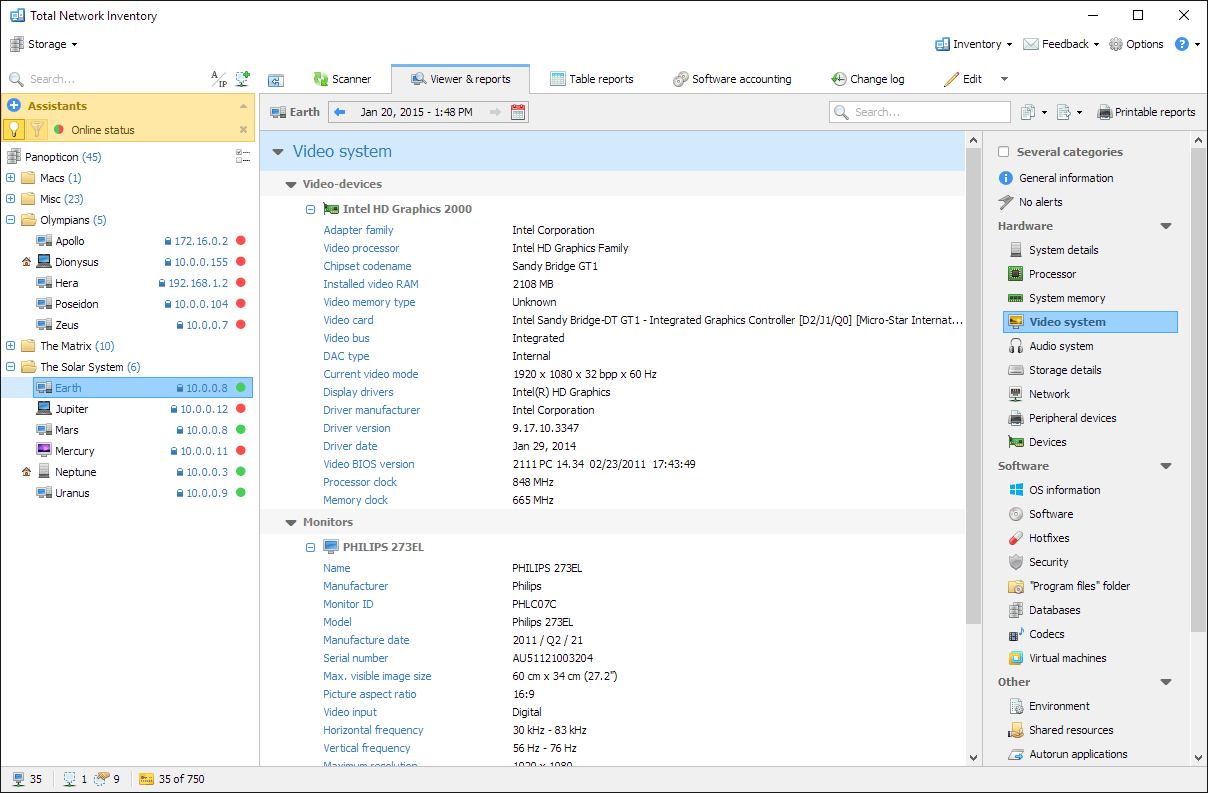 If you want an application that allows you to build and manage an inventory efficiently either fro your home, office or business enterprise, then Total Network Inventory is it. If you want an application that allows you to build and manage an inventory efficiently either fro your home, office or business enterprise, then Total Network Inventory is it.
What is Total Network Inventory?
It helps you build an inventory for you’re your entire network without leaving out anything. It queries all the machines on your network and relays detailed info about OS, service packs, hot fixes, hardware, software, running processes, etc. on remote machines. This information is added to the centralized database and administrators are able to generate reports about each or all machines on a network.
It allows you to create a perfect, effortless, hassle-free inventory. It is able to query all network devices no matter how large or diverse your network is! Its user interface is user friendly and gives you a fast and unobtrusive navigation through the program. This network inventory builder will store and organize information, providing you with a comprehensive report on a chosen subject in just a few clicks. With Total Network Inventory, all information about your network equipment is right at your fingertips!
Some of the key features of this program include: it allows you to be in control of your network, it has a user-focused interface, scan wizard, report builder and collects hardware and software information.
Softinventive Lab Inc., the author of this program, has added a few changes to this version. The changes include: scan scheduler, option to disable automatic checks for new versions, new currencies as well as other minor changes.
Downsides?
It has a 30 day trial version, it doesn’t allow to open, save or print reports and has nag screen.
To find out more, please go to SoftInventive.
Posted in Main | No Comments »
|
|
|




