Author Archive
Thursday, March 21st, 2013
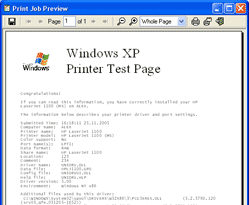 Distinguishing printing jobs in Windows can sometimes be very difficult, which means you require a separate program if you want to meet up with certain tasks. The problem is made more difficult when you consider the fact that standard ways of printer queue management included in Windows are also limited. To this end, you could try installing a program like Remote Queue Manager professional. Distinguishing printing jobs in Windows can sometimes be very difficult, which means you require a separate program if you want to meet up with certain tasks. The problem is made more difficult when you consider the fact that standard ways of printer queue management included in Windows are also limited. To this end, you could try installing a program like Remote Queue Manager professional.
What is Remote Queue Manager Professional?
Remote Queue Manager is a professional solution to manage print tasks; and there is no requirement to run any drivers to control a remote printer. Remote Queue Manager uses the remote computer’s drivers. Instead of hunting through non-descriptive job names, Remote Queue Manager lets you visually preview files in the spool. Easily connect to a remote printer cancelling unwanted tasks or changing their priority. The program also allows you to view properties for every printer task (paper size and orientation, printing preferences etc).
With Remote Queue Manager, having multiple printer is not a problem as it helps you control all the printers in your organization, right from where you sit. New features and updates have now been added to the program to include the following; “Print as Sorted”, new version checking, Czech translation, and improved support for many Epson printers.
Any Downside?
Remote Queue Manager has a 30 day timeout limitation.
Want to check it out? Visit Usefulsoft.
Posted in Main | No Comments »
Tuesday, March 19th, 2013
 Today’s manager wants to have all his major assignments carried out in the simplest of fashions. This requires installimg the best program that can effectively help him organize his personal andn professional schedules without losing grip of other things. To this end, a program like C-Organizer will be a perfect example of one of such applications. Today’s manager wants to have all his major assignments carried out in the simplest of fashions. This requires installimg the best program that can effectively help him organize his personal andn professional schedules without losing grip of other things. To this end, a program like C-Organizer will be a perfect example of one of such applications.
What is C-Organizer Professional?
It is a stylish and powerful manager of your personal and business-related information program that employs a user-friendly interface to make working with this software simple and intuitive. It was created to help you plan your personal and professional life.
C-Organizer contains a planner, an address book, password and bookmark managers, a notepad, and a calendar of events. It is a program designed with features to remind of up-coming birthdays, appointments, holidays, and scheduled tasks. Program’s tree-like database structure displays information in a convenient, easy to search and easy to navigate manner. All data can be shared in real-time on a network. You and your assistant can be in using your calendar at the same time.
The publisher has added a couple of new and advance features to make the program even more unique and efective. A few of these updates include; synchronization with Google Tasks, new options for the Calendar section of C-Organizer to make your work with the program more convenient, you can change a time interval in Daily view, ability to show a work time only, and a few bug fixes.
Downside
C-Organizer Professional is a shareware with a 30 day limitation.
Want to check it out? Visit CSoftLab.
Posted in Main | No Comments »
Tuesday, March 19th, 2013
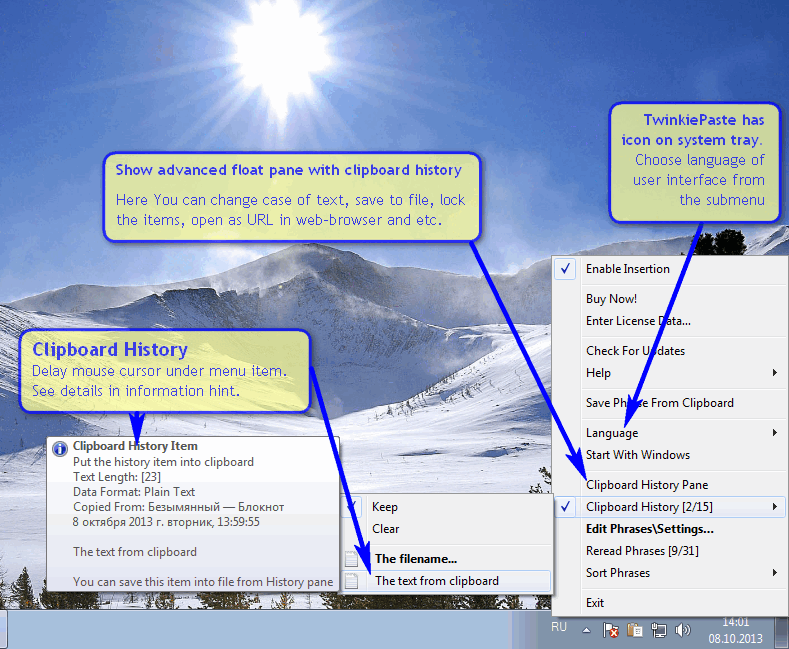 Any application that saves you a lot of time when typing is worth a mention; and that is one of several reasons you need to take a look at TwinkiePaste. It gives you the edge when it comes to pasting commonly used text phrases with hotkeys from menu anywhere. Any application that saves you a lot of time when typing is worth a mention; and that is one of several reasons you need to take a look at TwinkiePaste. It gives you the edge when it comes to pasting commonly used text phrases with hotkeys from menu anywhere.
What is TwinkiePaste?
TwinkiePaste is an application that allows you to paste commonly used text phrases with hotkeys from menu anywhere. It saves hours of typing and is the ideal solution for personnel in office, technical support, customer care, help desk, call center and medical or legal transcription settings. It allows you to paste plain text of formatted text (RTF) into any application.
TwinkiePaste enables you to do a lot of things including the following: start the any applications, web-sites, search on Internet quickly; customizable hot keys include diagnostics; works with almost all applications; supports unicode; minimal system requirement; and many more. The program has a lot of features that include the following: inclusion of lipboard history; customizable hot keys include diagnostics; lightweight and user friendly phrase editor; works with almost all applications; available in English, Polish and Russian language; no proprietary file format; and many more.
Any Downsides?
TwinkiePaste is a great application; and has no known issue.
Want to check it out? Visit Amlpages.
Posted in Main | No Comments »
Tuesday, March 19th, 2013
 There are lots of quality applications or programs being released these days that can make our computer and online experience easier. WinVHD seems to be one of those programs; and the fact that it’s a freeware makes it even more attractive. There are lots of quality applications or programs being released these days that can make our computer and online experience easier. WinVHD seems to be one of those programs; and the fact that it’s a freeware makes it even more attractive.
What is WinVHD?
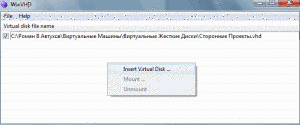
WinVHD is a small utility which automates attaching virtual hard disk’s (VHD) at the Windows starts. After first run, you can insert virtual hard disk files into loading list. Next, after you fill the list, you can change loading modes your VHD’s.
This version already includes a couple of fixes and updates such as; added support for VHDX virtual disk’s file format (only for Windows 8 and Windows Server 2012 and later), and support for ISO virtual disk’s file format (only for Windows 8 and Windows Server 2012 and later), and fixing of bug that has to do with email.
WinVHD also enables you to choose program options by select menu “File->Options” and disable program loading when the Windows startup (also disabled your VHD’s attaching). You can also remove virtual hard disk from the program list by selecting it and pressing “DEL” button, and attach or detach your disk’s at any time by right mouse button.
Downside?
All pending issues discovered in previous version have been fixed; and WinVHD now seems to be stable more stable.
Want to check it out? Visit SourceForge.
Posted in Main | No Comments »
Monday, March 18th, 2013
 If you want a freeware video converter that enables you to import videos from different sources, photos, music, DVD and convert them to AVI, MP4, WMV, DVD, 3GP, MP3, YouTube, then get Freemake Video Converter. If you want a freeware video converter that enables you to import videos from different sources, photos, music, DVD and convert them to AVI, MP4, WMV, DVD, 3GP, MP3, YouTube, then get Freemake Video Converter.
What is the real deal about this program?
It is a freeware that is designed for converting video files to other formats, but offers other converting and downloading features as well. It enables you to import videos from different sources, photos, music, DVD and convert them to AVI, MP4, WMV, DVD, 3GP, MP3, YouTube. Convert videos to devices: iPod, iPhone, iPad, PSP, Blackberry, Xbox, Apple TV, smartphones. Rip and burn DVD. Create photo slideshows and music visualizations. Extract MP3. Cut, join, flip, rotate video. Upload videos, photos, music to YouTube directly without having to access the website.
It has a simple user interface that is easy to navigate, a great Help page. You could use this freeware to cut unnecessary video parts, combine several videos into one, edit videos and so much more. You could convert videos with 10x speed due to CUDA and DXVA support. It does not have any adware.
Ellora Assets Corporation, the author of this program, has added a few changes to this version. They include: the new DVD menus, the auto-crop option, the auto-backup option and the possibility to set a custom DVD background.
Downsides?
Works well for me. This is a great video converter.
Want to know more? Please visit Freemake.
Posted in Main | No Comments »
Monday, March 18th, 2013
 If you are a photographer and you want an application that will make JPEG and TIFF processing and editing easy for you to implement, then you should check out the Nikon Capture NX for Windows. If you are a photographer and you want an application that will make JPEG and TIFF processing and editing easy for you to implement, then you should check out the Nikon Capture NX for Windows.
What is the big deal about this program?
It makes JPEG and TIFF processing and editing elegant and easy enough for any photographer to implement. It allows you to you make intuitive photo enhancements which are immediately visible on your monitor. Its new interface provides intuitive access to all of the tools you need to make your photographic possibilities endless and realize the power of your imagination with Capture NX. There are no complicated procedure- it is very simple and easy to use.
Some of the key features of this program are: color control point which allows you to adjust for hue, brightness and saturation are as simple as placing a Color Control Point on your image, then adjusting the length of the sliders. With a click of the mouse, its Selection Control point allows you to apply enhancements such as Unsharp Mask or D-Lighting to a specific area. Tone Curve adjusts the brightness and contrast, and Selection Control Point applies the effect only to the man and his surroundings.
You can easily adjust dust spots on an image to give it a more natural look using its Auto Retouch brush. This could remove facial blemishes, imperfections on flowers, or other unwanted objects within the frame.
Downsides?
It does what it is designed to do and is a lot faster too. An intuitive program with an original concept.
To learn more about this program, please visit Nikon.com.
Posted in Main | No Comments »
Saturday, March 16th, 2013
 Are you experiencing frequent Windows crashing? Is your computer sending several error messages? This could be due to problems with the Windows Registry. If you want an application that will help you scan and clean up your Windows registry, then check out Eusing Free Registry Cleaner. Are you experiencing frequent Windows crashing? Is your computer sending several error messages? This could be due to problems with the Windows Registry. If you want an application that will help you scan and clean up your Windows registry, then check out Eusing Free Registry Cleaner.
What is Eusing Free Registry Cleaner?
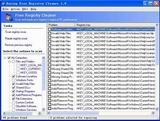
This freeware will scan your Windows registry for invalid or obsolete information and show you a list of the errors found. It helps to fix the invalid entries found, thus making your computer more stable and faster. To ensure maximum safety, Eusing Free Registry Cleaner will make a backup of the repaired entries. You can easily restore any changes made using the software by choosing Restore registry backup. It does not contain any spyware or adware.
It has a very plain and easy to navigate user interface. You can choose specific parts of your computer that you want to scan such as DLLs, startup etc. Also you can add registry keys to an ignore list, save the log file to a text document, open an entry in Registry Editor and select a preferred language for the interface. It is very light on system memory, moderate-to-high CPU, and can guide you to an online help file.
Some of the key features of this application are: safely scan your entire Windows registry for invalid or obsolete information, it has a simple and user-friendly interface, makes your computer faster by cleaning your registry, improves your PC’s overall performance and stability and aso on.
Downsides?
Not very portable. It’s a good application though.
To know more, visit Eusing.
Posted in Main | No Comments »
Saturday, March 16th, 2013
 If you want an application that allows you to play media files of various formats without the use of any external codecs, then get VSO Media player. If you want an application that allows you to play media files of various formats without the use of any external codecs, then get VSO Media player.
What is the big deal about this program?
It is a tool that allows you to play media files of various formats, including AVI, 3GP, FLV, MOV, MPG, along with DVDs and Blu-ray discs and audio files without any external codecs. It is extremely light and easy to use. You can also use this program to manage your playlist. It supports blu-ray and DVD iso files.
It is easy to navigate, with a clean, elegant interface. It comes with the usual media player tools- such as pause and stop, adjust the volume, switch to full screen mode and navigate back and forth within the video. In addition, you can save and load playlists, select the audio and video stream, add subtitles, as well as configure image settings (contrast, brightness, saturation and gamma).
Some of the key features of this program are: it is a free video player with no adware, spyware or toolbars, it is very easy to use, it does not require external codecs, Supports various audio file formats: mp3, wma, FLAC, and more, it is Blu ray and DVD compatible, has several advanced settings and comes in several languages.
Downsides?
The media player takes up a moderate-to-high amount of system resources and lacks a help file. Other than these, it is a very useful application.
To learn more about this program, visit VSO-Software.
Posted in Main | No Comments »
Friday, March 15th, 2013
 Need an application that helps you capture lots of screenshots easily with minimal intervention? Then check out Screenshot Captor. Need an application that helps you capture lots of screenshots easily with minimal intervention? Then check out Screenshot Captor.
What is Screenshot Captor?
It has multi-monitor support and includes a full image explorer with full shell functionality and unsurpassed integration with external tools like graphic editors, watermarkers, etc. It also supports unique effects not seen in other capture tools including the ability to automatically locate and enhance the active window.
Some of the outstanding features of this program include: Optimized for taking lots of screenshots with minimal intervention; highly configurable to make it work the way you want it to but stays out of your way in the system tray, Excellent multi-monitor support, Full set of scanner acquisition tools and scanner image correction, Perfect capture of Windows 7 partial transparency effects.
Other amazing features are: Ability to embed textual comments in files, watermarking, captioning, Lots of capture modes: Multimon (multiple monitors), Desktop, Active Window, Region, Windows Object, Scrolling Capture. Each mode has a customizable hotkey for quick access, Cool Special Effects,including automatic active window enhancement, ragged edge splicing, pixelation, and many more. Unsurpassed support for 3rd party user configurable tools, including file browsers and image editors; extend the program to do whatever you need by interfacing it with other programs and sidebar thumbnail file browser provides full shell operations, drag and drop support, and right-click actions on screenshots.
To know more go to http://www.donationcoder.com/Software/Mouser/screenshotcaptor/
Posted in Main | No Comments »
Friday, March 15th, 2013
 Are you having issues with your computer such as an extremely slow OS or your computer is churning out all kinds of errors because you tweaked the Windows? Xpy can help you fix such issues. Are you having issues with your computer such as an extremely slow OS or your computer is churning out all kinds of errors because you tweaked the Windows? Xpy can help you fix such issues.
What is xpy?
Xpy is a portable utility that disables the default threats of a Windows 2000, XP, and Server 2003 installations. Apart from it excellent antispy features, it also closes recent security holes like the remote procure call (RPC) service and the distributed component object model (DCOM). It helps to make your OS more secure, without risking any damage to the operating environment. It is a very handy utility when you want to tweak your OS. It is very easy to use.
Some of the features of this program include disable Windows communicating with Microsoft servers, disable remote services, restore Windows classic look, enable workstation features on Windows Server, increase Internet Explorer security, disable features, uninstall Windows Messenger, delete media files coming with a clean Windows installation, and disable usability annoyances.
Jan.T.Sott, the publisher of this program, has added a few changes to this version. They include: disable Adobe Flash Update Service, disable Skype Update Service, disable NVIDIA Update Service, disable Branch Cache, disable Adaptive Brightness Service, fixed bug in Metacrawler selection among several others.
Downside?
This app is not for newbies. It is meant for those that have a good knowledge about their OS. It is light, multilingual and easy to use.
To find out more about this program, please visit XPY.
Posted in Main | No Comments »
|
|
|





