Author Archive
Wednesday, February 27th, 2013
 Are you looking for a shareware that is not only affordable, but designed with some of the latest and easy to use features for Delphi/C++Builder and PostgreSQL 7.X? PostgresDAC might just be your choice of application. It allows you to create Delphi/C++Builder applications with direct access to PostgreSQL/Pervasive Postgres DB without BDE and ODBC. Are you looking for a shareware that is not only affordable, but designed with some of the latest and easy to use features for Delphi/C++Builder and PostgreSQL 7.X? PostgresDAC might just be your choice of application. It allows you to create Delphi/C++Builder applications with direct access to PostgreSQL/Pervasive Postgres DB without BDE and ODBC.
What is PostgresDAC?
PostgresDAC is a PostgreSQL BDE replacement for Delphi 4-6 and BCB5 applications with direct access to PostgreSQL DB without BDE and ODBC. This components set was developed for easy migration of existing projects from BDE/ODBC scheme to the native one. Interface is BDE-like and TDataSet compatible. Included for free is TDBImageEx component for JPEG images in BLOBs support.
This is a maintenance release that contains the latest client library, several bug fixes and improvements. System requirement for installation include Delphi 5 or C++Builder 5 and higher; PostgreSQL 7.4 and higher.
PostgresDAC is packed with some powerful features that include the following: royalty-free; Delphi 5-7, ++Builder 5-6, Borland Developer Studio 2005-2006 Win32 edition support; full compatibility with all the existing data-aware controls and report designers; full support of the BLOB fields; TNT Unicode Controls Wrappers package for Unicode applications for free (with sources); detailed help system and a lot of demo applications; and many more.
Downside
Free only for a limited period.
Want to check it out? Visit Microolap.
Posted in Main | No Comments »
Wednesday, February 27th, 2013
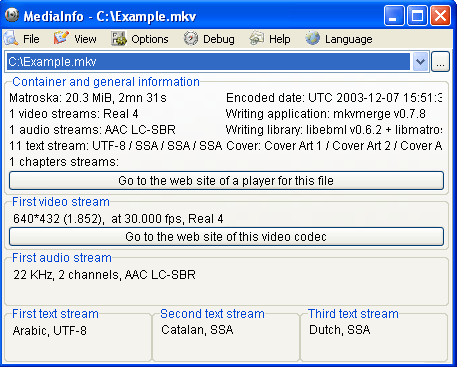 Searching for an application that provides you with the metadata abut any audio or video files? Why not check out MediInfo. Searching for an application that provides you with the metadata abut any audio or video files? Why not check out MediInfo.
What is the big deal about MediaInfo?
It allows you to get a quick look at the characteristics of media files. MediaInfo is a simple utility that can provide users with metadata about their audio and video files, including codecs, and frames per second. . It also provides more specific information for audio files such as: codec, aspect, fps, bitrate and more, and information for video files such as: codec, sample rate, channels, language, bitrate and more. This information can be exported as text, CSV or HTML.
Its user interface is plain and easy to navigate. You can select either an individual file or a whole folder of files to view. You can export metadata information in a CSV, sheet, text, or HTML file. MediaInfo doesn’t have much in the way of documentation aside from an FAQ on the publisher’s Web site, but the program is really pretty self-explanatory, at least for users who already know what all of this metadata means. You can view files in any of these 8 formats- Basic, Sheet, Tree, Text, HTML, XML, MPEG-7, and PBCore 1.2. Each of these formats provide you with different information such as file size, duration, bit rate, compression mode, and color space.
The publisher, MediaInfo, has added a few changes to this version. They include: ARIB STD B24/B37 caption detection (both Japanese and Brazilian versions), LXF: support of AVC, VC-3, MPEG audio, AC-3, Dolby E, and AAC detection and analysis, AC-3: support of 22.05 kHz streams (out of specs but they exist), MOV: AIC (Apple Intermediate Codec) scan type detection, MOV: support of AVID metadata (interlacement information) and Time code dedicated tracks (MOV, MXF, GXF).
Downsides?
Does its job well.
To find out more about this program, please visit SourceForge.
Posted in Main | No Comments »
Tuesday, February 26th, 2013
 Have you ever noticed that the performance of your computer starts slowing down after weeks and probably months of persistent use? This is most times caused by several issues including files that are left behind after uninstalling some applications and a lot of other issues. To this end, a program that lets you analyze and benchmark your computer won’t be such a bad idea. Fresh Diagnose is a program that offers you such possibilities as you are soon to find out. Have you ever noticed that the performance of your computer starts slowing down after weeks and probably months of persistent use? This is most times caused by several issues including files that are left behind after uninstalling some applications and a lot of other issues. To this end, a program that lets you analyze and benchmark your computer won’t be such a bad idea. Fresh Diagnose is a program that offers you such possibilities as you are soon to find out.
What is Fresh Diagnose?
Fresh Diagnose is a tool designed to analyze and benchmark your computer system. Fresh Diagnose can analyze and benchmark several kinds of hardware including CPU performance, hard disk performance, video system information, mainboard information, and several others.
Fresh Diagnose has some powerful and easy to use features that include the following: scanning your system and providing complete report about hardware and software; testing the performance of your system including CPU hard disk, CD/DVD ROM, and comparing it with other systems; Fresh Diagnose also enables you to learn more about your computer components, detect/diagnose problems or errors in your system, and increase the overall performance of your computer.
Fresh Diagnose is no doubt a nice application; but getting the registration code is a bit difficult.
Want to check it out? Visit FreshDevices.
Posted in Main | No Comments »
Tuesday, February 26th, 2013
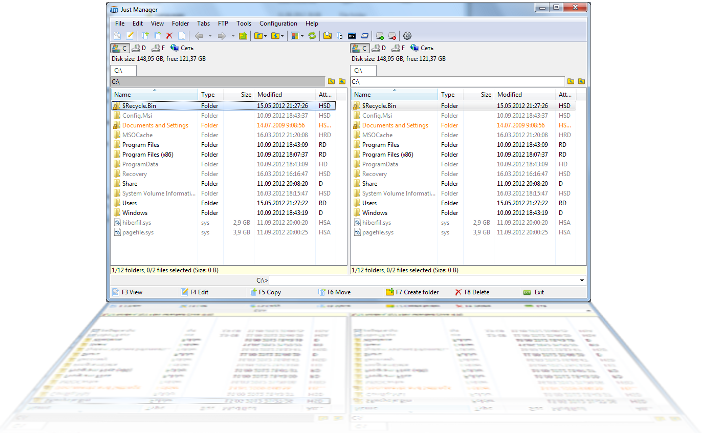 Are you looking for a tool that has multiple features that can be used for a lot of things on your system including multi-rename and quick file search? Then Just Manager sounds like a program that has all those features just made for you. Are you looking for a tool that has multiple features that can be used for a lot of things on your system including multi-rename and quick file search? Then Just Manager sounds like a program that has all those features just made for you.
What is Just Manager?
Just Manager is a file manager for the Windows Operating system. It features Multi-panel interface, Panel tabs, File operations, File Search, Quick search, Multi-rename tool, FTP, and a customizable interface.
Recently, a lot of changes were made to Just Manager to include the following fixes and updates: CMD folder opens instead of cmd-fixed; FTP UTF-8 support added; fixed application crash on file view/edit; environment variables resolving implemented; path panel not displayed problem fixed; and “open path edit” item added to path panel menu.
Other features that you can find in Just Manager 0.1 Alpha include the following: supports all modern versions of Windows with both x86 and x64 versions; Drag & Drop operations; Color and Font highlighting for file/folder extension and attributes; Standard file operations (move, copy, shortcut); Map and disconnect network drives; Favorite and system folders support; Built-in FTP client; Multilingual support; fully customizable interface; and UNICODE support.
Downsides (if any)?
Just Manager is a great program with amazing features; and the fact that it’s a freeware doesn’t take anything away from its performance.
Want to check it out? Visit JustManager.
Posted in Main | No Comments »
Tuesday, February 26th, 2013
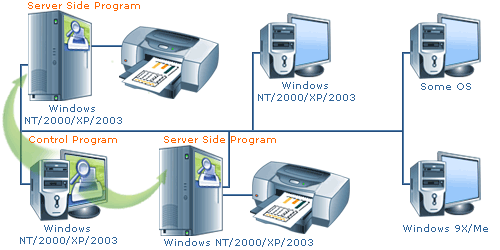 One of the very few ways to cut down some office expenses is installing a print or ink-watch application to monitor the level of ink used each time you have a print job to do. Knowing or having accurate idea of exact cost of printing in an organization or company will help save a lot in these hard times; and that is why installing O&K Print Watch is not such a bad idea. One of the very few ways to cut down some office expenses is installing a print or ink-watch application to monitor the level of ink used each time you have a print job to do. Knowing or having accurate idea of exact cost of printing in an organization or company will help save a lot in these hard times; and that is why installing O&K Print Watch is not such a bad idea.
What’s O&K Print Watch?
O&K Print Watch is a print manager to control and audit printing costs in your organization. It helps managers learn about the exact cost of printing in the company by monitoring all print jobs regardless of whether or not submitted onto a local networked printer.
O&K Print Watch supports multiple printing devices and unique printing pricing combined with per-user quotas and audit of all print jobs makes it possible to cut down printing costs and save on printing.
The print software also keeps track on print jobs and paper usage for all local and network printers. The printer monitor records that used a particular printing device, what and when were printed. Electronic images of all print jobs can be saved from managerial reviews. With this application, you can also track exact user names, date and time, and record the exact number of pages and printing parameters for each printing job.
Downside
O&K may not be able to handle too many tasks; especially where organizations make as much as 700 print queues.
Want to check it out? Visit Prnwatch.
Posted in Main | No Comments »
Monday, February 25th, 2013
 Need an easy to use yet powerful graphical query for your database? Get Universal SQL Editor. Need an easy to use yet powerful graphical query for your database? Get Universal SQL Editor.
What is the real deal about this program?
It allows you connect any ODBC compliant databases, such as Oracle, DB2, SQL Server, Sybase, etc., and edit SQL queries and scripts with code completion, syntax highlighting, SQL formatting, plus other useful features that allow you to work more efficiently.
Some of the key features of this program are: its flexible connectivity provides support for ODBC compliant databases, such as Oracle, DB2, SQL Server, etc, easy database object management, support for scripting database objects, support long script execution, Allow editing, grouping, searching, filtering and sorting, Powerful SQL editor that features Intellisense-like code completion, highlight references, parameter hinting, syntax highlighting, SQL formatting, multiple levels of undo and redo, column mode edit, code folding, etc.Query results can be exported to Excel spreadsheet or as a set of SQL statements and Low memory consumption.
Downsides?
It has just a 14 day trial period after which you have to purchase the software (with a $39 or $69 price tags it’s quite a pricy tool).
To find out more about this program, please do visit MingSoftware.
Posted in Main | No Comments »
Monday, February 25th, 2013
 Time is of the essence for those that manage corporate network; and that is regardless of the size. That is not all, it is also important to be accurate when it comes to time management when handling any task especially in a corporate environment. To ensure that your colleagues make it in time for both offline and online meetings; Absolute Time Server is an application that can serve a lot of purposes. Time is of the essence for those that manage corporate network; and that is regardless of the size. That is not all, it is also important to be accurate when it comes to time management when handling any task especially in a corporate environment. To ensure that your colleagues make it in time for both offline and online meetings; Absolute Time Server is an application that can serve a lot of purposes.
What’s Absolute Time Server All About?
Absolute Time Server is a full-featured time server that works as WinNT service and is fully RFC868 compatible. The program acts a background process, and has very low system consumption; and can be started before logon.
Version 8.0.990 is out with a lot of changes and fixes that include the following: improved compatibility with Windows 8 64-bit; starting with this version in review, the application is compatible with Windows Server 2012; and a couple of other minor improvements and fixes.
Absolute Time Server is made up of two main components that include a server part that works as a Windows service in the background and also performs several time synchronization tasks hidden from users, and a control panel manager that can be used to configure the server parameters.
Downside
Absolutely easy to use, and does not take up unnecessary space on your system.
Want to check it out? Visit TimeUtilites.
Posted in Main | No Comments »
Monday, February 25th, 2013
 If as a professional SEO and webmaster you’re searching for an application that will help you attract more visitors as well as increase sales then check out SEO SpyGlass. If as a professional SEO and webmaster you’re searching for an application that will help you attract more visitors as well as increase sales then check out SEO SpyGlass.
What is the big deal about this program?
This program is a powerful backlink analysis tool for professional SEOs and webmasters. It allows you to reach # 1 position in Google, Yahoo!, MSN and other search engines. This utility can show you exactly what the competitors are doing to get ranked number 1 in major search engines, such as Google, Yahoo and Bing. The program’s interface is very easy to use even for newbies. .
It can search for a certain word phrase that sums up what your website is about and tell you what other competitors are doing to reach the highest ranks in search engine results. On the other hand, a search may be run on a certain website in order for the program to provide an extensive data log about it and its SEO solutions.With the data it provides, you be able to understand why a specific site ranks well for a specific search string and what should be done to optimize your own website.
Some of the key features of this program include: Check the exact backlinks your site has — or spy on your competitor’s backlinks with SEO SpyGlass, Shows the BEST keywords to optimize the site for, Finding the best keywords is a quick and easy process, now that you’ve got SEO SpyGlass to help you, Tells you how to beat your competitor’s PageRank, Allows you to see the Alexa Traffic Rank of every backlink and several other outstanding features.
Downsides?
I think this is a nice application for backlink analysis.
To know more about this program, please visit SEO SpyGlass.
Posted in Main | No Comments »
Thursday, February 21st, 2013
 A lot of important files have been lost as a result of accidental deletion. This continues to cause a lot of problems for users who have little or no idea on how to recover lost files through other means know to experienced PC users. With Recuva (pronounced “recover”), you probably now have a chance of having your old files back the way you have always wanted it. A lot of important files have been lost as a result of accidental deletion. This continues to cause a lot of problems for users who have little or no idea on how to recover lost files through other means know to experienced PC users. With Recuva (pronounced “recover”), you probably now have a chance of having your old files back the way you have always wanted it.
What’s Recuva
Recuva is a freeware Windows utility to recover files that have been deleted accidentally from your PC. Some of these files include ones emptied from the Recycle bin as well as images and other files that have been deleted by user error from digital camera memory cards or mp3 players. Recuva is also built with features to bring back files that have also been deleted by bugs, crashes, and viruses.
Latest addition to Recuva include the following; added support for 3TB external drives, added support for hard disks with 4 KB sectors, improved NTFS deep scan recovery reliability, added VHD drive image creation for system drives (only available in pro version), and fixing of a minor bug with opening VHD images in Windows.
Downsides
Recuva is a decent piece of software, but is a bit restricted in terms of what it can do. The pro version is however, more feature-rich.
Want to check it out? Visit Piriform.
Posted in Main | No Comments »
Thursday, February 21st, 2013
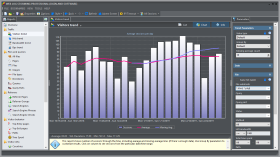 The idea of paying for any program online is to get top value for your money, and probably avoid using applications that could pose grave dangers to your PC. Some programs might cost some extra amount of money; but they sure add real value to your activities online. Web Log Storming probably falls into that category; and you might want to check its features to be sure. The idea of paying for any program online is to get top value for your money, and probably avoid using applications that could pose grave dangers to your PC. Some programs might cost some extra amount of money; but they sure add real value to your activities online. Web Log Storming probably falls into that category; and you might want to check its features to be sure.
What’s Log Storming?
Web Log Storming is an interactive desktop-based application, and is a web log analyzer for Windows. An entirely new concept of website statistics makes it clearly distinct from any web analytic software available today. You can browse through stats to drill down into details-down to an individual visitor’s session. You can also check the pattern of individual visitor’s behavior and also how it fits into your goals.
Web Log Storming is also an innovative web log analyzer application for making sense of your server’s log files. It does a lot more than just generating common reports. It also displays detailed website statistics with interactive graphs and reports. Complete and detailed log traffic analytics from every visitor to your website is just a couple of mouse-clicks away.
Downsides
Web Log Storming has a 30 days limitation; but is available for purchase at a price not beyond the reach of too many interested users.
Want to check it out? Visit WebLogStorming.
Posted in Main | No Comments »
|
|
|




