Author Archive
Wednesday, April 16th, 2008
 Won’t you like to have a clock that can tell the time, date and weather condition? Well in that case the remarkable Weather Clock 3.1 would be an excellent choice to know about the time, date and temperature, etc. The software is complied of clock utility that is skinnable and can be customized. It shows a bar that stays at the system tray and shows the time, temperature, etc according to your chosen settings. It is capable of showing the time of the zone and area of the user automatically. The features of the program can be accessed by right click on the system tray icon. What about reminders of important tasks? It is easy with the alarm feature that can be set to be accompanied by the pop-up message, audio file. You can even launch applications, access files and have the PC set to be shutdown at any specific time set by you. Won’t you like to have a clock that can tell the time, date and weather condition? Well in that case the remarkable Weather Clock 3.1 would be an excellent choice to know about the time, date and temperature, etc. The software is complied of clock utility that is skinnable and can be customized. It shows a bar that stays at the system tray and shows the time, temperature, etc according to your chosen settings. It is capable of showing the time of the zone and area of the user automatically. The features of the program can be accessed by right click on the system tray icon. What about reminders of important tasks? It is easy with the alarm feature that can be set to be accompanied by the pop-up message, audio file. You can even launch applications, access files and have the PC set to be shutdown at any specific time set by you.
Weather Clock 3.1 is convenient in its operation and does not takes much space at your PC. The software consist of the Weather feature that is a compilation of features like digital thermometer, weather forecast station, and dress guide help you to know about the weather and decide what to wear. With the Calendar feature you can have the appointments, alarms, tasks, etc set. Even you can set your PC to turn into an alarm clock that would wake you with your favorite music. You can even find you the time of various time zones by the given option. You have Options provided that can be set by you according to your choice.
Weather Clock 3.1 can prove to be powerful utility that help you have the time shown in customized manner as set by you and be reminded of works as well on time.
{More info and Download}
Posted in Main | No Comments »
Monday, April 7th, 2008
You can now optimize the performance of your PC to a great extent thereby avoiding endless waits at startups. This can be achieved with the help of the Background Optimizer 1.32 which upon configuration works when the PC is idle. The software aims to optimize your PC and thus boost up its performance by defragmentation and cleaning. It cleans the junk files and also conducts antivirus checks. Whenever you leave your seat for having a tea or lunch break or for some other work, the program starts the process of optimization. It will clean disks, defragment, and install updates, and you don’t even need to sit in front of PC.
Background Optimizer 1.32 shows up with a simple interface that is appealing to most users. The main screen of the program is small and the program can be activated or deactivated easily at your choice. Do this by clicking on Turn Off/On. You are provided with the settings for the Disk Cleaner. You can make the selections for the type of files that you want to be cleaned up like the Temporary Setup Files, Offline Web Pages, Temporary Internet Files, Debug Dump Files, and so many like these. Mark the boxes in front of the files and the program will do the cleaning according to the selection. The Defragmentation option is for the optimization of the files placement. The software working stays at your system tray and you can access the program from there also. Change the Settings for the startup and the idle time limit at which the program would start working. It also shows you the statistics of the time taken for the optimization. Make the selection of the Modules by marking or unmarking them.
Background Optimizer 1.32 optimizes the performance of your PC and does not requires you to have the work done manually. The best feature is that it works when you leave your PC idle and the software does not interrupt your work when you are using other applications.
{More Info and Download}
Posted in Main | 1 Comment »
Monday, April 7th, 2008
 Do you own loads of iTunes tracks and movies? Do you have problems playing them anywhere else because of format and DRM protection? Then you might like iTunes M4P Converter 4.60 that helps you to remove the protection and convert the files to various other formats. The software supports you to convert the iTunes M4P into MP3, WAV, WMA, M4A, etc easily. Have all your copy protected iTunes files converted and rest assured as you would get a high quality output. You can have the audio files recorded and have the configuration done automatically. Get all your files converted with the help of the batch mode conversion feature. Make ringtones for your mobile phone, burn music, movies, audio to the CD and you would get the tag information. Do you own loads of iTunes tracks and movies? Do you have problems playing them anywhere else because of format and DRM protection? Then you might like iTunes M4P Converter 4.60 that helps you to remove the protection and convert the files to various other formats. The software supports you to convert the iTunes M4P into MP3, WAV, WMA, M4A, etc easily. Have all your copy protected iTunes files converted and rest assured as you would get a high quality output. You can have the audio files recorded and have the configuration done automatically. Get all your files converted with the help of the batch mode conversion feature. Make ringtones for your mobile phone, burn music, movies, audio to the CD and you would get the tag information.
iTunes M4P Converter 4.60 does the conversion in a trouble free manner and you would find it easy to accomplish the conversion task. You just need to enter the word that the protected files contain, for the program to conduct the search accordingly. Make the selection of the folder that contains iTunes files by scrolling through. Then you need to make the selection of the format that you want to convert the file into from the scroll through buttons. Making the format selection either you can select to burn the playlist to CD or make the selection of a destination folder. Choosing all the required fields you just need to click on Convert DRM. You can have the iTunes tracks converted in batch mode that saves your time. The software is capable of converting iTunes, M4P, M4V, and DRM WMA, and DRM WMV files into MP3, WMA, WAV, MP4, AVI, WMV, 3GP, OGG, and different others. Get all the files converted and have them played in any player and anywhere.
iTunes M4P Converter 4.60 is best to be chosen by you if you have large collection of iTunes and want to have them converted to other formats.
{More Info and Download}
Posted in Main | No Comments »
Friday, April 4th, 2008
 CheckbookEase freeware has facilities for balancing the checkbook for one account and managing the home budget. The trails package also includes the trial for the premium package that has added facilities such as multiple accounts, calendars day planner and a picture viewer. CheckbookEase freeware has facilities for balancing the checkbook for one account and managing the home budget. The trails package also includes the trial for the premium package that has added facilities such as multiple accounts, calendars day planner and a picture viewer.
Pros: Checkbook Ease Freeware is a free checking account and household budget program. It has a lot of features that make it easy to use and understand. Household budgeting can be done and viewed together with the checkbook balance so that home budget adjustments could be done on a continuing basis. Whatever adjustments become apparent can be done on a continuing basis to balance the budget always. Besides the back of the envelope budget planner one could add retirement planner, home purchase planner, a college planner to optimize overall planning and accounting.
The application is totally flexible about transaction types. There are 100 odd predefined types to choose from. Transactions can be split across budget heads. When issuing checks numbers can be generated automatically, payees can be defined, payments scheduled so as not to forget a bill payment. Quick search and recall of previous bank statements are possible.
Printing of accounts, archiving of accounts are available. The premium account also includes Internet download of statements, back up/restore of data and import of data.
Cons: For the premium package the additional feature of day planner, multiple calendars, notepad and picture viewer do not seem to have a logical uniformity. Feel more like just some functionality thrown together to try and enhance value. On the other hand for the small price the publishers charge for the premium version it is an amazing collection of features. Export of data to packages like Money or quicken would be useful.
{More Info and Download}
Posted in Main | 1 Comment »
Friday, April 4th, 2008
 While performing image conversion for a bunch of images, you might have experienced difficulty while trying to convert the images one by one. Such a manual process is often cumbersome and also making across board editing changes takes inordinate amount of time. You need to edit with one application and then go to another for conversion. Now you can get rid of the frustrations by trying the Any Image 4.1. It supports the conversion of large images in batch mode and even provides you with advanced image processing operations. The software supports the conversion from and to various image file formats. It supports working with image processing operations such as resizing, sharpness, contrast, text fields, color, etc. The software allows you to make intricate changes in the images and have the batches converted easily. It also assists users in the creation of the HTML image tables for their image galleries and the thumbnail indexes. While performing image conversion for a bunch of images, you might have experienced difficulty while trying to convert the images one by one. Such a manual process is often cumbersome and also making across board editing changes takes inordinate amount of time. You need to edit with one application and then go to another for conversion. Now you can get rid of the frustrations by trying the Any Image 4.1. It supports the conversion of large images in batch mode and even provides you with advanced image processing operations. The software supports the conversion from and to various image file formats. It supports working with image processing operations such as resizing, sharpness, contrast, text fields, color, etc. The software allows you to make intricate changes in the images and have the batches converted easily. It also assists users in the creation of the HTML image tables for their image galleries and the thumbnail indexes.
Any Image 4.1 enables the users to effortlessly have the images converted to various other formats and also change the different aspects by selecting the proper images processing features. The step by step process makes it easy for the users to make the desired changes in the images. For starting to work with the software you just need to have the images selected or removed to make the specific selection according to you. You cab even find the files with the available feature and then move on to the Next step. Now you need to make the selection for the Output directory, Options and even choose other options relating to the Output format, image size and the preset list. Choose the Output format and choose the options for filter, frame, image adjustments like contrast, brightness, etc. Make the required selections for the Thumbnails images, index html formatting and layout, etc. When you’re done with the required selections then you just need to start the conversion.
Any Image 4.1 performs the batch conversion with speed and does not require you to wait for long.
{More Info and Download}
Posted in Main | 1 Comment »
Thursday, April 3rd, 2008
 Staring at the same desktop wallpaper can make you feel monotonous. How would you feel if by making a one time selection you get the wallpapers changed whenever you start your PC? With Fun Desktop Wallpaper Changer 1.22, you can achieve this with ease. It saves you from the boring work of changing the background every time. You just need to make a few selections and the work is done. Now every time you start your PC you would see a new background on the desktop. You can even have your own pictures or other images chosen to be placed on the desktop by the program. It works in a simple way and changes the wallpapers without any error. Staring at the same desktop wallpaper can make you feel monotonous. How would you feel if by making a one time selection you get the wallpapers changed whenever you start your PC? With Fun Desktop Wallpaper Changer 1.22, you can achieve this with ease. It saves you from the boring work of changing the background every time. You just need to make a few selections and the work is done. Now every time you start your PC you would see a new background on the desktop. You can even have your own pictures or other images chosen to be placed on the desktop by the program. It works in a simple way and changes the wallpapers without any error.
Fun Desktop Wallpaper Changer 1.22 has a small screen that contains counted options to be set. First you need to select the path to the pictures that you want to be applied as the desktop. Browse and make the selection with the dialog box that appears. Then set the ‘Statics’ features that shows the number of containing files by the folder and the scan time. You can click on ‘Change Now’ to change the wallpaper at the time and also Refresh the list if you have made some addition to the folder. Enable the options to ‘Set new Wallpaper on Windows startup’. Making these selections click OK and the program would start working. Having it activated you can enjoy the view of different wallpaper every day that too without setting the Desktop Properties every time.
Fun Desktop Wallpaper Changer 1.22 makes it easy for you to get rid of the same wallpaper and monotonous work of changing the settings.
{More Info and Download}
Posted in Main | No Comments »
Thursday, April 3rd, 2008
 Are you fond of green landscape and scintillating waterfalls? If that is the case you can now escape to your little paradise anytime you want. All you need to do is to get the Living 3D Waterfalls 3.0 screensaver and feel the refreshing aura around you. Your desktop will give you a wonderful and peaceful holiday feel. Feel it and you will find yourself in peace amidst all the work. Have the view of the waterfall, 3D animated hummingbirds, parrots and beautiful butterflies flying around. All this will take you away from stress to a whole new world where nature will soothe your senses. The sounds and the movements make it special and so realistic that you feel like not being at work but away from it and enjoying a fine holiday. Are you fond of green landscape and scintillating waterfalls? If that is the case you can now escape to your little paradise anytime you want. All you need to do is to get the Living 3D Waterfalls 3.0 screensaver and feel the refreshing aura around you. Your desktop will give you a wonderful and peaceful holiday feel. Feel it and you will find yourself in peace amidst all the work. Have the view of the waterfall, 3D animated hummingbirds, parrots and beautiful butterflies flying around. All this will take you away from stress to a whole new world where nature will soothe your senses. The sounds and the movements make it special and so realistic that you feel like not being at work but away from it and enjoying a fine holiday.
Living 3D Waterfalls 3.0 screensaver make your PC turn into beautiful natural scenery whenever you need a break from the long tiring work. Launch the screensaver and it would be shown with the Desktop Properties. From here you can change the settings and have the screensaver applied. With the Settings have the video features changed by changing the resolution and the color depth from the given selections. Select the scene from the provided variety to be applied as your desktop screensaver. You ca even select the count for the species like Scarlet macaw, Yellow and blue macaw, Snowcap, Racket-tail, Fish, Dragon flies, etc. Have the Preview and set the screensaver to be applied for your desktop. The water, the tropical sounds, birds, butterflies, flowers and everything makes you feel energetic and fills you with peace. Now you can take a break from your work and sit in front of your PC enjoying the spectacular sight of the nature.
Living 3D Waterfalls 3.0 screensaver provides you with a beautiful view on your desktop that promises a refreshing feel.
{More info and Download}
Posted in Main | No Comments »
Wednesday, April 2nd, 2008
 IMC2008 is a digital photography software. It contains image viewer, screen capture, comparer, retouch, photo album and compression tools. IMC2008 is a digital photography software. It contains image viewer, screen capture, comparer, retouch, photo album and compression tools.
Pros: Image compressor comes with a comprehensive set of tools that include import, capture, scan, retouch, compare, create photo album, share and compress facilities in one.
The basic facility of compression does not require the user to make a trade off between file size and quality. The application compresses the image as best as possible for optimum quality and a reasonable size. Viewing of images has a wide range of formats that include RAW formats of many popular camera makers; Canon’s CR2 CRW, Nikon’s NEF, Kodak’s DCR and Olympus’s ORF. Photo formats supported include image file types JPEG, JPEG2000, TIFF, GIF, PNG besides the RAW formats supported.
The additional but really useful functions include professional viewer, image comparison tools, retouching tool, screen capture, image grab from the net, EXIF data editor, photoshop filter plug-ins, web photo album creation and conversion/export to multi-page PDF, animated GIF, multi-page TIFF, PowerPoint and Word.
The comprehensive user interface with a large set of features that include such functions as screen capture or image capture from the net makes for a comprehensive tool for the graphics artist. The interface is simple enough to be useful for the learner yet has enough power to be useful for a professional.
The functionality of all the extra features offered are well integrated into the application. For example capturing images from the net or creating web photo albums do not require the user to come out of the application. Application settings, screen layouts, file associations, photoshop filters or web album are parameters that can be changed for setting up a configuration suitable for you.
{More Info and Download}
Posted in Animation, Design, Developer, Image Editor, Shareware | No Comments »
Wednesday, April 2nd, 2008
 Choose the video movie or its part and then crop it for your avatar or userpic. By using Video Avatar you can create original avatars for your blogs, journals, you can also set userpic in your profile page for any forums, communities. Choose the video movie or its part and then crop it for your avatar or userpic. By using Video Avatar you can create original avatars for your blogs, journals, you can also set userpic in your profile page for any forums, communities.
Pros: Essentially the Video Avatar is a tool for creating animated GIF avatars. One can choose to use a video clip or even a small part of it, get it converted to an animated GIF and use it as avatar or a user picture as a interesting variation on just using a static image. At one level this application is a video cropper. Use these avatars for your blogs, journals; you can also set userpic in your profile page for any forums, communities, your website, etc.
Video Avatar supports all the video formats for inputs. These include formats AVI, ASF,MP4, MPG, MPEG, MOV and WMV. Output parameter settings include width & height in terms of pixels, frames per second and whether the animation should play straight or in reverse. One could use a piece of a movie that one likes, a cartoon, music video or a personal clip. Same can be cropped to skip unwanted frames or give it a zoomed look by doing a rectangular crop on every frame chosen. The user interface provides a range bar with a preview panel to enable choosing the frames right. You could easily decide the time length of the animation you want to create. The range bar is a direct timeline for this purpose. One can save single image or the animated avatar and the corresponding animated GIF is saved in the same directory as the source or one chosen by the user.
Cons: Flash and FLV support would have added to the versatility of the package.
{More Info and Download}
Posted in Main | No Comments »
Thursday, March 27th, 2008
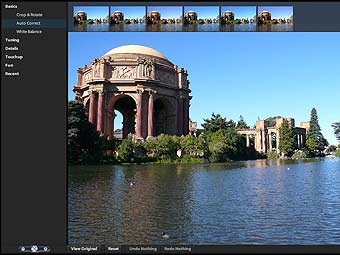 Adobe Systems Incorporated today announced Adobe Photoshop Express public beta, a free Rich Internet Application (RIA) available to anyone who wants to store, sort and show off digital photos with eye-catching effects. During the public beta period, Adobe will solicit Photoshop Express user feedback on product features and functionality, which will continue to evolve over time. As the newest addition to the Photoshop family line, Photoshop Express has taken much of Adobe’s best image editing technology and made it simple and accessible to a new online audience. Photoshop Express allows users to store up to 2 gigabytes of images online for free, make edits to their photos, and share them online in creative ways, including downloading and uploading photos from popular social networking sites like Facebook. Adobe Systems Incorporated today announced Adobe Photoshop Express public beta, a free Rich Internet Application (RIA) available to anyone who wants to store, sort and show off digital photos with eye-catching effects. During the public beta period, Adobe will solicit Photoshop Express user feedback on product features and functionality, which will continue to evolve over time. As the newest addition to the Photoshop family line, Photoshop Express has taken much of Adobe’s best image editing technology and made it simple and accessible to a new online audience. Photoshop Express allows users to store up to 2 gigabytes of images online for free, make edits to their photos, and share them online in creative ways, including downloading and uploading photos from popular social networking sites like Facebook.
“Photoshop is trusted technology that has changed the visual landscape of our world. Now, Photoshop Express allows anyone who snaps a digital photo to easily achieve the high-impact results for which Adobe is known,” said Doug Mack, vice president of Consumer and Hosted Solutions at Adobe. “Photoshop Express is a convenient, single destination where you can store, edit and share photos whether you’re at home, school or on the road.”
With Photoshop Express, digital photos can be uploaded and sorted anytime, edited non-destructively to always preserve the original image, and shared from anywhere, on any Web browser. In a few easy clicks, Photoshop Express empowers anyone to make standard edits, such as removing blemishes and red-eye, converting to black and white, cropping and resizing, and much more.
No experience is required to add special effects that will impress friends and family. In keeping with its one-click approach, Photoshop Express offers tricks like Pop Color which selects an object in an image, mutes the background color of the photo and allows the user to swap the object’s color so it jumps off the page. Sketch effects help photos look like drawings and the Distort feature allows you to distort facial features or objects within the images for a comical or artistic effect. Even users with limited photo editing knowledge can simply select what looks best from a line-up of sample photos with visual hints showing different variations of the added effect.
Photoshop Express offers a variety of creative sharing options, including uploading and showing off photos and slideshows in your own online “Gallery” hosted by Adobe, or conveniently embedding or linking photos to social networking sites and personal blogs without having to leave the application. Slideshows never looked better with animation that makes photos float and fly across the screen, allowing for viewer interactivity and unique presentation styles.
Adobe Photoshop Express beta is available now for free via any Web browser right here.
Posted in Image Editor, Internet, Photo, Web 2.0 | No Comments »
|
|
|




