Archive for the 'Main' Category
Thursday, April 5th, 2012
 Microsoft Research Cliplets is an interactive app that uses semi-automated methods to give users the power to create “cliplets” – a type of imagery that sits between stills and video from handheld videos. The program provides a creative lens one can use to focus on important aspects of a moment by performing spatiotemporal compositing and editing on a video-clip input. Microsoft Cliplets is an application that takes total advantage of semi-automated methods to provide users with the option to create. This kind of imagery includes elements from both still images and from videos shot with any handheld device. Microsoft Research Cliplets is an interactive app that uses semi-automated methods to give users the power to create “cliplets” – a type of imagery that sits between stills and video from handheld videos. The program provides a creative lens one can use to focus on important aspects of a moment by performing spatiotemporal compositing and editing on a video-clip input. Microsoft Cliplets is an application that takes total advantage of semi-automated methods to provide users with the option to create. This kind of imagery includes elements from both still images and from videos shot with any handheld device.
Microsoft Research Cliplets application is designed with a creative lens that can be used to focus on the aspects of the video that you want to, through simply putting together static and dynamic elements from a video clip. The program is not only new and advanced, but is also provided as a freeware for all users. It is light (2.39MB) in size, and is one of the easiest programs that can be downloaded and installed even by a newbie. Please verify from the publisher if your version of Windows is 32-bit or 64 bit before going ahead with download or installation.
Want to check it out? Visit: Microsoft.
Posted in Main | No Comments »
Thursday, April 5th, 2012
 CCFinder simply stands for Creative Commons Finder; and is a program that helps you to easily find pictures which were publicized under the Creative Commons License. CCFinder also enables you to search based on specific usage criteria and shows you what you may do with each picture. That means you can re-publicize most of the pictures found, for example on your website. CCFinder has easy to use features that will enable you do a couple of things with ease instead of the other way round. You can easily and quickly scan pictures in the overview or examine interesting pictures in the detail view. CCFinder simply stands for Creative Commons Finder; and is a program that helps you to easily find pictures which were publicized under the Creative Commons License. CCFinder also enables you to search based on specific usage criteria and shows you what you may do with each picture. That means you can re-publicize most of the pictures found, for example on your website. CCFinder has easy to use features that will enable you do a couple of things with ease instead of the other way round. You can easily and quickly scan pictures in the overview or examine interesting pictures in the detail view.
Some of its outstanding and easy to use features include the following: find and download pictures with a creative commons license from Flickr based on your search terms; it also allows you to put a color filter on the picture to change its look; It shows you which license a picture is published with, and how you may use it and what you need to keep in mind when doing so; you can download pictures by simply going to the source in the internet or directly use it as your desktop wallpaper; easily find pictures without stress; and many more.
Want to check it out? Visit: Abelssoft.
Posted in Main | No Comments »
Tuesday, April 3rd, 2012
 The operating system needs several drivers to run all the hardware associated with your computer from the monitor and keyboard, to video cards and network cards. Obsolete drivers can cause a host of problems ranging from hardware malfunction to system crashes. Trying to find and replace several outdated drivers and downloading the right ones could take a very long time. Also new users run the risk of downloading the wrong drivers, further compounding the problem. The operating system needs several drivers to run all the hardware associated with your computer from the monitor and keyboard, to video cards and network cards. Obsolete drivers can cause a host of problems ranging from hardware malfunction to system crashes. Trying to find and replace several outdated drivers and downloading the right ones could take a very long time. Also new users run the risk of downloading the wrong drivers, further compounding the problem.
Smart Driver Updater is a freeware that helps to locate and automatically replaces outdated drivers. Smart Driver Update provides a fast and safe way to automatically manage and update your drivers. So with a single click of the mouse, Smart Driver Updater will search your whole computer and any related hardware devices attached and makes recommendations for suitable driver updates. This utility contains several thousands of drivers which are regularly updated to ensure that users only download the most recent drivers.
Smart Driver Updater supports the following system requirements: Windows 7, Windows Vista, Windows XP, Windows server 2003 and Windows 2008.
Want to know more? Please visit SmartPCTools.
Posted in Main | No Comments »
Friday, March 30th, 2012
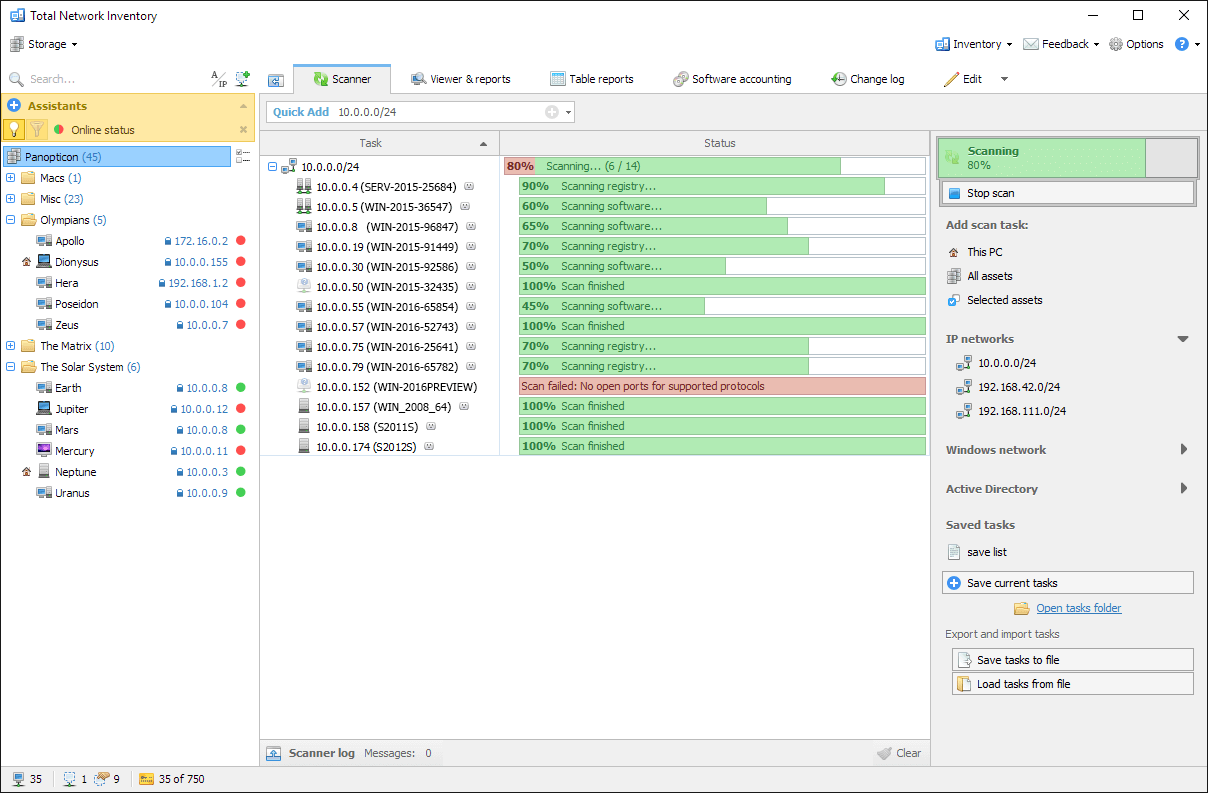 Total Network Inventory is an Asset Management and Tracking application for home, office, and large scale enterprise networks. It interrogates all machines on a network and reports back with complete information about OS, service packs, hotfixes, hardware, software, running processes, etc. on remote machines. This information is added to the centralized database and administrators are able to generate reports about each or all machines on a network. Total Network Inventory is agent-free, and requires no software installed on remote machines. The application is designed with the user in mind, which is reflected in its interface that provides quick and unobtrusive navigation through the program. Total Network Inventory is an Asset Management and Tracking application for home, office, and large scale enterprise networks. It interrogates all machines on a network and reports back with complete information about OS, service packs, hotfixes, hardware, software, running processes, etc. on remote machines. This information is added to the centralized database and administrators are able to generate reports about each or all machines on a network. Total Network Inventory is agent-free, and requires no software installed on remote machines. The application is designed with the user in mind, which is reflected in its interface that provides quick and unobtrusive navigation through the program.
Total Network Inventory is loaded with some high performance features that make it one of the most advanced inventory programs available. Some of these features include the following; inventory management, Windows, Mac OS X and Linux-based computers can be scanned without preinstalled agents, you can create flexible reports on different data categories and build table reports with hundreds of fields of TNI 2 data model (reports can be copied, exported or printed, and the search feature shows the results before you finish typing), you can see the number of software copies and get the list of computers it is installed on just with a few clicks, and many others.
Want to check it out? Visit: Total Network Inventory/.
Posted in Main | No Comments »
Friday, March 30th, 2012
 The WorldWide Telescope (WWT) is a Web 2.0 visualization software environment that enables your computer to function as a virtual telescope bringing together imagery from the best ground and space-based telescopes in the world for a seamless exploration of the universe. The program is created with the Microsoft high performance Visual Experience Engine and allows seamless panning and zooming around the night sky, planets, and image environments. It enables you to view the sky from multiple wavelenghts. Seamlessly pan and zoom from aerial views of the Moon and selected planets, as well as see their precise positions in the sky from any location on Earth and any time in the past or future with the Microsoft Visual Experience Engine. The WorldWide Telescope (WWT) is a Web 2.0 visualization software environment that enables your computer to function as a virtual telescope bringing together imagery from the best ground and space-based telescopes in the world for a seamless exploration of the universe. The program is created with the Microsoft high performance Visual Experience Engine and allows seamless panning and zooming around the night sky, planets, and image environments. It enables you to view the sky from multiple wavelenghts. Seamlessly pan and zoom from aerial views of the Moon and selected planets, as well as see their precise positions in the sky from any location on Earth and any time in the past or future with the Microsoft Visual Experience Engine.
You can see the x-ray view of the sky and zoom into bright radiation clouds and then crossfade into the visible light view and discover the cloud remnants of a supernova explosion from a thousand years ago. With Microsoft WorldWide Telescope, you can also switch to the Hydrogen Alpha view to see the distribution and illumination of massive primordial hydrogen cloud structures lit up by the high energy radiation coming from nearby stars in the Milky Way. There are different ways to reveal the hidden structures in the universe with the WorldWide Telescope beside the two mentioned here.
Want to check it out? Visit: WorldWideTelescope.org.
Posted in Main | No Comments »
Thursday, March 29th, 2012
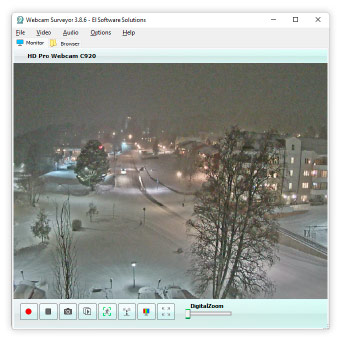 Webcam Surveyor is universal software for video recording and surveillance that enables you to record video from your webcam, take snapshots or record a sequence of snapshots into a video file with a time interval from 1 second to 59 hours. The application will help to track safety and will inform you if something happen. Webcam software also enables you to record all video activity, work as a motion detector, program alerts to be trigged by events (send an email, upload images to FTP site, capture all motion activity in AVI video format). With stealth mode you can hide Webcam Surveyor on your computer. It’s allows to record video at the presence of undesirable people or to find out what happens with your PC in your absence. The built-in browser allows to easily organizing captured images and video clips. Webcam Surveyor is universal software for video recording and surveillance that enables you to record video from your webcam, take snapshots or record a sequence of snapshots into a video file with a time interval from 1 second to 59 hours. The application will help to track safety and will inform you if something happen. Webcam software also enables you to record all video activity, work as a motion detector, program alerts to be trigged by events (send an email, upload images to FTP site, capture all motion activity in AVI video format). With stealth mode you can hide Webcam Surveyor on your computer. It’s allows to record video at the presence of undesirable people or to find out what happens with your PC in your absence. The built-in browser allows to easily organizing captured images and video clips.
With improved video and audio capture, as well as improved scheduler; Webcam Surveyor is a great program worth trying. Though, Webcam Surveyor is a shareware application, the publisher gives users an opportunity to try it out for 30 days. The program however, requires a Direct X 9.0 before it can work properly on your system.
Want to check it out? Visit: WebCamSurveyor.
Posted in Main | No Comments »
Thursday, March 29th, 2012
 Power Mixer is an advanced Windows audio mixer, and also a complete replacement for the standard Volume Control. Power Mixer lets you easily change the sound volume by rotating the mouse wheel or by using keyboard hot keys. It includes an audio mixer with advanced volume controls support, a scheduler, an on-screen display, command line support; and the ability to store and recall different unlimited presets via one mouse click or system-wide hot keys. With the presets, you can change all parameters of sound simultaneously. The program is designed to be especially useful for those who play games, work professionally with sound, or are everyday users. Power Mixer is an advanced Windows audio mixer, and also a complete replacement for the standard Volume Control. Power Mixer lets you easily change the sound volume by rotating the mouse wheel or by using keyboard hot keys. It includes an audio mixer with advanced volume controls support, a scheduler, an on-screen display, command line support; and the ability to store and recall different unlimited presets via one mouse click or system-wide hot keys. With the presets, you can change all parameters of sound simultaneously. The program is designed to be especially useful for those who play games, work professionally with sound, or are everyday users.
The publisher of this program has done a great job on this version. There are a couple of changes that can be regarded as remarkable improvement over previous versions. Some of these changes and updates include the following; addition of language support for Greek, addition for adjusting volume by mouse wheel/click for multiple audio controls, addition of default audio device as target for any tasks, addition of scheduler events ‘Run on Session Start/End’, addition of Button into scheduler to run task, and addition of option to display OSD for any changes of volume and mute.
Want to check it out? Visit: Power Mixer/.
Posted in Main | No Comments »
Thursday, March 29th, 2012
 AceMoney is a product developed for everyday tasks of personal finance management. It allows you to track your cash flow in multiple accounts, keep an eye on spending money by categories and payees, and satisfy a lot of questions like how much you pay for food last month with one click of a button. AceMoney can generate many different types of reports, and is compatible with QIF file format most banks use to provide data online. All you need do is download a file from the web site of your financial institution and import it to the account registry. It is designed for regular people that don’t have special accounting skills or banking techniques. AceMoney is a product developed for everyday tasks of personal finance management. It allows you to track your cash flow in multiple accounts, keep an eye on spending money by categories and payees, and satisfy a lot of questions like how much you pay for food last month with one click of a button. AceMoney can generate many different types of reports, and is compatible with QIF file format most banks use to provide data online. All you need do is download a file from the web site of your financial institution and import it to the account registry. It is designed for regular people that don’t have special accounting skills or banking techniques.
AceMoney has been in use for sometimes now, and is regarded as one of the easiest money management programs today. It supports different account types like checking, savings, credit cards, loans, debt accounts, and even enables you to create your own custom account type. Other advance features of AceMoney include the following; configure your home budget limits for every category and track the difference between actual and budgeted values, track your investment activities like 401k, Stock options, exchange rates for more than 150 different currencies are automatically downloaded from Internet, shows you when your bills are due, and many more.
Want to check it out? Visit: Mechcad.
Posted in Main | No Comments »
Thursday, March 29th, 2012
 Able Video Snapshot is an application that lets you take snapshots directly from your movie. That simply means you can go to any point within a video clip, capture a freeze frame picture, and save this image to your computer’s hard drive. This version now has a new control panel that makes it a bit stable than recent or past versions. Able Video Snapshot enables you to do a lot of things that include creating title slides with videos, add a title directly to the picture using a photo-editing program. Able Video Snapshot is an application that lets you take snapshots directly from your movie. That simply means you can go to any point within a video clip, capture a freeze frame picture, and save this image to your computer’s hard drive. This version now has a new control panel that makes it a bit stable than recent or past versions. Able Video Snapshot enables you to do a lot of things that include creating title slides with videos, add a title directly to the picture using a photo-editing program.
Able Video Snapshot is a shareware with a couple of nice and advanced features that include the following; users could email hi-light pictures of their videos to friends and family (not everyone can receive or view videos, so these pictures are a great alternative), users can also use the snapshot feature to transform their camcorder into a low-resolution digital camera by simply pointing their camcorders at their subjects, and later they can go through their videos and take virtual snapshots directly off the captured video, and a couple of others.
Able Video Snapshot is not exactly a bad program, but users need to try it out a couple of times to actually understand some of its features.
Want to check it out? Visit: Graphicregion.
Posted in Main | No Comments »
Wednesday, March 28th, 2012
 ExtractNow is a freeware that allows you to extract several of your archived files very easily with a simple click of the button. To do this, simply drag and drop them into the main program window or right-click on the files while in Windows Explorer. This program makes extracting files quite easy and at a breeze. It supports the following formats: ZIP, RAR, ISO, BIN, IMG, IMA, IMZ, 7Z, ACE, JAR, GZ, LZH, LHA and SIT archive. ExtractNow is a freeware that allows you to extract several of your archived files very easily with a simple click of the button. To do this, simply drag and drop them into the main program window or right-click on the files while in Windows Explorer. This program makes extracting files quite easy and at a breeze. It supports the following formats: ZIP, RAR, ISO, BIN, IMG, IMA, IMZ, 7Z, ACE, JAR, GZ, LZH, LHA and SIT archive.
The publishers have added the following new features: minimize command line parameter, fixed destination directory creation and you can now automatically extract files even when there is only one folder. This new version also supports most archive formats, uses password lists to locate the correct password for an archive. You can also manage the aftermath of a file extraction as well as keep a tab on directories for archives and automatically extract them.
It supports the following minimum systems requirements: Microsoft Windows 96 and Internet Explorer 5.5.
Want to know more? Please visit ExtractNow.
Posted in Main | No Comments »
|
|
|




