Archive for the 'Main' Category
Wednesday, December 21st, 2011
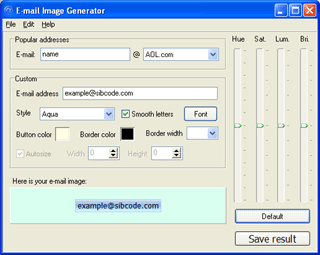 E-Mail Image Generator can be used to protect your pages from scanning by automatic robots. Pictures of email addresses created by E-Mail Image Generator can be used to replace text e-mail addresses, which you usually provide for public access on your personal homepage, discussion boards and blogs. The problem is if your address is displayed as a picture instead of text, special spammers’ e-mail harvesting programs will not be able to read your address and store it in the spam list. Some of the key features of E-Mail Image Generator include the following; ability to create attractive GIF, PNG, JPEG and BMP buttons, ability to create Aqua-styled email images, pre-made items for popular free mail services, and protection of e-mail addresses at your website from automated e-mail grabbers. E-Mail Image Generator can be used to protect your pages from scanning by automatic robots. Pictures of email addresses created by E-Mail Image Generator can be used to replace text e-mail addresses, which you usually provide for public access on your personal homepage, discussion boards and blogs. The problem is if your address is displayed as a picture instead of text, special spammers’ e-mail harvesting programs will not be able to read your address and store it in the spam list. Some of the key features of E-Mail Image Generator include the following; ability to create attractive GIF, PNG, JPEG and BMP buttons, ability to create Aqua-styled email images, pre-made items for popular free mail services, and protection of e-mail addresses at your website from automated e-mail grabbers.
A lot of email users may argue that they can make use of their MS Paint, text, and equally save images as graphic files; that is true, but there is nothing wrong in trying something really new. E-mail Image Generator gives you something new when it comes to creating email images. However, you should never get carried away with the fact that E-Mail Image Generator cannot be used as a replacement for your email address in your email client, or on websites which require an email address for signing up.
Want to check it out? Visit Sibcode.
Posted in Main | No Comments »
Wednesday, December 21st, 2011
 iDevice Manager (formerly iPhone Explorer) enables you to look into the file system of your iPhone, iPad and iPod Touch and download / upload files by USB connection, regardless of the file format. Within this function you can use your iPhone/iPad/iPod as an “external disk”. It supports direct access to photos, emails, SMS, and video directories of the iPhone. View photos, emails, SMS, videos and all other files easily. The same function is also available for videos, music (from iPod-App) and ringtones. The highlight of this program is the creation of your own ringtones with the ringtone editor from MP3, WAV, AIFF and M4A audio file formats. iDevice Manager (formerly iPhone Explorer) enables you to look into the file system of your iPhone, iPad and iPod Touch and download / upload files by USB connection, regardless of the file format. Within this function you can use your iPhone/iPad/iPod as an “external disk”. It supports direct access to photos, emails, SMS, and video directories of the iPhone. View photos, emails, SMS, videos and all other files easily. The same function is also available for videos, music (from iPod-App) and ringtones. The highlight of this program is the creation of your own ringtones with the ringtone editor from MP3, WAV, AIFF and M4A audio file formats.
One of the highlights of the iDevice Manager is the creating of custom ringtones for the iPhone. With the comfortable ringtone editor can you use MP3, WAV, AIFF and M4A audio file formats. The ringtone editor can accurately cut milliseconds. However the song length is not limited to 32 seconds as iTunes. iDevice Manager also offers access to the device file system, creates own ringtones from MP3, displays SMS messages, playing music and much more useful functions. iDevice Manager is a freeware program, and is available without limitation.
Want to check it out? Visit iDeviceManager.
Posted in Main | No Comments »
Tuesday, December 20th, 2011
 GreenCloud Printer is an optimized virtual printer, working with any printer model. It will allow you preview with the same dialog whatever the software you are using before printing. In 1 click GreenCloud Printer will allow you to deselect pages you don’t need to print, or to group several pages in 1 sheet of paper. GreenCloud printer is a fast PDF creator too, but it allows you to send the PDF by email, to Dropbox, Minus or Google Docs with the integrated file uploader. The ink, print cartridge or toner is saved by a setting you can define, instead of printing in pure black it will print with a dark grey which won’t affect the overall quality. The publisher also added duplex mode to print on the 2 sides of the sheet of paper (when printer supports this feature). GreenCloud Printer is an optimized virtual printer, working with any printer model. It will allow you preview with the same dialog whatever the software you are using before printing. In 1 click GreenCloud Printer will allow you to deselect pages you don’t need to print, or to group several pages in 1 sheet of paper. GreenCloud printer is a fast PDF creator too, but it allows you to send the PDF by email, to Dropbox, Minus or Google Docs with the integrated file uploader. The ink, print cartridge or toner is saved by a setting you can define, instead of printing in pure black it will print with a dark grey which won’t affect the overall quality. The publisher also added duplex mode to print on the 2 sides of the sheet of paper (when printer supports this feature).
GreenCloud Printer is a virtual driver for your printer. It works with your current printer to preview the pages to print for the following; preview printing job, remove unwanted page, group1, 2, 4, pages per sheet of paper, print to PDF fast PDF creator built-in, and directly to print to Dropbox, Evernote, Minus.com (will create a PDF doc).
Want to check it out? Visit Obviousidea.com.
Posted in Main | No Comments »
Tuesday, December 20th, 2011
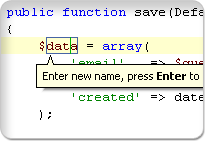 Zend Studio is an Integrated Development Environment (IDE) application designed for professional developers that encompasses all the development components necessary for the full PHP application lifecycle. Through a comprehensive set of editing, debugging, analysis, optimization, database tools and testing it speeds development cycles and simplifies complex projects. Zend Studio is an Integrated Development Environment (IDE) application designed for professional developers that encompasses all the development components necessary for the full PHP application lifecycle. Through a comprehensive set of editing, debugging, analysis, optimization, database tools and testing it speeds development cycles and simplifies complex projects.
Zend Studio is the only Integrated Development Environment (IDE) available for professional developers providing the capabilities needed to develop business applications. Features like refactoring, code generation, code assist and semantic analysis combine to enable rapid application development on both the server side (in PHP) and the browser side (in JavaScript).
The program also provides comprehensive debugging and testing support that helps you analyze and resolve problems quickly. Through support for both local and remote (on server) debugging, integrated PHP and JavaScript debugging, profiling, code inspection & quick fix, test generation and reporting, you have one of the best tools needed to diagnose and resolve application problems quickly while ensuring your code starts out correctly. Tight integration with Zend Server speeds root cause analysis of problems detected in testing, staging or the production environment. The program also enhances productivity with team-oriented development features, such as support for source configuration management (Git, GitHub, CVS, SVN) and shared project settings.
Want to check it out? Visit Zend.com.
Posted in Main | No Comments »
Tuesday, December 20th, 2011
 Free Hide IP is a privacy protection program that could hide your real IP address for FREE, anonymize your web surfing, keep your computer safe from hacker attacks and other risks, all with a single click. Free Hide IP software also allows you to send anonymous emails through any web based mail system, or get unbanned from restricted websites. Free Hide IP works with Internet Explorer, Firefox, Opera, Maxthon, MyIE and is compatible with all types of Internet. Free Hide IP is a privacy protection program that could hide your real IP address for FREE, anonymize your web surfing, keep your computer safe from hacker attacks and other risks, all with a single click. Free Hide IP software also allows you to send anonymous emails through any web based mail system, or get unbanned from restricted websites. Free Hide IP works with Internet Explorer, Firefox, Opera, Maxthon, MyIE and is compatible with all types of Internet.
Free Hide IP may be tagged a freeware program, but it sure comes with a couple of key features that could help you keep hackers at bay. Some of these features include the following; change your IP address for free when you surf online and others will never know your real IP address, surf anonymously and get protected from websites, hackers or identity thieves that want to monitor your online activities or steal your identity or other personal information, hide your real IP address with Free Hide IP, which will unban you from any forums or other blocked websites that have ever banned you, a “choose IP Country” option enables you to select one country at your wish from the country list and then you are assigned fake IP addresses from the designated country, etc. The program is a bit light, and is actually about 4.65 MB; which may not take a long time to download.
Want to check it out? Visit Free-hideip.
Posted in Main | 1 Comment »
Tuesday, December 20th, 2011
 freeCommander is a dual-panel file explorer with many features. In addition to the standard file management features, it can be used to compare directories, display folder sizes, synchronize folders and more. FreeCommander XE Build can also open/create ZIP and CAB files, and open RAR files as well as search inside those archives. You can set view filters, create folder list (for printing), change file attributes, launch a command prompt, take a desktop screenshot and more. When you have a freeware program with a lot of quality features, you can’t but commend those behind it. Hopefully, it will remain a freeware because it is going to do a lot of people a lot of good. freeCommander is a dual-panel file explorer with many features. In addition to the standard file management features, it can be used to compare directories, display folder sizes, synchronize folders and more. FreeCommander XE Build can also open/create ZIP and CAB files, and open RAR files as well as search inside those archives. You can set view filters, create folder list (for printing), change file attributes, launch a command prompt, take a desktop screenshot and more. When you have a freeware program with a lot of quality features, you can’t but commend those behind it. Hopefully, it will remain a freeware because it is going to do a lot of people a lot of good.
Its main features include the following; dual-panel technology-horizontal and vertical, tabbed interface, optional tree view for each panel, built in file viewer to files in hex, binary, text or image format, file viewer inside archives too, built in archive handling; nested archive handling, built in FTP client, easy access to system folders, control panel, desktop and start menu, copy, move, delete, rename files and folders, multi rename tool, wipe files, create and verify MD5 checksums, file splitting, file properties and context menu, calculation of folder size, and many more.
Want to check it out? Visit Freecommander.
Posted in Main | No Comments »
Tuesday, December 20th, 2011
 Audacity is a free audio editor that can record sounds, play sounds, import and export WAV, AIFF, and MP3 files, and more. You can also use it to edit your sounds using Cut, Copy, and Paste (with unlimited Undo), mix tracks, or apply effects to your recordings. It also has a built-in amplitude envelope editor, a customizable spectrogram mode, and a frequency analysis window for audio analysis applications. Built-in effects include Bass Boost, Wahwah, and Noise Removal, and it also supports VST plug-in effects. One of the best open source audio editing software programs I have seen; and combine a lot of quality and easy to use features. Audacity is a free audio editor that can record sounds, play sounds, import and export WAV, AIFF, and MP3 files, and more. You can also use it to edit your sounds using Cut, Copy, and Paste (with unlimited Undo), mix tracks, or apply effects to your recordings. It also has a built-in amplitude envelope editor, a customizable spectrogram mode, and a frequency analysis window for audio analysis applications. Built-in effects include Bass Boost, Wahwah, and Noise Removal, and it also supports VST plug-in effects. One of the best open source audio editing software programs I have seen; and combine a lot of quality and easy to use features.
Audacity for Windows also includes a couple of bug fixes and changes that make the program more attractive. It also retains a lot of its old features, and that means you will almost certainly find it very easy to get used to this latest version. New users can also find this version very easy to use. However, users with little or no experience may have some challenges when it comes to using Audacity. The features are a bit advanced, and may take a couple of trials to get used to.
Want to check it out? Visit Audacity.
Posted in Main | No Comments »
Tuesday, December 20th, 2011
 PstMsg Extract and Export Tool is an integration of MAPI (Microsoft Messaging API) and MSSQL (Microsoft SQL) Server based technologies to achieve fast and complete configuration driven data transformation of MAPI properties to a SQL Server table. The program processes Microsoft Outlook PST (Personal Storage) files, Profiles, and Disk Messages. It exports MAPI properties of Folders, Messages, and Attachments along with runtime values to database tables. Contents of attachments are not extracted. Most features of the tool are point-and-click. PstMsg Extract and Export Tool is an integration of MAPI (Microsoft Messaging API) and MSSQL (Microsoft SQL) Server based technologies to achieve fast and complete configuration driven data transformation of MAPI properties to a SQL Server table. The program processes Microsoft Outlook PST (Personal Storage) files, Profiles, and Disk Messages. It exports MAPI properties of Folders, Messages, and Attachments along with runtime values to database tables. Contents of attachments are not extracted. Most features of the tool are point-and-click.
PstMsg Extract and Export Tool has a lot of outstanding features that include the following; configuration driven export of Outlook PST and Message MAPI properties to SQL Server tables, builds PST file by scanning disk folders for Message files, extracts Messages from multiple PST files to disk, extracts attached files and Microsoft Office 97-2003/2007/Adobe Acrobat PDF Ole embedded attachments from Outlook Messages, imports a custom MAPI property in Messages while building PST file, and exports Messages, Recipients, Attachments, Folders, and Associated Folder MAPI properties in new or existing SQL Server tables.
PstMsg Extract and Export Tool requires Microsoft .Net Framework 2.0, approximately 15MB of disk space, Microsoft SQL Server 2000/2005/2008 or Microsoft SQL Express Desktop Engine, and Microsoft Windows XP SP2 or higher with Microsoft Office 2007.
Want to check it out? Visit Niksaa.
Posted in Main | No Comments »
Tuesday, December 20th, 2011
 Bitcoin is an experimental new digital currency application that enables instant payments to anyone, anywhere in the world. Bitcoin uses peer-to-peer technology to operate with no central authority: managing transactions and issuing money are carried out collectively by the network. Bitcoin is also the name of the open source software which enables the use of this currency. Users can transfer Bitcoins between arbitrary nodes on the network. The program is designed around the idea of using cryptography to control the creation and transfer of money, rather than relying on central authorities. Bitcoin is an experimental new digital currency application that enables instant payments to anyone, anywhere in the world. Bitcoin uses peer-to-peer technology to operate with no central authority: managing transactions and issuing money are carried out collectively by the network. Bitcoin is also the name of the open source software which enables the use of this currency. Users can transfer Bitcoins between arbitrary nodes on the network. The program is designed around the idea of using cryptography to control the creation and transfer of money, rather than relying on central authorities.
Some of the major features in this updated version include the following; Double spending is prevented by using a block chain, transactions are irreversible, Bitcoins can be transferred between arbitary nodes on the network, Transactions are broadcasted within seconds and verified within 10 to 60 minutes, and Transactions are received while the computer is turned off.
Bitcoin is a bit advanced and technical in terms of usage; and that is why users may require some documents posted on the publishers’ site. However, it is an open source program that runs on the following operating systems; Windows 7, 2000, 2003, Vista, and XP.
Want to check it out? Visit Bitcoin.org.
Posted in Main | No Comments »
Monday, December 19th, 2011
 Zip Express is a program that allows you to search by zip code, city, county, state, or area code. As you type in search criteria, potential matches are displayed. Preferences may be chosen on what data is to be displayed. Other benefits of using Zip Express include, copy data to the clipboard or print it, lets you automatically paste zip code information directly into your Windows applications via hot keys – over 80 hot keys are available, and you can have nearly unlimited formats for your data. To use this program, all you are expected to do is paste ZIP Code information directly into your Windows applications, then press a hotkey while in your word processor and a ZIP Code entry box appears. Type in your ZIP Code and the city, state and ZIP Code are typed right into your word processor. Zip Express is a program that allows you to search by zip code, city, county, state, or area code. As you type in search criteria, potential matches are displayed. Preferences may be chosen on what data is to be displayed. Other benefits of using Zip Express include, copy data to the clipboard or print it, lets you automatically paste zip code information directly into your Windows applications via hot keys – over 80 hot keys are available, and you can have nearly unlimited formats for your data. To use this program, all you are expected to do is paste ZIP Code information directly into your Windows applications, then press a hotkey while in your word processor and a ZIP Code entry box appears. Type in your ZIP Code and the city, state and ZIP Code are typed right into your word processor.
Zip Express is one of the easiest application to use; and it does precisely what the publisher said it does. Press another hot key to get a ZIP Code directly from your data base and watch the city, state and county appear. The program has a couple of key features that include the following; easy to use, gives you value for money, easy to install, etc.
Want to check it out? Visit Getzips.com.
Posted in Main | No Comments »
|
|
|




