Archive for the 'Main' Category
Thursday, June 3rd, 2010
 McAfee AVERT Stinger is a very good free anti-virus scanner designed and developed to be proactive in detecting and cleaning root kits, which are running on the computers. When prompted, the user should choose to save the file to a location that is most convenient on his hard disk. Once it has been saved, it then means that the download has been completed. The next stage will be to navigate through to the folder that contains the downloaded Stinger file, and run it. WindowsME/XP/Vista users. McAfee AVERT Stinger is a very good free anti-virus scanner designed and developed to be proactive in detecting and cleaning root kits, which are running on the computers. When prompted, the user should choose to save the file to a location that is most convenient on his hard disk. Once it has been saved, it then means that the download has been completed. The next stage will be to navigate through to the folder that contains the downloaded Stinger file, and run it. WindowsME/XP/Vista users.
Stinger is only unable to repair virus if the Windows System Restore functionality has a lock on the infected file. What should be done at this point is for the user to disable system restore before scanning commences.
One major plus for McAfee AVERT Stinger that it creates Stinger.opt file that saves the current Stinger configuration whenever it runs. By so doing, when next the user decides to runs the Stinger, the previous configuration is what is used as long as the Stinger.opt file is in the same directory as Stinger.
To get the best of McAfee AVERT Stinger is to set it to Medium sensitivity level because when it is set higher it uses to reports many false positives.
Want to check it out? Visit Stinger
Posted in Main | No Comments »
Wednesday, June 2nd, 2010
 Slackware Linux is a server-side product complete 32-bit multitasking UNIX-like system. It contains user-friendly an installation program, a menu-driven package system and extensive online documentation. A completely full installation gives users the X Window System, Perl, networking utilities, a mail server, a news server, C/C++ development environments, a web server, the GNU Image Manipulation Program, Netscape Communicator, an FTP server, and lots of other programs. Slackware Linux is a server-side product complete 32-bit multitasking UNIX-like system. It contains user-friendly an installation program, a menu-driven package system and extensive online documentation. A completely full installation gives users the X Window System, Perl, networking utilities, a mail server, a news server, C/C++ development environments, a web server, the GNU Image Manipulation Program, Netscape Communicator, an FTP server, and lots of other programs.
Slackware Linux is presently based around the 2.4 Linux kernel series and the GNU C Library version 2.3.4 (libc6). It can conveniently run on 486 systems all the way up to the latest x86 machines (but uses -mcpu=i686 optimization for best performance on i686-class machines like the P3, P4, and Duron/Athlon).
Some of the noticeable changes in Slackware 13.0 from the time of Slackware 12.2 are; major upgrades to the desktop environments (KDE version 4.2.4 and Xfce version 4.6.1), completely reworked collection of X packages (a configuration file for X is no longer needed in most cases), new txz package format with much better compression, and other upgrades all around.
On a final note, one glaring weak point is the fact that the new Slackware 13.0 is conservative and cannot be installed with minimal requirements.
Want to check it out? Visit Slackware.
Posted in Main | No Comments »
Monday, May 31st, 2010
 Dexpot 1.5 is a tool that has the capacity to optimize window management of a computer. It can eliminate any problem of problem of disorder on a PC desktop and carries a lot more functions. Some of its functions include; Extends Desktop to a multiple; makes working with computers faster than would have been expected and it is more comfortable. All Depot functions use a unified graphical interface which is very easy to operate. Dexpot 1.5 is a tool that has the capacity to optimize window management of a computer. It can eliminate any problem of problem of disorder on a PC desktop and carries a lot more functions. Some of its functions include; Extends Desktop to a multiple; makes working with computers faster than would have been expected and it is more comfortable. All Depot functions use a unified graphical interface which is very easy to operate.
Depot operates by creating additional workspaces that a user can easily and quickly switch between. For instance, Desktop 1 is to listen to your favorite music, users can surf the web on Desktop 2, Desktop 3 to used to handle daily word processing or switch to Desktop 4 for a game of Solitaire. Depot can create different icons, start-ups, wallpapers and a lot more can be configured for each desktop.
Going a step further, Depot the solution is to clone any problematic windows on all desired desktops. To carry out this function, simply right click on the Dexpot tray icon Desktop rules, add a new rule for sharp widgets windows and then in the “ACTION TAB” ALLOWS users to have “Copy” and to all to desktops.
When switching Depot, it usually gives users a blank screen with wallpaper.
Want to check it out? Visit Dexpot
Posted in Main | No Comments »
Monday, May 31st, 2010
 Glary Utilities provides a lot of powerful and easy-to-use computer system tools and utilities to help fix, maintain, speed up and protect PC. It allows users of this tool to actually clean common system junk files, as well as invalid registry entries and Internet traces. Glary Utilities provides a lot of powerful and easy-to-use computer system tools and utilities to help fix, maintain, speed up and protect PC. It allows users of this tool to actually clean common system junk files, as well as invalid registry entries and Internet traces.
The new interface of the Glary Utilities looks better than the previews interface. Users can manage and delete browser add-on, analyze disk space usage and duplicate files. It also can help users view and installed shell extensions, encrypt files from unauthorized access and use, split large files into smaller manageable files and rejoin them.
Glary utilities are a one-stop-shop for optimizing and maintaining computers for better performance. It freeware comes with registry and disk cleaning, privacy protection, amazing multifunctional tools and performance accelerator. It is very user friendly because it designed for both professionals and non professionals.
This utility tool is so good that it can fix registry errors, optimize internet speed, safeguard confidential files, wipe off clutters and sustain maximum performance.
Immediately a user is able to download Glary Utilities, he automatically becomes completely from the problem of slow download problems. It has just about everything a user could every need to optimize his system.
Want to check it out? Visit Glaryutilities
Posted in Main | No Comments »
Monday, May 31st, 2010
 Comodo System Cleaner is the recognized the world over as the first cleaner to come with 100% safe cleaning, and it is now very portable. Its main feature is the utilization of the revolutionary innovation of SafeDelete (a feature that allows users to safely recover any files deleted in error). This latest advancement has been able to eliminate risk from the process of PC cleaning as now Comodo System Cleaner is entirely risk-free. Comodo System Cleaner can be deployed on any removable storage device, such as a USB drive. Comodo System Cleaner is the recognized the world over as the first cleaner to come with 100% safe cleaning, and it is now very portable. Its main feature is the utilization of the revolutionary innovation of SafeDelete (a feature that allows users to safely recover any files deleted in error). This latest advancement has been able to eliminate risk from the process of PC cleaning as now Comodo System Cleaner is entirely risk-free. Comodo System Cleaner can be deployed on any removable storage device, such as a USB drive.
Comodo basically takes control system by customizing all aspect of Windows XP or Vista behavior with just a few clicks of the mouse. This Cleaner has a lot of quality features that stands it out. And so of them include; the capacity to boasts numerous additional utilities to safeguard privacy and security users files File Pend Delete and the powerful ‘File Wiper, can fine tune virtually every aspect of Windows behavior, can fingertip access to important controls and settings that are either not available or are very difficult to find in Windows and much more.
One disadvantage of this tool is that it not actually provides 100% safe cleaning.
Want to check it out? Visit System-cleaner
Posted in Main | No Comments »
Saturday, May 29th, 2010
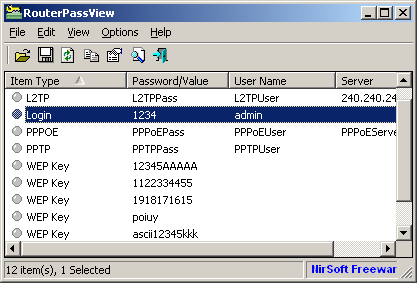 RouterPassView is utility tool that allows users to backup the configuration of the router into a file, and restore the configuration from the file when it is needed. The backup file of the router most of the time contains important data such as ISP user name and password, the login password of the router, and wireless network keys. In case a user happens to have lost one of these password or keys, but he still has a backup file of his router configuration, RouterPassView might help such a user to recover the lost password from your router file. RouterPassView is utility tool that allows users to backup the configuration of the router into a file, and restore the configuration from the file when it is needed. The backup file of the router most of the time contains important data such as ISP user name and password, the login password of the router, and wireless network keys. In case a user happens to have lost one of these password or keys, but he still has a backup file of his router configuration, RouterPassView might help such a user to recover the lost password from your router file.
RouterPassView supports the following number of router models; NETGEAR WGT624, and possibly similar models, Dynalink RTA1025W, and possibly similar models, Siemens ADSL SL2-141, and possibly similar models, Edimax BR6204WG, and possibly similar models, Linksys WRT54GL, and possibly similar models, ASUS WL-520g, and possibly similar models, COMTREND 536+ (Only Internet Login), US Robotics 9108 ADSL (internet login and admin login), D-Link DSL-2540U/BRU/D ADSL2+.
RouterPassView is very easy to use because it does not require any installation process or additional DLL files. You can start using it simply by running the executable file – RouterPassView.exe. Once you have finished running RouterPassView, then the next stage will be to open your router configuration file by using ‘Open Router Configuration File’ option (Ctrl+O) or by dragging the configuration file from Explorer into the main window of RouterPassView.
Want to check it out? Visit Nirsoft
Posted in Freeware, Main | No Comments »
Saturday, May 29th, 2010
 Mozilla Thunderbird is a new updated interface that contains filtering and timeline tools to pinpoint the exact email a user is looking for. It come with the capacity to checks if a system is running the latest version, and subsequently notifies the user when a security update is available. Mozilla Thunderbird is a new updated interface that contains filtering and timeline tools to pinpoint the exact email a user is looking for. It come with the capacity to checks if a system is running the latest version, and subsequently notifies the user when a security update is available.
One thing about this tool is the fact that its security updates are as small as 200KB – 700KB, thereby giving users only what they need and making the security update quick to download and install. The automated update system provides updates for Mozilla Thunderbird on Windows, Mac OS X, and Linux in over 40 different languages the world over.
The Mozilla Thunderbird is much faster; processing has been made a bit faster so also is its searches. Before the introduction of mail account setup, users had to know IMAP, SMTP, SSL/TLS settings. All that is no longer necessary because what is required is for users to provide their name, email address, and password and the new email account set up wizard will check its database and find the email settings.
The sad point is that Mozilla Thunderbird the fact that it eats up massive memory on the computer and does not work with older versions.
Want to check it out? Visit Mozillamessaging
Posted in Main | No Comments »
Saturday, May 29th, 2010
 Project Manager .NET is project management is an easy to use tool that is designed for people who are in dear need less complex tool to help them manage and complete projects. Its function is to help users organize both small and large projects, both for personal and business use. It can as well be described as a Web Host Solution. Project Manager .NET is project management is an easy to use tool that is designed for people who are in dear need less complex tool to help them manage and complete projects. Its function is to help users organize both small and large projects, both for personal and business use. It can as well be described as a Web Host Solution.
Project Manager. NET is simple, effective Project organization. All data is stored in compact data files, which may contain any number of Projects, Subtasks, Milestones, and Tasks. This makes it easy to copy and email to colleagues.
Project Manager allows users to secure the data file and certain functions within the application by supporting User Login and roles. Outlook integration allows Task List to be imported directly to their Outlook Task List, allowing them to work from their or synchronize on a Smart Phone or PDA.
Project Manager. NET has a Project Summary Page that gives users information about the Project such as User Workbook, Tasks completely Recently, Task Overdue or Upcoming, and detailed.
Project Manager. NET Shares Tasks with Outlook 2003. Users can manually import and export Tasks between Project Manager and Outlook, or setup Automatic Synchronization with Outlook.
Want to check it out? Visit Pmnet.tahelpya.com
Posted in Main | No Comments »
Friday, May 28th, 2010
 In some operating systems like Windows, when you delete a file, the file is not physically removed from your hard drive; instead it is stored into a hidden portion of your hard drive and these deleted files can still be recovered using a third party software capable of restoring deleted files. In some operating systems like Windows, when you delete a file, the file is not physically removed from your hard drive; instead it is stored into a hidden portion of your hard drive and these deleted files can still be recovered using a third party software capable of restoring deleted files.
Fine Recovery Enterprise is powerful data recovery software capable of recovering deleted files from your hard drive. It offers a lot of features for restoring files easier and faster. The review for this software focuses on these criteria: installation and system requirements, user interface, features and performance.
First are the system requirements. The program does not require sophisticated hardware specifications. A single core processor is enough, and a 1 gigabyte of memory, and a free hard disk space of about 5 MB. The program is compatible with Windows 2000 and later versions. Its graphical user interface is easy to use, but probably not the best. The interface looks like “windows explorer” in terms of the color and design. Menus are easy to find, and searched files are display in a grid together with the filename, size and date created and modified.
It offers tools for scanning your hard drive and recovering deleted files from your hard drive. It allows you to either perform a quick scan or full scan on your hard drive. The program displays the deleted file in a grid and can be viewed on the center of the window. For a faster searching, you can also use the find tool; just type the filename or a phrase from the filename of the file you want to recover.
You can preview a deleted file before retrieving. When you found the files that you want to retrieve, just check the file/s and then click preview. Searching and retrieving files on this program is fast. You can recover a single file or batch files in one action. You also can recover deleted files from corrupt, deleted or even damaged partitions (NTFS). When performing search and retrieval, the program does not modify the deleted file or the hard drive space where these deleted files are stored. It supports multiple types of hard drives (IDE/SATA/SCSI), and can search disk capacity of 1TB.
Well, the speed of scanning and retrieving depends on the size of hard drive being scanned and the size of file/s being retrieved. But in normal operation, file recovery is faster. The program slows down a bit when performing full scan, so when using this feature, try to close other programs to optimize speed.
Fine Recovery Enterprise is powerful data recovery software that offers fast search and retrieval of deleted files. The features are cool and very useful, the system requirements are minimal and attainable, and runs smoothly on Windows platform. However, the program is commercial software with a price of $39.95. A trial version is available for free download but with limited functionality. This program is perfect for users who need to recover deleted files but has the right budget for the best software available.
You can download or purchase Fine Recovery Enterprise at Finerecovery.com
Posted in Main | No Comments »
Thursday, May 27th, 2010
 VirtualBox is a powerful x86 and AMD64/Intel64 virtualization product which is the only professional solution that is freely available as Open Source Software under the GNU General License (GPL). VirtualBox therefore is for both home use and enterprise. VirtualBox is not only a high performance product for enterprise customers but also comes with extremely rich features. VirtualBox is a powerful x86 and AMD64/Intel64 virtualization product which is the only professional solution that is freely available as Open Source Software under the GNU General License (GPL). VirtualBox therefore is for both home use and enterprise. VirtualBox is not only a high performance product for enterprise customers but also comes with extremely rich features.
Presently, as it stand today, VirtualBox runs efficiently well on Windows, Macintosh and OpenSolaris hosts, Linux, and also supports a large number of guest operating systems such as Windows (NT 4.0, 2000, XP, Vista, Windows 7, Server 2003), 3.x, Linux (2.4 and 2.6), DOS/Windows, Solaris and OpenSolaris, and OpenBSD.
The memory requirement of VirtualBox is at least 512 MB of RAM and any thing shot of this minimum automatically means that users will likely not enjoy the experience. If the system memory is not up to the required minimum, what happens is that VirtualBox will refuse to install. This obviously can best be described as one of its limitation.
VirtualBox is intended for wide audience that includes the general users, third-party OEM vendors and developers. This product is of interest mainly to developers and system administrators because it comes with advanced functionality and distinctive capabilities.
Want to check it out? Visit Virtualbox
Posted in Main | No Comments »
|
|
|




