Archive for the 'Main' Category
Tuesday, November 25th, 2014
 Several things determine what browser a user installs on his system. These days, it is not only about speed, but also about security and a couple of other features that make for easy browsing. Those are just a few things that make the Firefox and Chrome browsers of this world very popular. For those who want to try their hands on something slightly different, Slimjet is not a bad idea. Several things determine what browser a user installs on his system. These days, it is not only about speed, but also about security and a couple of other features that make for easy browsing. Those are just a few things that make the Firefox and Chrome browsers of this world very popular. For those who want to try their hands on something slightly different, Slimjet is not a bad idea.
What’s the big deal about Slimjet?
Slimjet is a fast, smart and powerful web browser based on the Blink engine. It is built on top of the Chromium open source project, on which Google chrome is also based. The browser easily integrates a lot of powerful and convenient features to help users maximize their online productivity. Slimjet users can get more work done in much less time, all without taking the pain to hunt for external plugins from various sources.
Slimjet also includes many options and settings so that users can customize the browser to best suit their own personal preference. Slimjet is compatible with almost all plugins and extensions from the Chrome web store.
Want to check it out? Visit SlimJet.com.
Posted in Main | No Comments »
Monday, November 24th, 2014
 Freeing up space on your computer can speed it up, and enable installed programs work as they ought to. With PerfectDisk, you can access a tool that has a lot of useful features when it comes to defragmentation. Freeing up space on your computer can speed it up, and enable installed programs work as they ought to. With PerfectDisk, you can access a tool that has a lot of useful features when it comes to defragmentation.
What is the big deal about PerfectDisk?
PerfectDisk redefines enterprise disk defragmentation addressing an issue that Microsoft, in various published articles, states is often the cause of poor system performance on a system. Provides the most comprehensive solution for defragmentation by optimizing virtually every file on the system, including the Master File Table ($MFT), all metadata, paging files, and directories. Patented SMART Placement technology arranges files on a disk to ensure that free space is consolidated and the future rate of fragmentation is minimized.
The program’s new OptiWrite technology prevents most fragmentation on your drive before it occurs, which prevents your system from slowing down. The new OptiWrite feature detects when Windows is going to fragment files and intelligently redirects I/O to stop the fragmentation from occurring. Other features in the PerfectDisk include: space management (new) that recovers disk space by detecting and removing duplicate files such as text documents, pictures, music, and videos; and many more.
Does it have any downside?
PerfectDisk has a 30 day trial limitation. Full version would cost you $39,99, but you should really look out for the sales (you’d be able to save up to 40%).
Want to check it out? Visit: Raxco.com.
Posted in Main | No Comments »
Monday, November 24th, 2014
 Do you want a program that can help you convert and burn your videos to DVD? ConvertXtoDVD is a program that has some features such as providing support for popular formats such as Xvid, MOV, VOB, Mpeg, Mpeg4, MP4, AVI, WMV, DV and stream formats. Do you want a program that can help you convert and burn your videos to DVD? ConvertXtoDVD is a program that has some features such as providing support for popular formats such as Xvid, MOV, VOB, Mpeg, Mpeg4, MP4, AVI, WMV, DV and stream formats.
What is ConvertXtoDVD?
ConvertXtoDVD is a program to convert and burn your videos to DVD. In only a few clicks you can back up your movies to DVD playable on any home DVD player. It supports the most popular formats such as Xvid, MOV, VOB, Mpeg, Mpeg4, MP4, AVI, WMV, DV and stream formats. It converts your files into a compliant DVD Video set of files and burns it on a DVD media. The aspect ratio can be automatically selected or forced to a specific format. The program works for NTSC and PAL video formats and creates chapters automatically. Multiple audio tracks are supported.
ConvertXtoDVD has loads of features including: advanced settings for ultimate conversions; create DVD video standard videos (vob files) to guarantee compatibility with all home DVD players; edit your project with the various settings and features; watch your videos on any TV with this AVI to DVD converter software; and many more.
Does it have any downside?
ConvertXtoDVD is arguably one of the best converters available, so you should be ready to spend some money on this gem – $39.99 for a single license.
Want to check it out? Visit VSO-Software.fr.
Posted in Main | No Comments »
Monday, November 24th, 2014
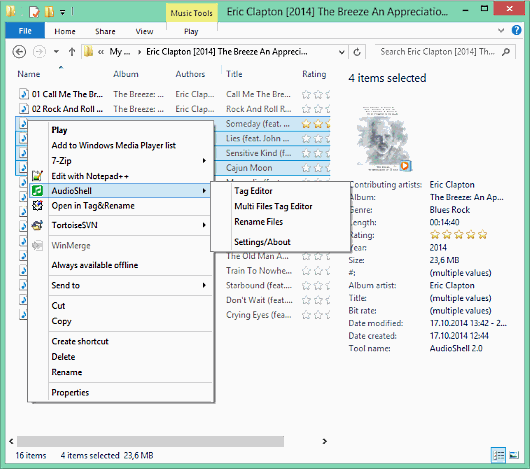 Are you looking for a free MS Windows Explorer shell extension plugin which allow you to view and edit music files tags directly in Windows Explorer? You can try out AudioShell. It has a lot of features, and also supports mp3 (all ID3v2 tag versions), wma, asf and wmv, Apple iTunes aac (m4a and m4p), and many more. Are you looking for a free MS Windows Explorer shell extension plugin which allow you to view and edit music files tags directly in Windows Explorer? You can try out AudioShell. It has a lot of features, and also supports mp3 (all ID3v2 tag versions), wma, asf and wmv, Apple iTunes aac (m4a and m4p), and many more.
AudioShell is a free MS Windows Explorer shell extension pluggin which allow you to view and edit music files tags directly in Windows Explorer. It support mp3 (all ID3v2 tag versions), wma, asf and wmv, Apple iTunes aac (m4a and m4p) and mp4 files, ogg, flac (vorbis comment tags), mpc , mp+, monkey’s audio, wav pack, optim frog (APE and APEv2 tags). The add tag editor and viewer tabs to music files properties page, detailed music files hint with tag and file information and additional columns in Explorer files list. It includes full Unicode support.
A few changes have been made to this version in review. Some of these updates or changes include: added support for TRACKTOTAL and DISCTOTAL tag frames in Vorbis Comments (ogg/flac) tags; and fixed Comments column support in Windows Explorer.
Want to check it out? Visit SoftPointer.com.
Posted in Main | No Comments »
Tuesday, November 18th, 2014
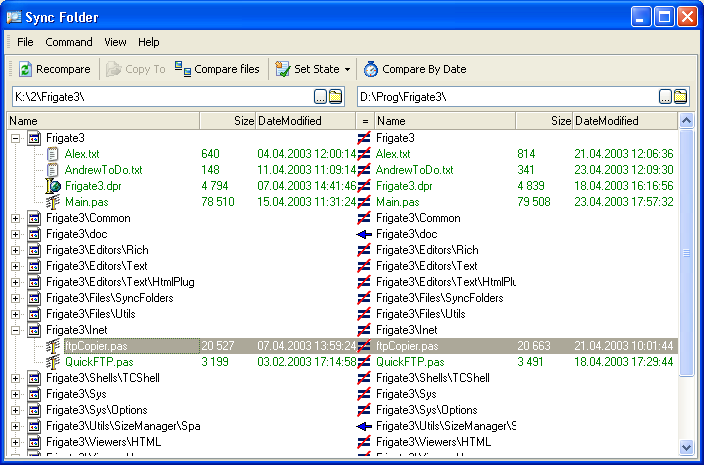 Are you looking for a program that allows you to visually compare files and folders without wasting much of your time? SyncFolder is a program that has transparent interface for you to easily analyse differences in detail and carefully reconcile them. Are you looking for a program that allows you to visually compare files and folders without wasting much of your time? SyncFolder is a program that has transparent interface for you to easily analyse differences in detail and carefully reconcile them.
What is SyncFolder?
SyncFolder is the visual file comparison/merging and folder synchronization application. It is designed for software engineers, web authors, and other professionals who work with multiple revisions of text files or who need to keep multiple folder hierarchies in sync.
The program saves time and reduces errors by enabling you to work quickly and accurately, whether you are comparing individual files or reconciling entire branches of source code. Merge is a particularly useful tool for code review or code audit situations: the tight integration between file and folder comparison makes it easy to identify and review every change in every source file, even when comparing source hierarchies containing thousands of files.
It is a handy tool for developers as it helps to find and show them all the changes in source code so that they can compare program output and validate their copies, and all changes are marked by colour. SyncFolder not only shows the difference between files, but can also synchronize them copying the modified file to the counterpart folder.
Want to check it out? Visit CoolUtils.com.
Posted in Main | No Comments »
Monday, November 17th, 2014
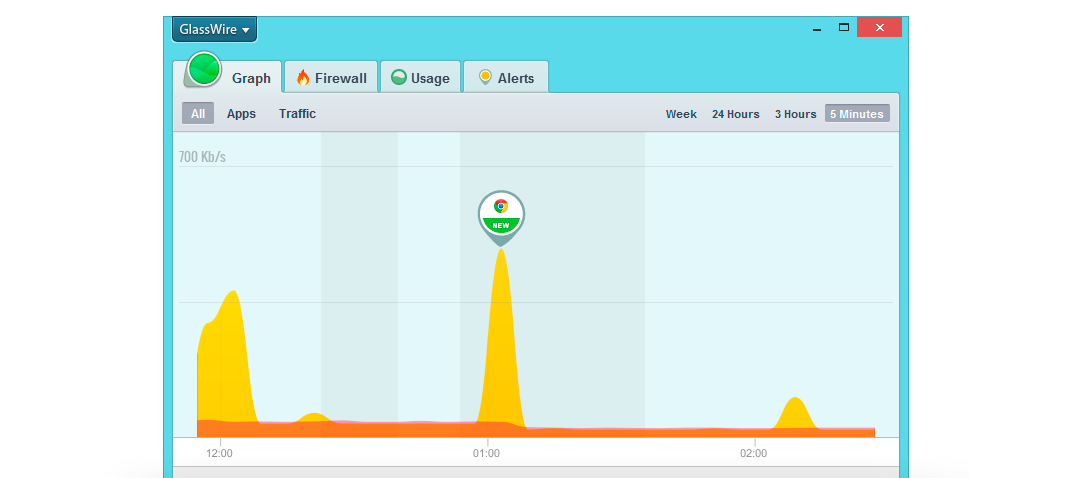 There are some unusual or abnormal behaviour on the internet that could indicate signs of malware or privacy violation. When this happens, you need to put the security situation of your network under perspective in order not to be caught unaware. One of the programs you can use to understand the situation is GlassWire. There are some unusual or abnormal behaviour on the internet that could indicate signs of malware or privacy violation. When this happens, you need to put the security situation of your network under perspective in order not to be caught unaware. One of the programs you can use to understand the situation is GlassWire.
What is GlassWire?
GlassWire displays your network activity on an easy to understand graph while searching for unusual Internet behavior that could indicate malware or violations of your privacy. Once unusual network activity is discovered you’re instantly alerted with detailed information so you can protect your computer, privacy, and data.
A lot of changes and improvements have been made to this version. These changes include: user interface optimizations including showing “away” time in the bottom mini graph and darker easier to read text; security improvements including remote access passwords encrypted on the hard drive and remote access rate limiting along with a password strength indicator; and a few bug fixes, for example if you had trouble making a remote connection this bug is now fixed. The publisher also improved the application’s resource usage.
All in all GlassWire is a handy tool that is very easy to use which, on at first sight, hasn’t any visible downsides.
Want to check it out? GlassWire.com.
Posted in Main | No Comments »
Monday, November 17th, 2014
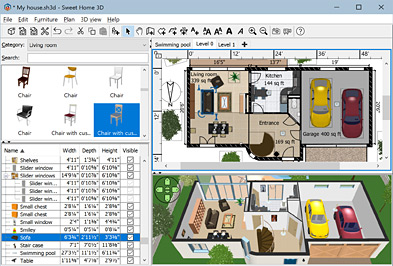 Are you looking for a free application that offers you wonderful features that give you opportunity to place your furniture on a house 2D plan, with a 3D preview? With wonderful features including the one that lets you add furniture to the plan from a searchable and extensible catalogue organized by categories such as kitchen, living room, bedroom; you should consider Sweet Home 3D. Are you looking for a free application that offers you wonderful features that give you opportunity to place your furniture on a house 2D plan, with a 3D preview? With wonderful features including the one that lets you add furniture to the plan from a searchable and extensible catalogue organized by categories such as kitchen, living room, bedroom; you should consider Sweet Home 3D.
What is Sweet Home 3D?
Sweet Home 3D is a free interior design application that helps you place your furniture on a house 2D plan, with a 3D preview. The program has a lot of amazing features despite being a freeware. When you consider the quality of features included in the software, you will appreciate the quality of work that has been put into it by the publisher. You can change colour, texture, size, thickness, location and orientation of furniture, walls, floors and ceilings.
Other features in Sweet Home 3D include the following: annotate the plan with room areas, dimension lines, texts and show the North direction with a compass rose; create photorealistic images and videos with the ability to customize lights and control sunlight effect according to the time of day and geographic location; and many more.
Does it have any downside?
It may not have the best interface, but it is a great program overall.
Want to check it out? Visit SweetHome3D.com.
Posted in Main | 1 Comment »
Monday, November 17th, 2014
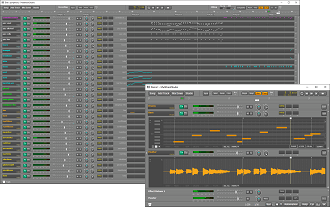 Do you want a program that allows you to record your own songs, and also record tracks while playing along with previously recorded ones? The program you should consider is MultitrackStudio. Do you want a program that allows you to record your own songs, and also record tracks while playing along with previously recorded ones? The program you should consider is MultitrackStudio.
What is MultitrackStudio?
MultitrackStudio is audio/midi multitrack recording software targeted at home recording musicians. You can record your own songs, recording tracks while playing along with previously recorded ones. It contains a multitrack recorder, a mixer, and lots of effects: everything you need to record your own CD.
The software has a lot of amazing features that can make your recording experience an unforgettable one. For instance, users can record Midi tracks by simply using a MIDI keyboard. They can also use the computer keyboard or even a touchscreen. Instrument sounds can be generated by the General MIDI compatible MultitrackStudio Instruments or external MIDI hardware like a keyboard. VSTi/AUi plugins can be used as well.
Other key features in the software include: audio and MIDI tracks can be edited to get rid of any mistakes; you can mix all tracks down to a single audio file; audio tracks can be recorded while playing along with previously recorded ones; and many more.
Want to check it out? Visit MultiTrackStudio.com.
Posted in Main | No Comments »
Saturday, November 15th, 2014
 Do you want to convert PDF to PNG, BMP, TIFF, PDF to EMF metafiles with ease? Without Adobe Reader, ByteScout can be used to convert PDF to PNG, TIFF, BMP, and PDF to EMF metafile. Do you want to convert PDF to PNG, BMP, TIFF, PDF to EMF metafiles with ease? Without Adobe Reader, ByteScout can be used to convert PDF to PNG, TIFF, BMP, and PDF to EMF metafile.
ByteScout PDF Renderer SDK is a program that helps you to convert PDF to PNG, BMP, TIFF, PDF to EMF metafiles. PDF Renderer SDK for .NET, ASP.NET, ActiveX converts PDF to PNG, TIFF, BMP, PDF to EMF metafile without Adobe Reader or other PDF software required.
ByteScout PDF Renderer SDK does not require Adobe Reader or any other PDF reader software to be installed. The software also renders text, fonts, font styles; renders vector graphics; renders images; preserves original layout as much as possible; can render a given area or a whole page. It also works in .NET, ASP.NET and Visual Basic 6 applications; works in both x86 and x64 modes; SDK is accessible from legacy programming languages like Visual Basic 6 and Classic ASP.
This version also comes with some minor changes and improvements such as: improved pdf to image conversion; improved pdf format support; demo utility PDF Viewer improves stability; improved support for images rendering in PDF; minor improvements; and documentation updates.
Does it have any downside?
The program has a trial limitation and, since it’s a SDK version, a very high price – starting from $999.
Want to check it out? Visit ByteScout.com.
Posted in Main | No Comments »
Wednesday, November 5th, 2014
 Do you want to download a fully-featured mail server that is easy to use, and also free? You won’t find too many fully-featured programs or mail servers that come cost-free; and that is why it is worth trying out hMailServer. Do you want to download a fully-featured mail server that is easy to use, and also free? You won’t find too many fully-featured programs or mail servers that come cost-free; and that is why it is worth trying out hMailServer.
What is hMailServer?
hMailServer is a free, open source mail server for Windows. It has support for SMTP, POP3, IMAP, virtual domains, antivirus scanning, distribution lists and much more. It comes with a great COM library that easily can be used for integration. Data is stored in a database server, MySQL or MS SQL, depending on your choice.
hMailServer is used by Internet service providers, companies, governments, schools and enthusiasts in all parts of the world. The program supports popular e-mail protocols (IMAP, SMTP and POP3) and can easily be integrated with many existing web mail systems. It has flexible score-based spam protection and can attach to your virus scanner to scan all incoming and outgoing email.
Version 5.5.2 has now been upgraded to OpenSSL 1.0.1j.
Want to check it out? Visit Hmailserver.com.
Posted in Main | No Comments »
|
|
|




