Archive for the 'Main' Category
Monday, September 21st, 2009
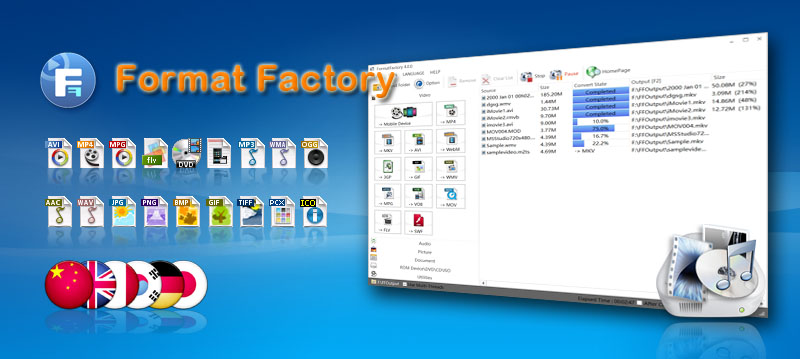 Format Factory is a file conversion application that covers almost every major format. The application can convert audio, video and image into your preferred format. It could basically replace all your conversion applications that are only limited to single format. Format Factory is a file conversion application that covers almost every major format. The application can convert audio, video and image into your preferred format. It could basically replace all your conversion applications that are only limited to single format.
Aside from being an efficient file conversion application, the application can also be used as a ripper. Format Factory can be used to extract video from DVDs and audio CDs. Users can automatically convert the video and audio they ripped into their preferred format. Full customization which includes screen size, audio format as well as specific output folder is included.
An additional feature in the application includes the ability to improve video quality. Specifically, videos and audios that are unable to load well in various video and audio players can be fixed through the application. Image conversion is not just limited to simple change in format as the picture can be zoomed, rotated and even tagged before converted.
The interface of the application is very simple that users can simply choose a “task” on the upper left side of the application. The interface based on that task will load. Conversion is almost in an instant especially for smaller files.
Last but not the least; the application has default configurations for mobile devices. Users can convert videos that will be compatible to iPod, PSP and other MP4 players. Even 3GP is supported so that it can easily play in various 3GP-capable mobile phones. The application is literally a one-stop shop for audio, video and image conversion.
Check it out at pcfreetime.com
Posted in Main | No Comments »
Friday, September 18th, 2009
 Defraggler is small application with a very important function for any computer. As the name suggests, Defraggler is a tool that can defrag hard drives with efficiency. The installation file is less than 1mb which means it can be used in just a few minutes. Defraggler is small application with a very important function for any computer. As the name suggests, Defraggler is a tool that can defrag hard drives with efficiency. The installation file is less than 1mb which means it can be used in just a few minutes.
The unique feature of Defraggler is the ability to defrag files. Files contain fragments that might be distributed in various portions of the hard drive, making it slower to load compared to other files. Through Defraggler, the file should be able to load faster because they were defragged through the small application.
The interface of Defraggler is very straightforward. After running the application, users should be able to select the hard drive they want to defrag. The application will start to analyze the hard drive so that it will determine its contents. After the application is done analyzing, users can defrag the entire hard drive or select the files inside the hard drive. Users can choose to check the files they want to defrag or simply right click on the files they want to defrag in the application.
Because Defraggler is relatively small, it can analyze the hard drive with limited capacity fast. The added visual representation on the hard drive should give users an idea on the remaining space. The only difficulty users might experience with Defraggler is the lag that could be experienced when the application tries to analyze a hard drive more than 500GB. But if the content in a 500GB hard drive is less than 20%, the Defraggler should work at its optimal speed.
Check it out defraggler.com
Posted in Main | No Comments »
Friday, September 18th, 2009
 Assassin S.E. is a very popular malware and spyware detection application. It has the ability to actively detect processes that might be used to extract your information and use them for illegal purposes. It’s very easy to use as the application continues to auto update itself with the latest forms of attacks. An efficient malware is highly recommended for every user since many unknown applications could be used to extract data or inject viruses without the user’s knowledge. A single malware can easily destroy a single computer and delete precious files. Assassin S.E. is a very popular malware and spyware detection application. It has the ability to actively detect processes that might be used to extract your information and use them for illegal purposes. It’s very easy to use as the application continues to auto update itself with the latest forms of attacks. An efficient malware is highly recommended for every user since many unknown applications could be used to extract data or inject viruses without the user’s knowledge. A single malware can easily destroy a single computer and delete precious files.
The interface of the application is very simple. When the application is loaded in the desktop, it will show the current processes that are currently running in the application. Users can choose which processes will be terminated if they suspect the said process is simply gathering information without any actual use in the computer. Users can also update the application at will or set the time when the application should update itself.
This type of application is usually recommended for advanced computer users. But Assassin S.E. removes the difficulty associated with the application by providing “ratings” of each process. Aside from listing the processes currently running in the application, Assassin S.E. rates the processes so that the user can identify which process should be suspected as malware. With this feature, first time anti-malware users should be able to easily work with the application. Protecting your sensitive information in your local computer is important and this applications eases the trouble of establishing proper computer protection.
Check it out at blacklistsoft.com
Posted in Main | No Comments »
Friday, September 18th, 2009
The European Football Result and League Table Database 1.0 is the perfect solution for those who wanted to get the latest scores in football without requiring a strong internet connection. There are many football leagues in Europe that tracking each game just to get the latest results could be difficult. You can always visit a website wherein you can get the latest scores but they can take too much bandwidth.
The interface of the application is a little bit challenging to work with first. But the complexity also shows the application’s ability to load your needed data. The “League Date Range Selector” is a very impressive tool as it will help the user connect to the latest results in the league. Although you can’t search by team, you should be able to get the data you need in no time.
There are two impressive tools users can enjoy from European Football Result and League Table Database. The first feature is the “League Analysis” wherein users should be able to see the schedule in full details including Home and Away games. Another feature is the head to head team comparison. You can select up to 4 teams and see the results of their matches since 1993.
The only downside of the application is that it’s an add-on to Microsoft Access application. Users who have installed limited MS Office might not have this application. But for those who have MS Access, the application will work without any problem as it provides football results in an instant.
Check it out at soccer-data.co.uk/
Posted in Main | 1 Comment »
Thursday, September 17th, 2009
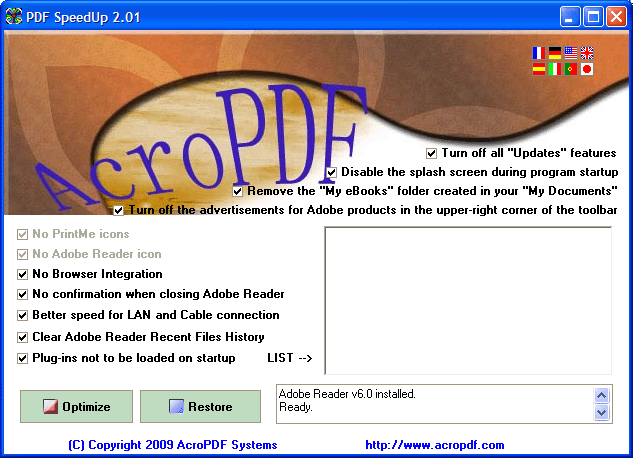 While using Adobe Reader, you might have noticed that it takes huge amount of time in loading due to various plugins installed within it. Nevertheless, now you can get the Reader opened instantly without wasting much of your time. For this, you’d simply require installing PDF SpeedUP 2.01 that significantly speeds up the loading time of Adobe Reader. The program is capable of disabling the plug-ins to, while just the necessary ones to make the program run quickly. The program imparts several features, and also enables you to manually activate or deactivate the plug-ins, as is needed. It functions compatibility with Adobe Reader 5 up to 9. With multi-lingual interface and smooth operations, the program can easily be used even by the novice users. While using Adobe Reader, you might have noticed that it takes huge amount of time in loading due to various plugins installed within it. Nevertheless, now you can get the Reader opened instantly without wasting much of your time. For this, you’d simply require installing PDF SpeedUP 2.01 that significantly speeds up the loading time of Adobe Reader. The program is capable of disabling the plug-ins to, while just the necessary ones to make the program run quickly. The program imparts several features, and also enables you to manually activate or deactivate the plug-ins, as is needed. It functions compatibility with Adobe Reader 5 up to 9. With multi-lingual interface and smooth operations, the program can easily be used even by the novice users.
The PDF SpeedUp runs with simple console and provides effective support in quickly launching the Adobe Acrobat and Adobe Reader utilities. While setting up the program configuration for speeding up you’re the Adobe Reader application, you can Turn off all ‘Update’ features; Disable the splash screen during program startup; Remove the ‘My Books’ folder created in you’re ‘My Documents’; and Turn off the advertisement for Adobe products in the upper-right corner of the toolbar. Adding to these, it allows you to disable PrintMe icons, Adobe Reader icons, browser Integration, and confirmation when closing Adobe Reader. Further, in the settings series you’re also provided options: Better speed for LAN and Cable connection; Clear Adobe Reader Recent Files History; and Plug-ins not to be loaded on startup. Enabling or disabling these features and pressing ‘Optimize’, you can easily speed the program launch, thus getting instant access to your PDF files.
PDF SpeedUp 2.01 is capable of significantly decreasing the loading time of Adobe Acrobat and Reader program by disabling the unwanted plug-ins.
{More Info and Download}
Posted in Main | No Comments »
Thursday, September 17th, 2009
 With the cases of online attacks soaring up in recent times, an updated antivirus application has become indispensable for modern PC users. These tools are installed to protect your PC against various threats, such as viruses, malware, spyware, Trojans, and other malicious processes. Well, if you haven’t found an antivirus application for your computer yet, then try out BitDefender Antivirus 2010. It’s fantastic antivirus utility that scans emails, instant messaging traffic, and web in real-time for safeguarding your system against viruses and other threats. With the antivirus utility functioning on your PC, you can protect your identity while shopping, banking, listening to music, and watching videos. It blocks spyware and web pages stealing your credit card info. Even the configurations of the program are easily customizable to make it function according to your needs. With the cases of online attacks soaring up in recent times, an updated antivirus application has become indispensable for modern PC users. These tools are installed to protect your PC against various threats, such as viruses, malware, spyware, Trojans, and other malicious processes. Well, if you haven’t found an antivirus application for your computer yet, then try out BitDefender Antivirus 2010. It’s fantastic antivirus utility that scans emails, instant messaging traffic, and web in real-time for safeguarding your system against viruses and other threats. With the antivirus utility functioning on your PC, you can protect your identity while shopping, banking, listening to music, and watching videos. It blocks spyware and web pages stealing your credit card info. Even the configurations of the program are easily customizable to make it function according to your needs.
For using BitDefender Antivirus 2010 you’ve to create a BitDefender account, and then choose usage profile as Typical, Gamer, or Custom. Moving on, you’ve to describe the computer to be laptop or in home network, and further select the interface view mode as Novice, Intermediate, or Advanced. Further steps include configuring BitDefender network; choosing to run update and scanning related tasks; and then click ‘Finish’ for completing startup configurations. In case, being a home PC user, if you’ve selected Intermediate interface mode, you’d get Dashboard, Antivirus, AntiPhishing, Vulnerability, and Network tabs. Here, Dashboard tab shows the status by presenting Overall Status, Usage Profile, and Status Detail, along with options to ‘Scan Now’ and ‘Fix All Issues’.
The Antivirus tab displays entire threats and helps protecting your system against viruses and other threats, whereas Antiphishing shows vulnerability status to help you keeping the crucial PC application up-to-date. With Vulnerability tab, you can fix the detected vulnerability affecting your system’s security, and the last Network tab presents the home network structure of BitDefender where you can carry out several actions for configuring and managing the program over your home network.
Moreover, the BitDefender Antivirus 2010 provides different program settings enabling you to alter its functioning as per your specific requirements.
{More Info and Download}
Posted in Main | 4 Comments »
Wednesday, September 16th, 2009
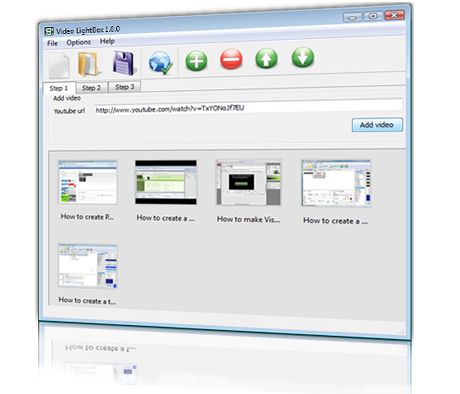 Video LightBox JS is a free wizard program that helps you easily add video to your website or blog, in a few clicks without writing a single line of code. Video LightBox JS is a free wizard program that helps you easily add video to your website or blog, in a few clicks without writing a single line of code.
Features: Video LightBox JS is a free wizard program. A utility that lets you add video to a website. Be it a commercial one or a personal blog. Adding the video is in simple 3 step process. Choose a video to be added, choose a template and then just publish it. It is as simple as that. Adding the video clip by cut- and paste of a YouTube URL, for example is possible. You then need to select a template for video pop-up and decide the appearance of the video thumbnail. You can publish the result to a local drive initially or get the content FTPed to your site directly.
The application will generate a decent thumbnail for the clip you are about to publish. When clicked on the thumbnail transforms into a overlay window that plays the video. There is no need to mess with CSS, HTML. Javascript etc. Adding videos from popular sources like YouTube, Metacafe, Vimeo or MySpace is simple. Video gallery themes are available, the video overlay comes up in a nicely rounded format. Adding of captions are possible. FTP is built in.
Overall: Quite an easy way to add videos to your website or blog.
{More Info and Download}
Posted in Main | No Comments »
Wednesday, September 16th, 2009
 Once we are done with our tasks on PCs, most of us usually don’t have the habit of deleting the data related to the completed work. This clutters our systems with various redundant files thus affecting performance of our PC considerably. It also occupies lots of disk space. To regain the disk space and enhance the performance of your PC; you need to cleanup such data. Junk files cleaner utility helps you to wipe out non-required files or data from your PC. After performing cleaning activity you will see immediate increases in performance. Once we are done with our tasks on PCs, most of us usually don’t have the habit of deleting the data related to the completed work. This clutters our systems with various redundant files thus affecting performance of our PC considerably. It also occupies lots of disk space. To regain the disk space and enhance the performance of your PC; you need to cleanup such data. Junk files cleaner utility helps you to wipe out non-required files or data from your PC. After performing cleaning activity you will see immediate increases in performance.
Features: The tool is nicely designed; you simply need to follow the sequential process for carrying out the unwanted data cleaning task. The tool scans for the junk files and folders in user-specified drives and lists them to make the file selection for cleaning process. Then it requires you to choose junk files scan options like removes invalid start menu, shortcuts, files and folders; clears empty, obsolete and temporary files. Once scanning is performed on the selected drive, list of junk files, folder with file size and type is displayed on the screen. You can then perform an action such as select all junk file and folder, delete all junk file and folder or delete all selected junk files and folders. It gives lots of benefits like free up disk space on your hard drive, increase hard drive searching performance, increase system performance etc.
Overall: This is good utility to cleanup non required files and optimizes performance of your PC.
{More Info and Download}
Posted in Main | No Comments »
Wednesday, September 16th, 2009
 Box Shot 3D is a virtual packaging design tool. It creates box-shot, vista boxes, ebook covers, CD covers, electronic magazines covers and more. It allows you to create high quality web and printable graphics with just a few clicks. Box Shot 3D is a virtual packaging design tool. It creates box-shot, vista boxes, ebook covers, CD covers, electronic magazines covers and more. It allows you to create high quality web and printable graphics with just a few clicks.
Features: Box Shot 3D helps create virtual packaging designs.The utility is able to create software box-shot, vista boxes, ebook covers, CD covers, books, electronic magazines covers etc.Depending on whether you are going to us it for printing or publishing on the web; you can optimize the graphics for high quality. All it takes is a few clicks. You do not need a graphics designer to create the box shots either. There is a selection of preexisting shapes available that you can start with.
These include boxes, DVD-cases, screenshots, books, notebooks, magazine covers and so on. You just need to select the shape or shapes temlate and ask for rendering and publishing, that is all it takes. You have full control over the design. You are alows you to fully control box reflection, transparency, depth on the floor and are able to see previews in real time. You are able to make images look realistic.
You can save your project and use the easy to use image editor available with the program. It’s very simple to add pictures, texts, shapes to the skin of box. Skins that are used more often are readily available in the program packagae. These include CD, box face and so on.You can easily use your own cover image with the box designs. There are three rendering methods available.Image resolution can be arbitrary from 1X1 to 4096X4096.
Overall: Quick and handy designer for virtual product boxes.
{More Info and Download}
Posted in Main | No Comments »
Tuesday, September 15th, 2009
 Total Audio Suite includes a set of powerful applications that supports Record, Edit, Extract, Convert for mobile devices, Rip audio CDs, Burn audio CDs etc. It has more than the standard features to meet all your needs. Total Audio Suite includes a set of powerful applications that supports Record, Edit, Extract, Convert for mobile devices, Rip audio CDs, Burn audio CDs etc. It has more than the standard features to meet all your needs.
Features: Total Audio Suite is nicely designed keeping in mind the need of music lovers. It is a fast, tightly integrated suite of audio processing programs that helps you in your work with audio data. It is a pack of six essential processing tools includes Audio recorder, Audio converter, Audio CD burner, Audio editor, Audio extractor and Audio grabber.
With audio recorder, you can record sound from CDs, microphone, internet streaming, radio and other sound card inputs. You can set output file type, recording view mode and many other options to improve recording quality. Audio converter allows you to convert your audio file to various popular audio formats such as MP3, WMA, WAV, OGG Vorbis, etc. With audio editor you can open, create and save audio files. You can perform editing on audio file with basic operations as cutting, copying, deleting, pasting, mixing and inserting/deleting noise/silence etc. There are list of sound effects offered such as amplifying, delay, equalizing, fade in/out, flange, inverse, normalizing, reverse, delay, silence, stretching, vibrato, echo and chorus. CD burner allows you to burn audio CD with different burning speed. Audio extractor extracts audio files from video files without loss of sound quality. It support video formats as AVI, DivX, XviD, MPEG, MPG, WMV, DAT, OGM, AMV, etc. and converts audio file to popular audio format such as WAV, MP3, AC3, AAC, M4A, MPC etc. With audio grabber rip audio tracks from CDs and save them to popular formats as WMA, MP3, WAV, OGG, AAC, etc.
Overall: This software meets all your need, whether you are a professional multimedia personnel or a music lover. The program has varied set of functions followed by its impressive performance
{More Info and Download}
Posted in Main | No Comments »
|
|
|




