Archive for the 'Main' Category
Tuesday, September 15th, 2009
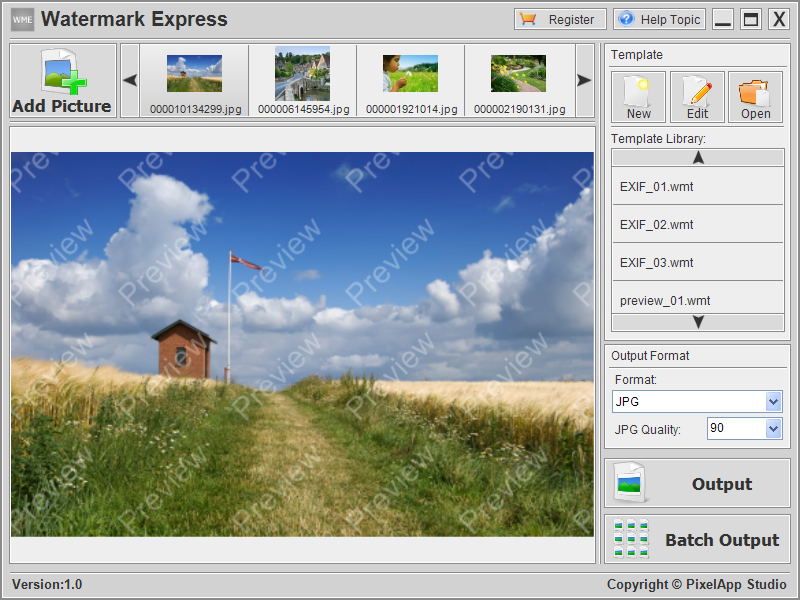 Watermark Express is a powerful and professional watermarking software that helps you to protect your digital photos easily. Watermark Express is a powerful and professional watermarking software that helps you to protect your digital photos easily.
Features: It is easy to copy photographs published on the web for anyone. Watermarking is one way your could protect your photos. Watermark Express is powerful and professional watermarking software. With Watermark Express are able to add watermarks to all your photographs. The watermark can be text, EXIF information, image etc. The application thus would allow you some protection against infringement of your copyright. It is a batch processor and will let you process a large number of photographs very quickly. The utility allows multilayer watermarks to be edited. You can create such multilayer watermarks in the editor too. The application lets you add various image effects such as shadows, noise, transparency, rotation etc. Watermark elements are automatically adjusted depending on the target image size.
It is possible to add EXIF information such as aperture data, date photo taken etc as watermarks. Batch processing feature lets you process a set of images at one time. The interface makes it easy to support the batch processing. Integrated with an explorer like interface it is easy to pick up the images for processing. The thumbnails are displayed in a scroller with forward and backward movement controls. You have a preview area that shows you the effect of adding watermarks on the target image. There are several templates available with which you can start. The output folder can be specified. The output created is in JPG format. Controls are available so that you can manage the trade off between image quality and the file size.
Overall: This is a version 1.0 release so you will need to watch out for bugs, otherwise an easy to use utility.
{More Info and Download}
Posted in Main | No Comments »
Monday, September 14th, 2009
 Advanced File Manager utility allows you to manage and monitor disk space on your network computer and server. It displays information in grid and graph format by selecting data explorer or pie chart tab respectively. Advanced File Manager utility allows you to manage and monitor disk space on your network computer and server. It displays information in grid and graph format by selecting data explorer or pie chart tab respectively.
Features: In order to view the details of each folder in windows explorer you need to view properties. Advance file manager displays the size of each folder on your local, network and removable drives without clicking property pages. You can see the space distribution for drive, folder, and subfolder on the pie chart. You can search files and folders by size and multiple name criteria. It provides you size filter option to define your search criteria. You can also view file and folder owners on NTFS formatted drives within exploring mode. It includes an image viewer that supports icons, bitmaps, JPEGs and GIFs in thumbnail mode.
Utility has a very nice reporting feature facility. Report setting allows you to define your columns which you would like to appear in your report. In advance option you can select include subdirectories, include directory size data, append to existing file. Select directory which you would like to report and set report location to store the report. You can select report format option as HTML file or CSV file. Nicely formatted report in HTML and CSV gets generated for the selected directory. You can use or share this report for further analysis and study. It supports XP themes and has a favorites engine, a DOS prompt engine, and a configurable button bar for starting external programs.
Overall: This is a nice utility to manage and monitor your disk space. It generates awesome reports.
{More Info and Download}
Posted in Main | No Comments »
Monday, September 14th, 2009
 WorkWeek 2 is a personal easy-to-use organizer for managing events and tasks. WorkWeek 2 is compatible with iCalendar file format which means you can easily share your calendars and view hundreds of web calendars. WorkWeek 2 is a personal easy-to-use organizer for managing events and tasks. WorkWeek 2 is compatible with iCalendar file format which means you can easily share your calendars and view hundreds of web calendars.
Features: WorkWeek 2 is a personal easy-to-use organizer. You can manage events and tasks. The calendar is easy t share with others. WorkWeek 2 is compatible with iCalendar file format. Thus you are able to easily share the calendar with anyone following the same format. You will also have easy access to hundreds of web calendars with holidays, sports events, concerts and so on. One window wizard simplifies creating and editing events and to-dos. Classical calendar view modes available are by day, week or month. You can have custom views and colors for events so that you can categorize and organize the way you want. Color schemes are are3 customizable so that creating a workspace that you are comfortable with is not at all difficult.
Standard organization you can have include celebrity events, home & work calendars and week numbers. On the left panel you have calendar for three months. One month prior to the current one and one month beyond the current month. on the right panel you can set up the to-do list. all the events of the day are listed in the main display area. The display is arranged very comfortably and you are not likely to miss anything.
Overall: Quite a useful calendar that can be shared easily.
{More Info and Download}
Posted in Main | No Comments »
Friday, September 11th, 2009
 The Real Alternative is a software package that you can download and install in order to play files that are normally only supported by Real Player. Anyone that has dealt with Real Player will know that the software package can be a pain to deal with at times and the Real Alternative is a completely free alternative that does not have many of the same faults. The Real Alternative is a software package that you can download and install in order to play files that are normally only supported by Real Player. Anyone that has dealt with Real Player will know that the software package can be a pain to deal with at times and the Real Alternative is a completely free alternative that does not have many of the same faults.
When compared with Real Player, the Real Alternative is easier to install and actually uninstalls properly if you want to get rid of it. There are no processes running in the background when you use it, you can choose a lot of the options and there are no registration forms or advertisements included. When you add to this the fact that the Real Alternative is much less resource intensive than Real Player, you can see that this is an excellent piece of software that you can use instead of the annoying Real Player.
At the moment, full support is not available for .smi and .smil files. Also, streaming content must be played on Media Player Classic. Aside from those two minor changes, the Real Alternative is easily a better choice than the Real Player.
More information is available at codecguide.com.
Posted in Main | No Comments »
Friday, September 11th, 2009
 The PiggyDB is a piece of free software that can literally change the way you look at the world. When you look at any piece of software, you’ll notice that it comes with a knowledge base. This is essentially a construction of the knowledge available about that piece of software that is used by end users to get information about that software package. Well, your real life has a knowledge base attached to it as well. The PiggyDB is a piece of free software that can literally change the way you look at the world. When you look at any piece of software, you’ll notice that it comes with a knowledge base. This is essentially a construction of the knowledge available about that piece of software that is used by end users to get information about that software package. Well, your real life has a knowledge base attached to it as well.
Now, you can put it all together with the PiggyDB, a web application that will help you create your own knowledge base. The input for adding knowledge fragments to the knowledge base is similar to blogging and therefore everyone should be familiar with its use. Once you have entered the knowledge fragments into the knowledge base, you can link them together by using this program to build different relationships. You can change the relationships as new knowledge becomes available and you can even create a hierarchy that can be used later by you when inputting new fragments and reading through old ones.
In short, you can use PiggyDB as your own personal memory dump, discovering new things about yourself and gaining creativity in the process. All you need is the Java Runtime Environment to make this possibility a reality. For more information, please visit the publisher’s website at piggydb.net
Posted in Main | 1 Comment »
Thursday, September 10th, 2009
 Version 1.12 of this freeware program was released on September 4th and it contains a number of upgrades that make the previous version seem very archaic indeed. Perhaps one of the most important updates is the fact that no special system requirements are in place for this software, allowing you to retain portability and free cost without having to tax your system in the process. Version 1.12 of this freeware program was released on September 4th and it contains a number of upgrades that make the previous version seem very archaic indeed. Perhaps one of the most important updates is the fact that no special system requirements are in place for this software, allowing you to retain portability and free cost without having to tax your system in the process.
The MP3 Quality Modifier has always been an impressive piece of software. With an intuitive process in place for bit rate changes, this software package allows you to decrease the file size of your audio files while at the same time keeping the same level of quality. The end result is the same great music with more disk space available. If you want, you can even use it to change available channels for the music, use presets and down sample any audio file that you come across.
In addition to this, MP3 Quality Modifier does not require any installation whatsoever. It is less than a megabyte in size and has an intuitive interface that is extremely easy for the average person to understand. For all these reasons and more, it is a great addition to the freeware collection of any audio aficionado.
More information on this particular piece of software can be obtained from inspire-soft.net.
Posted in Main | 1 Comment »
Thursday, September 10th, 2009
 The latest release of TextFindIT came to the freeware marketplace on September 9th and it has already received rave reviews from people that enjoy the specialized service that it provides. The latest release of TextFindIT came to the freeware marketplace on September 9th and it has already received rave reviews from people that enjoy the specialized service that it provides.
Using TextFindIT, you can search for a specific text string inside all of the files in a folder. This means that if you’re looking for a specific letter or article and you can remember a phrase from it, TextFindIT will allow you to find that file in a way that the normal search that comes with Vista could never do.
Most people that have searched through their files on Windows have at one point or another come to the conclusion that being able to search for specific text strings within files would be a useful thing to have. Now, thanks to the genius and programming grit of an individual programmer, TextFindIT 2.0 brings that functionality to you in stunning form.
The only thing that you need to know in order to run this program is that Microsoft .NET Framework 3.5 is required in order to run it. This is not the only reason to get this framework however and most people should already have it.
Aside from that, you can find out more information about this piece of software by visiting the publisher’s website at crwld.org.
Posted in Main | No Comments »
Thursday, September 10th, 2009
 Codec packs are typically used to help run parts of multimedia files in a way that unlocks the true potential of the file. This is why some file types require certain codec packs to be downloaded before they can be played. It is also why some files can already be played by the pack of common codec files that come with most multimedia players these days. Codec packs are typically used to help run parts of multimedia files in a way that unlocks the true potential of the file. This is why some file types require certain codec packs to be downloaded before they can be played. It is also why some files can already be played by the pack of common codec files that come with most multimedia players these days.
The anime multimedia that is available these days is quite intense. With all of the different lighting, drawing and sound effects that take place over the course of a typical anime portrayal, there is definitely going to be room for codec packs to be created that will maximize the excellence of the viewing process.
This is what the CCCP has the ability to do. The latest version was released on September 9th and it represents the culmination of the work of the greatest experts in the anime industry. These people have made knowing anime their life and for that reason are the best people to judge which codec code belongs in this pack and which code should simply be disposed of. Now, the combination of their expertise is freely available for you to download and enjoy. You won’t believe the difference it’ll have on your anime viewing experience.
For more information, visit cccp-project.net.
Posted in Main | No Comments »
Wednesday, September 9th, 2009
 Unlock PDF Protection is the industry-leading PDF protection remover tool, to allow users to unlock pdf protection of copying, printing, editing, modifying PDF files. Now users can unlock PDF protection & unlock pdf permissions in one go. Unlock PDF Protection is the industry-leading PDF protection remover tool, to allow users to unlock pdf protection of copying, printing, editing, modifying PDF files. Now users can unlock PDF protection & unlock pdf permissions in one go.
Features: With Unrestricted PDF you can remove the restrictions set in a document. Once the protection is unlocked you are able to easily copy, print, edit, modify Adobe PDF documents. The application can modify the pdf protection and to security. Process to Unlock PDF protection hardly takes only a few seconds to unlock all the protection of copying, editing, printing, modifying of a PDF document. The software unlocks owner password for PDF files. The utility works stand alone thus there is no need for any Adobe Acrobat to be present.
PDF Protection remover software supports Acrobat version up to 9. It is capable of removing 28-bit or 256-bit encryption. Software is extremely easy to use. Users can run the software on any version of Windows 98, ME, 2000, 2003, XP, and Vista. The interface is simple. It lets you unlock one file at a time. With the browse button you can explore the file directories for the file you want to unlock. There’s another text display area below the file name text box. The unlock button is right next to it. When you click on the unlock button this text area is meant for displaying the logs as the process progresses.
Overall: The software does its job well and possibly deserves 3 star rating. But the only legitimate situation one can see for using this is if you have lost the password of a document you have created or you own. Otherwise clearly you do not have rights to the document and trying to break it is not ethical at all. This is easy to use otherwise.
{More Info and Download}
Posted in Main | No Comments »
Wednesday, September 9th, 2009
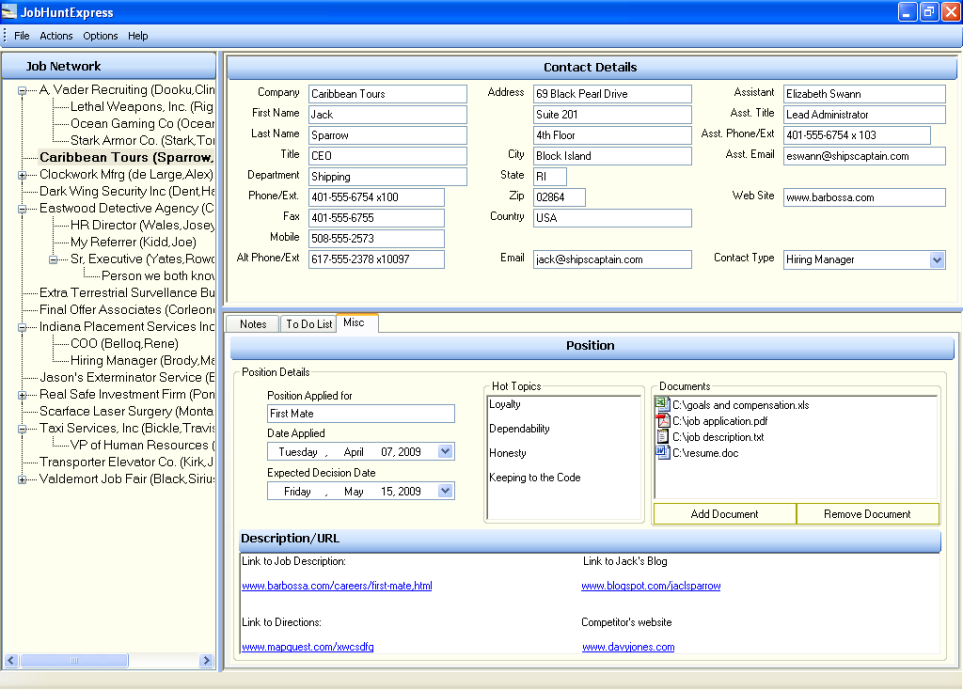 Organize, target, and cultivate all of your job opportunities, recruiters, and other important networking contacts quickly and effectively with powerful, yet easy-to-use tools to make you more successful at getting that great job that you deserve. Organize, target, and cultivate all of your job opportunities, recruiters, and other important networking contacts quickly and effectively with powerful, yet easy-to-use tools to make you more successful at getting that great job that you deserve.
Features: To get the job that you really want is possible only if you can increase the opportunities you have, more networking contacts you have and such other things that increase the probability for you. Job Hunt Express is an easy-to-use software package. It makes hunting a job very efficient and effective.What that means is that The important information for your job opportunities that are scattered about on different websites, on paper, on spreadsheets, and in your head need to be organized.
The contact data for hiring managers, recruiters and other networking resources is stored in multiple places or in one awkward spreadsheet or document,you do not have an individual action plan or calendar tracking capability for each opportunity and such other chaos needs to be controlled into a organized way of managing contact details and follow through with a given opportunity.
Job Hunt Express provides you the means to get organized completely. You have to apply to more job openings, talk to more recruiters, network with more people, and generally be much more proactive just to be considered for an open position in this tough market. Like sales people manage their contacts this software application lets you manage job contacts. The interface is very well organized and gives you details of a contact and makes following a lead very easy.
Overall: A very nice tool for managing job hunt.
{More Info and Download}
Posted in Main | No Comments »
|
|
|




