Archive for the 'Main' Category
Monday, March 16th, 2009
 Do your writing skills leave a lot to be desired? WhiteSmoke 2009 is an English writing software that will boost your writing skills, make your writing look and sound more professional, and help you find the right words when words seem to fail you. Do your writing skills leave a lot to be desired? WhiteSmoke 2009 is an English writing software that will boost your writing skills, make your writing look and sound more professional, and help you find the right words when words seem to fail you.
Features: Whether one writes for business or pleasure quite often one could use a little help. WhiteSmoke 2009 aims to be such a companion when you are writing and can point out errors that include not only spelling errors but also style related. This package is indeed better that a lot of run of the mill packages aimed at this niche. The application provides a grammar checker that can detect and correct tricky grammar errors. A style checker helps improve sentences, vocabulary and writing style. The included punctuation checker attempts to improve readability with accurate punctuation.
Error explanations that pop up provide you with detailed explanations of the problem detected and helps you learn from errors. The application can work in conjunction with any document preparation in MS Word, Outlook and other text based applications. All these help are supported by a Thesaurus so that accurate word definition, synonyms and idiomatic phrases are available to you when needed. Letter templates help with templates for standard situations. Something like 600 templates are provided by the package. Supported by NLP and text enrichment technologies this package not only helps your English get better it also can help some one with English as the second language to smoothen out all the kinks. White Smoke 2009 is an amazing English writing software that is sure to have you writing high quality letters, articles, and website content quickly and effortlessly.
Overall: This is truly a great help, particularly the learning experience it provides.
{More Info and Download}
Posted in Main | No Comments »
Monday, March 16th, 2009
 keyCulator is the simplest calculator software in the world. However, the simplicity is both a concept and a power! This is the only calculator software without a program window. Actually, there is no window at all! keyCulator is the simplest calculator software in the world. However, the simplicity is both a concept and a power! This is the only calculator software without a program window. Actually, there is no window at all!
Features: keyCulator is a simple calculator software. It does not need a separate program window or any complicated interface. It works with the program that you may be using at that time. It can add this calculator functionality to any running program at all. It does work standalone too. Supposing you need a calculation to be shown in a Word document and have the calculator running. Typing 2+2 and hitting the = sign will automatically produce the string 2+2+4. If you do not need the 2+2 string that can be done too and only the result entered into the document. You may want to a calculation and then comeback into the document. All these options are available with this calculator.
When running, all you need to do is press the NumLock button. The numeric keypad becomes the calculator keys. The enter key becomes the = key. For calculations outside any other program simply enter numbers and operators as you would with any calculator. As soon as you hit the = key the expression as well as the result is shown in the hint window at the bottom of the screen. You can continue to do calculations with the results of the first step. Simply use the operator of the next level and continue normally you will keep getting results as they are calculated with the result of the earlier stage, the new operator and the new number at the current level.
Overall: Nice and easy to use program. Though for a very simple purpose it does the job well.
{More Info and Download}
Posted in Main | No Comments »
Monday, March 16th, 2009
 Address book with user-friendly interface that will help you to start a new life. Address book with user-friendly interface that will help you to start a new life.
Features: Delicious Address Book is a user friendly program that can keep track of all your contacts. No need to flip through a bulky address book you have been maintaining manually. Here’s no way you can forget your friend’s phone number or another’s email address. It makes the search very easy. The interface in its friendly way helps updating details of your contact or finding the details. Contacts are organized in a tree so that a structure is imposed on the details and it becomes easy to find.
For example a top level branching could be based on whether the contact is from work or he/she is a friend. Names, addresses, phone numbers, email addresses etc are maintained in the database. A value added feature for busy people is a built in Calendar that never lets you forget any meeting or events.
Overall: Even though the version number says it is not a version 1.0, looks like all the kinks has not been ironed out yet. It gave several internal OLE automation error messages during the try out. Did not look like there was anything additional you could do that you could not do in Outlook.
{More Info and Download}
Posted in Main | No Comments »
Friday, March 13th, 2009
 Web menu buttons and banners play a significant role in grabbing the visitor’s attention and to urge them for visiting the website pages. Considering their importance, developers put lot of their efforts in creating attractive web buttons and banners. But, it often becomes a long process due to the technicalities involved in applying various effects and customizations to them. So, if you want to create web button or banners conveniently, while avoiding the hassles involved, then just give a try to Just Buttons 4.1. By using the application, you can conveniently generate the web banners and buttons while applying different customizations according to your requirement. The program supports you in applying different effects, mousedown and mouseover events, add text, lines shapes, and event more. Web menu buttons and banners play a significant role in grabbing the visitor’s attention and to urge them for visiting the website pages. Considering their importance, developers put lot of their efforts in creating attractive web buttons and banners. But, it often becomes a long process due to the technicalities involved in applying various effects and customizations to them. So, if you want to create web button or banners conveniently, while avoiding the hassles involved, then just give a try to Just Buttons 4.1. By using the application, you can conveniently generate the web banners and buttons while applying different customizations according to your requirement. The program supports you in applying different effects, mousedown and mouseover events, add text, lines shapes, and event more.
 The Just Buttons 4.1 opens with a decently structured interface with self-explanatory features that are easy to use. For creating a new button, you’re shown the default button structure on program screen. For customizing the button, you’re provided with option windows for Size and Location, Text Options, and Preview. The utility even prompts you to take the assistance of the Guide to generate professional web buttons or banners. The frames and buttons that you create are listed with tree view on left panel for easy selection to customize them. Further, you can alter the shapes, insert images, line, colors, text, mouseover, font, style, size, location, and apply different features like shadow, bevel, glass, outline, etc. Using the application, you can create buttons with shapes like rounded rectangle, parallelogram, trapezoid, star, circle, square, triangle, ellipse, hexagon, bullet, and various others. As you customize the web buttons, the preview of the changes made can be seen simultaneously with the Preview window. For creating banner you can easily insert frames, gif frames, images, and other objects, alter animation properties, and apply different supported customizations. Completing the necessary steps, you can save and export the created button/banners. The Just Buttons 4.1 opens with a decently structured interface with self-explanatory features that are easy to use. For creating a new button, you’re shown the default button structure on program screen. For customizing the button, you’re provided with option windows for Size and Location, Text Options, and Preview. The utility even prompts you to take the assistance of the Guide to generate professional web buttons or banners. The frames and buttons that you create are listed with tree view on left panel for easy selection to customize them. Further, you can alter the shapes, insert images, line, colors, text, mouseover, font, style, size, location, and apply different features like shadow, bevel, glass, outline, etc. Using the application, you can create buttons with shapes like rounded rectangle, parallelogram, trapezoid, star, circle, square, triangle, ellipse, hexagon, bullet, and various others. As you customize the web buttons, the preview of the changes made can be seen simultaneously with the Preview window. For creating banner you can easily insert frames, gif frames, images, and other objects, alter animation properties, and apply different supported customizations. Completing the necessary steps, you can save and export the created button/banners.
{More Info and Download}
Posted in Main | No Comments »
Friday, March 13th, 2009
 If you’re looking to buy a foreclosed home as you often get a good deal on them, then you might be looking for different ways to find such homes. You need not go through long procedures or spend tiring hours to search the required information through web, as you can now get it at one place by simply using the Foreclosure Listings 1.0. Whether you need to buy a home or wish to make money through investment, you can get the information relating prices, latest news, strategies and techniques with the help of Foreclosure Listings. If you’re looking to buy a foreclosed home as you often get a good deal on them, then you might be looking for different ways to find such homes. You need not go through long procedures or spend tiring hours to search the required information through web, as you can now get it at one place by simply using the Foreclosure Listings 1.0. Whether you need to buy a home or wish to make money through investment, you can get the information relating prices, latest news, strategies and techniques with the help of Foreclosure Listings.
The Foreclosure Listings 1.0 gives you access to the accurate and current listings of commercial foreclosures, government foreclosures, and bank foreclosures homes. You can get to know about any such home being sold at different places. It installs a Forclosures Authority toolbar, which helps you get latest information regarding bank foreclosures at your browser. The toolbar includes Foreclosures, Search, View Homes, E-mail Notifier, Radio, for easy accessibility to various functions. You can easily find and view homes with the provided option as per the preferences. It’s easy to select the type of Real Estate investments, mortgage properties, etc to get specific results. You can even modify the configurations with Toolbar Options with the provided ‘Foreclosures’ features. Clicking it, you get three tabs including components; Personal Components, Useful Components, and Predefined Components. Locating any tab’s components, you can select or clear the check box for any of the components. You can find the listings of HUD Homes Listings, REO Foreclosures Listings, Real Estate Listings, and Pre-Foreclosed Homes. You can easily scroll through the foreclosed homes details and other relevant information.
With the help of Foreclosure Listings 1.0 you can easily lookout for foreclosed homes, and get the best deal as per your requirements.
{More Info and Download}
Posted in Main | No Comments »
Thursday, March 12th, 2009
 Finding a hotspot in a city you’re not familiar with is very difficult. Although your mobile phone and laptops that could connect to an available Wifi hotspot is there, you still need to know the actual location so that you can connect without any problem. Finding a hotspot in a city you’re not familiar with is very difficult. Although your mobile phone and laptops that could connect to an available Wifi hotspot is there, you still need to know the actual location so that you can connect without any problem.
That’s where WeFi comes to help you. WeFi is a combination of a hotspot finder and a social networking application. This application will not only inform you that a hotspot is available, it will also inform you that someone that you know is also connected to that hotspot.
The application is also a data gathering tool in terms of hotspots. As soon as you log-in and connect to a network via WeFi, the application will automatically log the hotspot based on location. This information will then be shared to all the members of the WeFi community. That is why WeFi will also inform you the nearest hotspots in your area as long as the hotspot has been profiled by one of the members of the community.
This software has many implications. WeFi will help you connect to secured hotspots as they are highly recommended by the fellow members of WeFi network. It also checks surrounding hotspots so that you can transfer to the faster network. The software is also fully integrated with Twitter and Facebook. Any changes in your WeFi activity could be broadcasted through these online tools depending on your preferences.
What’s even remarkable is the automatic transfer from GRPS to Wifi by this application. If you’re using your mobile phone to connect online with GPRS, WeFi will automatically disconnect the GPRS connection so that it could use Wifi. This will greatly cut costs in your mobile phone use. This software is a must for those who are constantly on the road.
More info at Wefi.com
Posted in Main | No Comments »
Thursday, March 5th, 2009
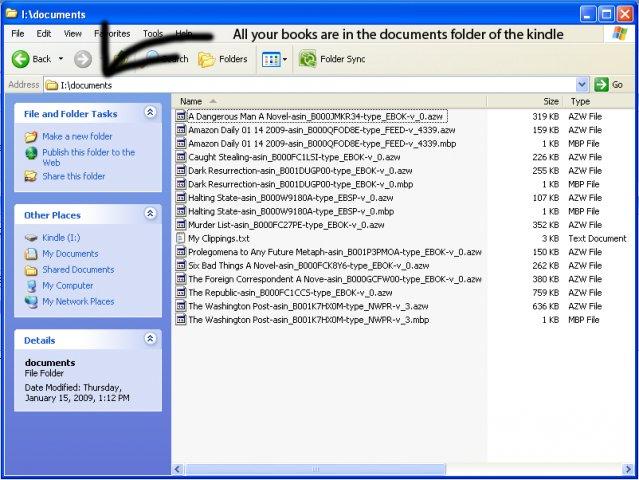 Kindle is one of the most popular eBook readers today. This gadget from Amazon.com has been the favorite for those who wanted to read books without having to deal with heavy books. The books could be purchased electronically from Amazon and could be easily read in Kindle. Kindle is one of the most popular eBook readers today. This gadget from Amazon.com has been the favorite for those who wanted to read books without having to deal with heavy books. The books could be purchased electronically from Amazon and could be easily read in Kindle.
But there are documents in your computer that you need to transfer in your Kindle. Since Kindle is limited in compatibility with different file formats, you need to covert them into something readable. That’s where Auto Kindle eBook Converter comes in. As the name suggests, the application could easily convert common document file formats into .mobi – the file format for Kindle.
This application is not only limited to Kindle, since it’s output is in .mobi, the converted file could become available in other gadgets as well. The said file format is recognizable by different eBook readers and small applications could even be installed in computers and SmartPhones so that it could read files in .mobi formats. With the eBook converter, the possibility of having a library in your mobile phones is now possible.
But the application is still in its early stages. The software is still buggy especially when the application deals with .lit file formats. The output file may not also be the same as expected if the application deals with the said file format.
A great feature of this converter is the support for images in PDF files. Photos in other file formats may not be converted properly but the application is a work in progress so more updates are coming which will enhance the features of the converter.
More info and download at http://sourceforge.net/projects/autokindle
Posted in Main | 7 Comments »
Thursday, March 5th, 2009
 Most operating systems (OS) have a built in functionality to slideshow the pictures in a specific folder. Through the slideshow, users can easily look at different photos without an additional demand. But when you don’t have a computer or a gadget that has the ability to render photos in slideshow, you need to look for options so that you can have a good presentation of photos. Most operating systems (OS) have a built in functionality to slideshow the pictures in a specific folder. Through the slideshow, users can easily look at different photos without an additional demand. But when you don’t have a computer or a gadget that has the ability to render photos in slideshow, you need to look for options so that you can have a good presentation of photos.
One of the options is to create a movie out of your photos. That could be easily done in a software called Picture2avi pro. Basically this software will enable the user to collect the photos of their choice and render them into movie with a .avi file format. The .avi format can be read by almost any software with video playing capabilities. There are even standalone video players who have the ability to read .avi files. You won’t need to have a computer to watch the slideshow. You can burn the .avi file into a CD and play it to a compatible player and show it to everyone.
But the end product of the movie is not just your regular changes in the photos. Users can add effects to the presentation. Although the additional effects are very simple such as simple slides, the ease of operation is always assured. The application also detects the codec in your local gadget so that the files will automatically become compatible with your local gadget.
Last but not the least, the acceptable file formats for photos are very impressive. Almost all major file formats will be automatically converted into a .avi file format.
More info avalable at http://easytornado.com/
Posted in Main | No Comments »
Wednesday, March 4th, 2009
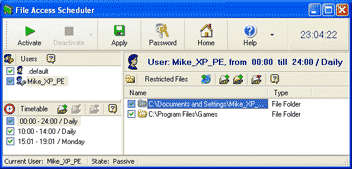 File Access Scheduler is a useful program for anyone wanting to control or restrict access to certain things on a computer. This can include folders, files, games, programs, and even internet connection. You can set the restrictions to apply to a certain schedule. File Access Scheduler is a useful program for anyone wanting to control or restrict access to certain things on a computer. This can include folders, files, games, programs, and even internet connection. You can set the restrictions to apply to a certain schedule.
This could be useful in many ways, such as restricting children’s internet usage or their access to chat programs and games to certain times only.
It could also be used to ensure employees only have access to the relevant business applications. It can be set on a per user basis also, as it supports multiple users profiles.
More info at the homepage here
Posted in Main | No Comments »
Tuesday, March 3rd, 2009
 Do you ever get bored with the same old boring desktop wallpaper? Wouldnt it be nice if you could have it changed automatically now and then? Wouldn’t it be even nicer if you could do this automatically, from a variety of image sources such as your own local files or folders, FTP remote folders, Flickr, Yahoo, Panoramio, Pikeo, Ipernity, and Photobucket images? Do you ever get bored with the same old boring desktop wallpaper? Wouldnt it be nice if you could have it changed automatically now and then? Wouldn’t it be even nicer if you could do this automatically, from a variety of image sources such as your own local files or folders, FTP remote folders, Flickr, Yahoo, Panoramio, Pikeo, Ipernity, and Photobucket images?
If you’re answering yes to all this, then you might like to check out this little freeware program called Wally which does all the above. It also supports various wallpaper layouts and has the ability to save downloaded photos. It’s cross platform, running on Windows, Linux and Mac.
So if you want to liven up the look of your desktop, its worth checking out and it’s totally free.
You can get it over at the Wally homepage here.
Posted in Main, Shell and Desktop | No Comments »
|
|
|




