Archive for the 'Main' Category
Wednesday, October 29th, 2008
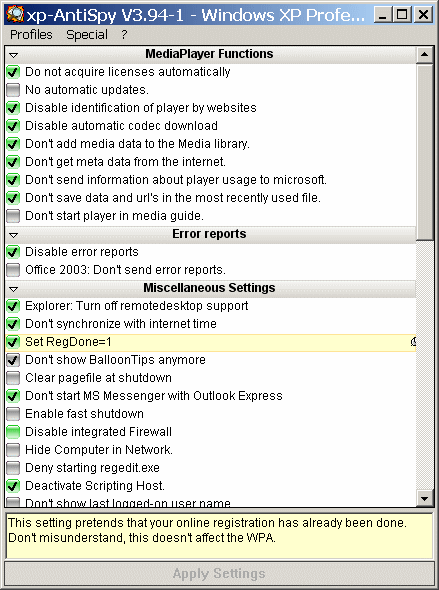
XP-AntiSpy is an utility that let’s you disable some built-in update and authetication features in Windows XP.
With the purpose of improving this product and provide a better service, there’s an updated version now available on xp- AntiSpy, the basic modification in the new version includes the fixing of few minor bugs etc.
The basic changes in the product when compared with beta 2 include the following:
- Bug fixes
- New tweaks
- Open the device manager via ‘My Computer’
- Do not offer the Windows Tour anymore
- Avoid automatic links in the network neighbourhood
- Do not cache thumbnails
- Disable the search assistant
- Disable UAC (Vista only)
Download and more Info available at www.xp-antispy.org
Posted in Main | 1 Comment »
Wednesday, October 29th, 2008
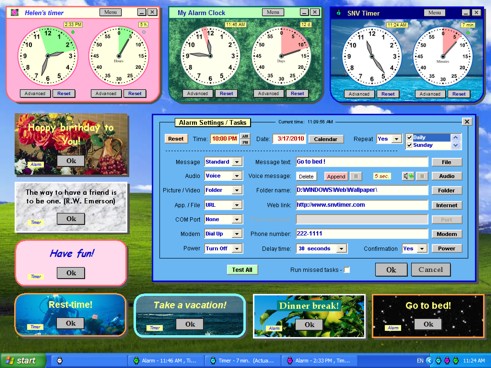 This is a program that serves as a multifunctional scheduler. SNV Timer includes Timer & Alarm & Clock & Calendar & Notepad. This is a program that serves as a multifunctional scheduler. SNV Timer includes Timer & Alarm & Clock & Calendar & Notepad.
Basic features include:
- A simultaneous launch of multiple instances with various tasks.
- Multi-customizable view which includes colors, background pictures, borders, fonts, etc. and original interface with transparency effects.
- It has seven alarm actions (multi-customizable notification message, audio/voice, picture/video, opening file/app./URL, external devices control, phone dialing, power control) that can be assigned simultaneously.
That’s not all! SNV Timer can perform seven actions at a preset time (which could be daily or specified days of the week, monthly, yearly), or at recurring intervals (seconds, minutes, hours, days). It is also able to select random text strings from collections of proverbs, quotations, etc.
It shows a picture or video. With this program you can select any JPG, BMP, GIF, WMF, AVI, MPEG files. It gives you a slide show with random selection of pictures and music? No problem. SNV Timer allows you to do it.
SNV Timer helps you start an application; open a file, folder or web page. It helps you launch your text editor at a preset time and also to play multimedia in your default media player.
Check it out at http://www.snvtimer.com/
Posted in Main | No Comments »
Wednesday, October 29th, 2008
 This software effectively retrieves the data off the discs invented by “drag and drop” CD/DVD writing software, such as famous Sonic Solutions DLA, Roxio (Adaptec) and Ahead Nero software packages, CeQuadrat’s PacketCD, B’s CLiP and others. This software effectively retrieves the data off the discs invented by “drag and drop” CD/DVD writing software, such as famous Sonic Solutions DLA, Roxio (Adaptec) and Ahead Nero software packages, CeQuadrat’s PacketCD, B’s CLiP and others.
CDRoller recovers DVD movies and photos, created by a wide set of standalone devices that record directly onto disks, including Panasonic, Hitachi, Canon, Samsung and Sony DVD camcorders as well as standalone video recorders.
It has a built-in Video Splitter which splits the recovered VOB or VRO files into a several clips (scenes), automatically converting a “raw” DVD-video into MPEG files without loss of quality. It has been specially tested on the discs, recorded by Hitachi DVD camcorders.
It burns a new DVD with recovered video that can be played back in the most DVD players. It also recovers CD data written by Sony Mavica CD digital cameras. Another advantage it has is the added feature of a fault-tolerant UDF Reader. This gives direct access to UDF discs, including CDs and DVDs written by old versions of Roxio (Adaptec) DirectCD and Drag-To-Disk.
It finds and retrieves accidentally deleted files, files located in the corrupted folders, files on incorrectly closed disks amongst others. It digitally extracts audio tracks into a wide set of wave formats. It tests CD/DVD readability.
CDRoller extracts ISO Image file. Burns ISO Image files to a new disc. It Catalogs files and folders into CD/DVD library. It supports a wide set of CD, CD-R, CD-RW and DVD formats which include:
- CD format CD-DA,
- CD format CD-ROM,
- CD format CD-WO,
- CD format CD-ROM XA and Mixed-Mode CD,
- CD format Stamped multisession CD,
- CD format CD-MRW (“Mt. Rainier” CD-RW),
- DVD format DVD-ROM, DVD-R, DVD-RW, DVD+R, DVD+R DL, DVD+RW, DVD-R DL, DVD-RAM.
System Requirements
- Microsoft Windows 95/98/ME/2000/XP/2003/Vista operating system,
- Intel Pentium or compatible CPU,
- 256 MB of RAM,
- 12 MB free hard disk space for program installation and some additional space for CD/DVD images,
- CD/DVD drive(s). The devices with IDE or SCSI interfaces are highly recommended under Windows 95/98/ME.
For download, visit: www.cdroller.com
Posted in Main | 1 Comment »
Tuesday, October 28th, 2008
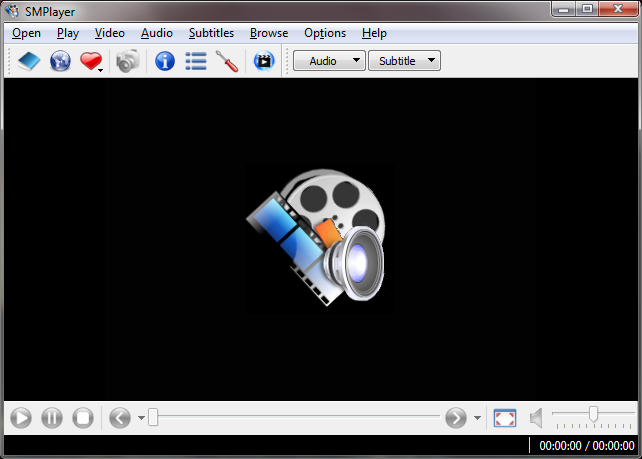 SMPlayer is a player with basic features like playing videos, DVDs, and VCDs to more advanced features like support for MPlayer filters and more. SMPlayer is a player with basic features like playing videos, DVDs, and VCDs to more advanced features like support for MPlayer filters and more.
SMPlayer has a unique quality which is, it remembers the settings of all files you play. If you start to watch a movie but you have to leave… don’t worry, when you open that movie again it will resume at the same point you left it, and with the same settings: audio track, subtitles, volume…
Other basic advantages include:
- It has configurable subtitles which provide you with the ability to choose font and size, and even colors for the subtitles.
- Audio track switching: this gives you the benefit to choose the audio track you want to listen..
- Seeking by mouse wheel: in this case, you can use your mouse wheel to go forward or backward in the video.
- Video equalizer which allows you to adjust the brightness, contrast, hue, saturation and gamma of the video image.
- Multiple speed playback makes you play at 2X, 4X… and even in slow motion.
- several filters which include: deinterlace, postprocessing, denoise… and even a karaoke filter (voice removal).
- audio and subtitles delay adjustment which allows you to sync audio and subtitles.
- Playlist which allows you to enqueue several files to be played one after each other. Autorepeat and shuffle supported too.
- With Preferences dialog you can easily configure every option of SMPlayer by using a nice preferences dialog.
SMPlayer is presently translated into more than 20 languages, including Spanish, German, French, Italian, Russian, Chinese, Japanese….
It is available for Windows and Linux. Check it out at http://smplayer.sourceforge.net/
Posted in Main | No Comments »
Monday, October 27th, 2008
 Soundbase was designed for the purpose of filling the space in the large amount of free and commercial mp3 players. This will most likely fit into your mp3 playing experience as a player, as a tag editor or as an organizer. Soundbase always give you a quick way of doing common tasks. Soundbase was designed for the purpose of filling the space in the large amount of free and commercial mp3 players. This will most likely fit into your mp3 playing experience as a player, as a tag editor or as an organizer. Soundbase always give you a quick way of doing common tasks.
Soundbase applies the Microsoft DirectShow architecture. DirectShow offers a high-quality capture and playback of multimedia streams. It also supports a wide variety of formats, including OGG Vorbis (OGG), MPEG Audio Layer-3 (MP3), Monkey Audio (APE), and FLAC sound files. It instantly observes and adopts audio acceleration hardware when available, but also supports systems without acceleration hardware.
It has a facility to use BASS Audio drivers, they can be installed from inside Soundbase.
Notable functions of Soundbase include:
- It organizes your music to different locations.
- Edits tag information.
- Search, filter and create playlists.
There is a unique history display and Soundbase doesn’t use any registry entries but stores all in one file.
You will enjoy the fact that it is free and absolutely anonymous, it can run from any location with limited user access rights, and much more.
Check it out at www.dajukebox.com
Posted in Main | No Comments »
Monday, October 27th, 2008
 Tag clinic is a full-featured tag editor and batch file renamer for digital audio files. It supports .aac, .ape, .flac, .m4a, .mp3, .mp4, .mpc, .ogg, .vqf, and .wma tags. Tag clinic is a full-featured tag editor and batch file renamer for digital audio files. It supports .aac, .ape, .flac, .m4a, .mp3, .mp4, .mpc, .ogg, .vqf, and .wma tags.
With this software, you can rename a single file, selected files, or an entire folder of files, preview and edit new names before they’re applied, and undo changes if you change your mind.
Tag Clinic has the ability to convert tags between versions, auto-fills them, swaps text between fields, or creates one type of tag using data from another. It can also choose which tag fields to make visible and in what order they appear. It drags rows around to create the exact playlist order you want. It also have the capacity to drag columns around for the view you need. Tag clinic supports Find, Find All, Find & Replace, prints tags, and saves tag lists to six different file formats.
Tag clinic creates custom capitalization schemes with the multi-function Capitalization Editor. Backup and restore tags to and from CSV or MS Excelâ files, or drag in spreadsheet data to be added to tags.
One good benefit you will enjoy is that you can store album art and other files directly in your tags for safe-keeping and for one-click access. You can now view, store, extract, rearrange, or remove pictures and other objects, or copy and paste them, or move them around easily.
It features the most comprehensive support available of tag types and tag fields, providing easy access to various fields.
Tag clinic does the following and more:
- Operates on all or selected files.
- Rename files based on tag data
- Rename preview
- Folder scanning
- Rename undo
- Duplicate file name report generator
- User-defined renaming formats
- Extract tag data from file or folder names
It also backup and restore tag data to and from CSV and XLS files
For more information, check www.kevesoft.com
Posted in Main | No Comments »
Sunday, October 26th, 2008
 Here is a tool worth checking out! Here is a tool worth checking out!
MobileVideo for ipod is a free video conversion software newly developed by keronsoft to allow you convert your regular PC video files (avi, mpeg, etc) into the proper video format that your iPod understands.
MobileVideo For iPod gives a convenient way to convert all of the popular video formats to iPod Video such as converting AVI to iPod, MPEG to iPod, WMV to iPod. No program supports so comprehensive video files including AVI, MPEG, WMV, MOV, MP4, RM, RMVB.
What you will love about this cool tool is that it offers a way to convert popular audio files including WAV, WMA, MP2, AC3, RA, M4A, OGG, AAC etc. to iPod supported MP3 formats. Conversion procedures are very rapid and easy to handle.
Want to see if this is what you need? Check it out right here.
Posted in Main, Utilities | No Comments »
Saturday, October 25th, 2008
 ProgDVB is a tool for digital video broadcasting. It is the best software for watching digital TV and listening to radio channels. It has a special support for Internet TV and radio, DVB-S (satellite), DVB-S2, DVB-C (cable), DVB-T,ATSC, IPTV, Analog TV or playback from a file. ProgDVB is a tool for digital video broadcasting. It is the best software for watching digital TV and listening to radio channels. It has a special support for Internet TV and radio, DVB-S (satellite), DVB-S2, DVB-C (cable), DVB-T,ATSC, IPTV, Analog TV or playback from a file.
Here are the basic things, it does:
- Provides a High Definition TV support including H.264/AVC
- It supports the InternetTV (WMP)
- Gives support for most DVB and ATSC devices
- Support for the popular digital television standards, such as DVB-S(S2), DVB-C, DVB-T, ATSC
- It supports the IPTV
- It gives support for the Analog TV.
- Support for all digital TV audio formats: MPEG, AC3, AAC
- ProgDVB offers picture-in-picture support as well as independent simultaneous recording/playback of several channels from one or more devices
- It does time shifting using the RAM or disk buffer of unlimited size
- 10 Bands equalizer
- Records TV and Radio channels.
- It plays back from disk based files and many more
This software works with DVB-S, DVB-S2, DVB-T and DVB-C cards of the following manufactures:
- Anysee (E30S Plus,…)
- AverMedia DVB-S
- Azurewave (TwinHan) VP-1027, VP-1034, VP-1041
- BroadLogic 2030/1030
- Compro VideoMate DVB-S
- Digital everywhere FireDTV/FloppyDTV
It operates without a card, for example, as a video player or as a broadcast client
Want to check itout? Go to www.progdvb.com
Posted in Main | No Comments »
Thursday, October 23rd, 2008
 A password recovery tool for managing passwords that works as a toolbar for your native web browser. A password recovery tool for managing passwords that works as a toolbar for your native web browser.
Pros: This is a password recovery tool that will save your passwords for future use, so that you won’t have to remember too many passwords. The toolbar is the basic mode to do this. It can also help the user in filling up forms. But read the cons before coming to any conclusion about this product.
Cons: It promises a lot, but problems are plentiful. It appears that it doesn’t actually work. Or works, but one cannot figure out how to make it work. The interface is poor and cluttered, it attaches two small windows to your web browser, and thereafter one is not sure of what to do. There is also an irritating, and yes, insistent screen that wants you to buy this stuff. The help function does not seem to work so it is not possible to figure things out by looking in there.
If the form filling etc. are supposed to work that information ought to be saved somewhere (and therefore visible to the user) but this is not the case so one is not certain if that will work – alternatively, this is the same as saying that one does not know where to populate information for this purpose. All in all, this is a frustrating experience. There are lingering questions about how updating of passwords etc. will work, but those are secondary assuming one can get the simple tasks to work.
{More Info and Download}
Posted in Main | 1 Comment »
Thursday, October 23rd, 2008
 A RSS-feed reader for paintings and giclee prints by the artist Murray Hubick. A RSS-feed reader for paintings and giclee prints by the artist Murray Hubick.
Pros: By publisher Modern Paintings this is a RSS-feed reader of the paintings and giclee prints of the artist Murray Hubick. Murray Hubick lives in England and primarily works on paintings based on the female nude but also delves occasionally into Still life. He has enjoyed a successful career in the varied disciplines of illustration, teaching, painting and drawing in a variety of mediums and advanced trompe d’oeil technique. He has a degree in Fine arts from Canada.
The Modern Paintings RSS feed tool is an RSS reader that takes updates from the website and displays the art in high-resolution graphics. The interface looks very good and goes with the quality of the art. The way that the tool is designed makes the art eminently visible by not crowding the interface with too many controls and other unnecessary things. As mentioned before, the way that the graphics are rendered is excellent and it makes the art-work come alive on the user’s screen.
Cons: Limited audience, this tool is for a specific group of art enthusiasts, although it would be good even for others. The quality of the graphics demands that the graphical capabilities of the user’s computer be very good, otherwise the art will not displayed to its fullest merit.
{More Info and Download}
Posted in Main | 1 Comment »
|
|
|




