Archive for the 'Main' Category
Tuesday, October 31st, 2006
 Those of you who were fans of the Star Wars X-Wing Fighter game of the early nineties now have the opportunity to play a version of it for free. I don’t know if the final battle of Return of the Jedi was ever in the original X-wing game, but you get the chance to play an X-wing fighter pilot with this game. Those of you who were fans of the Star Wars X-Wing Fighter game of the early nineties now have the opportunity to play a version of it for free. I don’t know if the final battle of Return of the Jedi was ever in the original X-wing game, but you get the chance to play an X-wing fighter pilot with this game.
Like all Star Wars games, this starts with the traditional scrolling effect. In then has the great scene where all the fighters, led by Lando in the Millenium Falcon, come flying in. After leading off the squads, it seems like forever until the game finally begins.
Once it does, it is a little confusing. The steering controls are done with the mouse, and you can easily be blown off-course. Like Yoda says: “Control! You must learn control!”. After that, it can be hard to find TIE fighters to shoot down. However, if you keep heading toward a Star Destroyer, TIE fighters will swarm around you. Getting them in your crosshairs is difficult, but they usally go down with one hit. When they do, they tend to spin around like that one fighter did in Empire Strikes Back. You also have the option of using torpedos to hit your targets.
All in all, I would say the game is a lot of fun. I’m not certain how far you can go, though. I mean, can you go into the heart of the Death Star itself? That would be cool. I always liked the shot in Jedi when the whole thing falls down, and Lando’s ship barely makes it out. Even if it doesn’t, I hope there isn’t any Ewoks.
You can get the game here.
Posted in Main | 7 Comments »
Monday, October 30th, 2006
 Diver Down is an interesting little game that’s kind of a mix of Gauntlet and old-school adventure games. I’m not really certain why it is called that, because scuba diving doesn’t look involved in any way shape or form. Diver Down is an interesting little game that’s kind of a mix of Gauntlet and old-school adventure games. I’m not really certain why it is called that, because scuba diving doesn’t look involved in any way shape or form.
Diver Down takes place on some mythical continent that I honestly forget the name of. The beginning has more backstory than the opening sequence of the first Lord of The Rings movie, but is so detailed and uninteresting that it draws you out of the game instead of in. I think there’s like three separate factions in the souther continent, or island, or something.
Your main character, who the computer seems to call “Drek” awakes in a dungeon. This character is a either a partial amnesiac, or total spacecase. He is covered in blood, and yet somehow has armor on. For some reason, it never occurs to him to take it off and find the nearest mirror. Your character meets a guard, who seem to know who you really are. He, of course, dies before he can give any more information, just like the bad guys on 24.
The game controls are the simple arrow keys, but I couldn’t get anything past that. There doesn’t seem to be any in-game instructions, and I’m too lazy to read the “read me” file. Most games know that they are complex, and should go out of their way to be simple. In this game, I found a dungeon door that I wanted to open. I found a set of dungeon keys, but I apparently could not open the door. Or least, I’m not even sure if I was using it right. Who knows? If you play, remember that the Space Bar key opens a menu, and the Alt key ends it. The Enter key is kind of an “action” key that can do a number of things.
In short, Diver Down might need to stay there. The game is far too uninteresting and complicated. However, if you want to give it a shot, you can download it here.
Posted in Main | 4 Comments »
Monday, October 30th, 2006
So maybe you’re sick of the same “boring blue” windows theme, day in-day out. Well before you throw your Windows out the window, check this out!
Windowblinds is one of those programs that once you start using it, you can never go back to the old way again.
It comes from the same people who brought us bootskin and logonstudio, so they know what they’re doin’. Basically you can change how your windows operating system looks, by simply downloading easy to install themes. There’s plenty of these available online in lots of styles on sites such as www.wincustomise.com and www.skinz.org, so you’re sure to find something to suit your tastes.
 It doesn’t change how Windows works, but just how Windows looks. I’ve been using it for the last couple of years now and i found it doesn’t slow up the computer in the slightest. In fact i remember reading that it uses less resources than the windows default skin! Whether this still appies to the latest version, i’m not too sure, but it hasn’t slowed my computer up at all in any way. This new version, Windowblinds 5, now includes per-pixel alpha blending, allowing such effects as semi transparent menus and windows. You ‘re also able to change progress animations toolbar icons, and the hue and saturation of the windows interface.
This is a cool program if you wanna escape from boring blue default windows theme land . It’s safe and you can finally have a more individually styled computer (like this example). (more…)
Posted in Main | 3 Comments »
Monday, October 30th, 2006
 This game I found on a whim, and didn’t take long to download. I didn’t play it long, either. This game I found on a whim, and didn’t take long to download. I didn’t play it long, either.
Simply put, the game is confusing. Apparently, you are working this four legged spider who can fire missiles. The back story is that it is the year 8888, and boy, will people laugh when that year rolls around and discovers the future is completely devoid of red spiders who shoot missiles. The back story deals with something about environmental fallout of several wars, or something. Why is it these complicated games always have even more complicated backstories?
The controls are very confusing as well. You see, some of the enemies are floating, and you have to hit the up key to jump up in the air to shoot them. Unfortunatley, this up key also increases your speed, so you can’t help but go way fast everytime you jump up. This causes you to hit a wall and explode. (more…)
Posted in Main | 23 Comments »
Monday, October 30th, 2006
 5 Days a Stranger is a great reminder of the old-school games of 2.5 dimensional gaming. You may not be old enough to remember games like King’s Quest, Space Quest, or other titles from Sierra, but 5 Days a Stranger has the same type of game play. That is, you are a character who can move within a semi 3-D lanscape, interact with items and people, and eventually work your way toward a game goal. 5 Days a Stranger is a great reminder of the old-school games of 2.5 dimensional gaming. You may not be old enough to remember games like King’s Quest, Space Quest, or other titles from Sierra, but 5 Days a Stranger has the same type of game play. That is, you are a character who can move within a semi 3-D lanscape, interact with items and people, and eventually work your way toward a game goal.
In the case of 5 Days, you play a cat burglar named Trilby. The name is more of an alias, really, and you make your living going to places and ripping off valuable goods. This time, you are at the estate of Clearance DaFoe, a rich man who was recently found hung. His wife was also killed as well. Triby’s only goal is to get the goods from the place and go.
Unfortunately, there is a complication. Once you get in the house, you are locked inside. It doesn’t look like you’re alone. There are four others trapped inside with you. The question is, can they be trusted? Probably not. I’m not too far in the game as yet, but something tells me they got their secrets. In a way, this game is like being on the show Lost, but it’s all indoors. (more…)
Posted in Main | 4 Comments »
Sunday, October 29th, 2006
TextEdit is the default text editor packaged with Macs, and though it isn’t quite as bad as Windows Notepad, it’s close. Since I keep lots of notes in text files on my computer as well as using a text editor for some web development, I found it necessary to search for a replacement.
What I found was a free program from Bare Bones Software called TextWrangler. This program is actually a sort of light version of their famous (in the Mac world) advanced text editor called BBEdit. TextWrangler is freeware while BBEdit is not.
I’ve had trouble from time to time when trying to copy and paste text from TextEdit into my wordpress blogs. Sometimes junk characters were included because of the default rich text formatting of TextEdit. This is one of the basic problems that TextWrangler has solved. The file stays in plain text with no extra characters or formatting included. (more…)
Posted in Main | No Comments »
Sunday, October 29th, 2006
 How much does it cost to buy the latest version of Photoshop? As of this writing, you’ll have to pay almost $600. I don’t know about you, but that’s a lot of change for me. The good news is that there’s a free alternative available: The GIMP. How much does it cost to buy the latest version of Photoshop? As of this writing, you’ll have to pay almost $600. I don’t know about you, but that’s a lot of change for me. The good news is that there’s a free alternative available: The GIMP.
The question always comes up (and with good reason) about the name. What the heck does it mean? It stands for GNU Image Manipulation Program. The GNU part refers to the licensing of the software and just means that the software can be free or for sale, but must include the source code or access to it so that users can modify it if they want to.
The GIMP is available free for Windows, Mac, and Unix systems, but the Windows version was used for this review. Installation was simple after downloading the installation package. Before the program itself can be installed, though, a separate file containing necessary libraries must be downloaded and installed. Each of these files installed in just a couple of minutes without trouble on my test machine. (more…)
Posted in Main | 1 Comment »
Sunday, October 29th, 2006
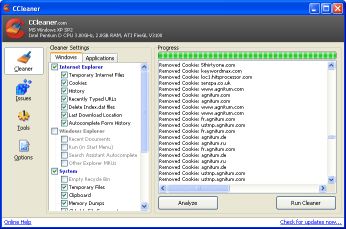 C Cleaner is an all in one Windows disc cleaner. It’s a freeware system optimization and privacy tool, which means in real terms it flips through your system and fixes anything which shouldn’t be there or be configured that way. C Cleaner is an all in one Windows disc cleaner. It’s a freeware system optimization and privacy tool, which means in real terms it flips through your system and fixes anything which shouldn’t be there or be configured that way.
It deletes unused files from your system, speeding things up a bit, but also removes traces of your online activities such as your Internet history. Now… we all know you don’t go anywhere you shouldn’t. But if you DO then this will remove all traces. From your computer anyway. Server logs are another problem.
But C Cleaner is really cool and very fast. If you own and use Internet Explorer, Firefox, Opera, it’ll take out the trash of Temp files, history, cookies and so forth. Plus it will stick a loo brush up Windows, going through your Recycle Bin, Recent Documents, Temporary files and Log files etc. There’s a bunch of other stuff it does too, it’s very comprehensive, and according to the writers 100% Spyware FREE. (more…)
Posted in Main | 6 Comments »
Sunday, October 29th, 2006
 Winamp is a very popular music player for windows. Chances are you’ve heard of it by now if you’re into using your computer to listen to music, so i’ll save the big introduction. I’m gonna share some (hopefully) useful tips from my experience of using it as my main music player. Winamp is a very popular music player for windows. Chances are you’ve heard of it by now if you’re into using your computer to listen to music, so i’ll save the big introduction. I’m gonna share some (hopefully) useful tips from my experience of using it as my main music player.
Skins:
I’ve downloaded a lot of skins in the past in my neverending quest for the perfect skin.The novelty value soon wears off after a few minutes of use with most of these. So in the end i decided to settle on the default “modern” skin. I didn’t like the default color of it, but i found you can easily change this in options. This way you’re sure to have the most compatible skin (since it’s the default one as standard) but in a color more suited to your taste or desktop. If you’re on a slower computer, i recommend you stick with the “classic” skin as it uses a lot less resources. (more…)
Posted in Main | No Comments »
Friday, October 27th, 2006
Another free little program from the same people who bought you bootskin. This is a similiar thing, working in much the same way, but allows your to change your windows log-on screen. You can actually create and edit your own screen if you are feeling creative. If not, don’t worry! If you don’t feel up to the challenge of making your own there’s a lot of bootscreens available here .
Both bootskin and this program work great together for anyone who wants to add a more personalized touch to their computer, and who realises there is life past default blue color schemes and windows logos. : ) (more…)
Posted in Main | No Comments »
|
|
|






