Archive for the 'Main' Category
Saturday, March 2nd, 2013
 Ever thought of making the entire screen of your computer system highly dynamic by making color changes? Well if till now it wasn’t possible for you to do the same then ColorVeil 1.0 is definitely going to make things happen. This particular application promises to make your screencast and presentations immensely appealing by putting the filters of varied colors. Whatever is currently being executed on your monitor say media player with movie going on, or internet browser or any other application running as well as plain desktop, can be over shadowed by lovely colorful filters and eventually make things really pleasing to eyes. Moreover, quite a lot of other features affixed in it too add an enhanced user experience. Ever thought of making the entire screen of your computer system highly dynamic by making color changes? Well if till now it wasn’t possible for you to do the same then ColorVeil 1.0 is definitely going to make things happen. This particular application promises to make your screencast and presentations immensely appealing by putting the filters of varied colors. Whatever is currently being executed on your monitor say media player with movie going on, or internet browser or any other application running as well as plain desktop, can be over shadowed by lovely colorful filters and eventually make things really pleasing to eyes. Moreover, quite a lot of other features affixed in it too add an enhanced user experience.
ColorVeil offers a perfect way to display the PC screens in a fantastic way. You can choose any color of your desire and set it. Even with your mood you get to set the color of your screen ideally with it. Well main objective of this application is to not only create colored display of the screen but also reduce brightness of the screen and reduce strain that tends to build on your eyes. This also can help your PC and specially laptops as well as tablets to consume less power and run longer. You get to experiment with the tool and set elegant colors to get randomly generated plus determine the level of transparency of screen colors. It will not hamper the normal functioning of your system and run as smoothly as ever. User interface of this color veiling application is simple, user-friendly and attractively designed like any professional application.
Try it yourself and check the glamor it can bring on to your screen. Furthermore with the main aspect of beauty along with eye protection which you get from ColorVeil 1.0.
{More Info and Download}
Posted in Main | No Comments »
Thursday, February 28th, 2013
 Any program that enables you to simplify creation of batch files, and also use batch files to automate many routine operations will always be a welcome addition; and that is what a program like Dr.Batcher offers. Any program that enables you to simplify creation of batch files, and also use batch files to automate many routine operations will always be a welcome addition; and that is what a program like Dr.Batcher offers.
What is Dr.Batcher?
Dr.Batcher is a powerful tool for creation and editing Windows batch files. You can simplify creation of batch files, and using batch files you can automate many routine operations; which save your time. Batch file is a small script that allows you to automate some routine operations: for example, creation of backups, cleaning folders from garbage files, etc. Batch file is like a small program, and it’s very easy to create it with Dr.Batcher.
What else has Dr.Batcher got to offer?
Simple mode that enables you to create BAT files with visual editors and wizards; professional mode that enables you to create BAT files with full-featured and highly customizable text editor with syntax highlighting, code tooltips, lines numbering and bookmarks; easy switching between different modes of batch file editor; built-in support for most commonly used standard Windows and DOS commands; expandability: easy to add new commands through XML files with their descriptions; support for BAT scripts in Windows and DOS encoding, fast conversion of text from one encoding to another; and many more.
Downside
Dr.Batcher has a nag screen, and is limited to only 30 days for trial.
Want to check it out? Visit M-W-C-S.com.
Posted in Main | No Comments »
Thursday, February 28th, 2013
 A lot of people use the internet these days relying only on free antivirus and ant tracking applications; and this should not be considering how vulnerable your system can be. To check or put in check all kinds of tracking, it is important to install a premium application; and there are a few good ones out there. East-Tec Eraser protects your data and privacy and remove all evidence of your computer and online activity. A lot of people use the internet these days relying only on free antivirus and ant tracking applications; and this should not be considering how vulnerable your system can be. To check or put in check all kinds of tracking, it is important to install a premium application; and there are a few good ones out there. East-Tec Eraser protects your data and privacy and remove all evidence of your computer and online activity.
What is East-Tec Eraser?
East-Tec Eraser that meets and exceeds government and industry standards for the permanent erasure of digital information and removes every trace of sensitive data from your computer, including Internet history, Web pages, pictures, unwanted cookies, conversations, and all traces of files, confidential documents, e-mails deleted in the past, or entire drives, floppy disks, CDs/DVDs, USB flash drives.
East-Tec Eraser cleans away evidence from the latest versions of the most popular Internet browsers (Internet Explorer, Mozilla Firefox, Google Chrome, AOL, MSN Explorer, Opera, Safari, Netscape Navigator) and hundreds of popular programs (Yahoo Messenger, MSN Messenger, and many more.
East-Tec Eraser is an application that features an intuitive interface and wizards, automatic cleaning of your computer at specified intervals, Anti-Surprise (Anti-Boss/Panic) key to protect your privacy in emergency situations, support for custom privacy needs, user-defined erasure methods, built-in safety features that prevent you from accidentally removing critical files or folders, password protection, and many more.
Downside
East-Tec Eraser has an annoying nag screen, and has a 15 day trial limit.
Want to check it out? Visit: East-Tec.
Posted in Main | No Comments »
Thursday, February 28th, 2013
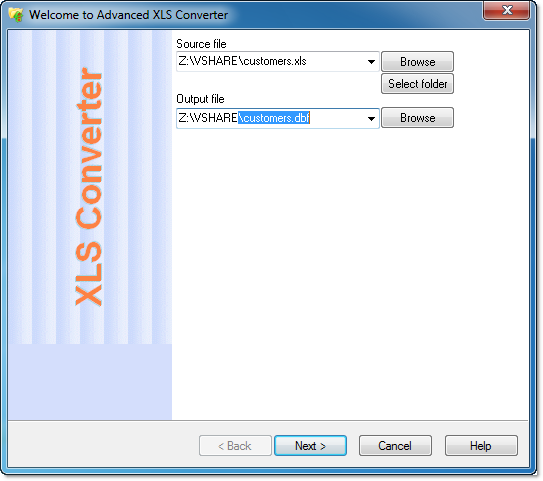 Did you know you can now convert Excel files into any format of your choice with a simple application known as Advanced XLS Converter? Some of the files you can easily convert include standard database (.dbf), or Structured Query Language (.sql) format. Did you know you can now convert Excel files into any format of your choice with a simple application known as Advanced XLS Converter? Some of the files you can easily convert include standard database (.dbf), or Structured Query Language (.sql) format.
What is Advanced XLS Converter?
Advanced XLS Converter is a program that allows you to convert any Excel file into one of a number of different formats with a single click. Convert your spreadsheet to standard database (.dbf), or Structured Query Language (.sql) format, to transform your data into a database file that can be opened and edited with all major database management systems, such as Oracle, Apache Derby, or Microsoft Access.
Advanced XLS Converter enables you to use comma-separated values (.csv), plain text (.txt), or rich text (.rtf) format, to convert your data to universally compatible text formats, and avoid those frustrating compatibility and formatting issues you encounter when transferring files between operating systems. Or convert to markup language (.xml or .html) format, to create polished web pages in one click, and take the stress out of updating your website.
This latest version includes a number of updates such as the following: improved XLS/XLS to CSV conversion; improved conversion for multi-sheet Excel workbooks; and some minor improvements in xls converter.
Downside
It limits you to only 50 rows, which is a bit low for users with other plans
Want to check it out? Visit XLS-Converter.
Posted in Main | No Comments »
Thursday, February 28th, 2013
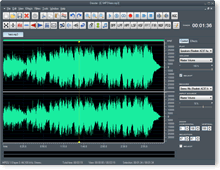 Are you looking for an audio application that supports several popular audio formats and features audio CD burning? Not every program out there provides the kinds of features most people or users want; but a few of them do have some nice user-interfaces that you can use without stress. Dexster might just be one such program considering some of the features that have been included in it by the publisher. Are you looking for an audio application that supports several popular audio formats and features audio CD burning? Not every program out there provides the kinds of features most people or users want; but a few of them do have some nice user-interfaces that you can use without stress. Dexster might just be one such program considering some of the features that have been included in it by the publisher.
What is Dexster?
Dexster is an audio editor tool for your music production that supports many popular audio formats and features audio CD burning. It provides cool and easy-to-use interface that allow you to edit an audio file visually (Cut, Copy, Delete Select, Delete Silence, Paste, Paste From File, Mix, Mix From File); apply different effects (Amplify, Compressor, Delay, Envelope, Equalizer, Expander, Fade, Flanger, Invert, Normalize, Phaser, Reverb, Reverse, Silence, Stretch, Trim, Vibrato, Chorus, Pitch Shift); Vocal Reduction; Mix Stereo Channels; Insert noise and silence in an audio file.
Dexster supports audio format of uncompressed WAV PCM, compressed WAV (ADPCM, GSM, DSP and others),MP2 (MPEG 1/2 Layer-2), MP3 (MPEG 1/2 Layer-3), VOX (Dialogic ADPCM), WMA (Windows Media Audio 9), RAW audio (PCM, A-LAW, U-LAW), MPC (MusicPack),AVI (audio track), Audio CD, Ogg Vorbis,G.721, G.723, G.726,AIFF (Apple audio format) and AU (UNIX audio format).
Downside
This version is only limited to nine uses, and has a nag screen.
Want to check it out? Visit SoftDivShareware.
Posted in Main | No Comments »
Wednesday, February 27th, 2013
 Need a program to help you recover your lost password real fast? Get Passware Kit. Need a program to help you recover your lost password real fast? Get Passware Kit.
What is the real deal about Passware Kit?
It is a total password recovery solution that provides corporate security administrators with the full control over employees’ computers and files. System administrators, IT professionals and help desk personnel can now get access to any business file whenever required. It can recover or reset many passwords instantly while difficult passwords can be recovered by its advanced acceleration methods.
Some of the features of this program include: instantly recover several types of passwords, Instantly decrypts MS Word and Excel files up to version 2003, Resets passwords for Local and Domain Windows Administrators instantly, Recovers encryption keys for hard drives protected with BitLocker in minutes, including BitLocker ToGo, Recovers passwords for Windows users from a memory image or a standalone SAM file and Recovers passwords for Windows users from a memory image or a standalone SAM file.
It can also Decrypt TrueCrypt, FileVault2, and PGP volumes in minutes, Extracts passwords from encrypted Mac keychain files, Extracts passwords from Windows/Unix/Mac hashes among several other features.
Dmitry Konevnik, the author of this program, has added a few changes to this version. These are: Extraction of Facebook, Google, and other websites’ passwords from live memory or hibernation files, Hardware acceleration: the latest ATI cards (AMD Radeon 7 series) supported, Distributed password recovery now with custom dictionaries, Portable rainbow tables for instant offline decryption of Word and Excel files up to v.2003 now for sale and Control hardware resources used for password recovery to optimize performance.
An excellent piece of password cracking tool. A bit pricey though.
To learn more about this program, please do visit LostPassword.
Posted in Main | 1 Comment »
Wednesday, February 27th, 2013
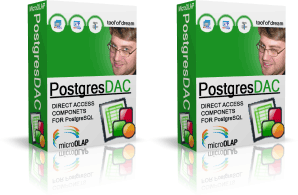 Are you looking for a shareware that is not only affordable, but designed with some of the latest and easy to use features for Delphi/C++Builder and PostgreSQL 7.X? PostgresDAC might just be your choice of application. It allows you to create Delphi/C++Builder applications with direct access to PostgreSQL/Pervasive Postgres DB without BDE and ODBC. Are you looking for a shareware that is not only affordable, but designed with some of the latest and easy to use features for Delphi/C++Builder and PostgreSQL 7.X? PostgresDAC might just be your choice of application. It allows you to create Delphi/C++Builder applications with direct access to PostgreSQL/Pervasive Postgres DB without BDE and ODBC.
What is PostgresDAC?
PostgresDAC is a PostgreSQL BDE replacement for Delphi 4-6 and BCB5 applications with direct access to PostgreSQL DB without BDE and ODBC. This components set was developed for easy migration of existing projects from BDE/ODBC scheme to the native one. Interface is BDE-like and TDataSet compatible. Included for free is TDBImageEx component for JPEG images in BLOBs support.
This is a maintenance release that contains the latest client library, several bug fixes and improvements. System requirement for installation include Delphi 5 or C++Builder 5 and higher; PostgreSQL 7.4 and higher.
PostgresDAC is packed with some powerful features that include the following: royalty-free; Delphi 5-7, ++Builder 5-6, Borland Developer Studio 2005-2006 Win32 edition support; full compatibility with all the existing data-aware controls and report designers; full support of the BLOB fields; TNT Unicode Controls Wrappers package for Unicode applications for free (with sources); detailed help system and a lot of demo applications; and many more.
Downside
Free only for a limited period.
Want to check it out? Visit Microolap.
Posted in Main | No Comments »
Wednesday, February 27th, 2013
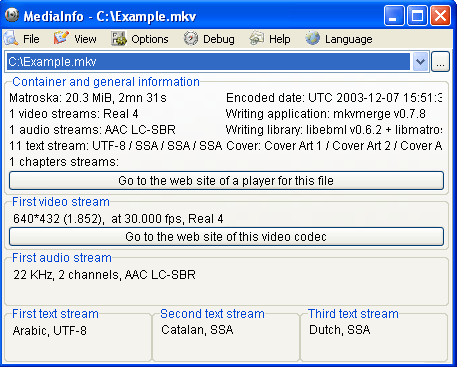 Searching for an application that provides you with the metadata abut any audio or video files? Why not check out MediInfo. Searching for an application that provides you with the metadata abut any audio or video files? Why not check out MediInfo.
What is the big deal about MediaInfo?
It allows you to get a quick look at the characteristics of media files. MediaInfo is a simple utility that can provide users with metadata about their audio and video files, including codecs, and frames per second. . It also provides more specific information for audio files such as: codec, aspect, fps, bitrate and more, and information for video files such as: codec, sample rate, channels, language, bitrate and more. This information can be exported as text, CSV or HTML.
Its user interface is plain and easy to navigate. You can select either an individual file or a whole folder of files to view. You can export metadata information in a CSV, sheet, text, or HTML file. MediaInfo doesn’t have much in the way of documentation aside from an FAQ on the publisher’s Web site, but the program is really pretty self-explanatory, at least for users who already know what all of this metadata means. You can view files in any of these 8 formats- Basic, Sheet, Tree, Text, HTML, XML, MPEG-7, and PBCore 1.2. Each of these formats provide you with different information such as file size, duration, bit rate, compression mode, and color space.
The publisher, MediaInfo, has added a few changes to this version. They include: ARIB STD B24/B37 caption detection (both Japanese and Brazilian versions), LXF: support of AVC, VC-3, MPEG audio, AC-3, Dolby E, and AAC detection and analysis, AC-3: support of 22.05 kHz streams (out of specs but they exist), MOV: AIC (Apple Intermediate Codec) scan type detection, MOV: support of AVID metadata (interlacement information) and Time code dedicated tracks (MOV, MXF, GXF).
Downsides?
Does its job well.
To find out more about this program, please visit SourceForge.
Posted in Main | No Comments »
Tuesday, February 26th, 2013
 Have you ever noticed that the performance of your computer starts slowing down after weeks and probably months of persistent use? This is most times caused by several issues including files that are left behind after uninstalling some applications and a lot of other issues. To this end, a program that lets you analyze and benchmark your computer won’t be such a bad idea. Fresh Diagnose is a program that offers you such possibilities as you are soon to find out. Have you ever noticed that the performance of your computer starts slowing down after weeks and probably months of persistent use? This is most times caused by several issues including files that are left behind after uninstalling some applications and a lot of other issues. To this end, a program that lets you analyze and benchmark your computer won’t be such a bad idea. Fresh Diagnose is a program that offers you such possibilities as you are soon to find out.
What is Fresh Diagnose?
Fresh Diagnose is a tool designed to analyze and benchmark your computer system. Fresh Diagnose can analyze and benchmark several kinds of hardware including CPU performance, hard disk performance, video system information, mainboard information, and several others.
Fresh Diagnose has some powerful and easy to use features that include the following: scanning your system and providing complete report about hardware and software; testing the performance of your system including CPU hard disk, CD/DVD ROM, and comparing it with other systems; Fresh Diagnose also enables you to learn more about your computer components, detect/diagnose problems or errors in your system, and increase the overall performance of your computer.
Fresh Diagnose is no doubt a nice application; but getting the registration code is a bit difficult.
Want to check it out? Visit FreshDevices.
Posted in Main | No Comments »
Tuesday, February 26th, 2013
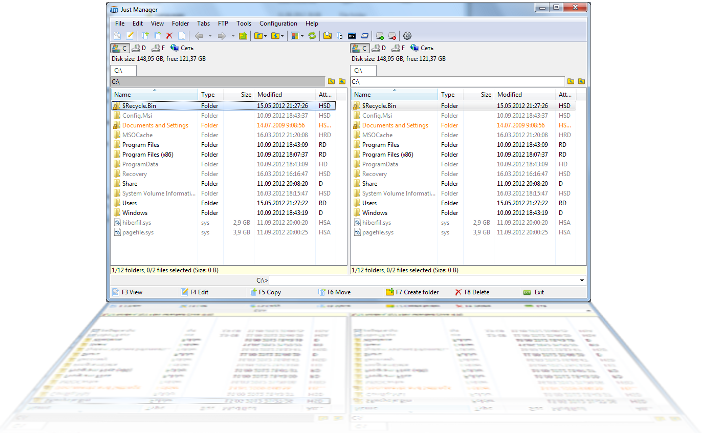 Are you looking for a tool that has multiple features that can be used for a lot of things on your system including multi-rename and quick file search? Then Just Manager sounds like a program that has all those features just made for you. Are you looking for a tool that has multiple features that can be used for a lot of things on your system including multi-rename and quick file search? Then Just Manager sounds like a program that has all those features just made for you.
What is Just Manager?
Just Manager is a file manager for the Windows Operating system. It features Multi-panel interface, Panel tabs, File operations, File Search, Quick search, Multi-rename tool, FTP, and a customizable interface.
Recently, a lot of changes were made to Just Manager to include the following fixes and updates: CMD folder opens instead of cmd-fixed; FTP UTF-8 support added; fixed application crash on file view/edit; environment variables resolving implemented; path panel not displayed problem fixed; and “open path edit” item added to path panel menu.
Other features that you can find in Just Manager 0.1 Alpha include the following: supports all modern versions of Windows with both x86 and x64 versions; Drag & Drop operations; Color and Font highlighting for file/folder extension and attributes; Standard file operations (move, copy, shortcut); Map and disconnect network drives; Favorite and system folders support; Built-in FTP client; Multilingual support; fully customizable interface; and UNICODE support.
Downsides (if any)?
Just Manager is a great program with amazing features; and the fact that it’s a freeware doesn’t take anything away from its performance.
Want to check it out? Visit JustManager.
Posted in Main | No Comments »
|
|
|




