Archive for the 'Main' Category
Sunday, December 16th, 2012
 Lan-Secure Switch Center is a network management and monitoring software for managed switches, routers and hubs from any vendor supporting SNMP BRIDGE-MIB that helps to discover, monitor, mapping and analyzing networks topology, connectivity and performance. Lan-Secure Switch Center is a network management and monitoring software for managed switches, routers and hubs from any vendor supporting SNMP BRIDGE-MIB that helps to discover, monitor, mapping and analyzing networks topology, connectivity and performance.
Switch Center can be connected through any network port without the need of remote agents or special network configuration. The unique monitoring engine provides complete network connectivity and performance of local and remote network nodes and interconnecting devices trunks.
Lan-Secure Switch Center Workgroup supports SNMPv1/2 and SNMPv3 discovery options including optional VLANs monitoring engine. The software’s built-in central viewer supports multiple management levels and provides automatic network mapping using OSI Layer 2 and Layer 3 topology including real-time reports, statistics and alerts. The workgroup version of this program supports one network switch.
Switch Center can also be combined with Network Access Control (NAC) monitoring engine that implements 802.1X capabilities on any network switch port using Switch Center Protector to enforce network organization policy and create complete management solution for network monitoring and security.
Lan-Secure Switch Center Workgroup has the following features; real-time network management and monitoring, nodes and users discovery including port location, reports and statistics including exporting capabilities, multi vendor’s network devices ports mapper and scanner, and a host of others.
Downside
Lan-Secure Switch Center Workgroup has a 30 day limitation.
Want to check it out? Visit: Lan-Secure.
Posted in Main | No Comments »
Sunday, December 16th, 2012
 What is Adobe Illustrator? It was specifically redesigned from the inside out to be faster and more intuitive; and with stability when working on files that are a bit complex. With Adobe Illustrator CS6, you can create and edit patterns up to 75% faster. What is Adobe Illustrator? It was specifically redesigned from the inside out to be faster and more intuitive; and with stability when working on files that are a bit complex. With Adobe Illustrator CS6, you can create and edit patterns up to 75% faster.
The software also enables you to automatically collect all your files for production in a few clicks. It also works faster and efficiently with the new streamlined interface; and with illustrator CS, your tools can always keep up with your ideas.
Adobe Illustrator is a program that defines the future of vector graphics with groundbreaking creative options and powerful tools for efficiently publishing artwork on the Web, in print, everywhere. Produce superb Web graphics using symbols and innovative slicing options. Explore creative ideas with live distortion tools. Publish in record time with dynamic data-driven graphics and other productivity features.
In the future, you can always get new releases and updates through the Cloud membership. The Creative Cloud ensures you no longer have to wait for future releases, fixes, and updates. As a matter of fact, you will be able to gain access to new features as soon as they become available.
Any downsides?
Version 16.03 has no issue; and seems to be stable.
Want to check it out? Visit: Adobe.
Posted in Main | No Comments »
Sunday, December 16th, 2012
 BurnAware is one of the easiest burners for all categories of users including inexperienced ones. It allows you to do a lot of your burning jobs just like a pro, and is unbelievably available at an affordable price. BurnAware is one of the easiest burners for all categories of users including inexperienced ones. It allows you to do a lot of your burning jobs just like a pro, and is unbelievably available at an affordable price.
What is BurnAware?
BurnAware Professional is a powerful CD, DVD and BD disc burning solution intended for users who need maximum control over every aspect of the burning process and use multiple burners for mass-production of various discs and quick creation of disc-to-disc copies. It’s a solid piece of software that will help you cope with your daily burning tasks faster and more efficiently.
BurnAware is an application that allows you to burn CD, DVD and BD discs with data, audio and video in a simple and hassle-free manner. BurnAware is intended for users seeking balanced, lightweight and easy to use burning tools for everyday use.
BurnAware Professional has a lot of built-in features to enable you enjoy your burning assignments. Some of these features include; burn, backup or copy your files to CD, DVD, or Blu-ray Discs, append or update multisession discs, burn standard or boot disc images, create bootable CD or DVD, create audio CDs, and many more.
Downsides
Free version of BurnAware has a 10 day timeout.
Want to check it out? Visit Burnaware.
Posted in Main | No Comments »
Saturday, December 15th, 2012
 The publisher of CCleaner has a reputation for providing some very helpful applications that have become parts of what many users enjoy today. A lot of applications from this publisher have become household names; and are sometimes regarded as indispensable. Defraggler is one application from the same people that published CCleaner. The publisher of CCleaner has a reputation for providing some very helpful applications that have become parts of what many users enjoy today. A lot of applications from this publisher have become household names; and are sometimes regarded as indispensable. Defraggler is one application from the same people that published CCleaner.
What is Defraggler?
Defraggler is a free file defragmentation tool from the makers of CCleaner and Recuva. It is different from several other defrag tools in the market, by enabling you to quickly and simply defrag the files you want to, without having to process the whole drive. All you have to do is run it, select the file and defragment in seconds. No more struggling with the Windows defragmentation tool.
Defraggler does almost all the things it says it does, and is available for free download to all users. Some of its features include the following; it uses the exact same techniques that Windows uses to read or write files, it’s light on your system, it enables you to defrag an entire file, its drive map shows you blocks that are empty, organizes empty disk space to further prevent fragmentation, set the application to defrag on scheduled dates, and many more.
Any downside?
Defraggler doesn’t have any downside; especially when you consider the fact that it is also a freeware application.
Want to check it out? Visit Piriform.
Posted in Main | No Comments »
Saturday, December 15th, 2012
 Searching for a text editor program foe your Windows? EmEditor to the rescue! Searching for a text editor program foe your Windows? EmEditor to the rescue!
What is the real deal about this program?
This program is an ultra fast, lightweight, yet extendable, easy-to-use text editor for Windows. It supports JavaScript or VBScript macros, Unicode, plug-ins, syntax highlighting (including embedded scripts in HTML, ASP, and PHP files), drag-and-drop, and menu and keyboard customizations. Apart from Java and VBScripts, it also supports the following texts editing macros: PerlScript, PHPScript, Python, Ruby, and other languages as long as script engines you want to use are installed.
This text editor supports powerful macros, Unicode, and very large files. EmEditor is Windows 8 compatible. It comes with its own uninstaller and has a 30-day time out period.
Any downsides?
It is a very good program if you want an app that can handle large files, then EmEditor does it pretty well. Several features make this app really desirable. It is compact and fast. Very easy to install.
To learn more about this program, please go to Emeditor.
Posted in Main | No Comments »
Friday, December 14th, 2012
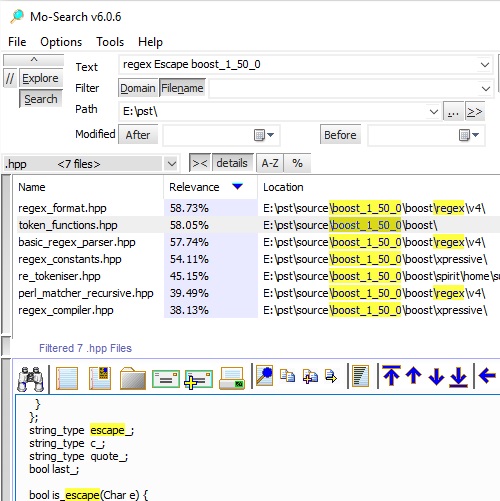 Want an app that helps you to search for applications, files or folders on your desktop? Go for Mo-Search. Want an app that helps you to search for applications, files or folders on your desktop? Go for Mo-Search.
What is the big deal about Mo-Search?
It helps you to search for and locate files and data on your desktop quickly and easily. It makes searching for files on your desktop very easy: just enter a search word and phrase and this app locates it for you.
Some of the key tools of this app are: search results can be listed by relevance, by name, location (path), size, modified date, and further Filter by file type; The FileViewer provides quick navigation of matching files, as well as other tools: Email (file attachment or excerpt), Print, Word Counts, File Properties, File Index, and more; The AutoIndexer continually updates your index using industry standard iFilter, plus a host of indexers. A suite of other tools are also included: Duplicate files detection and cleanup, File type analysis, Whois internet lookup, and File index analysis. It comes with its uninstaller.
MeauxSoft, the publisher of this program, has added the following new changes to this version: Optimization: Faster searching; Cleanup: UI tweaks for Registration plus match App descriptions with website and RegNow; Feature: During installation allow customization of Search paths (longstanding request) and Feature: Added PNG viewer (Also added PNG into Media: Photo domain).
Downsides?
It is a nice piece of app to have. The authors should work on the search speed.
To know more please do visit MeauxSoft.
Posted in Main | No Comments »
Thursday, December 13th, 2012
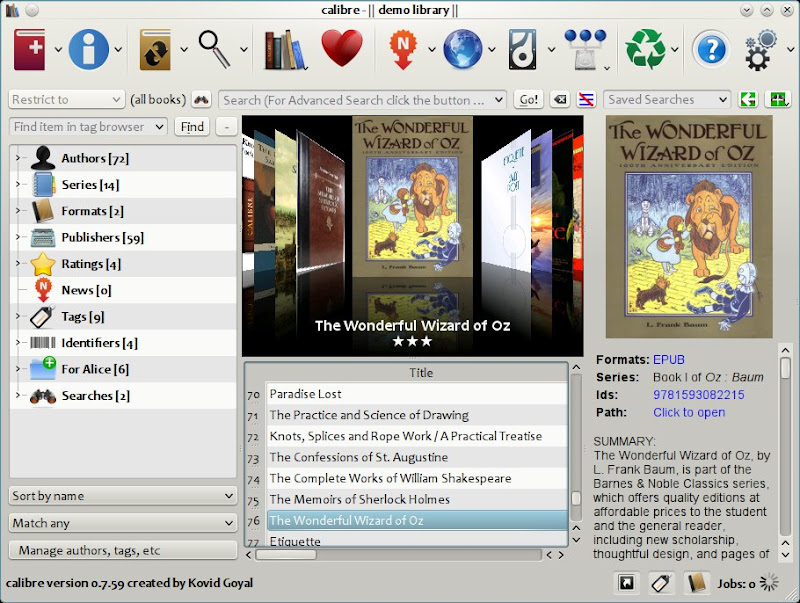 Need an application to manage your e-book library? Get Calibre Need an application to manage your e-book library? Get Calibre
What is the deal about this program?
It is e-book library management freeware that has an easy to use interface. It stores your ebook files in a database along with easily editable metadata describing each book. With the aid of its “add and drop” function, you can easily add ebooks from a single or multiple directories. You can also add books by entering their ISBN.
Some of the key features of this app includes: It allows you to create libraries and toggle between them, as well as rename, delete, backup and restore libraries, connect to iTunes, start a content server, search and sort ebooks, and more. It synchronizes with several e-reader devices easily: it has a modular device driver design that makes adding support for different e-reader devices easy.
Caliber allows you to fetch news item from some of your favorite news sites, format the news into an ebook and upload it to a connected device. You can also schedule news download, or download all scheduled news sources. Some of the supported news sites are: News Week, New York Times. The BBC and The Economist.
Kovid Goyal, the publisher of this program, has added the following new features to this version: fixed an indefinite loop while trying to recover a damaged EPUB file; Fix handling of links in files that link to the obsolete tags instead of tags with an id attribute and so much more.
Downsides?
If you have an ebook, this is a must have app on your computer. Great piece of work from its publishers. However the program uses a high amount of system resources.
To find out more about this program, please visit Calibre-ebook.
Posted in Main | No Comments »
Thursday, December 13th, 2012
 GOM Player is a freeware player that supports long and impressive lists of features. The application is not actually new in the market; but has been updated several times in the past. This new version already includes a number of updates and fixes that have made it more stable than past ones. GOM Player is a freeware player that supports long and impressive lists of features. The application is not actually new in the market; but has been updated several times in the past. This new version already includes a number of updates and fixes that have made it more stable than past ones.
What is GOM Player?
It is a freeware media player supporting loads of useful advanced features. GOM Player also supports a lot of files including broken ones. Some of its latest features include the following; now supports Windows 8 support, default MPEG transport stream changed, addition of aspect ratio options, audio playback issue has been fixed, RTL language subtitle support is now enabled by default, and file playback information now includes the version of GOM media player being used.
GOM Player does not occupy as much space as other freeware or shareware players; and offers you several options. GOM Player also has a codec finder service, and has loads of built-in features to enable you play a lot of video files. The player also has a feature that enables you enjoy or satisfy your playback needs.
Downsides
GOM Player comes with annoying toolbar that should have been optional in the first place; and features a nag screen that is difficult to deactivate.
Want to check it out? Visit Gomlabeng.
Posted in Main | No Comments »
Thursday, December 13th, 2012
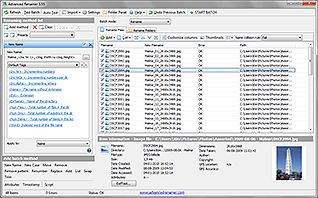 Advanced Renamer is freeware that allows you to rename multiple files or folders at once. Advanced Renamer is freeware that allows you to rename multiple files or folders at once.
What is the big deal about Advanced Renamer?
This program allows you to easily construct new file names by adding, removing, replacing, changing case, or giving the file a brand new name based on known information about the file. This program makes it easy to set up an advanced batch job using multiple methods on a large group of files.
Some of the key features of this program are: it is a great utility for organizing digital pictures for both professionals and beginners. With this program, you can rename all your photos at once. It allows you to add information about video and audio content such as codec or resolution to the filename. It has its uninstaller.
Hulubulu software, the authors of this program, have added the following new features to this version: Command line automation: Mask parameter is no longer case sensitive; File content tag now fixed to use UTF8 text encoding and several others.
Downsides?
It is very easy to use and has a very good interface. It is also very fast and makes batch renaming a breeze. It has little or no learning curve.
To know more about this program, please visit AdvancedRenamer.
Posted in Main | No Comments »
Thursday, December 13th, 2012
 Need an application that helps you monitor your hard disk drives? CrystalDiskInfo is it! Need an application that helps you monitor your hard disk drives? CrystalDiskInfo is it!
What is the deal about this program?
It helps to monitor the health system of your HDD and display basic information about your hard disk drives, solid sate drives as well as other external drives. It displays the information in an easy to read interface. Been an intelligent app, it can alert you when things begin to go wrong.
Some of the very useful data displayed by this app includes Power On Count and Hours, Host Reads and Writes, Firmware version, and Standards. Under Features, it showed that our SSD was compatible with SMART, TRIM, and NCQ as well as 48-bit Logical Block Addressing (LBA).
It is very easy to install and update. It displays useful HDD details that helps you detct early signs of HDD failure. It displays detailed SMART data in the optional bottom view under a variety of headings.
Any downsides?
None as of now. It is a very useful too to check the health status of your HDD. An excellent product that shows you a lot of info about your HDD.
To learn more about this program, please visit Crystalmark
Posted in Main | No Comments »
|
|
|




