O. James Samson - October 13, 2011
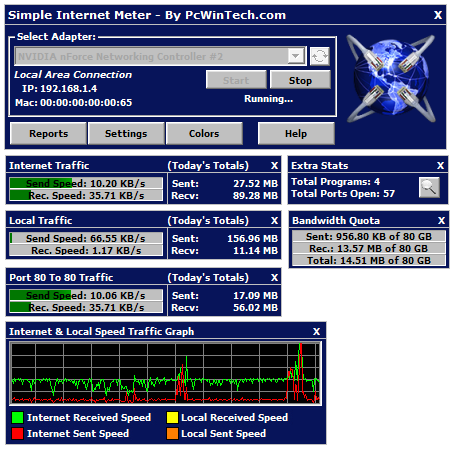 Simple Internet Meter is a new bandwidth monitor program used for monitoring internet traffic as well as local network traffic. The program seems to be a follow up to an earlier program known as CS Fire Monitor. The program is designed using WinPcap as well as PacketX.dll. Simple Internet Meter Standard Edition is easy light, and may not affect the performance or speed of your system. Simple Internet Meter Standard Edition will clean its used memory any time the memory usage goes above 10 mb; and is able to run 24/7 without any problem. Simple Internet Meter is a new bandwidth monitor program used for monitoring internet traffic as well as local network traffic. The program seems to be a follow up to an earlier program known as CS Fire Monitor. The program is designed using WinPcap as well as PacketX.dll. Simple Internet Meter Standard Edition is easy light, and may not affect the performance or speed of your system. Simple Internet Meter Standard Edition will clean its used memory any time the memory usage goes above 10 mb; and is able to run 24/7 without any problem.
Simple Internet Meter has a lot of key features that include the following; monitor Network Traffic, monitor a range of ports, keep logs of daily and hourly usage, auto save any report to a file, easily change the colours to fit your style and taste, resize the monitors to make them very small and transparent, blend to desktop mode makes the monitors blend to your desktop, ghost mode makes the monitors click through, system tray icon can be animated to show network traffic, open network connections and Windows firewall settings from the right click menu of the tray icon, and a host of others.
Want to check it out? Visit PCwintech.
Rating:  Loading... No Comments »
Ciaran Moore - October 13, 2011
 The installation of as well as uninstalling applications, searching the net, and day-to-day computer use may take its toll on your PC’s general performance. This is exactly why you should find the correct cleaning application to maintain your computer working on all cylinders. SlimCleaner is a unique program that makes use of crowdsourcing to give active feedback for the software set up on your computer. The installation of as well as uninstalling applications, searching the net, and day-to-day computer use may take its toll on your PC’s general performance. This is exactly why you should find the correct cleaning application to maintain your computer working on all cylinders. SlimCleaner is a unique program that makes use of crowdsourcing to give active feedback for the software set up on your computer.
Its rapid scans and all-inclusive features make it a must-have system utility. SlimCleaner opens with a expertly designed, intuitive user interface. On the left side of the home window you’ve got seven maintenance choices: Cleaner, Optimize, Uninstaller, Browsers, Hijack Log, Shredder, and Windows Tools. Although it provides an ample Help function (you can get online help, video tutorials, and a manual), you will not need it to leap right in and start the cleaning procedure.
Starting with the Cleaner will break down your choices into Windows, Programs, Web browsers, as well as Advanced. Making use of radio buttons, you’ll be able to check off the things that you want to scan. Click the Analyze button, and within a few moments, SlimCleaner will generate a summary of results. Clicking the Clean button successfully removes problem items. Moving on, the Optimize function can show your startup applications, along with a Community Rating and Community Feedback for each one. Over-all, SlimCleaner is an remarkable program for trying to keep your computer in tip-top condition.
You can check it out at Slimcleaner.
Rating: Loading... No Comments »
O. James Samson - October 13, 2011
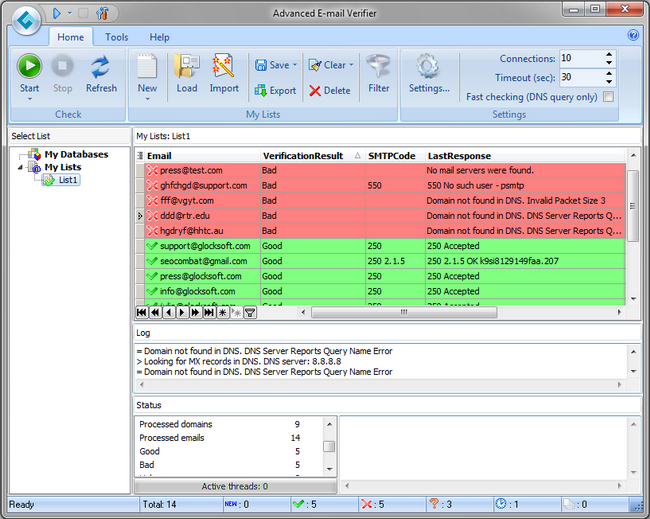 Advanced E-mail Verifier is one of those easy to use and effective applications for the “message delivery error”. The program is designed for system administrators, webmasters, and programmers as well as for those Internet marketers who have their own mailing lists and need to keep them up-to-date. It is useful for users who have email addresses stored in a database on their computers or on remote servers. It means that they can connect to that databases straight from Advanced E-mail Verifier and verify the email addresses. Advanced E-mail Verifier works with any ODBC compliant database. During the verification Advanced E-mail Verifier will write the results directly to the database so you don’t need to export anything. Advanced E-mail Verifier is one of those easy to use and effective applications for the “message delivery error”. The program is designed for system administrators, webmasters, and programmers as well as for those Internet marketers who have their own mailing lists and need to keep them up-to-date. It is useful for users who have email addresses stored in a database on their computers or on remote servers. It means that they can connect to that databases straight from Advanced E-mail Verifier and verify the email addresses. Advanced E-mail Verifier works with any ODBC compliant database. During the verification Advanced E-mail Verifier will write the results directly to the database so you don’t need to export anything.
Advanced E-mail Verifier gives you opportunity to enjoy the following features; clear your email list or database from bounced and undeliverable email addresses that allows you update and keep your contact lists “clean” on a proactive basis, decrease the Internet traffic and save your bandwidth which means you reduce your costs by focusing only on real prospects, load large mailing lists for verification in seconds, save the verification results to a text file, safely save and recover your data, sort and filter the email addresses which means you can organize the contact information in the most convenient way for you, and a few others.
Want to check it out? Visit Glocksoft
Rating: Loading... No Comments »
O. James Samson - October 11, 2011
 DS Clock is a digital desktop clock that displays variable date, time, and time zone information built from the format string. DS Clock allows you to fully customize its look and feel, and can synchronize your computer’s clock with Atomic Time Servers. You also get the chance to select any combination of date and time, pick custom colors and fonts, play Westminster chimes or custom sound, etc. DS Clock also allows you to show a tool tip window with upcoming reminders of Calendarscope and supports Swatch Internet Time and Stopwatches. DS Clock is a digital desktop clock that displays variable date, time, and time zone information built from the format string. DS Clock allows you to fully customize its look and feel, and can synchronize your computer’s clock with Atomic Time Servers. You also get the chance to select any combination of date and time, pick custom colors and fonts, play Westminster chimes or custom sound, etc. DS Clock also allows you to show a tool tip window with upcoming reminders of Calendarscope and supports Swatch Internet Time and Stopwatches.
This is a vastly improved version of DS Clock; and to think version 2.6.1 is also free makes it even more attractive to users. The program is built with lots of wonderful features that would give users opportunity to check time zone in many countries or regions. DS Clock sits on your desktop, and is so easy to install and even configuration is easier. The program simply displays variable date and time information from the format string. Configuration is quite easy, and you can select any combination of date, time, and time zones, insert any text, pick custom colors and fonts, set custom sound to play at the top of the hour, play real Westminster chimes, and a lot more.
Want to check it out? Visit Dualitysoft.
Rating: Loading... No Comments »
O. James Samson - October 10, 2011
 Rapid CSS is equipped with key features that can quickly and easily create and edit cascading style sheets of any complexity. You can write the style sheet code manually or let the program do it for you. Whichever option chosen by you, you can be sure each case is easy because of various helpful functions like auto complete and code inspector. Results are shown instantly using built-in preview. It is also an HTML editor and it makes CSS powered HTML editing a snap. It is designed to save your time and make the job easier. Version 2011 11.1.0.128 of Rapid CSS already includes a few changes like improved FTP connectivity, as well as other minor fixes. Rapid CSS is equipped with key features that can quickly and easily create and edit cascading style sheets of any complexity. You can write the style sheet code manually or let the program do it for you. Whichever option chosen by you, you can be sure each case is easy because of various helpful functions like auto complete and code inspector. Results are shown instantly using built-in preview. It is also an HTML editor and it makes CSS powered HTML editing a snap. It is designed to save your time and make the job easier. Version 2011 11.1.0.128 of Rapid CSS already includes a few changes like improved FTP connectivity, as well as other minor fixes.
Rapid CSS also retains a lot of its key features that include the following; advanced fully customized text editor, HTML and XHTML editing features, syntax highlighting for CSS and HTML documents, HTML5 and CSS3 support, CSS checker and validator, CSS code explorer, code inspector, code auto complete for CSS and HTML, instant style sheet preview with internet explorer or FireFox, X-Ray for HTML preview, compliance with CSS standards and various browsers, integration with W3C CSS and HTML validatros, built-in CSS reference, CSS code formatter and beautifier, CSS code compressor, and many more.
Want to check it out? Visit Blumentals.net.
Rating: Loading... No Comments »
O. James Samson - October 8, 2011
 PixBuilder Studio is a free image editing software built for digital photo editing, image processing, and resizing. For digital photo editing, you can use the program’s many professional quality functions. PixBuilder Studio allows you to use the following color management functions; brightness/contrast management, color balance, and levels manipulation. For professional results, you can use the curves function. PixBuilder Studio also enables you to carry out great professional looking photo editing as well as to manipulate the image with color channels. Layers concept, multi-step undo, gradients and masks support, and text layers support all make PixBuilder Studio a great graphics software program for image processing and creating illustration. PixBuilder Studio is a free image editing software built for digital photo editing, image processing, and resizing. For digital photo editing, you can use the program’s many professional quality functions. PixBuilder Studio allows you to use the following color management functions; brightness/contrast management, color balance, and levels manipulation. For professional results, you can use the curves function. PixBuilder Studio also enables you to carry out great professional looking photo editing as well as to manipulate the image with color channels. Layers concept, multi-step undo, gradients and masks support, and text layers support all make PixBuilder Studio a great graphics software program for image processing and creating illustration.
PixBuilder Studio also allows for flexible selection transform and management functions for drawing complex raster shapes and effects or use the built-in shapes drawing tool. For other complex goals, you can use the built-in high quality effects, such as different blur types, sharpen effects, and others. By using the web safe palette and save with preview function, you can easily create web graphics in any of the most popular formats you want: JPEG, GIF, PNG, and a host of others. You can also use a standard set of graphics software features that include the following; rotating, resizing, stamp tool, clone tool, healing brush tool, and a host of others.
Want to check it out? Visit Pixbuilder.
Rating: Loading... No Comments »
O. James Samson - October 7, 2011
 Nevitium is a program equipped with a lot of important tools you need, and putting you in firm control of customer and vendor relations. The program includes a comprehensive inventory manager and other professional features. Nevitium is designed to work well on a netbook or other small computer for handling transactions in the field. The program is designed with GST/VAT tax options and support for rounding cash sales. Nevitium treats the whole English-speaking business world as a first class citizen. Nevitium is a program equipped with a lot of important tools you need, and putting you in firm control of customer and vendor relations. The program includes a comprehensive inventory manager and other professional features. Nevitium is designed to work well on a netbook or other small computer for handling transactions in the field. The program is designed with GST/VAT tax options and support for rounding cash sales. Nevitium treats the whole English-speaking business world as a first class citizen.
As a freeware program, you will be surprised at some of the quality features included by the publisher to ensure you enjoy every bit of it. Nevitium helps you solve many problems related to tracking payments and more. It can help business owners and bookkeepers create and manage quotes and invoices with ease and speed. However, this freeware version does not have support for users. The program has an easy to use interface that allows users to easily track vendors and customers. Nevitium also features a fully integrated inventory database. Reports are provided so the user can readily access all of the important information they need. Nevitium also prints labels and checks. You can check out the paid version for more advanced features.
Want to check it out? Visit InvoiceSoftwareFree.
Rating: Loading... No Comments »
O. James Samson - October 7, 2011
 Recordzilla is a shareware screen recorder software that lets you capture video, audio and pictures of anything you see on your computer screen and save it as video AVI, WMV, Flash SWF, or Flash FLV. The program currently has a couple of changes that include the following; option to create html page when output recording swf video new, the publisher has been able to fix run rime error ‘13’, fixing of issue screen white-out when Windows Aero theme is enabled, fixing of incorrect auto-save output location, as well as other minor improvements and updates. Recordzilla is a shareware screen recorder software that lets you capture video, audio and pictures of anything you see on your computer screen and save it as video AVI, WMV, Flash SWF, or Flash FLV. The program currently has a couple of changes that include the following; option to create html page when output recording swf video new, the publisher has been able to fix run rime error ‘13’, fixing of issue screen white-out when Windows Aero theme is enabled, fixing of incorrect auto-save output location, as well as other minor improvements and updates.
Recordzilla allows you to carry out a lot of recording including capturing entire desktop, active windows, any portions of the screen, mouse cursor’s movement, menus, games, and even video with sound. You can also use Recordzilla to record from microphone to add narration to your recordings, or record what you hear from the computer speakers. Recordzilla has a lot of key features that include; time stamps your videos, schedule a recording, hotkeys, adjust video resolution, size, and frame rate. Recordzilla is useful for creating training videos, presentations, demos, and recording streaming video like YouTube, recording webcams from AIM, Skype, ICQ, MSN Messenger, Yahoo Messenger or capture movies from TV card, DVD, VCD.
Want to check it out? Visit Softdivshareware.
Rating: Loading... No Comments »
O. James Samson - October 7, 2011
 BarracudaDrive is a secure application server with an integrated scripting language, database engine, WebDAV server, Web File Manager, tiny SSL server, HTTPS tunnel, and various SLL VPN clients for the HTTPS tunnel. BarracudaDrive also includes an easy to use Content Management System (Web Page Creator) and an Electronic Bulletin Board. The program simply gives you an opportunity to create your very own online multiuser file storage, run your own web-site and blog, host your own photo albums and videos, access content that is otherwise blocked, and so much more. BarracudaDrive is a secure application server with an integrated scripting language, database engine, WebDAV server, Web File Manager, tiny SSL server, HTTPS tunnel, and various SLL VPN clients for the HTTPS tunnel. BarracudaDrive also includes an easy to use Content Management System (Web Page Creator) and an Electronic Bulletin Board. The program simply gives you an opportunity to create your very own online multiuser file storage, run your own web-site and blog, host your own photo albums and videos, access content that is otherwise blocked, and so much more.
With BarracudaDrive there is no need to be worried about the security of any content stored online since it is server is hosted exclusively hosted by you. BarracudaDrive becomes your personal cloud, allowing you to store and access your files and appliances anytime from anywhere but without the vulnerability inherent in 3rd party web portals. The program simply transforms your home network into a powerful online storage system, letting you access and share files from any computer, anywhere.
BarracudaDrive has quite a number of quality features that include the following; inclusion of a word-like editor, easy to use even for non professional users, restricts access to external users, optimized for slow network, etc.
Want to check it out? Visit BarracudaServer.
Rating: Loading... No Comments »
O. James Samson - October 7, 2011
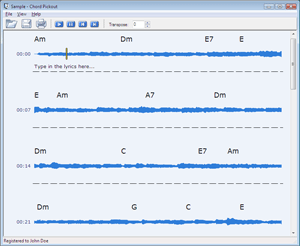 Chord Pickout is an application that uses its artificial intelligence to guess chords for you. As a user, all you have to do is load a media file (wav or mp3) and click a button. Chord Pickout will transcribe the music and write down the recognized chords. The process is fully automated. Version 2.0 of Chord Pickout has been improved in a couple of ways including latest changes made to the recognition output. Chord Pickout is an application that uses its artificial intelligence to guess chords for you. As a user, all you have to do is load a media file (wav or mp3) and click a button. Chord Pickout will transcribe the music and write down the recognized chords. The process is fully automated. Version 2.0 of Chord Pickout has been improved in a couple of ways including latest changes made to the recognition output.
Chord Pickout enables you to use your PC to guess chords to your favorite songs. The program also ensures guitar and piano players can get chords to popular songs right away. Guitar fingerings are available to guitarists for easier playback. There is no need to wait for official scores and lyrics because Chord Pickout ensures you can pick out chords from live music, converting a song into a perfect score completely automatically. The program’s powerful editing capabilities allow modifying and printing scores and lyrics.
The program is also very easy to use for users who are very familiar with use of guitars and piano. All they need is to simply download a tune and save it into a WAV, MP3 or other supported file, load it into Chord Pickout, sit back and relax. Chord Pickout uses all the power of artificial intelligence to pick out the chords for you, transcribing the music and producing a printable and editable score.
Want to check it out? Visit ChordPickout.
Rating: Loading... No Comments »
|
|
|





