O. James Samson - November 9, 2010
 WebCopier is an offline browser that downloads Websites and stores them locally. No matter the time, WebCopier for Windows is capable of giving you instant access to any site, no matter your location. You can use the program to perform precise link searching, including JavaScript parsing, download up to 100 files at the same time and print them as well. The program also has support for proxy servers; allows you to specify account name and password to access secure websites. The advanced features also include; website preview, SSL (HTTPS) support, agent identification, scheduler, templates, URL and file filters, wizards, dialer, resume downloads, support for various languages, shockwave file support, and skinnable user interface. WebCopier is an offline browser that downloads Websites and stores them locally. No matter the time, WebCopier for Windows is capable of giving you instant access to any site, no matter your location. You can use the program to perform precise link searching, including JavaScript parsing, download up to 100 files at the same time and print them as well. The program also has support for proxy servers; allows you to specify account name and password to access secure websites. The advanced features also include; website preview, SSL (HTTPS) support, agent identification, scheduler, templates, URL and file filters, wizards, dialer, resume downloads, support for various languages, shockwave file support, and skinnable user interface.
WebCopier for Windows is available for the use of companies (so that they can transfer their intranet contents to staff computers, and create a copy of company’s online catalogs and brochures for sales and personal, backup corporate website, and print downloaded files), for individuals (to save complete copies for the favorite sites), and for developers (who would love to analyze website structure, and find dead links on a website).
WebCopier for Windows 5.3 is a shareware program, but is available for a limited trial period of fifteen (15) days. The usual price to purchase and download the unlimited period version is $40.00.
Want to check it out? Visit Maximumsoft.
Rating:  Loading... No Comments »
O. James Samson - November 8, 2010
 If you don’t want some applications to add themselves to your computer startup menu or associate files to themselves, simply try WinPatrol. This program helps to monitor your computer by simply preventing the addition of certain applications to your computer startup menu. WinPatrol takes snapshot of your critical system resources and alerts or informs you of any changes that may occur outside your knowledge. As a matter of fact, this is one of the first programs to start using a heuristic behavioral approach to detecting attacks and violations of your computing environment. That means that as a user of this program, one can benefit from the experience of other users of WinPatrol. If you don’t want some applications to add themselves to your computer startup menu or associate files to themselves, simply try WinPatrol. This program helps to monitor your computer by simply preventing the addition of certain applications to your computer startup menu. WinPatrol takes snapshot of your critical system resources and alerts or informs you of any changes that may occur outside your knowledge. As a matter of fact, this is one of the first programs to start using a heuristic behavioral approach to detecting attacks and violations of your computing environment. That means that as a user of this program, one can benefit from the experience of other users of WinPatrol.
Although WinPatrol also has its pro or paid versions, this free version is still well-packaged to get the job done. The size is amazingly light compared to what it can actually do on your computer. It keeps you in total control of your computer startup, making sure no unwanted addition is made to it during startups. WinPatrol uses the cloud technology to protect and monitor your computer; enabling you to share and benefit from other users of the program. The free version is strong enough to deal with some particular kinds of unwanted programs that pose grave dangers to your system, but not really as strong as the premium or the WinPatrol Plus.
Want to check it out? Visit Winpatrol.
Rating: Loading... No Comments »
O. James Samson - November 8, 2010
 MediaPortal is an open source program that is ideal for turning your personal computer system or television into an advanced Media Center. With MediaPortal, you have the chance to listen to your favorite music and radio, watch and store your videos and DVDs, view, schedule and record live television as a digital video recorder and much more. It is interesting to also note that MediaPortal 1.2.0 Alpha is an open source program, which means you can use it for free, and also help to contribute in developing the program. It is also free for tweaking to suit your own needs with lots of innovative plugins. MediaPortal is an open source program that is ideal for turning your personal computer system or television into an advanced Media Center. With MediaPortal, you have the chance to listen to your favorite music and radio, watch and store your videos and DVDs, view, schedule and record live television as a digital video recorder and much more. It is interesting to also note that MediaPortal 1.2.0 Alpha is an open source program, which means you can use it for free, and also help to contribute in developing the program. It is also free for tweaking to suit your own needs with lots of innovative plugins.
MediaPortal 1.2.0 Alpha has some wonderful features, which include: listen to music and radio; play videos, movies and DVDs; view pictures or create a slideshow; stream media, radio, and television to any personal computer connected to your network; check weather, news or information on the web, even play games; and view pictures or create a slideshow. The application also has hundreds of plugins and skins available, allowing you to the almost anything that include; monitor your HTPC, view sports scores or local movie show times, stream web television, apple trailers, Youtube videos or internet radio, and many more.
It is a powerful freeware application that can be used as an open source, which makes it even impressive.
Want to check it out? Visit Team-mediaportal.
Rating: Loading... No Comments »
O. James Samson - November 8, 2010
 wyBuild 2.6.9 is a program that lets you create tiny updates patches, and releasing them to your users quickly. You can add automatic updating to your program like; Windows Update or Google Chrome Updater using the free Automatic Updater control. wyBuild has very easy-to-understand user interfaces; making it a simple program to use. It is actually a program for software publishers, and particularly good for program updates and keeping your users informed about regular bug fixes, and newer versions of programs. wyBuild 2.6.9 is a program that lets you create tiny updates patches, and releasing them to your users quickly. You can add automatic updating to your program like; Windows Update or Google Chrome Updater using the free Automatic Updater control. wyBuild has very easy-to-understand user interfaces; making it a simple program to use. It is actually a program for software publishers, and particularly good for program updates and keeping your users informed about regular bug fixes, and newer versions of programs.
wyBuild 2.6.9 has some new additions and updates, which include: Windows 2000-Windows, create tiny patch files, full 64- & 32-bit support, handles Windows user account control (UAC) seamlessly, can create all types of software, AutomaticUpdater control, and a few more.
wyBuild is for B2B consumer software companies, game developers, and web designers. The features include; standalone modes, easy to use drag and drop, version management, turbopatch, multi-lingual wyUpdate, secure update, self update, modify the registry, customize the wyUpdate theme with your branding, full integration with your .NET application, file permissions are seamlessly handled, full 64-bit & 32-bit support, .NET optimizations, dual & quad processor support, and many more.
wyBuild is a shareware program, but has a 21 day trial period for those who would love to try it out before actual purchase. The actual price is $69.99 per download.
Want to check it out? Visit Wybuild.
Rating: Loading... No Comments »
O. James Samson - November 8, 2010
 Game Jackal Pro 4.1.1.0 is a killer application for the computer gamer. It is actually made for people who want to avoid the pain of looking for and inserting the CD-ROM for their favorite game each time they play it. The publishers have also made some minor changes and fixes in version 4.1.1.0, and these include; updates to the media error detection, fixed a driver emulation issue with the new lossy image mode, fixed a profile deactivation issue (when profile deactivated from the manager), and fixed an issue that prevent the Game Jackal client from starting correctly). Game Jackal Pro 4.1.1.0 is a killer application for the computer gamer. It is actually made for people who want to avoid the pain of looking for and inserting the CD-ROM for their favorite game each time they play it. The publishers have also made some minor changes and fixes in version 4.1.1.0, and these include; updates to the media error detection, fixed a driver emulation issue with the new lossy image mode, fixed a profile deactivation issue (when profile deactivated from the manager), and fixed an issue that prevent the Game Jackal client from starting correctly).
Game Jackal Pro 4.1.1.0 comes with the following features: image mode (adds support for games that need to stream data directly from the CD or DVD during game play); young gamers can make short work of a game CD; Guardian control; easy to use; create profiles right from the desktop with the new “one-click” profile creation option; unused profiles can now be moved to an archive section, allowing you to keep your current favorites in the “my game” profile section; improved reliability, support and performance for many games and hardware configurations; auto update; game load times are dramatically shortened; and many more.
It is quite commendable to know that the publishers have made some few changes and bug fixes to this version. Game Jackal Pro is a shareware, and can be bought for $29.00.
Want to check it out? Visit Gamejackal.
Rating: Loading... 1 Comment »
O. James Samson - November 2, 2010
 CPU-Z is a diagnostic tool that provides information on your CPU, which include; processor name vendor, core stepping and process, processor package, internal and external clocks, clock multiplier, partial overclock detection, processor features, supported instructions sets, L1 and L2 cache information, location, size speed, and technology. CPU-Z is a diagnostic tool that provides information on your CPU, which include; processor name vendor, core stepping and process, processor package, internal and external clocks, clock multiplier, partial overclock detection, processor features, supported instructions sets, L1 and L2 cache information, location, size speed, and technology.
This is certainly one program that helps to present a data sheet of your computer system’s functions and operations. It simply works by cutting out some technical and manual searching; generating a list of important details about your computer system. However, the program has no command icons, making it quite simple to operate its user interface. One might just as describe or compare CPU-Z 1.56 to reading or going through a report. I must point out that this program is not really for people who don’t have enough computer knowledge; a bit too technical for a casual user of a computer. Every of the term consist of a lot of technicalities, which is a reason for any user without enough technical knowledge to be confused.
Every bit of information you is accessed through its seven tabs found on its user interface. CPU-Z 1.56 is a must for computer lovers who have enough computer skills to understand how to read and understand the data presented by it.
Want to check it out? Visit Cpuid.com.
Rating: Loading... No Comments »
O. James Samson - November 2, 2010
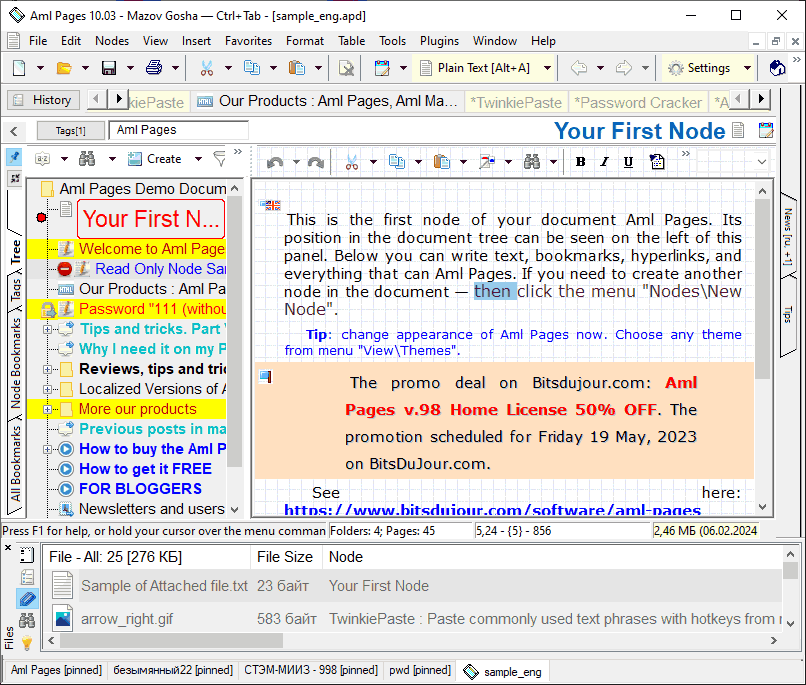 Aml Pages is a program created with features to help you organize your notes; and is made for the Windows operating system. It helps to keep all your notes, personal information, web pages, passwords, emails and URLs in tree form; enabling you to find what you need without any difficulty. The program saves fragments of web pages from web browsers and word processors, and offers a sticky note for quick viewing. Aml Pages is a program created with features to help you organize your notes; and is made for the Windows operating system. It helps to keep all your notes, personal information, web pages, passwords, emails and URLs in tree form; enabling you to find what you need without any difficulty. The program saves fragments of web pages from web browsers and word processors, and offers a sticky note for quick viewing.
Additional features and changes have been added to Aml Pages 9.20 Beta to enhance its performances. These features and additions include; hyperlinks to bookmarks, hyperlinks with names, command “copy as hyperlink”, hyperlinks to other documents of Aml Pages, auto-detection of charset for incorrect we-archives, and command remove hyperlink.
Aml Pages 9.20 Beta supports plain text, rich text and web pages, tables and figures, attachments, as well as many plug-ins for expansion features. Users will also find this program useful when it comes to recording important information a sticky note instead of looking up from the important cases. The program works with most popular browsers like; Internet explorer, Firefox, Google Chome, Apple Safari, Maxthon, and many more.
Aml Pages is a shareware, but users can try it out for a limited period of 40 days before going for a full version if they want to. The full version costs $29.00 per download.
Want to check it out? Visit Amlpages.
Rating: Loading... No Comments »
O. James Samson - November 1, 2010
 Total Recorder records streaming audio, mic input, line-in input, and DVD and CD sounds. Every recoded sound can be stored or saved to your hard-drive in either WAV or MP3 format. Users of Total Recorder Professional can also convert different sound formats to WAV and MP3. Total Recorder records streaming audio, mic input, line-in input, and DVD and CD sounds. Every recoded sound can be stored or saved to your hard-drive in either WAV or MP3 format. Users of Total Recorder Professional can also convert different sound formats to WAV and MP3.
Some of the very recent changes in version 8.2 Build 4100 include the following: a feature to help users listen to audio being captured from a sound bar; add-on that allows users to transfer an audio being played back or captured by Total Recorder over a local network or the internet in real time; the send to iTunes/iPod Add-on allows users to set the “Store position” and “Exclude from shuffle” options when sending files to iTunes/iPod; and a few other changes.
Users can also record in many different formats such as the following: PCM; FLAC; APE; MP3; WMA; Ogg; and any other formats by a system codec are also supported. This professional version also has support for a number of high-quality stereo formats (PCM- up to 192 kHz 24 bit and float, FLAC- up to 192 kHz 24 bit, WMA Lossless- up to 96 kHz 24 bit, and formats provided by the Windows Media Audio Professional codec).
Total Recorder Professional 8.2 Build 4100 is a shareware program, and goes for $35.95 per download.
Want to check it out? Visit TotalRecorder.com.
Rating: Loading... No Comments »
O. James Samson - November 1, 2010
 ICE Book Reader Professional 9.0.3a is an ultimate e-book reader that can also be used as a teleprompter. It comes with support for native support; and LIT files, which do not use any Microsoft Reader components. The program can read the following formats: TXT; RTF; HTML; MS Word documents; Palm books (PDB and PRC); and Microsoft Reader Books (.LIT). Users can also enjoy features such as: ultra smooth scrolling with the exact control of scroll speed; automatically adjusted scroll speed; full text antialising super scrolling with subpixel precision, wave scrolling; complete support Unicode and all known codepages; automatic text reformatting; automatic text coloring; and a host of others. ICE Book Reader Professional 9.0.3a is an ultimate e-book reader that can also be used as a teleprompter. It comes with support for native support; and LIT files, which do not use any Microsoft Reader components. The program can read the following formats: TXT; RTF; HTML; MS Word documents; Palm books (PDB and PRC); and Microsoft Reader Books (.LIT). Users can also enjoy features such as: ultra smooth scrolling with the exact control of scroll speed; automatically adjusted scroll speed; full text antialising super scrolling with subpixel precision, wave scrolling; complete support Unicode and all known codepages; automatic text reformatting; automatic text coloring; and a host of others.
There are also a couple of few changes in version 9.0.3a, which include; addition of append clipboard, addition of possibility to delete recent library or index from recent list, restoration of selecting text in scroll mode with skins, disabling of clipboard monitoring by default, and a few other fixes.
It is a kind of good program for people who do not wish to strain their eyes while reading. It gives you that ability to read form a distance because there is no need to keep scrolling or changing pages.
ICE Book Reader Professional is a shareware, and goes for $96.00; that to me is huge, but the benefits too are huge.
Want to check it out? Visit Ice-graphics.
Rating: Loading... No Comments »
O. James Samson - November 1, 2010
 My Money for Windows is a personal financial software written from ground up to work with online bank statements. What you need to do is download details of your financial transactions from your bank’s website and they are entered automatically into electronic register. This is one way of bringing all your financial information in a single place; helping you to efficiently organize your financial information data, simplify taxes and grow your net worth at the same time. My Money for Windows is a personal financial software written from ground up to work with online bank statements. What you need to do is download details of your financial transactions from your bank’s website and they are entered automatically into electronic register. This is one way of bringing all your financial information in a single place; helping you to efficiently organize your financial information data, simplify taxes and grow your net worth at the same time.
With 60 days to try how this program works, users can enjoy some newly added features and fixes to some minor bugs like; addition of new option to better control bank post dates resolution, fixing of OFX issues with missing currency definitions, fixing of fidelity investments OFX “accounts-up-to-date,” fixing of synchronization issues with fifth third bank, and fixing of spiking balances in account forecast. These were some of the complaints and weaknesses noticed in previous version of My Money for Windows.
When you download the trial version of this program, you get to benefit from the same quality features people who have the unlimited version enjoy. However, this is only for a limited period. The unlimited version goes for $39.95 per download; at least fair enough for all the things you can do with it.
Want to check it out? Visit Mthbuilt.
Rating: Loading... No Comments »
|
|
|





