O. James Samson - June 16, 2010
 VirtuaWin 4.2 is actually an Open Source, virtual desktop manager which is designed for Windows operating system. It can actually organize applications over several “virtual” desktops with a lot of ease. For instance, if user uses two virtual desktops he can put a Web browser on desk 1 and by using a desktop manager “switch away” the Web browser and it will just seem like he have a new empty workspace on desk 2 to put another application on. VirtuaWin 4.2 is actually an Open Source, virtual desktop manager which is designed for Windows operating system. It can actually organize applications over several “virtual” desktops with a lot of ease. For instance, if user uses two virtual desktops he can put a Web browser on desk 1 and by using a desktop manager “switch away” the Web browser and it will just seem like he have a new empty workspace on desk 2 to put another application on.
Some of the new additions that differentiate VirtuaWin 4.2 from the past are as follows: new dynamic taskbar order feature to support Taskbar shuffle, it can close spawned module process handles, dynamic taskbar button removal option as a better fix to long standing issue, it can re-implement taskbar activation option to be a window rule option, improved SetForegroundWindows, so focus can be given back to desktop, portable Unicode package creation, and fixed handling of close message so it does exit VirtuaWin 4.2 if requested.
VirtuaWin 4.2 is designed to be elegant and simple to users and yet still very configurable. It is very common in Unix/Linux, and once users get accustomed to using it, it becomes an essential part of a productive workflow.
Want to check it out? Visit Virtuawin.sourceforge.net
Rating:  Loading... No Comments »
Ciaran Moore - June 15, 2010
 VideoPad Video Editor is free and open source software for editing videos. It provides lots of tools and features that are very useful for achieving the video quality you wanted. VideoPad Video Editor is free and open source software for editing videos. It provides lots of tools and features that are very useful for achieving the video quality you wanted.
You look like a professional when working with your videos, thanks to a professional looking user environment. Menus and functions are well organized; you can work on two files, the original and the edited simultaneously as two players are provided.
Supports multiple video file formats including the commonly used formats in the Internet like avi, mpg, wmv, 3gp, divx and many others. Aside from multiple video file format support, the program also contains lots of features and tools for editing videos. You can adjust the brightness and contrast of the video for better quality, apply other effects like sepia and negative effects which are also customizable.
It’s also possible to add still pictures and other images with a few clicks using this program. This makes your edited videos highly personalized. You can also record a narration for your videos, or if you already have a pre-created narration file, you can upload it and integrate to your video. If you don’t want narration, you can add text caption on each clip for a more flexible movie.
The program also supports videos from external sources like DVD video formats including Blu-Ray discs. You can then burn your edited videos to a DVD and watch it anytime.
Create and edit videos like a professional, that’s what VideoPad Video Editor can provide for you. This program is highly recommended not only for advanced users but also for beginners. Its rich features and tools allow you to create the best quality video. More importantly, you will have all these amazing benefits for free. Read the rest of this entry »
Rating: Loading... 2 Comments »
O. James Samson - June 15, 2010
 VirtualBox is a multi-purpose full virtualizer which is designed for x86 hardware and AMD64/Intel64. It main target is server, desktop and other embedded use. It is an Open Source that will come as a major relief for users who are need of a complete professional-quality virtualization solution. VirtualBox comes with very rich features, high performance and it is also freely available. VirtualBox is a multi-purpose full virtualizer which is designed for x86 hardware and AMD64/Intel64. It main target is server, desktop and other embedded use. It is an Open Source that will come as a major relief for users who are need of a complete professional-quality virtualization solution. VirtualBox comes with very rich features, high performance and it is also freely available.
VirtualBox runs quite efficiently on Windows (NT 4.0, 2000, XP, Server 2003, Vista, and Windows 7), DOS/Windows 3.x, Linux (2.4 and 2.6), Solaris and OpenSolaris, and OpenBSD.
VirtualBox has fixed superfluous resize-event on powering-on VM for X11, fixed guest-to-guest communication over wireless (3.2.0 regression; bug #6855), more improved storage that has fixed a potential guest disk corruption with growing images, fixed shared modules detection for Win64 guest, 3D support which allows for the use of CR_SYSTEM_GL_PATH and fixed host assertion for some multi-threaded guest applications.
VirtualBox is very handy for both professional and non professional making it highly unique in every sense of the word. There is hardly any software in this category that offers what it does in its features both professional and non-professional alike for free.
Want to check it out? Visit Virtualbox.org
Rating: Loading... No Comments »
O. James Samson - June 15, 2010
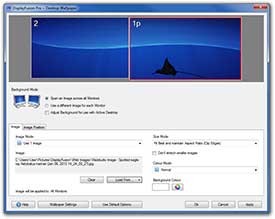 DisplayFusion is a program which has been designed to make dual or triple monitor experience smooth and painless process. Sample of some of the things DisplayFusion can do are: advanced multi-monitor wallpaper support and Flickr integration for image searching and fully customizable window management hotkeys, it can use a different desktop wallpaper image on each monitor, auto-snap windows to the edge of your monitor, built-in support for different languages and Drag or middle-click the taskbar of maximized windows to move them to other screens. DisplayFusion is a program which has been designed to make dual or triple monitor experience smooth and painless process. Sample of some of the things DisplayFusion can do are: advanced multi-monitor wallpaper support and Flickr integration for image searching and fully customizable window management hotkeys, it can use a different desktop wallpaper image on each monitor, auto-snap windows to the edge of your monitor, built-in support for different languages and Drag or middle-click the taskbar of maximized windows to move them to other screens.
The good thing about DisplayFusion is the fact that it does not conflict with security programs such as: Norton Internet Security 2010, Trojan Hunter, Super Anti Spyware, Malwarebytes, HostsMan, Spyware Blaster, Avira Premium Security Suite, MS Office 2007, MS Money, Casper 5.0 Backup and Sticky Password 4.0.
Another major plus for DisplayFusion is that it usually supports: folders, files, Flickr, FTP remote folders, Yahoo, Pikeo, Panoramio, Photobucket, Ipernity, Picasa, Buzznet, Smugmug, and Bing images and so on.
Some of its unique features include: Toggle Freeze Current Wallpaper Images, Foobar2000 Full screen Visualizations, taskbar stuck behind applications, a new Compatibility option to prevent Taskbar items from being removed from the Windows taskbar (if desired) and so on.
Want to check it out? Visit Binaryfortress
Rating: Loading... No Comments »
Ciaran Moore - June 15, 2010
 A spyware is a program that maliciously infiltrates your computer and its main goal is to lurk for information and possible data that can be used to steal confidential files or passwords. There are lots of programs of this type, most of them are embedded on websites and installers and they continue to propagate which makes our computers vulnerable the moment we connect to the internet or install a new program. Though antivirus programs often include spyware detection, but it’s not that accurate at all. To get all out protection from spywares, why not look for software that detecting and removing spyware as its main priority? A spyware is a program that maliciously infiltrates your computer and its main goal is to lurk for information and possible data that can be used to steal confidential files or passwords. There are lots of programs of this type, most of them are embedded on websites and installers and they continue to propagate which makes our computers vulnerable the moment we connect to the internet or install a new program. Though antivirus programs often include spyware detection, but it’s not that accurate at all. To get all out protection from spywares, why not look for software that detecting and removing spyware as its main priority?
SpyShelter is an antispyware program that detects and remove any signs of spyware programs from your computer. There are lots to look forward on this program and these are discussed here.
Simple, clean and an intuitive user friendly graphical user interface, that’s the best way to describe the interface of the program. It’s utilization of tabs makes the screen wider for display of different functions. Glossy buttons are also added that makes the graphical user interface amusing.
The key of the program’s success in detecting and removing the most dangerous spywares and other threats is the program’s algorithm. This algorithm is allegedly way better than those used by popular antivirus and computer security programs. You don’t need a database to update the program. The program does its function in real time so you’re sure that no spyware escapes and steals information from your computer. Read the rest of this entry »
Rating: Loading... No Comments »
O. James Samson - June 15, 2010
 Safari is the first browser to offer users with the opportunity of real internet-to-mobile-device. Safari provides pages on iPhone, iPod and iPad touch the way a user use to see them on his computer. Safari reader instantly banishes those blinking and flashing adverts that distract users from their online articles and the likes. For instance, if a user is browsing his favorite site, Safari can tell the user if he is on a web page with an article. Safari is the first browser to offer users with the opportunity of real internet-to-mobile-device. Safari provides pages on iPhone, iPod and iPad touch the way a user use to see them on his computer. Safari reader instantly banishes those blinking and flashing adverts that distract users from their online articles and the likes. For instance, if a user is browsing his favorite site, Safari can tell the user if he is on a web page with an article.
Safari is designed in such a way that it places emphasizes on the browsing, and not the browser (the browser frame is a single pixel wide). Scroll bar appears only when needed and a user can decide to hide almost the entire interface thereby removing every distraction from the browser window.
With Safari browsers, users no longer have to click through sites one after the other. Rather than present a static list of URLs and face users to click repeatedly, Safari Top sites keep a running tally of the websites users have visited and automatically create a graphically rich page that has the capacity to display up to 24 thumbnails of their favorite sites.
Safari is also fast and highly user-friendly. Installation takes just few steps.
Want to check it out? Visit Apple.com
Rating: Loading... No Comments »
O. James Samson - June 15, 2010
 Messenger Plus! Live can best be described as the one essential add-on for Windows Live Messenger. What a user will get with Messenger Plus! Live would not just be a couple of new options, but a whole new dimension for the Windows Live Messenger. Messenger Plus! Live can best be described as the one essential add-on for Windows Live Messenger. What a user will get with Messenger Plus! Live would not just be a couple of new options, but a whole new dimension for the Windows Live Messenger.
Messenger Plus! Live offers users its their scripting environment so that they can develop and add their own features to Windows Live Messenger. With this software, users can get scripts or learn how to develop their own from the scripts section.
Messenger Plus! Live is freeware so users do not have to pay to benefit from all the beautiful features of the program. Messenger Plus! Live does not contain any type of spyware or Trojan. Messenger Plus! Live can keep logs of all your conversations in a much more flexible way than Messenger can. Actually, Plus! lets you do that for years before Microsoft added it as a standard, far from perfect, feature.
Messenger Plus! Live can keep logs of all conversations in a much more flexible way than Messenger can. Some of the major feature of Messenger Plus Live is as follows: Skinnable logs (makes it easy for users to drop a custom.css file in logs folder to change their look), Log Viewer, Emoticons and Winks and HTML Logs just to mention a few.
Want to check it out? Visit Msgpluslive.net
Rating: Loading... No Comments »
Ciaran Moore - June 14, 2010
 Diff Doc is software capable of comparing contents of different files regardless of their file formats. Among the file types the program supports are MS Office files, PDF files, XML, HTML, txt and many more popular file formats available. Diff Doc is software capable of comparing contents of different files regardless of their file formats. Among the file types the program supports are MS Office files, PDF files, XML, HTML, txt and many more popular file formats available.
Feature wise, the program offers rich features for comparing files. As mentioned, it offers full support for not only multiple but more popular file formats available in use today and that include Microsoft Office Suite (MS Word, MS Excel, MS PowerPoint), Portable Document Format (PDF) format, Notepad’s text format, XML, HTML, WordPerfect etc. whatever text editor you use, you can use the program to compare files created on different editors (for example .doc and .txt).
There are also lots of options when performing a file comparison. You can even compare different folders to determine what particular files was edited before you perform a detailed comparison of the content of files. The program does not alter any of the files being compared and retains the original status of the files (both the contents and extension).
It also provides two options of displaying comparison results; “All in One” and Side by Side”. You’ve got two different views on how are you going to see the differences between the files being compared. The program also provides reports creation with lots of format choices. Read the rest of this entry »
Rating: Loading... No Comments »
Ciaran Moore - June 13, 2010
 Encrypting your files and folders is very important to protect your data and files from being stolen and maliciously used by unauthorized users. If you’re not the only one using your computer or you’re connected to a network, you need to protect your confidential data from being used or read by others without your authorization. Choosing the best encryption software would be a difficult task as there are lots of good encryption software available, both proprietary and open-source. But if you’re looking for an all-in-one package for file encryption, IS Protector gets the job done for you. Encrypting your files and folders is very important to protect your data and files from being stolen and maliciously used by unauthorized users. If you’re not the only one using your computer or you’re connected to a network, you need to protect your confidential data from being used or read by others without your authorization. Choosing the best encryption software would be a difficult task as there are lots of good encryption software available, both proprietary and open-source. But if you’re looking for an all-in-one package for file encryption, IS Protector gets the job done for you.
IS Protector is a free and open source software for encrypting files and folders from your computer to prevent others from illegally accessing them. There are other features to look into this software as it offers not only file encryption and this review will focus on the pros and cons of this software.
The program provides a well organized, easy to understand and user-friendly graphical user interface. Menus are organized in such a way that they can be easily read, understood and located by ordinary users. Each menu will trigger another screen that’s large enough to display its function.
The main function of this program is to encrypt and decrypt confidential data. The program used strong file encryption algorithms to provide a full proof protection of your important files from being accessed or used by unauthorized users. In fact, the 16 algorithms being used by the program are all US Military compliant algorithms. Among of the strong used algorithms is US Department of Defense DoD 5220.22-M and US Army AR380-19.
Other features offered by this program that are significant in protecting your computer includes File Shredder that erases important files permanently so that no one can recover deleted files, Wipe Space can be used to permanently delete all the files you already deleted before you install the program on your computer, and the Wipe Disc which erases any content found on your hard drive, optical drives and external drives. These tools are very useful to prevent other users from recovering deleted data using file recovery software.
IS Protector is an all-in-one protection suite that protects your computer’s confidential data not only by encrypting them but also remove any traces of them once you’ve deleted them. You can be 100% sure that others cannot recover your confidential data that was deleted. You can acquire all these useful and amazing features free of charge by downloading it from here.
Rating: Loading... No Comments »
O. James Samson - June 12, 2010
 AnyDVD is a tool that functions by working in the background to remove the copy protection of a DVD movie automatically as soon as it’s inserted into the drive, allowing users to backup the movie using a DVD backup tool such as CloneDVD mobile. It also provides users with the opportunity to remove the RPC region code, consequently making the movie region free and viewable on any DVD player and DVD player software. AnyDVD is a tool that functions by working in the background to remove the copy protection of a DVD movie automatically as soon as it’s inserted into the drive, allowing users to backup the movie using a DVD backup tool such as CloneDVD mobile. It also provides users with the opportunity to remove the RPC region code, consequently making the movie region free and viewable on any DVD player and DVD player software.
AnyDVD is designed with features like; capacity removes encryption (CSS) and region code (RPC) from DVDs, Removes analogue copy protection, removes features such as forced subtitles and warnings, decrypts without the need to save the data onto your hard-disk, decrypts ‘on the fly’, prevents automatic launching of ‘PC-friendly’ software on video DVDs, allows adjustment of your monitor refresh rate for both NTSC and PAL monitors, allows execution of external programs on disc insertion and removal, allows speed control of your DVD drives.
AnyDVD provides users with its own Universal Disk Format (UDF) reader. Also Disk which cannot be read by Windows can be copied using the AnyDVD ripper.
The basic requirement of AnyDVD are: IBM-compatible PC with a minimum 500 MHz Pentium-class microprocessor; 64 MB RAM; Windows 98, Windows ME; Windows 2000; Windows XP; Windows Vista or Windows 7 (32 or 64 bit); 2 MB hard-disk space and so on.
Want to check it out? Visit Slysoft
Rating: Loading... No Comments »
|
|
|





