O. James Samson - April 28, 2010
 Floola for Windows 5.7 is a fine freeware program that helps you to effectively manage your Mtorola mobile phones; no matter the model of iTunes under Linux. It also helps to manage your iPod, Mac OS X as well as Windows. Floola needs no further installation because it can be run directly for a user’s iPod. Floola for Windows 5.7 is a fine freeware program that helps you to effectively manage your Mtorola mobile phones; no matter the model of iTunes under Linux. It also helps to manage your iPod, Mac OS X as well as Windows. Floola needs no further installation because it can be run directly for a user’s iPod.
Virtually all iPod features works on Floola, and they include: artwork, podcasts, and smart playlists. Users can also find it useful when it comes to converting both audio and video incompatible with the iPod, making it easy for copying virtually any file directly to it.
The fact that Floola for Windows now supports Nano5G makes it more feature-rich and wonderful to use. Users who have this standalone application can also keep their Google calendars synched, add videos from YouTube and MySpace with just one click.
Some other unique features that users can begin to enjoy once they have the benefit of using this application include the following: copy and extract songs to and from iPod; easily find duplicated songs on iPod; availability in various languages; create HTML files containing list of iPod files belonging to users.
At least this application is free and does no harm to anyone who decides to give it a try; a fair enough program to use.
Want to check it out? Visit Floola
Rating:  Loading... No Comments »
O. James Samson - April 28, 2010
 Microsoft Windows Home Servers is a program for those with multiple home-based businesses, and also with multiple computers. It assists them to share, organize and back up their files automatically. Users can also backup their photos, important documents and even create backups for their videos and music files easily. Microsoft Windows Home Servers is a program for those with multiple home-based businesses, and also with multiple computers. It assists them to share, organize and back up their files automatically. Users can also backup their photos, important documents and even create backups for their videos and music files easily.
Microsoft has a lot of registered online users, and users might not have much problem in finding people to connect with online. This community of Windows users is registered to help improve the Windows Server Software online.
Microsoft Windows Home Server v2 Beta is weak when it comes to wireless connection. As a matter of fact, it does not work over a wireless connection, and this will create a lot of wireless users. If most routers can be wirelessly connected, why should it be different with Microsoft Windows Home Servers? Though still in Beta stage and some weaknesses can be excused, the publishers must know how important a factor this wireless issue is. Read the rest of this entry »
Rating: Loading... No Comments »
Ciaran Moore - April 27, 2010
 Start-up programs are loaded first after your operating system boots up. These are parts of a whole application installed on your computer that needs to be loaded first because it is needed by the operating system to function properly. But there are also programs or applications that are automatically included as one of the start-up programs like antivirus. As more and more applications installed on your computer, start-up programs also increase even if some of them are not used. The more start-up programs loaded, the slower your computer will perform. You can manage start-up entries using task manager. Task manager contains all the start-up processes but provides limited information about each process so there’s a risk in killing an important process that will affect the performance of your computer. Start-up programs are loaded first after your operating system boots up. These are parts of a whole application installed on your computer that needs to be loaded first because it is needed by the operating system to function properly. But there are also programs or applications that are automatically included as one of the start-up programs like antivirus. As more and more applications installed on your computer, start-up programs also increase even if some of them are not used. The more start-up programs loaded, the slower your computer will perform. You can manage start-up entries using task manager. Task manager contains all the start-up processes but provides limited information about each process so there’s a risk in killing an important process that will affect the performance of your computer.
StartupStar is third party software used to manage start-up programs of your computer. StartupStar offers flexibility in controlling what are the programs that must be loaded during start-up. You can access the start-up programs of your computer using StartupStar. Unlike windows task manager this program displays the details of each entry such as its name, its entry in the list, the file location, and the status. With its functionalities like change entry, remove entry and launch entry you can manage all the start-up programs of your computer very well.
Another important feature of StartupStar is that it automatically creates a back-up of the current settings of each program but you can do it also manually. With this feature, you can add new programs on start-up and observe its performance without worry of damaging your computer. Another feature of StartupStar is that it allows you to set entry-block. You can block files and prevent it from loading into your start-up automatically. This feature provides better safety from unwanted programs like spyware and adware, though this feature is only available in the commercial version and not on the 30 day trial. StartupStar’s environment is very informative, a help file is also provided, and entries are arranged in colors representing its location.
Further information is at Startupstar
Rating: Loading... No Comments »
Ciaran Moore - April 27, 2010
 Operating systems like Windows provides a feature to view basic information of your computer’s hard disk; the volume name, the used space, and the free space. But the information that you can view from this is very vague and speaks only on the whole hard disk and not on the individual files or folders contained inside your hard disk. What if you want to find out what particular files consumes too much space on your disk? Maybe one solution for this is to right click on the file or folders then go to properties tab. But what if you have thousands of files inside your hard disk? Repeating this step all over again then taking notes of each file size is a time consuming thing to do. The good news is that there is third party software that analyzes your hard disk in a detailed manner. Operating systems like Windows provides a feature to view basic information of your computer’s hard disk; the volume name, the used space, and the free space. But the information that you can view from this is very vague and speaks only on the whole hard disk and not on the individual files or folders contained inside your hard disk. What if you want to find out what particular files consumes too much space on your disk? Maybe one solution for this is to right click on the file or folders then go to properties tab. But what if you have thousands of files inside your hard disk? Repeating this step all over again then taking notes of each file size is a time consuming thing to do. The good news is that there is third party software that analyzes your hard disk in a detailed manner.
Disk Analyzer Pro is commercial software used in analyzing and managing disk space usage. The program scans your storage device such as hard disk and removable devices and then displays the content of your storage device in a grid provided on the program’s interface. Detailed information of the files inside your hard disk is also displayed like the exact location of file, the size of file, and the file type. Disk analyzer provides a very user friendly environment. Every component and function are organized in such a way user won’t get lost or take eternity just to look for a basic function like search or delete files. Disk Analyzer Pro also utilized the use of tabs to allow a more detailed view on the files inside your hard disk. Overall, the interface and performance of Disk Analyzer is very good and it is very convenient to use especially for the novice. Read the rest of this entry »
Rating: Loading... No Comments »
Tilgore Kraut - April 27, 2010
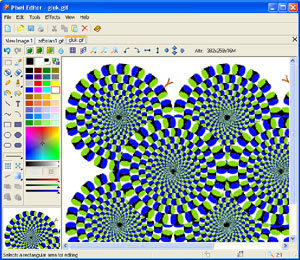 Graphic designing is a field to reckon with nowadays due to its creative and artistic bent in terms of presenting and visualizing ideas; combining various methodologies and tools using colorful imagery, graphics, clip arts, stylized text and page layout techniques to achieve the desired results. This designing principle is used in multiple verticals like magazine designing, creating stunning adverts and even designing innovative packaging for product brands. Various assistants help the designer in working out the most apt strategy to create the most effective designs and one of the more promising one is Pixel Editor 2.23 that enhances the designing experience and permits creating striking designs with its step ahead tools and features. Graphic designing is a field to reckon with nowadays due to its creative and artistic bent in terms of presenting and visualizing ideas; combining various methodologies and tools using colorful imagery, graphics, clip arts, stylized text and page layout techniques to achieve the desired results. This designing principle is used in multiple verticals like magazine designing, creating stunning adverts and even designing innovative packaging for product brands. Various assistants help the designer in working out the most apt strategy to create the most effective designs and one of the more promising one is Pixel Editor 2.23 that enhances the designing experience and permits creating striking designs with its step ahead tools and features.
Pixel Editor 2.23 opens with a neatly arranged interface with the chief options placed at the top pane and the styling options located at the left panel comprising a host of tools for coloring, designing and jazzing up the imagery. This comprehensive collection enables creation and editing of small images and photos in any sizes and color depths which can be of up to 32 bit color depth and 8 bit alpha channel and much more. The sophisticated features also include the pen, air brush, brush and inserting various shapes and painting the image as desired and altering with various effects. Furthermore, the software is also capable of importing and exporting the graphic files in different image formats like PNG, BMP, GIF, and JPEG and also allows re-sampling the images and printing as well, besides having all these tools to work on your mobile phone as well.
Pixel Editor 2.23 certainly proves to be a superlative tool for designing and creative purposes making it the perfect assistant to a graphic designer.
{More Info and Download}
Rating: Loading... No Comments »
Tilgore Kraut - April 27, 2010
Website building is not a difficult task these days, with major enhanced tools and website builder software available, it is possible to create stunning looking websites in a jiffy. However, when it comes to test the cost factor it turns out to be quite a daunting task to outsource or to even carry on this activity proves to be costly activity. Different sources are available for creation of company web pages and even personal home pages utilizing diverse tools that facilitates creation of striking and immensely user friendly websites tapping the internet savvy crowd. Blockstar Website Builder 3.01 is a tool for website building and hosting service that works a step ahead of its counterparts that assists in making web pages without requiring technical expertise.
Blockstar Website Builder opens with a vibrant looking interface with the major options located at the top pane along with vividly placed icons. An enhanced application with impressive set of features to initiates building of websites for all sorts of purposes like blog posting sites, photo galleries and web pages without requiring for any specialized technical expertise and knowledge of HTML. The procedure is immensely simple with the user only requiring creating an account at Blockstar.com and after that the websites can be created in the smoothest manner possible. Post the website creation; it can be published on Blockstar where it will be hosted for the user. Offering both paid and free services, this software provides multiple packages to its users for website hosting and publishing depending upon the bandwidth and storage space. The application is highly recommended for people wanting to create websites in speedy and cost effective method.
Blockstar Website Builder 3.01 is certainly a promising tool with regard to website creation and hosting service solutions.
{More Info and Download}
Rating: Loading... No Comments »
Tilgore Kraut - April 27, 2010
 This is an application that lets you set up a video chat with a random person. You can switch quickly if you do not want to continue the current chat session. This is an application that lets you set up a video chat with a random person. You can switch quickly if you do not want to continue the current chat session.
Flash based webcam video chat system that lets you communicate with random person on the Internet. You can initiate a random online chat (video and text) with another visitor. At any point, either user may leave the current chat. All it takes is to start another random connection. You get two video screens and on start chat the system will try to find the next webcam it can find. In case of bad video connections it is possible that fire wall settings are not correct, or you may have to switch the firewall off all together. It is a flash application for both parties. Audi and video connections use On2VPG encoding. Either party may decide to leave the chat by initiating another move. Video stream is routed through the Red5 video server of the service provider to ensure stable streaming.
Every time a session is set up you’d be asked if the webcam found is to be allowed or denied. You could ask the software to remember settings so that next time the webcam is found the software need not ask again. It is possible for users to report inappropriate behavior of any user on webcam. While the hosted version is available for everyone, you could download and install your own private system on your servers. Should there be a need to integrate the application with your own, complete source code is available too. Your window has control of whether to send both video and audio or either. Chat session controls are simple one click affairs too. If you are looking for random fun, this tool can help.
{More Info and Download}
Rating: Loading... No Comments »
O. James Samson - April 24, 2010
 AVG Anti-Virus Free 9.0.81 4a2810 is an update to other previous versions of this security program. It ranks as one of the best known free antivirus program available on the internet today. It offers protection to certain limits, and users who want something out of this world should consider using a paid antivirus application. AVG Anti-Virus Free 9.0.81 4a2810 is an update to other previous versions of this security program. It ranks as one of the best known free antivirus program available on the internet today. It offers protection to certain limits, and users who want something out of this world should consider using a paid antivirus application.
As usual, AVG still ranks high on the lists of most software review sites, also users have continued to tryst AVG because of its numerous advantages over others. The problem users have always complained about is none other than its size. AVG free just makes your system to crawl, making it difficult for your system to work as fast as it should be.
The core of the testing engine is a virtual device driver which loads the directly into the memory as soon as you boot your Windows. AVG may be free, but at least it still provides some very good online security measures for your computer. AVG is also good at detecting a lot of unwanted programs and yet giving you the opportunity to delete them.
Want to check it out? Visit AVG
Rating: Loading... 2 Comments »
O. James Samson - April 24, 2010
 A good piece of software for all those who likes keeping personal their personal information private, track weight loss and keep nutritional information. It has some unique features when compared to other programs used for online journaling. Users who invest a small amount of their money into this program are likely going to enjoy full value for money. A good piece of software for all those who likes keeping personal their personal information private, track weight loss and keep nutritional information. It has some unique features when compared to other programs used for online journaling. Users who invest a small amount of their money into this program are likely going to enjoy full value for money.
Some of the features of Advanced Diary 3.0 Beta include: rich text; voice recording; ability to insert pictures; password protection and much more. The program goes for $29.95 per download, a fair price to pay for a simple to understand program. Some newly added features include: new program interface; combination of calendar and documents tree modules; improvement of sorting functions; addition of category support among others.
Those who wish to try Advance Diary 3.0 Beta can do so for thirty days, so that they can decide if they really want it or not. Users can also enjoy this program in terms of support for multiple diary and multiple entries.
Want to check it out? Visit Diary
Rating: Loading... No Comments »
O. James Samson - April 23, 2010
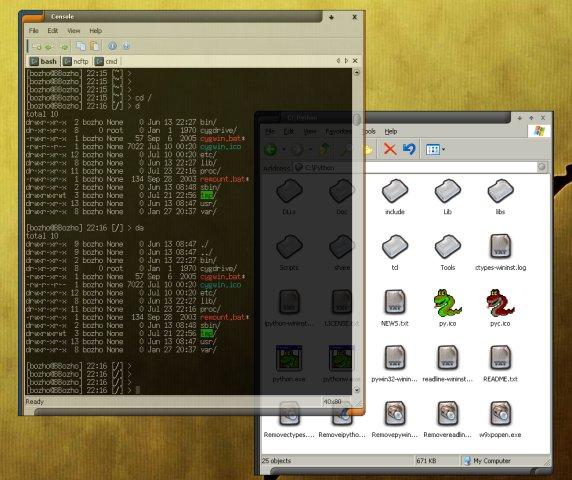 A very small, but us Console Build is out with some new features that make it even more interesting to use. Users can now have a richer Windows7 lockup fix, better error messages on shell startup, configuration load fix, better handling of Windows settings’ change. A very small, but us Console Build is out with some new features that make it even more interesting to use. Users can now have a richer Windows7 lockup fix, better error messages on shell startup, configuration load fix, better handling of Windows settings’ change.
Console 2.00 Build 146 Beta is newly released, and even if it is still in Beta stage, users can still enjoy a lot of its wonderfully blended features. It includes multiple tabs, text editor-like text selection, alpha and colour-key transparency, configurable font among others.
Console is easily customizable for users who need to, and apart from that, users can also enjoy this program for free. It is an open source, and users do not need to pay to use this program.
The publishers should consider going full screen with this program because it is going to be greater when it is viewed from a wider screen perspective. I have no doubt in my mind that this is one piece of program well put together by the publishers; kudos to them.
Want to check it out? Visit Console
Rating: Loading... No Comments »
|
|
|





