O. James Samson - December 16, 2009
 Actual Window Manager 5.5 Beta 4 is a good program if you can afford to buy it. Though a bit on the high side, it is still no doubt a good manager that will do your windows installations a lot of good. Actual Window Manager 5.5 Beta 4 is a good program if you can afford to buy it. Though a bit on the high side, it is still no doubt a good manager that will do your windows installations a lot of good.
With Actual Window Manager 5.5 Beta 4, you can add new Minimize To Tray and Stay on Top buttons to any Windows’ title bar near standard Minimize/Restore/Close, add transparency effect to any windows such as task bar, Instant Messenger and others.
Version 5.5 Beta has some new updates. These updates include: The introduction of the Classic Widow Snapping as a replacement for Aero Snap earlier introduced in version 5.4, also the publishers have now fully implemented the Notification area for the Multi-Monitor Taskbar Extension. Users can also customize the display orientation in the desktop profiles properties.
The last version came out in July of this year, and was well accepted by users. However, comments and minor complaints made by those who used have been looked into and that is good for the image of the publishers. It shows they have a listening hear.
Want to check it out? Visit Actualtools.com
Rating:  Loading... No Comments »
O. James Samson - December 16, 2009
 The name of this program tells you the purpose of its publication. Time is most valuable, especially when it is performance tied. When you have a lot of schedule and managing to keep them has always caused you embarrassing moments with your partners, either online or offline, TimeRecorder 4.43 is a useful tool to use. The name of this program tells you the purpose of its publication. Time is most valuable, especially when it is performance tied. When you have a lot of schedule and managing to keep them has always caused you embarrassing moments with your partners, either online or offline, TimeRecorder 4.43 is a useful tool to use.
While some individual may depend on other software to keep up-to-date with events, a closer look at this program will reveal how useful it can be. Built with functions such as: Remind you of your appointments organize your schedules according to your setting and registers all your activities, ensuring that you keep setting limit if you ever had one. Built also with feature that can record and transfer your activities in a presentable memo.
For $27.95 you can get yourself this program. That, in my view is a bit too much. Even though time keeping is essential in business and in relationship with friends and colleagues, I think this program does not have enough features to warrant such a price. May be, good for that individual whose schedule is not too tight. For that very busy executive, the features may not just be sufficient enough.
Want to check it out? Visit Timerecorder
Rating: Loading... No Comments »
O. James Samson - December 16, 2009
 With the help of database connectivity, this program turns outlook into a more comprehensive information management tool. GeniusConnetc 4.0.1.0 Beta 3 is compatible with most database system. The program is structured to allow you use your own table structure to define conversations for columns with data type’s that are not too compatible with an outlook field. With the help of database connectivity, this program turns outlook into a more comprehensive information management tool. GeniusConnetc 4.0.1.0 Beta 3 is compatible with most database system. The program is structured to allow you use your own table structure to define conversations for columns with data type’s that are not too compatible with an outlook field.
GeniusConnect, through access to current database information, improves efficiency while working in Outlook, offers flexibility by allowing connectivity to any standard SQL Database; it also grants quick and easy access to contact, calendar and customer information, already stored in your database.
This version in review is not a freeware, and is sold for $100. The publishers must have taken into account some other factors before settling at the above price, but I think there are some other equally good software of the same range that sells for less. Though its performance and efficiency is not in doubt, I believe the price could have gone a little bit less than it is.
Want to check it out? You can visit Geniusconnect.com
Rating: Loading... No Comments »
O. James Samson - December 16, 2009
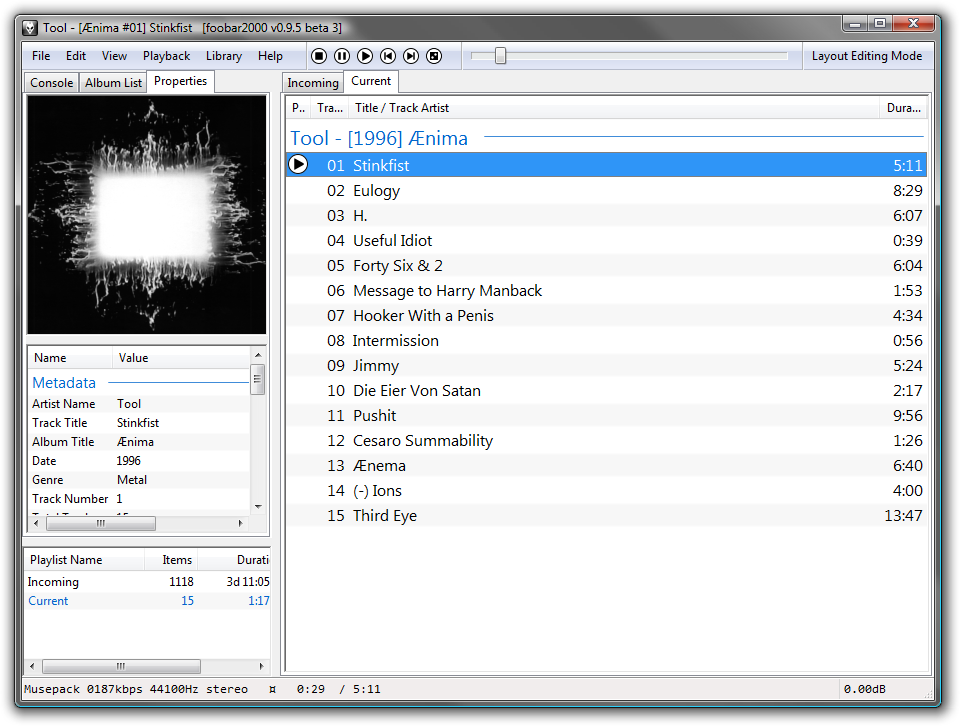 This program is an advanced music audio player. Foobar 1.0 Beta 4 works with windows platform. Among the basic features of Foobar are: Replay-gain support and native support for all popular audio formats you can think of. This program is an advanced music audio player. Foobar 1.0 Beta 4 works with windows platform. Among the basic features of Foobar are: Replay-gain support and native support for all popular audio formats you can think of.
The main features include: support of audio formats like mp3, mp4, AAC, CD audio, FLAC, WAV, AU, SND and a host of other file formats. The foobar 2000.1.0 Beta has an interface that can be customized easily.
Taking a look at the latest changes to this version of the program, the publishers have been able to add new context menu structure, built in support for Windows media and RTSP Streaming, improved compatibility with multimedia keyboard and more customizable album art support among others.
Foobar 2000 1.0 Beta is a freeware and is one of those freeware program that could easily have passed for a shareware because of its value added features.
Want to check it out? Visit Foobar2000
Rating: Loading... No Comments »
O. James Samson - December 14, 2009
 Leading internet service provider (ISP) American Online has introduced AOL for Windows 10.1 (2.1.97.1) Beta 2. The service allows users to obtain up to seven email addresses per account, get 10MB of personal homepage space. Buddy lists and instant messaging features are also included along with an AOL account. Leading internet service provider (ISP) American Online has introduced AOL for Windows 10.1 (2.1.97.1) Beta 2. The service allows users to obtain up to seven email addresses per account, get 10MB of personal homepage space. Buddy lists and instant messaging features are also included along with an AOL account.
With just a single AOL account, users can make use of a vast array of online stores, chat rooms and message boards. Users can also enjoy great features like: user profiles, online screening software and easy access to the Internet with the AOL browser.
The installation and utility simplifies setup by locating local dial-up numbers, configuring your software and finding your modem.
AOL for Windows 10.1 (2.1.97.1) Beta 2 is a subscription program and you will need to subscribe for the service to benefit from what AOL has got to offer.
Want to check it out? Visit AOL
Rating: Loading... No Comments »
O. James Samson - December 14, 2009
 Looking for a simple way to build HTML help files without loosing your sleep in the process? Then, you got yourself a fine software in HelNdoc 2.3.0.11 software program. This is an easy to use program that can create HTML help files, provide you with an easy to build HTML help interface without having to worry about the inner working of help file generation. Looking for a simple way to build HTML help files without loosing your sleep in the process? Then, you got yourself a fine software in HelNdoc 2.3.0.11 software program. This is an easy to use program that can create HTML help files, provide you with an easy to build HTML help interface without having to worry about the inner working of help file generation.
All a user of this program needs to do is enter text in the built-in word processor and hit the “compile” to get a functional help file which is not in any way different from the way you designed it from the start.
At $55.00, this program now even has some new addition added to its features. Features like PDF font embedding configuration, left and right floating images support, various optimization and enhancements and other features. On the whole, the program is quite easy to install and configure and does not require any technical skill or ability to understand.
HelNdoc 2.3.0.11 has a free version which is almost as good as this one but for the fact that it does not have all the full features that this paid version has.
Want to check it out? Visit Helpndoc
Rating: Loading... No Comments »
O. James Samson - December 14, 2009
 The new System Explorer 2.0 RC1 provides you with detailed information of every process, Internet Explorer add-ons, Drivers, Connections, Opened Files, Windows, Uninstallers and Explorers. For easy comparing of system and a good action monitoring of system processes, making of Registry and files snapshots. The new System Explorer 2.0 RC1 provides you with detailed information of every process, Internet Explorer add-ons, Drivers, Connections, Opened Files, Windows, Uninstallers and Explorers. For easy comparing of system and a good action monitoring of system processes, making of Registry and files snapshots.
System Explorer ensures that all results are displayed and in fact, results are presented in a Tree like fashion for you to view. Once the results have been displayed, you can now decide on what actions to take.
System Explorer 2.0 RC1 though made some few bugs check up, this version does not however removed the annoying Splash screens added to the last version, also, I discovered that this version does not give you the ability to replace the Task manager requiring registry hacking, does not remember positions properly on multiple monitors among others you can find.
At least it is a Freeware and there is no harm in trying it out. It is all the same a fine software for your PC.
Want to check it out? Visit Systemexplorer.mistergroup.org
Rating: Loading... No Comments »
O. James Samson - December 11, 2009
 VirtuaWin 4.2 Beta 1 is an open source program designed for Windows. It is built to help you organize applications over several ‘virtual’ desktops. The program supports close to Twenty (20) desktops, user defined icons, modules for additional features, configurable key/ mouse control and much more. VirtuaWin 4.2 Beta 1 is an open source program designed for Windows. It is built to help you organize applications over several ‘virtual’ desktops. The program supports close to Twenty (20) desktops, user defined icons, modules for additional features, configurable key/ mouse control and much more.
There is really nothing bad if you have a virtual desktop software program on your computer. Though one may not require more than one desktop at a particular time, but in case you do have two, you can use this program by putting a web browser on web 1 and by this desktop manager, you can switch away the web browser and make it look like an empty workspace to put other applications on.
VirtuaWin 4.2 Beta 1 is an open source program and comes with an uninstaller. Good software no doubt, it can compete well with other similar programs in the same category. I do not really find any problem with this program since it is still in Beta stage but surely open source programs do have limitations in terms of features.
Want to check it out? Please visit Virtuawin.sourceforge.net
Rating: Loading... No Comments »
O. James Samson - December 11, 2009
 Every security software released calls for some kind of proper assessments. No serious individual will go online without a very strong and reliable security software installed on your computer to check intrusion. The Webroot Internet Security provides you with a new and more effective method of securing your online activities. Every security software released calls for some kind of proper assessments. No serious individual will go online without a very strong and reliable security software installed on your computer to check intrusion. The Webroot Internet Security provides you with a new and more effective method of securing your online activities.
Webroot Internet Security 7.0.1.131 Beta is an integrated security suite that delivers a complete Internet security against all forms of threats like phishing, hackers and spy ware. Webroot is built with multi-layered identity protection encrypts and you can be sure that your files are protected.
There is no doubt that the publishers have genuine intention to provide users quality and sound security software but there are flaws that must be looked into. Take the silver light installation for instance, I do not really think the publishers should have developed it to install itself without the permission of the user. I think they have to work on this.
Though still a Beta program, The Webroot Security Complete 7.0.1.131 is a Freeware program.
Want to check it out? Please visit Webroot.com
Rating: Loading... No Comments »
O. James Samson - December 11, 2009
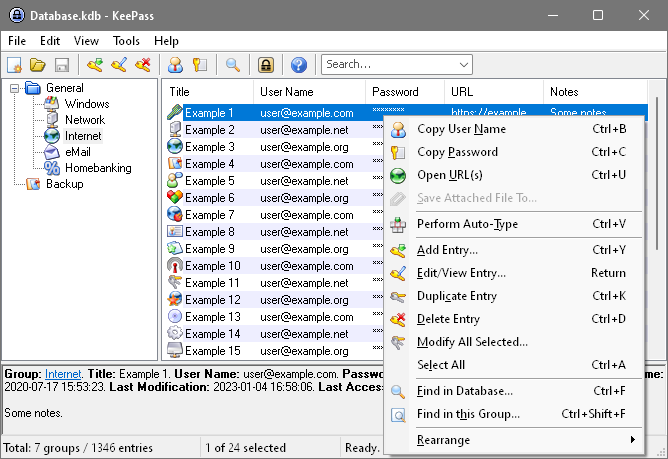 This software is an open source pass word program that secures your password, and also manages your password in a secure way. With KeePass Password Safe Classic Edition 1.17, you can have all your password safely kept in one database and lock it with a single master key-disk. With this, you do not have problems with remembering all your passwords. This software is an open source pass word program that secures your password, and also manages your password in a secure way. With KeePass Password Safe Classic Edition 1.17, you can have all your password safely kept in one database and lock it with a single master key-disk. With this, you do not have problems with remembering all your passwords.
KeePass Password Safe Classic Edition 1.17 is an encrypted software program using the best and most secured encryption algorithms currently known as (AES and Twofish). The data stored in the database is free from external access because it requires the use of a password to open it.
Among the latest changes are: option to use file transaction when writing database; high PDI support; Ctrl+E support shortcut key now jumps to the quick search box and menus are now rendered with gradient item backgrounds.
When compared to the previous version, version 1.17 appears more brilliant. This software could have passed for a paid program because it is a good and effective program.
Want to check it out? Visit Keepass
Rating: Loading... 2 Comments »
|
|
|





