O. James Samson - October 5, 2009
 Here is a tool really worth checking out, AIMP Classic 2.60 Build 505 RC1. It is a really cool software. Here is a tool really worth checking out, AIMP Classic 2.60 Build 505 RC1. It is a really cool software.
It has a customizable skin and so easy to get used to you will fall in love with it from the first time you start using it. Included in this version is a 18-band equalizer, a window just for visualizing display of rhythm and of course a play list editor to enable you arrange your audio files. Other basic features include: a nice fading effects that makes your song list look like an endless music loop; a volume normalizing feature which enables you to avoid serious changes in volumes between tracks. To make it a complete audio player just for you, the main functions can be controlled by its global hotkeys.
The AIMP Classic has some additional features that give you the ability to record any sound on your pc, convert audio files from a format to another as well as edit tags. Based on the audio engine bass, the AIMP Classic connects with ease to new plug-ins which expands the functionality of the player. This of course is possible from the plug-in library designed as part of the player.
Want a one stop audio player for your pc?
Why not check it out at aimp.ru
Rating:  Loading... No Comments »
O. James Samson - October 5, 2009
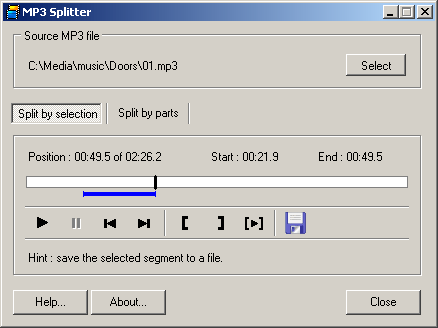 Have you ever had problems trying to fit a particular Mp3 file into a media for instance a 2G MP3 file into a 258MB memory stick or you just want part of an interesting song, exciting dialogue or a cool instrumental solo. May be you wanted to split an MP3 file based on its logical structure, audio book 1st e.t.c Have you ever had problems trying to fit a particular Mp3 file into a media for instance a 2G MP3 file into a 258MB memory stick or you just want part of an interesting song, exciting dialogue or a cool instrumental solo. May be you wanted to split an MP3 file based on its logical structure, audio book 1st e.t.c
I am please to introduce to you “MP3 Splitter” which solves the aforementioned problems and more.It simply dice MP3 files into smaller bits depending on your choice whether you want fragmentation by frame or unit. It also makes it possible to export these new files to a destination of your choice.
It is worthy of note that although it is an easy piece of software for use, it has some drawbacks.when dicing, through its user-definable split method, one can only select one beginning and one end cut point at a time which undermines its flexibility. Its interface is fixed in size and thus can’t be resized.On installation the program doesn’t create any icons but surreptitiously adds an entry to the start menu. Apart from resizing, it doesn’t possess any extra features of any sort.
You might want to try out this software although its 7-day trial doesn’t allow much perusal of its capabilities.
You can visit the publisher’s site for download information – brizsoft.com
Rating: Loading... No Comments »
O. James Samson - October 4, 2009
 Just like kaza, this one uses p2p technology in connecting you to other users, except that this time around it does not give you the file sharing function but enables you to with your friends without any payment. Skype enables you to make phone calls to your friends and what’s more, it’s simple to use! Just like kaza, this one uses p2p technology in connecting you to other users, except that this time around it does not give you the file sharing function but enables you to with your friends without any payment. Skype enables you to make phone calls to your friends and what’s more, it’s simple to use!
Over the years, Skype has improved so well that it can even begin to compare with other similar software in its category. Soft wares such as: voip and open wengo.
On the down side of this software are issues such as: credit expiration, which to me should not be when you consider the fact that other competitors don’t do the same. At least your credit should remain in your account whether or not you use it. A second issue is that of the size of the software, which I think should not be that big. I think Skype would be enjoyed even without most of the added features.
In a nutshell, it is a good software and it works perfectly on my Windows XP.
You can check it out at the publisher’s homepage: http://www.skype.com/intl/en
Rating: Loading... No Comments »
Tilgore Kraut - October 2, 2009
 An expert image resizing tool is highly called for when you require generating thumbnails and processing multiple images to similar size, in order to create an impressive album. In such situation, carrying out individual image resizing task take a toll on your valuable time, and often gives low quality results. This is where you require a skilled application that can resize all your images together without compromising upon their quality. One such tool provided for you is Picture Reduce Studio 1.0.0, which efficiently can aid you in performing image resizing task using batch-process. It is capable of reducing your bulk of images using resizing or compressing options, thus allowing you to use them in album, or easily share them with friends through email or web. The program functions compatibly with BMP, WMF, PNG, GIF, JPEG, etc formats. An expert image resizing tool is highly called for when you require generating thumbnails and processing multiple images to similar size, in order to create an impressive album. In such situation, carrying out individual image resizing task take a toll on your valuable time, and often gives low quality results. This is where you require a skilled application that can resize all your images together without compromising upon their quality. One such tool provided for you is Picture Reduce Studio 1.0.0, which efficiently can aid you in performing image resizing task using batch-process. It is capable of reducing your bulk of images using resizing or compressing options, thus allowing you to use them in album, or easily share them with friends through email or web. The program functions compatibly with BMP, WMF, PNG, GIF, JPEG, etc formats.
With user-friendly interface, the Picture Reduce Studio software can effortlessly be operated by anyone. The simple options are provided to you for adding multiple files or adding an entire folder containing images. As the images get loaded with the program, they are queued up at the Image List panel. While you select an image, its preview simultaneously would be displayed at mid screen. The Options panel imparts you with features to set the Resize Type, along with the New Width and New Height in percentages. Further, you can choose between Compress by Quality or File Size Less Than (KB), for reducing the image as per you needs. Proceeding to bottom side options, you can easily set the desired Output location, and also can mark the features to ‘Open output folder after conversion’ and ‘Overwrite exist files’. Finally, for deriving the results you simply require pressing ‘Start’ option to let the program reduce the images to desired size.
Picture Reduce Studio allows you to reduce your images size according to your need.
{More Info and Download}
Rating: Loading... No Comments »
Tilgore Kraut - October 1, 2009
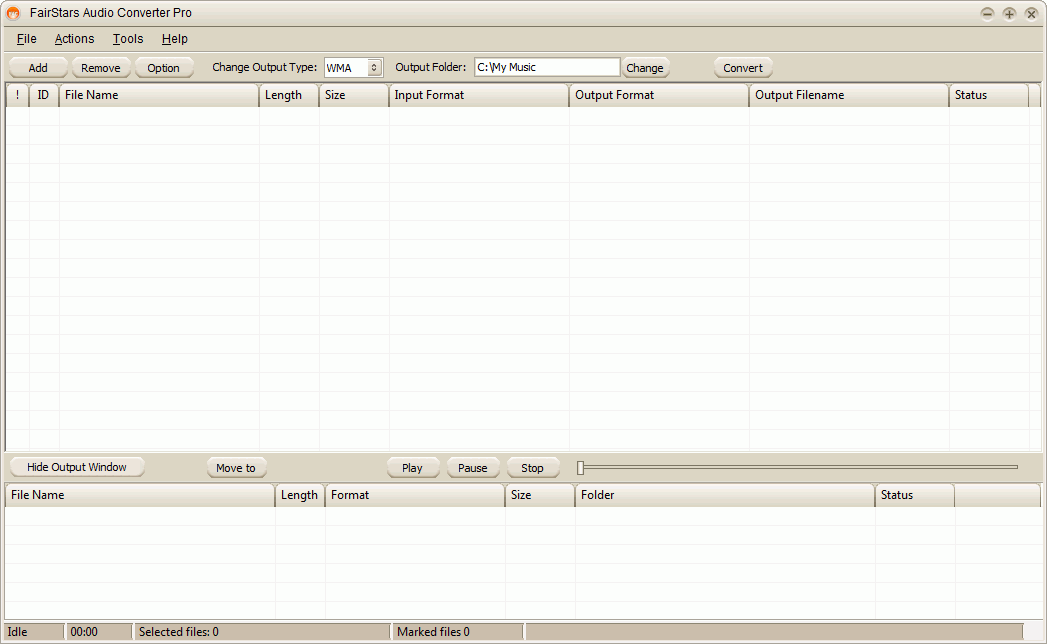 Are you looking for an expert audio converter tool, but didn’t get an apt one yet? Well, here you’re provided a skilled assistant named FairStars Audio Converter Pro 1.10 that effectively can aid you in converting your several format audio files. It efficiently aids you in converting different audio formats such as WAV, Real Media AC3, AIF, DTS, AIFF, AU, AIFC, Creative VOC along with other known formats like FLAC, MP3, OGG, MP4, AAC, and even more. The output format you can derive using this tool is MP3, VQF, AAC, AWB, M4A, FLAC, OGG, WAV, and APE formats. Even, the program assists you in converting several files in one go, regardless of their source or target format. In addition, while converting the program allows adjusting volume, retaining and editing ID3 tags, extracting audio from CD image, and do more. Are you looking for an expert audio converter tool, but didn’t get an apt one yet? Well, here you’re provided a skilled assistant named FairStars Audio Converter Pro 1.10 that effectively can aid you in converting your several format audio files. It efficiently aids you in converting different audio formats such as WAV, Real Media AC3, AIF, DTS, AIFF, AU, AIFC, Creative VOC along with other known formats like FLAC, MP3, OGG, MP4, AAC, and even more. The output format you can derive using this tool is MP3, VQF, AAC, AWB, M4A, FLAC, OGG, WAV, and APE formats. Even, the program assists you in converting several files in one go, regardless of their source or target format. In addition, while converting the program allows adjusting volume, retaining and editing ID3 tags, extracting audio from CD image, and do more.
With its user-friendly console, the FairStars Audio Converter Pro software makes audio conversion task effortless for you. To start up, you’ve to add the files within this program, which you can even individually play for keeping a check. Moving on, you require setting the output format type, and specify the output folder for storing the final output files. Now, click over ‘Convert’ for beginning the audio file conversion process, simultaneously to which the converted files would be displayed within the Output Window placed at bottom side. Even, you can easily hide or show this window, as per your convenience. You can set individually set the format for every file to perform different audio files conversion altogether. The source files are shown with ID, File Name, Length, Size, Input Format, Output Format, Output Filename, and Status info, whereas the output files are displayed with File Name, Length, Format, Size, Folder, and Status details. Along with these, it provided different functions to perform normalization, edit ID3 tags, and more.
FairStars Audio Converter Pro can easily be operated to convert your audio files into the desired output format.
{More info and Download}
Rating: Loading... No Comments »
Tilgore Kraut - October 1, 2009
 Do you often remain worried about remembering numerous passwords to different websites, applications, email accounts, etc? Even, if you use remember password option, they become much prone to leakage and theft. Nevertheless, now you can opt for an expertise assistant that would help you keep your entire password and other information, safe and encrypted. This proficient assistant has been named Extra Password Eudemon 6.64 that is an effectively usable password management tool for Windows. It’s capable of storing your passwords within highly encrypted database that consists of a single file. The database containing the entire passwords can only be opened using the key file or the master key. So, it reduces all the hassles and leaves you with one master password or key file to remember for unlocking the whole passwords database. Also, the created database is encrypted with the most secure AES and Twofish encryption algorithms. Do you often remain worried about remembering numerous passwords to different websites, applications, email accounts, etc? Even, if you use remember password option, they become much prone to leakage and theft. Nevertheless, now you can opt for an expertise assistant that would help you keep your entire password and other information, safe and encrypted. This proficient assistant has been named Extra Password Eudemon 6.64 that is an effectively usable password management tool for Windows. It’s capable of storing your passwords within highly encrypted database that consists of a single file. The database containing the entire passwords can only be opened using the key file or the master key. So, it reduces all the hassles and leaves you with one master password or key file to remember for unlocking the whole passwords database. Also, the created database is encrypted with the most secure AES and Twofish encryption algorithms.
Using the Extra Password Eudemon you can store any number of passwords within the secure database. After you’ve launched the application you’d be shown an intuitive interface with various options placed over it. For recording your account info and relevant password, first you’ve to define a master password for encrypting your database. Now, create different groups for categorizing your password entries such as internet, email, website, software, FTP, homebank, etc. When the group has been created you can begin to add entries by specifying Group, Icon, Title, Username, Password, Quality, URL, Notes, Expires, and Attachment fields. Further, the program also allows editing, batch modifying, and creating duplicates of entries. You can easily copy the username and password information for using wherever needed. Now, press Save and the program would let you save the database file at desired destination which can only be accessed by entering the correct master password or the key file.
Extra Password Eudemon 6.64 aids you in storing all your passwords within an encrypted database file secured with key file or master password.
{More Info and Download}
Rating: Loading... No Comments »
O. James Samson - October 1, 2009
 If for some reason you don’t like your Windows Explorer file manager system and want a way to organize your files that is more like the DOS file manager (two windows are fixed beside each other) then you should try Total Commander. This is an application that has been specially built to work with the Windows operating system, and take the place of Explorer. If for some reason you don’t like your Windows Explorer file manager system and want a way to organize your files that is more like the DOS file manager (two windows are fixed beside each other) then you should try Total Commander. This is an application that has been specially built to work with the Windows operating system, and take the place of Explorer.
In archiving, the Total Commander supports the following files ZIP/ARJ/LHA/RAR/UC2/TAR/GZ/CAB/ACE archives, and can also compress files in a zip folder. That means you can store more in your computer’s memory drives. You can search for these files, view them, edit them, and everything else that you can do with the Windows Explorer, only in a different set-up which you may find easier to use. There are a few extras for this application:
- Your keyboard functions will be the same as the original DOS.
- It will let you delete “full” directories.
- Since the archives are treated as directories, copying to and from these files are easier.
- An enhanced search feature.
This is not the first Window Commander that has come out, but this one fixed the bugs that were found on the first release, like the Unicode search, more media files work with the interface, and many others.
The application can be downloaded for free online, and will not take long to download because it is not a big file. Be sure to source your download directly from their site at ghisler.com since this is an application, there will be people out there who will send malware along with it.
Rating: Loading... No Comments »
O. James Samson - September 30, 2009
 Fascinated with movies and you just can’t help but wish you can make your own? It’s now possible with the latest innovations of computer. You can now create your own movie and burn it on your own disk. One of the most reliable software is the Sothink Movie DVD Maker. You can add your own videos and convert them into DVD as the software support different formats such as WMV, AVI, MP4, MPEG, DivX, MKV, Xvid, DivX, FLV, QuickTime Movie, Real Video, M2TS, MTS, M2T and many others. Fascinated with movies and you just can’t help but wish you can make your own? It’s now possible with the latest innovations of computer. You can now create your own movie and burn it on your own disk. One of the most reliable software is the Sothink Movie DVD Maker. You can add your own videos and convert them into DVD as the software support different formats such as WMV, AVI, MP4, MPEG, DivX, MKV, Xvid, DivX, FLV, QuickTime Movie, Real Video, M2TS, MTS, M2T and many others.
After importing your videos, you can also edit them by simply trimming and cropping parts which need some editing. You can also make use of the preview button of the software to preview the video before you finally get done with the movie. You can also resize your own videos with the powerful features such as stretch mode, Pan & Scan, and Letterbox.
When you are satisfied with the video, you can customize the DVD menu of your disc. You can add subtitles, set each chapter of the video depending on your preference. These features will certainly make the viewing of your videos easier and more convenient.
After setting the DVD menu, you can already go on with burning the disc. You can burn with any of the following disks: DVD+R, DVD+RW, DVD-RW, DVD-R, DVD-5, and DVD-9. Do not worry for you can stop, pause, resume anytime you want while burning. Burning is so fast and easy with Sothink Movie DVD Maker. You can access the software at sothinkmedia.com.
Rating: Loading... No Comments »
O. James Samson - September 29, 2009
 Pictures are still images of precious moments that should be treasured. Thus, they need to be kept safe and away from possibly being damaged. Pictures are still images of precious moments that should be treasured. Thus, they need to be kept safe and away from possibly being damaged.
Camera Recovery 4.0.1.6 is a software program developed by flashdriverecoverysoftware.com. This is a program that rescues any images that might have been corrupted or lost. This is also compatible with and can address the problems of images that are in various formats such as bmp, mov, wav, wma, gif, riff, mpeg, midi, and many others.
There are so many ways by which images might get lost or damage. Thus, the developer of the program also prepared Camera Recovery 4.0.1.6 to be able to get back the images in full, untouched conditions. The software can be used to recover images that are damaged or lost due to human error, hardware malfunction, digital camera error, system errors, and many other unforeseen errors and happenings.
This software is most beneficial to photographers who make images the sole center of their livelihood. With low quality, damaged, or lost images, their customers will surely not be happy with their service. It can also be used to recover other files aside from images such as audio, video clips, and other documents that can be saved in memory cards.
Camera Recovery is also affordable. It is compatible with Windows 7.0, Vista, XP, 2000, 98, NT, ME, and others. It can also recover images captured by different cameras such as those of Sony, Toshiba, Samsung, LG, Canon, Panasonic, Yashica, Kodak, Casio, Nikon, Konika-Minolta, and many other brands.
You can check it out right here.
Rating: Loading... No Comments »
O. James Samson - September 29, 2009
 Windows from Microsoft is the most popular type of operating system today, and while it has many good features that people like, anything that is mass produced, even a software program that is highly customizable can do with a bit of tweaking now and then. Windows from Microsoft is the most popular type of operating system today, and while it has many good features that people like, anything that is mass produced, even a software program that is highly customizable can do with a bit of tweaking now and then.
Like many people, I had problems with the Explorer, it explores too many things and doesn’t really always find the files that I’m looking for. Since I didn’t want to change the operating system on my computer, I opted to change the file management software instead, and found the XYplorer to be a suitable replacement.
The first thing you will most probably notice is that web browsing becomes faster and more relevant. With this software, you can also customize applications even more. You can even set it up to do the things that you usually do on the web, as if on automated mode- it is like having a virtual assistant that sets up your computer just the way you like it whenever you turn it on.
The advantage of XYplorer over other Windows compatible file managers is that it will work even with the older versions of the operating system, and you don’t even have to upload it into the system. That means my system and my registry will remain the same. It also means that it will not be placing bugs into the computer, or messing it up in any other way. It’s just a little helper that makes things easier for me. Look more into it at their site named xyplorer.com and try it.
Rating: Loading... No Comments »
|
|
|





