Tilgore Kraut - September 23, 2009
 Being a software developer, while creating an application you require keeping different aspects into consideration, an important one of which is creating the application icon. Now, either you’d prefer creating the icon yourself or else buy the ready-to-use icon packages available online. Nevertheless, sometimes even from the wide variety of readily usable icons you don’t find any icon suiting to your application’s theme. Also, you may find it much hassling and time-taking to get software and create an icon file settings its different attributes. Well, how about getting a simpler method that aids you in converting your liked images into icons. The program has been designed to facilitate you in generating 32×32 and 16×16 icon files from any of your images. It integrates a wizard-based interface facilitating you in performing the conversion process smoothly. Being a software developer, while creating an application you require keeping different aspects into consideration, an important one of which is creating the application icon. Now, either you’d prefer creating the icon yourself or else buy the ready-to-use icon packages available online. Nevertheless, sometimes even from the wide variety of readily usable icons you don’t find any icon suiting to your application’s theme. Also, you may find it much hassling and time-taking to get software and create an icon file settings its different attributes. Well, how about getting a simpler method that aids you in converting your liked images into icons. The program has been designed to facilitate you in generating 32×32 and 16×16 icon files from any of your images. It integrates a wizard-based interface facilitating you in performing the conversion process smoothly.
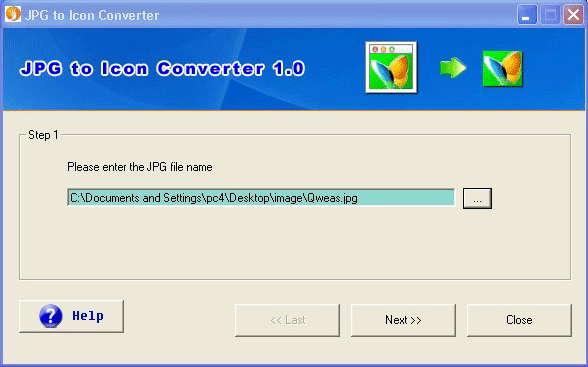
The JPG to Icon Converter 1.02 provides you with a wizard-style interface, providing first step to select the desired image file for converting into an icon file. After choosing the image file, move to next step for specifying the size of your icon file. You can select any between two standard icon sizes provided, i.e. 32×32 and 16×16. Now, when you’ve chosen the image size, just press ‘Next’ for proceeding to further step. The further step prompts you to specify a particular destination directory for storing the output icon file. Further, clicking ‘Next’ the program offers ‘Convert to Icon Now’ and ‘Explore Icon File’ options. Pressing ‘Convert to Icon Now’ bar converts your selected image file into icon, and when the conversion process completes you can use ‘Explore Icon File’ button for accessing the target directory to view the resulting files.
With the JPG to Icon Converter 1.02 you can effortlessly convert any of your images into icon file for using with your software development, etc projects.
{More Info and Download}
Rating:  Loading... No Comments »
Tilgore Kraut - September 22, 2009
 XviD is a form of video codecs that provides quality visual and audio experience, but is only supported for playback by some specific multimedia players. Well do you require XviD format videos for uploading on your website or for playback with your multimedia player? But, you might be confronting hassles as usually the videos stored within your PC are normally available in different formats. In such a situation, you can go for converting your different format videos into XviD codecs, for which you can use Cute XviD Converter 1.10 application. It’s an effective utility for converting your several videos into XviD format videos. The program supports converting several video formats such as DivX, MPEG, MPEG-4, MOV, H.263, AVI, H.264, ASF, and WMV to XviD format. Not just this, the application facilitates conversion from XviD to other formats; extracting audio with M4A, MP3, WMA, AAC, WAV, AC3, and OGG formats. XviD is a form of video codecs that provides quality visual and audio experience, but is only supported for playback by some specific multimedia players. Well do you require XviD format videos for uploading on your website or for playback with your multimedia player? But, you might be confronting hassles as usually the videos stored within your PC are normally available in different formats. In such a situation, you can go for converting your different format videos into XviD codecs, for which you can use Cute XviD Converter 1.10 application. It’s an effective utility for converting your several videos into XviD format videos. The program supports converting several video formats such as DivX, MPEG, MPEG-4, MOV, H.263, AVI, H.264, ASF, and WMV to XviD format. Not just this, the application facilitates conversion from XviD to other formats; extracting audio with M4A, MP3, WMA, AAC, WAV, AC3, and OGG formats.
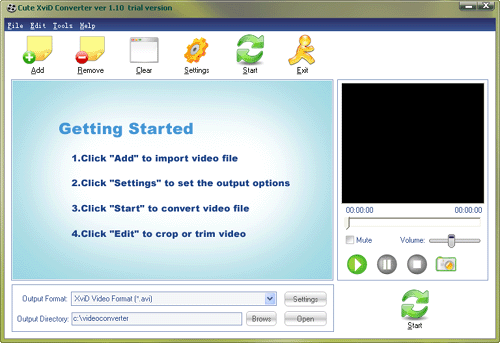
Along with video conversion and audio extraction, the Cute XviD Converter 1.10 supports capturing images from videos, and trimming desired video segments to form short clips. For commencing the conversion process, you’d require adding videos into program which you can even preview using the in-built player. Next, you can set the output format and even explore further output options using Settings button. After defining the necessary settings simply press ‘Start’ option for starting the video conversion process. Further, the application includes Edit feature that allows cropping and trimming the video to get the desired output. Below the player, you’re shown the image capturing feature clicking which you can easily capture any video scene into an image. Even, you can generate short clips by marking specific video segment with Start and End points.
Cute XviD Converter 1.10 application has been intuitively designed to aid you in converting your videos into XviD format, and perform other supported functions.
{More Info and Download}
Rating: Loading... No Comments »
Tilgore Kraut - September 22, 2009
 SupportSmith v2 2.0 is a competent tool that enables organization and professional users to immediately establish safe connection between computers by providing required resources. It doesn’t require any open ports on technicians as well at the customer’s side. The program supports establishing an instant and secure remote desktop connection between PCs using a suite of imparted tools that allows best interactions. It would effectively aid remote control, application sharing, desktop sharing, chat, online collaboration, file transfer, remote shell, and port forwarding. The utility manages the permission and accesses using SSH-2 protocol; AES 128-bit encryption; along with Active Directory authentication. With the program, you’d get complete remote PC information that too without requiring to interrupt the users. It proves cost-effective and efficient as it helps saving expenditures incurred on appointing the services of consultants; technical supports providers; and system administrators. SupportSmith v2 2.0 is a competent tool that enables organization and professional users to immediately establish safe connection between computers by providing required resources. It doesn’t require any open ports on technicians as well at the customer’s side. The program supports establishing an instant and secure remote desktop connection between PCs using a suite of imparted tools that allows best interactions. It would effectively aid remote control, application sharing, desktop sharing, chat, online collaboration, file transfer, remote shell, and port forwarding. The utility manages the permission and accesses using SSH-2 protocol; AES 128-bit encryption; along with Active Directory authentication. With the program, you’d get complete remote PC information that too without requiring to interrupt the users. It proves cost-effective and efficient as it helps saving expenditures incurred on appointing the services of consultants; technical supports providers; and system administrators.
SupportSmith v2 2.0 software comprises of an intuitive interface along with easily-operable functions. While establishing remote access, the utility provides server, supporter tools, pre-installed agent, and on-demand agent creator. Now, you’d have to configure by setting communications, access control, and general options. Further, to have to set the agent configurations using setting from status, connection, access control, user information, and general tabs. Queuing up come the supporter tools configurations with connection, personal information, incidents, and general settings. Now, you’d be presented with Login screen to begin accessing remote PC using Support Manager. The Support Manager has the network PCs listed over its screen, from where you can select one for commencing the remote session. You can even easily access the support request of customers with the agents and support manager’s help. Even right clicking over the queued up computers you can Initiate Remote Assistance, Start Chat, Display System Info, Remote Wakeup the PC, and Remove system from Favorites. Integrated with different other supportive functions, the utility proves beneficial in providing instant remote support.
SupportSmith v2 2.0 application functions with precision to aid you in establishing remote connections to PCs for providing support to network system users and customers.
{More Info and Download}
Rating: Loading... No Comments »
Tilgore Kraut - September 22, 2009
 While managing an online image gallery, web masters and professional photographers require processing a large number of images for giving them appropriate layout. In such a case, using a complex and large application uselessly complicate the simple image resizing, rotating, renaming, etc tasks. So, why get confused using complex tools when you can get an easier solution to perform such simple tasks within lesser time and in batch mode. One such utility is Batch It Pro 4.0 that facilitates you in resizing, renaming, rotating, adding captions, etc to your images. It supports processing different image formats like JPEG, PCX, BMP, TGA, JPEG 2000, PPM, PNG, PBM, GIF, along with VDA, VST, PIX, ICB to name a few. Further, it supports JPEG image quality and smoothing attributes, Dot Per Inch modification, and enables resizing image aspects ratio. Not just this, you can even add watermarks with this remarkable application. While managing an online image gallery, web masters and professional photographers require processing a large number of images for giving them appropriate layout. In such a case, using a complex and large application uselessly complicate the simple image resizing, rotating, renaming, etc tasks. So, why get confused using complex tools when you can get an easier solution to perform such simple tasks within lesser time and in batch mode. One such utility is Batch It Pro 4.0 that facilitates you in resizing, renaming, rotating, adding captions, etc to your images. It supports processing different image formats like JPEG, PCX, BMP, TGA, JPEG 2000, PPM, PNG, PBM, GIF, along with VDA, VST, PIX, ICB to name a few. Further, it supports JPEG image quality and smoothing attributes, Dot Per Inch modification, and enables resizing image aspects ratio. Not just this, you can even add watermarks with this remarkable application.
With its intuitive console, Batch It Pro 4.0 application provides you with smoothly operable functions for image modification. For beginning to process images, you’re provided Load Files and Load Folders options for selecting the different images or folders containing your image collection. The loaded images are queued up at the mid area, from where you highlight any and see the before and after versions of the images at right side sections. Further selecting the images you can move to Settings tab where you can use Image Properties, Image Effects, Text Caption Properties, Watermark Properties, Filename Changer Properties, Properties options for making desirable changes. Alter the settings, you simply have to specify the target directory and click ‘Process All’ for beginning to apply the preferred changes you’ve selected. In addition to these, it lets you mark/unmark features to Use Filename Change, Do Filename Change Only, Enable Change Preview, and Enable Print Images. Every Settings option possess various functions that help you process images, as needed.
Batch It Pro 4.0 software allows the altering of your images by resizing, rotating, renaming, and watermarking them along with performing different other supported tasks.
{More Info and Download}
Rating: Loading... No Comments »
O. James Samson - September 21, 2009
 The name of the application tells exactly what users should expect. FREE Flash Video & Game Recorder is a very straightforward application. Users should be able to download videos from popular video sharing sites like YouTube and Google Video. The application is also very efficient in downloading flash games from popular online flash games websites. The name of the application tells exactly what users should expect. FREE Flash Video & Game Recorder is a very straightforward application. Users should be able to download videos from popular video sharing sites like YouTube and Google Video. The application is also very efficient in downloading flash games from popular online flash games websites.
The application boasts of a very simple interface when downloading videos and games. Users simply need to run the application and open the website where their video or game is located. The application detects the flash videos or games in the site and their direct links are loaded in the application. Users can simply download the files they need to watch the videos or play the games offline. Aside from being a downloader, the application is also an FLV player. This means users can watch the videos after they have successfully downloaded the flash video. Although the application can’t run flash games, users can still enjoy the games by simply opening the file in your favorite browser.
A common concern about flash video and game downloaders is that they usually slow down the system while they download. FREE Flash Video & Game Recorder tries to deal with that problem by providing the necessary files in advance rather than by using online tools. But even with the offline tools, the FREE Flash Video & Game Recorder is still slow. Flash detection in games is often a hit or miss, especially if the application cannot accurately pinpoint which flash file is the flash video game.
Check it out at flashrecorder.org
Rating: Loading... 1 Comment »
O. James Samson - September 21, 2009
 Format Factory is a file conversion application that covers almost every major format. The application can convert audio, video and image into your preferred format. It could basically replace all your conversion applications that are only limited to single format. Format Factory is a file conversion application that covers almost every major format. The application can convert audio, video and image into your preferred format. It could basically replace all your conversion applications that are only limited to single format.
Aside from being an efficient file conversion application, the application can also be used as a ripper. Format Factory can be used to extract video from DVDs and audio CDs. Users can automatically convert the video and audio they ripped into their preferred format. Full customization which includes screen size, audio format as well as specific output folder is included.
An additional feature in the application includes the ability to improve video quality. Specifically, videos and audios that are unable to load well in various video and audio players can be fixed through the application. Image conversion is not just limited to simple change in format as the picture can be zoomed, rotated and even tagged before converted.
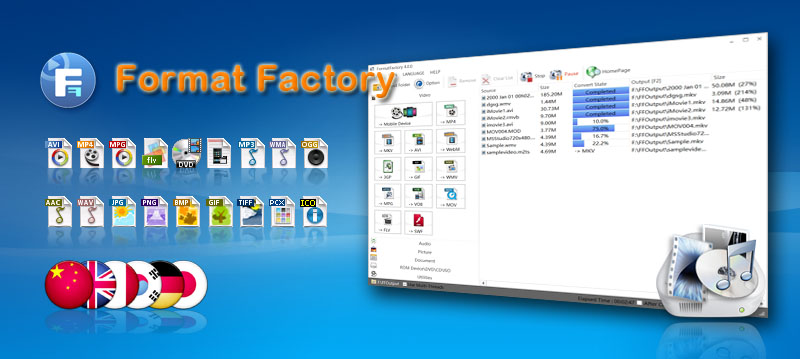
The interface of the application is very simple that users can simply choose a “task” on the upper left side of the application. The interface based on that task will load. Conversion is almost in an instant especially for smaller files.
Last but not the least; the application has default configurations for mobile devices. Users can convert videos that will be compatible to iPod, PSP and other MP4 players. Even 3GP is supported so that it can easily play in various 3GP-capable mobile phones. The application is literally a one-stop shop for audio, video and image conversion.
Check it out at pcfreetime.com
Rating: Loading... No Comments »
O. James Samson - September 18, 2009
 Defraggler is small application with a very important function for any computer. As the name suggests, Defraggler is a tool that can defrag hard drives with efficiency. The installation file is less than 1mb which means it can be used in just a few minutes. Defraggler is small application with a very important function for any computer. As the name suggests, Defraggler is a tool that can defrag hard drives with efficiency. The installation file is less than 1mb which means it can be used in just a few minutes.
The unique feature of Defraggler is the ability to defrag files. Files contain fragments that might be distributed in various portions of the hard drive, making it slower to load compared to other files. Through Defraggler, the file should be able to load faster because they were defragged through the small application.
The interface of Defraggler is very straightforward. After running the application, users should be able to select the hard drive they want to defrag. The application will start to analyze the hard drive so that it will determine its contents. After the application is done analyzing, users can defrag the entire hard drive or select the files inside the hard drive. Users can choose to check the files they want to defrag or simply right click on the files they want to defrag in the application.
Because Defraggler is relatively small, it can analyze the hard drive with limited capacity fast. The added visual representation on the hard drive should give users an idea on the remaining space. The only difficulty users might experience with Defraggler is the lag that could be experienced when the application tries to analyze a hard drive more than 500GB. But if the content in a 500GB hard drive is less than 20%, the Defraggler should work at its optimal speed.
Check it out defraggler.com
Rating: Loading... No Comments »
O. James Samson - September 18, 2009
 Assassin S.E. is a very popular malware and spyware detection application. It has the ability to actively detect processes that might be used to extract your information and use them for illegal purposes. It’s very easy to use as the application continues to auto update itself with the latest forms of attacks. An efficient malware is highly recommended for every user since many unknown applications could be used to extract data or inject viruses without the user’s knowledge. A single malware can easily destroy a single computer and delete precious files. Assassin S.E. is a very popular malware and spyware detection application. It has the ability to actively detect processes that might be used to extract your information and use them for illegal purposes. It’s very easy to use as the application continues to auto update itself with the latest forms of attacks. An efficient malware is highly recommended for every user since many unknown applications could be used to extract data or inject viruses without the user’s knowledge. A single malware can easily destroy a single computer and delete precious files.
The interface of the application is very simple. When the application is loaded in the desktop, it will show the current processes that are currently running in the application. Users can choose which processes will be terminated if they suspect the said process is simply gathering information without any actual use in the computer. Users can also update the application at will or set the time when the application should update itself.
This type of application is usually recommended for advanced computer users. But Assassin S.E. removes the difficulty associated with the application by providing “ratings” of each process. Aside from listing the processes currently running in the application, Assassin S.E. rates the processes so that the user can identify which process should be suspected as malware. With this feature, first time anti-malware users should be able to easily work with the application. Protecting your sensitive information in your local computer is important and this applications eases the trouble of establishing proper computer protection.
Check it out at blacklistsoft.com
Rating: Loading... No Comments »
O. James Samson - September 18, 2009
The European Football Result and League Table Database 1.0 is the perfect solution for those who wanted to get the latest scores in football without requiring a strong internet connection. There are many football leagues in Europe that tracking each game just to get the latest results could be difficult. You can always visit a website wherein you can get the latest scores but they can take too much bandwidth.
The interface of the application is a little bit challenging to work with first. But the complexity also shows the application’s ability to load your needed data. The “League Date Range Selector” is a very impressive tool as it will help the user connect to the latest results in the league. Although you can’t search by team, you should be able to get the data you need in no time.
There are two impressive tools users can enjoy from European Football Result and League Table Database. The first feature is the “League Analysis” wherein users should be able to see the schedule in full details including Home and Away games. Another feature is the head to head team comparison. You can select up to 4 teams and see the results of their matches since 1993.
The only downside of the application is that it’s an add-on to Microsoft Access application. Users who have installed limited MS Office might not have this application. But for those who have MS Access, the application will work without any problem as it provides football results in an instant.
Check it out at soccer-data.co.uk/
Rating: Loading... 1 Comment »
Tilgore Kraut - September 17, 2009
 While using Adobe Reader, you might have noticed that it takes huge amount of time in loading due to various plugins installed within it. Nevertheless, now you can get the Reader opened instantly without wasting much of your time. For this, you’d simply require installing PDF SpeedUP 2.01 that significantly speeds up the loading time of Adobe Reader. The program is capable of disabling the plug-ins to, while just the necessary ones to make the program run quickly. The program imparts several features, and also enables you to manually activate or deactivate the plug-ins, as is needed. It functions compatibility with Adobe Reader 5 up to 9. With multi-lingual interface and smooth operations, the program can easily be used even by the novice users. While using Adobe Reader, you might have noticed that it takes huge amount of time in loading due to various plugins installed within it. Nevertheless, now you can get the Reader opened instantly without wasting much of your time. For this, you’d simply require installing PDF SpeedUP 2.01 that significantly speeds up the loading time of Adobe Reader. The program is capable of disabling the plug-ins to, while just the necessary ones to make the program run quickly. The program imparts several features, and also enables you to manually activate or deactivate the plug-ins, as is needed. It functions compatibility with Adobe Reader 5 up to 9. With multi-lingual interface and smooth operations, the program can easily be used even by the novice users.
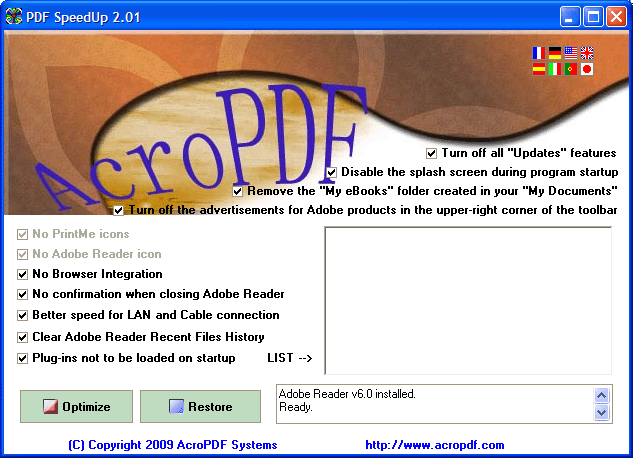
The PDF SpeedUp runs with simple console and provides effective support in quickly launching the Adobe Acrobat and Adobe Reader utilities. While setting up the program configuration for speeding up you’re the Adobe Reader application, you can Turn off all ‘Update’ features; Disable the splash screen during program startup; Remove the ‘My Books’ folder created in you’re ‘My Documents’; and Turn off the advertisement for Adobe products in the upper-right corner of the toolbar. Adding to these, it allows you to disable PrintMe icons, Adobe Reader icons, browser Integration, and confirmation when closing Adobe Reader. Further, in the settings series you’re also provided options: Better speed for LAN and Cable connection; Clear Adobe Reader Recent Files History; and Plug-ins not to be loaded on startup. Enabling or disabling these features and pressing ‘Optimize’, you can easily speed the program launch, thus getting instant access to your PDF files.
PDF SpeedUp 2.01 is capable of significantly decreasing the loading time of Adobe Acrobat and Reader program by disabling the unwanted plug-ins.
{More Info and Download}
Rating: Loading... No Comments »
|
|
|





