Tilgore Kraut - July 24, 2009
 Showrooms, banks, hotels, etc equip their premises with several advanced security systems, and one of the preferred systems of these is surveillance cameras. Nonetheless, using these devices can be made more effective by associating cameras with your PC using an apt application. Well, the task is made even easier for you, as your webcam along with a security application named as CSSS Video 2.2 can be used for capturing the room/area activities. The application connecting with your webcam device supports real time survey by recording video or capturing snapshots of every movement. It further provide visual motion indicator that helps you set sensitivity level, and can silently call using modem, Skype, mobile phones, emails, or play sound. Even, in case of ‘call pickup’, the program can dial up to one to five phone numbers, also supports remote listening with voice modems, and include several other features. Showrooms, banks, hotels, etc equip their premises with several advanced security systems, and one of the preferred systems of these is surveillance cameras. Nonetheless, using these devices can be made more effective by associating cameras with your PC using an apt application. Well, the task is made even easier for you, as your webcam along with a security application named as CSSS Video 2.2 can be used for capturing the room/area activities. The application connecting with your webcam device supports real time survey by recording video or capturing snapshots of every movement. It further provide visual motion indicator that helps you set sensitivity level, and can silently call using modem, Skype, mobile phones, emails, or play sound. Even, in case of ‘call pickup’, the program can dial up to one to five phone numbers, also supports remote listening with voice modems, and include several other features.
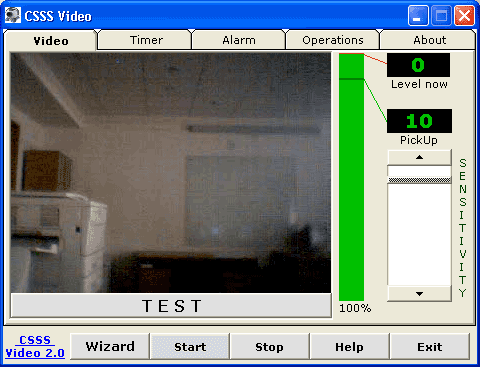
CSSS Video 2.2 comprises of Video, Timer, Alarm, Operations, and About tabs to coordination between program’s and camera’s functioning. ‘Video’ tab enables viewing the area under webcam surveillance, and also provides features to check Level Now and Pick Up. In addition, you can also set Sensitivity level, use wizard, and options to start/stop the process, as required. Next tab is ‘Timer’ that provides two reverse timers, which can be set to start and stop the monitoring process at specific time. Further, the ‘Alarm’ tab lets you define numbers to call, set pulse or tone, enable Listening to sounds, set Voice modem, define email address to send snapshots at, along with marking provided options: Answer always, After pickup, and Silent Dial. Adding to these, the ‘Operations’ tab allows you to set a specific sound for alarm, which can even be listened, enabled and saved before actual application. Along with this, it provides options like Test, Stop, In Using, Sound Record, Settings, Record Video, Viewer, Snapshots, and Open files, to control distinctive operations.
CSSS Video 2.2 executes showing a decently structured interface to define configurations for beginning surveillance of the room/area, with ease.
{More info and Download}
Rating:  Loading... No Comments »
Tilgore Kraut - July 24, 2009
 AdwordsReporter 2.0.4 is an Adwords account analyzing tool that provides instant results to its users. It functions promptly, where with Google Adwords campaign every click takes some time till you’re provided with the requested results. The derived Adwords results are easier to understand and interpret, as these are generally shown in graphical view displaying how your campaign’s different properties had changed during last period. It facilitates you to create 56 separate graph combinations for examining the Click Through Rate, clicks, impressions, position, purchases, total costs, cost per conversion, content cost per click, and maximal cost per click. AdwordsReporter 2.0.4 is an Adwords account analyzing tool that provides instant results to its users. It functions promptly, where with Google Adwords campaign every click takes some time till you’re provided with the requested results. The derived Adwords results are easier to understand and interpret, as these are generally shown in graphical view displaying how your campaign’s different properties had changed during last period. It facilitates you to create 56 separate graph combinations for examining the Click Through Rate, clicks, impressions, position, purchases, total costs, cost per conversion, content cost per click, and maximal cost per click.
For using the AdwordsReporter 2.0.4 tool, firstly you require creating a report within Google Adwords account. After logging in, you’ve to select ‘Reports’ tab, choose to generate a new report, and mark ‘Ad Performance’ for the type of report to be generated. Following these, you would’ve to configure settings, and also can add or remove columns, and set filters for specific results. Now, specifying report name, and saving it as a template, you’ve to schedule it for further automatic reports generation. Also, you’ve to enter necessary email address, and set report attachment to be sent as XML. Now, click ‘Create Report’, and after receiving and downloading the XML file, simply import it to AdwordsReporter’s database.
When file is loaded, select the data range for report generation through related fields provided at upper side. Even you can view data for this week, last week, this month, last month, custom, or all. If you select Custom, you’re allowed defining individual time frame. Now, the AdwordsReporter data would be shown within different columns such as campaigns, clicks, impression, average cost per click, cost, conversion rate, average position, return of investment, etc. It presents data in red and green, with red depicting monitory loss and green defining money you make. Furthermore, the AdwordsReporter provides graphical view of the report data. The program allows importing, exporting and printing the reports.
AdwordsReporter 2.0.4 utility is a competent Adwords report generator, which lets you derive results of any date along with graphical view.
{More Info and Download}
Rating: Loading... No Comments »
Tilgore Kraut - July 23, 2009
 Are you troubled with the constantly degrading performance of your PC, which in turn is affecting your overall productivity? Nevertheless, there can be several reasons behind slow down of your PC, but the most common out of these is low disk space. It happens due to the redundant files cluttering your PC, and manual checking of the directory space occupied by such files is quite difficult. However, you can easily get rid of the entire hassles and free your PC disk space conveniently from unwanted files and folders. For this, you would require opting out the assistance of Make more disk space 1.9.4 application. The utility scans and subsequently displays the disk size occupied by different directories and their included files. You can easily explore the presented files and even can delete the non-required files and folders. Are you troubled with the constantly degrading performance of your PC, which in turn is affecting your overall productivity? Nevertheless, there can be several reasons behind slow down of your PC, but the most common out of these is low disk space. It happens due to the redundant files cluttering your PC, and manual checking of the directory space occupied by such files is quite difficult. However, you can easily get rid of the entire hassles and free your PC disk space conveniently from unwanted files and folders. For this, you would require opting out the assistance of Make more disk space 1.9.4 application. The utility scans and subsequently displays the disk size occupied by different directories and their included files. You can easily explore the presented files and even can delete the non-required files and folders.
To begin using Make more disk space 1.9.4 you have to select a drive from the detected ones, and press the green icon to start scanning the selected drive. It would scan and present the drive’s containing directories and files along with their size and disk space they occupy on the right side interface area. You can set the size of drive and directories to be displayed in bytes, kilobytes, megabytes, and gigabytes. The selected drive with its associated folders and files are presented in tree-view at left pane, making it easier to explore and access them. The occupied disk space is also shown within user-specified pie or bar diagram, which is further classified as program files, pagefile.sys, documents and settings, WINDOWS, or others. Even, you can scan a particular folder for the disk size it occupies. Furthermore, the statistics of drive, its entire and free size, and %free space is provided at bottom left. If you wish to form of report of the disk size details, then you save the entire analysis within HTML or CSV format file.
Using the Make more disk space 1.9.4 you can get to know about how much disk size each file and folder is occupying, and can delete the ones that you don’t want to free disk space.
{More Info and Download}
Rating: Loading... No Comments »
Tilgore Kraut - July 23, 2009
 Selecting web-album creation tools often takes a toll over your time and resources, as the online space is filled with a vast variety of such tools. Furthermore, the album you create using such utilities are often of large size, and require converting them for web compatibility. Nonetheless, you can avoid the hassles involved in carrying out long album creation process and go for Image Flow 1.0 that serves the purpose adeptly. It’s a flash component carrying data through XML file, and facilitates you in creating flash album easily embeddable with websites. The customization is also easier as you simply have to make alterations to the XML file associated with Image Flow package. Using Image Flow you can get your images compiled into a paneled album with sliding view. Selecting web-album creation tools often takes a toll over your time and resources, as the online space is filled with a vast variety of such tools. Furthermore, the album you create using such utilities are often of large size, and require converting them for web compatibility. Nonetheless, you can avoid the hassles involved in carrying out long album creation process and go for Image Flow 1.0 that serves the purpose adeptly. It’s a flash component carrying data through XML file, and facilitates you in creating flash album easily embeddable with websites. The customization is also easier as you simply have to make alterations to the XML file associated with Image Flow package. Using Image Flow you can get your images compiled into a paneled album with sliding view.
While associating your images with Image Flow 1.0 to form a fantastic personal image album or product presentation, you can customize it to the desired level. You’re allowed to make changes through the XML file, where you get different variables to modify the appearance of your album/presentation. Among the variables, you can modify ActiveHeight to set picture height when it’s on front; InactiveHeight to change picture height when it isn’t active; and ActivePicture for defining image to be active on file loading. Further, borderSize is available for changing size or removing image border; backgroundColor for placing desired color for the border; backgroundOverColor allows specifying color of border on mouse-over; and pictureSpacing to set spacing between images. The customizable variables don’t end here, as you’re also provided ZoomSpeed for setting speed for zoom out/in effect; MoveSpeed for altering image moving speed; and mirrorDistance for placing specific distance within picture and mirror. The other alterable features added are autoFlow true/false, rand true/false, time value, titleFormat, fillType, and colorsBackground. When you’ve altered these, you get the all new appearance of the image presentation.
Image Flow 1.0 component is easily alterable and embeddable with your website and results in an impressive flash image album/presentation.
{More Info and Download}
Rating: Loading... No Comments »
Tilgore Kraut - July 23, 2009
 After coming back from an excursion, you must be planning to transfer all your images from the image capturing device to your PC. For this, you often require installing an appropriate image viewer utility to open them. Even, troubles don’t end here, as you’d require hopping through several websites to find an image editing tool to make necessary corrections on to your photos. Nonetheless, downloading and installing separate application, and shuffling between them to first view and then edit the images is highly troubling as well as time consuming. But, the entire hassles and fuss can be prevented by using Fly Free Photo Editing & Viewer 2.16, as it combines both functionalities into one application along with features to upload images on Google, Flickr, Facebook, or send through MSN. You can view your images and also can simultaneously edit them using crop, rotate, color correction, flip and other provided features. After coming back from an excursion, you must be planning to transfer all your images from the image capturing device to your PC. For this, you often require installing an appropriate image viewer utility to open them. Even, troubles don’t end here, as you’d require hopping through several websites to find an image editing tool to make necessary corrections on to your photos. Nonetheless, downloading and installing separate application, and shuffling between them to first view and then edit the images is highly troubling as well as time consuming. But, the entire hassles and fuss can be prevented by using Fly Free Photo Editing & Viewer 2.16, as it combines both functionalities into one application along with features to upload images on Google, Flickr, Facebook, or send through MSN. You can view your images and also can simultaneously edit them using crop, rotate, color correction, flip and other provided features.
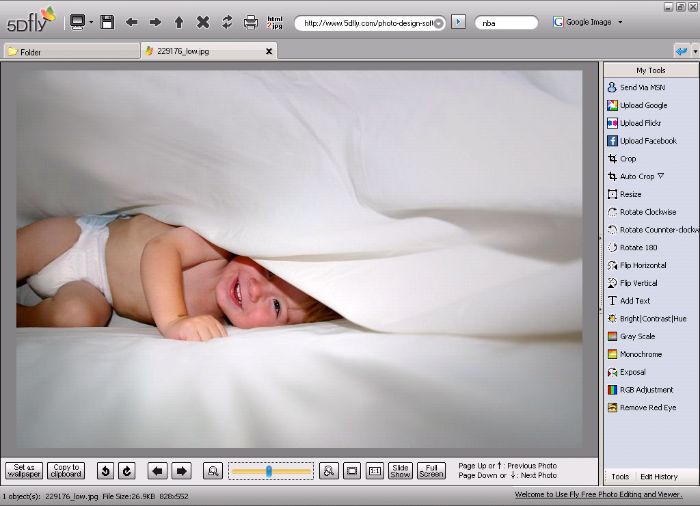
The Fly Free Photo Editing & Viewer 2.16 tool integrates the features of both image viewer and editor to make image processing easier and less time consuming. It includes file explorer at left that supports you in browsing through PC and choosing specific directory, images from which would eventually be shown over mid area. The program consists of My Tools panel on right that facilitates you with features like View Or Edit, Send Via MSN, Upload Google, Upload Flickr, Upload Facebook, Batch resize, Photo PPT/PPS, E-mail Photo, and HTML to Image. As you double-click images for viewing them, each image would be opened within a different tabs, thus you view and edit several images at one time. It allows creating PowerPoint presentation and form images from html web pages along with uploading them to different websites. Further, viewing and editing tab comprises of features: Crop, Resize, Rotate, Flip, Add Text, Bright/Contrast/Hue, Gray Scale, Monochrome, Exposal, RGB Adjustment, Remove Red Eye, Set as Wallpaper, Slide Show, Full Screen, and more.
Fly Free Photo Editing & Viewer 2.16 application supports viewing, editing, and uploading images along with creating slideshows and converting html into images simultaneously using one tool.
{More Info and Download}
Rating: Loading... No Comments »
Tilgore Kraut - July 23, 2009
 Procaster 1.0 is a powerful desktop application that makes quality live broadcasting easier. It’s capable to automatically boost your streams quality to top levels. The program offers its assistance in streaming your webcam, DV cam, desktop and games to the numerous viewers. Procaster integrates with livestream.com’s professional channel pages, proven scalability, and embeddable player, which make it capable turning any live presentation and broadcast into a blockbuster. Among other features, the Procaster consists of real-time record and play, real-time chat, send tweets, flash-based player, mix in real-time 2D/3D, massive viewers, and various others. Procaster 1.0 is a powerful desktop application that makes quality live broadcasting easier. It’s capable to automatically boost your streams quality to top levels. The program offers its assistance in streaming your webcam, DV cam, desktop and games to the numerous viewers. Procaster integrates with livestream.com’s professional channel pages, proven scalability, and embeddable player, which make it capable turning any live presentation and broadcast into a blockbuster. Among other features, the Procaster consists of real-time record and play, real-time chat, send tweets, flash-based player, mix in real-time 2D/3D, massive viewers, and various others.
Moving to the functional part of Procaster 1.0 after installation you’re required to create channel. For this, you would be guided through step-by-step process to fill in the required details for account creation and naming your channel. After this, the channel would be available with Procaster. As you log-in the program automatically analyzes hardware of your PC for determining the most appropriate broadcast settings for it. Now, after logging-in you would be displayed the main screen with tabs of Broadcast, Chat, Promote, and Watch. To begin with Broadcast, you’ve to pick a source from the provided ones: camera, screen, or game, and following it press ‘Go Live’ button for live broadcasting. Next is ‘Chat’ tab that enables you to interact with the viewers through real-time chat, which can be carried out right from Procaster. Further, Promote tab is available for spreading the word, as being all set to go live, you can send Tweets right from Procaster for countdown and letting everyone know that you’re ‘On Air’. Finally, ‘Watch’ tab provides you with Channel Page Link, Normal Embed Code, and Object Embed Code (for MySpace and Others), so that you can share your channel with viewers by copy-pasting embed code with different websites and social network.
In addition, the Procaster 1.0 associates a Control Bar with easy broadcast options; use 3D and 2D Effect for broadcasting screen and camera together; Zoom In/Out any specific region; game-casting with great detail; channel page view; and embedded player, etc.
{More Info and Download}
Rating: Loading... No Comments »
Tilgore Kraut - July 22, 2009
 Create vast expanses of terrains, add trees, select the best point of view and render hyper-realistic images of your landscapes in moody atmospheres in a few mouse clicks. Vue 7 Pioneer is a nice way to learn 3D. Create vast expanses of terrains, add trees, select the best point of view and render hyper-realistic images of your landscapes in moody atmospheres in a few mouse clicks. Vue 7 Pioneer is a nice way to learn 3D.
Features: With this software it is possible to make expanses of terrains, adding trees/forests, selecting a point of view and render realistic landscapes. You are able to add the mood of atmospherics too to make the images even more realistic. You are able to create these renderings in a few mouse clicks too. Vue 7 Pioneer is a nice way to learn 3D. It’s so easy to use and makes even a complete beginner productive right away. They are able to make these realistic landscapes very soon after getting started. Vue 7 Pioneer is derived from the high-end products the publisher sells to special effects user communities. Vue 7 Pioneer includes free access to the Cornucopia3D community. You can get help, exchange tips and suggestions with other users, find inspiration by looking at their art, or show off.
With Vue 7 Pioneer could be a good way to learn about 3D. You need to concentrate on the art that you are creating. Effects due to 3 D nature of objects; perspective, lights and shadows are taken care of by the software automatically. All functions are only a click away. One click can create a terrain, a new plant, add 3D text, etc. Scenes can be composed in real-time and the results previewed before choosing the final one. A click on the camera icon makes the final output image.
Overall: A nice tool to play with that sensitizes you to 3D effects and issues.
{More Info and Download}
Rating: Loading... No Comments »
Tilgore Kraut - July 22, 2009
 Modern digital cameras take huge photos – great for high quality printing, but too big to email to friends and family, and too large for displaying on web sites. PhotoRazor solves this by making high quality copies of your photos at a smaller size. Modern digital cameras take huge photos – great for high quality printing, but too big to email to friends and family, and too large for displaying on web sites. PhotoRazor solves this by making high quality copies of your photos at a smaller size.
Features: Modern digital cameras, particularly those hi-resolution/high MP rated cameras, take photos that are really large. It is difficult to place them for viewing on a web site or to send out to family and friends. Some of them may not have high bandwidth Internet connections and the download could become quite a pain. The originals are good for very good prints of course. So, trick is to retain these photos in the original size while have the ability to create smaller copies for easy viewing and sharing. This utility is able to resize a full folder on a single click.
The resized photos are saved in a separate folder so that there is no chance of mixing up with the high resolution originals.You save the originals for print copies and the pleasure of viewing these cherished memories at the best quality possible.The alterations you do on the originals can be viewed in original so that you know exactly what you are going to get. You are also able to monitor the file size before you actually process data. In the main display area you get a vertical strip of thumbnails so that selecting a photo is easy. It is also integrated with the explorer so that finding the folder is not difficult at all. Size & quality controls lets you trade off photo size and its quality. Rotate, flip and color corrections are available options. Resize and save controls lets you do the processing on the folders that you specify.
Overall: Most photo editors would give you these functionality and you are likely to have one. But, if you don’t and need these functionality to be handy this is a good tool.
{More Info and Download}
Rating: Loading... No Comments »
O. James Samson - July 21, 2009
 Rocket Launcher is a very small yet a very smart application. The software is basically a scheduler that will automate some tasks at the appointed date and time. In gist, the application will allow users to launch a specific file, application and website on the users preferred time and date. Although the application is smart enough to launch specific functions on the appointed date and time, the application will run smoothly in the background. This means the application can run without lagging the computer. Rocket Launcher is a very small yet a very smart application. The software is basically a scheduler that will automate some tasks at the appointed date and time. In gist, the application will allow users to launch a specific file, application and website on the users preferred time and date. Although the application is smart enough to launch specific functions on the appointed date and time, the application will run smoothly in the background. This means the application can run without lagging the computer.
This feature of the application is common among launchers. But what makes this application different is that Rocket Launcher allows further customization. Users should be able to add small but significant arguments in the application. This means more options for users who wanted more functions from the scheduler. This is very useful for opening websites or interacting with select applications. Although this feature might require some familiarity with the application since it uses unique commands, this option can be used in no time.
What makes the application run efficiently in the background is that it uses unique commands instead of standard shortcuts which will require additional processing power to the local gadget. The interface is also very straightforward. It consists mainly of the text area where users can indicate which functions should be launched at the specific time and date. Additional arguments can be added after the main command in the application. Users can easily clear the tasks by simply hitting the “Clear All” button at the bottom of the application.
Check it out at rcktlnchr.sourceforge.net
Rating: Loading... No Comments »
O. James Samson - July 21, 2009
 This simple software was created as an educational tool as the application offers detailed information on various figures that a student will most likely deal with at school. The application offers an intricate view of the figure selected along with various calculations. The user will just point and click on a figure and the application will provide the needed data. This application is very helpful to students or anyone who wants to understand basic and advanced formulas in geometry. This simple software was created as an educational tool as the application offers detailed information on various figures that a student will most likely deal with at school. The application offers an intricate view of the figure selected along with various calculations. The user will just point and click on a figure and the application will provide the needed data. This application is very helpful to students or anyone who wants to understand basic and advanced formulas in geometry.
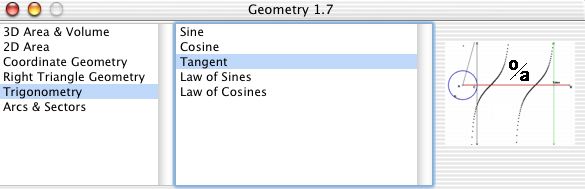
The interface of Geometry is very simple to understand. There are three columns in the application wherein the first two columns contain the commands that are interpreted in the right side of the application. The first column will allow the user to specify the view of the figure. The option for 3D is very impressive since it will allow more than basic drawing of the figure. This is very useful in understanding the formula related to volume and other special figures. The middle column will allow the user to specify the formula the user wants to be implemented on the right side of the application. The options for users are very impressive. Aside from the straightforward formula, the data could be rendered in sine, cosine and tangent.
As already indicated, the right side of the application has very little reaction from the users input but they can be controlled from the first two columns. The figure is tagged with the formula so that the user understands which part of the figure is being used in the calculation.
Geometry has only one function but executes it very well. It’s a highly recommended tool for students and geometry teachers.
Check it out at Theeastfamily.net
Rating: Loading... No Comments »
|
|
|





