O. James Samson - February 26, 2009
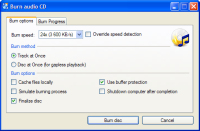 CDBurnerXP Pro is a popular software package that has likely been featured here before and the new release that has come out on February 22, 2009, has taken this fantastic piece of software and made it into something that is even better. First and foremost, additional operating software functionality has been added to this software package to make it compatible with Windows 2000, XP, 2003, Vista and even Windows 7 in advance of the release of that software package. In addition to that, a number of cosmetic and convenience changes have been made to the software package that allows it to be utilized in a way that is more convenient than many of the proprietary packages available on the market today. CDBurnerXP Pro is a popular software package that has likely been featured here before and the new release that has come out on February 22, 2009, has taken this fantastic piece of software and made it into something that is even better. First and foremost, additional operating software functionality has been added to this software package to make it compatible with Windows 2000, XP, 2003, Vista and even Windows 7 in advance of the release of that software package. In addition to that, a number of cosmetic and convenience changes have been made to the software package that allows it to be utilized in a way that is more convenient than many of the proprietary packages available on the market today.
CDBurnerXP Pro 4.2.4.1235 has also gained a large amount of functionality in terms of the options that are available when the manipulation of image files or other CD files is concerned. A number of functions that did not work before have also been improved to increase functionality and this software package that started off as a freeware file and remains a freeware file is now starting to gain some very impressive user friendliness that are smoothing out the rough edges it used to have.
More information is available at http://www.cdburnerxp.se
Rating:  Loading... No Comments »
O. James Samson - February 26, 2009
 XMedia Recode is one of the most important software packages that a multimedia aficionado could have. The reason for this is that through a large amount of pioneering work, the author of this software package was able to create a freeware version of software packages that would cost hundreds or even thousands of dollars if they had to be purchased through the proprietary software market. XMedia Recode is one of the most important software packages that a multimedia aficionado could have. The reason for this is that through a large amount of pioneering work, the author of this software package was able to create a freeware version of software packages that would cost hundreds or even thousands of dollars if they had to be purchased through the proprietary software market.
The latest release of XMedia Recode, which was put into the freeware marketplace on February 22, 2009, has the ability to convert any audio or video file format you can think of. No matter how ridiculous the format of the file might be, it will be able to convert it to one of the commonly used file formats that you would expect to be associated with either the audio or the video milieu of the present day.
There are many improvements that have been made to XMedia Recode in the most recent release, most of which are designed to either expand the list of file formats supported or alternatively to increase the functionality of the software through making the interface more convenient to utilize.
More information is available at http://www.xmedia-recode.de/index.html
Rating: Loading... 2 Comments »
Tilgore Kraut - February 25, 2009
 When you want to relax and freshen up your mood, what’s the fist thing that comes to your mind? Well quite clearly many of us would you like to sit by a beautiful lake surrounded with mountains and greenery. Even the thought of being at such a place gives a refreshing feel, isn’t it? Well! you don’t have to wait enjoy the view of such a place, as you can get it right at your home or office, by installing SS Alpine Lake – Animated ScreenSaver 2.0. The screensaver program lets you view the amazing site of a magnificent lake side, with a realistic feel. The astounding view features lake with snow covered mountains, greenery, birds, butterflies, beautiful flowers, fishes, bear, deer, ducks, accompanied by pleasing sounds. The graphics, animation and sounds of the screensaver certainly would refresh you and calm your senses. When you want to relax and freshen up your mood, what’s the fist thing that comes to your mind? Well quite clearly many of us would you like to sit by a beautiful lake surrounded with mountains and greenery. Even the thought of being at such a place gives a refreshing feel, isn’t it? Well! you don’t have to wait enjoy the view of such a place, as you can get it right at your home or office, by installing SS Alpine Lake – Animated ScreenSaver 2.0. The screensaver program lets you view the amazing site of a magnificent lake side, with a realistic feel. The astounding view features lake with snow covered mountains, greenery, birds, butterflies, beautiful flowers, fishes, bear, deer, ducks, accompanied by pleasing sounds. The graphics, animation and sounds of the screensaver certainly would refresh you and calm your senses.
Once you install the SS Alpine Lake – Animated ScreenSaver 2.0 at your system, it can instantly be set as default screensaver, and even you can alter its settings as per your preferences. The application offers ‘Movie Size’, ‘Quality’, ‘Exit On’ options in addition to which you can enable or disable the ‘Sound’ or ‘Cursor’ options. Whenever the screensaver would appear on your PC screen, you would be displayed a picturesque view with delighting mountains with tops covered with snow, dense wood with green trees, small lake with water moving slowly, with beautiful fresh flowers give you a calming feel. In addition to these, you can see the wild nature with fishes swimming around in the lake water, a clumsy bear and a deer passing by, ducks, and all this becomes more enjoyable with the sounds added to it. Viewing the scene, you can experience peace, calm, philosophical mood, sensation of freedom, and even more.
With the SS Alpine Lake – Animated ScreenSaver 2.0 is easy to install, and on viewing the screensaver, it takes you away from the stress of work and soothes your senses to rejuvenate you.
{More Info and Download}
Rating: Loading... 2 Comments »
Tilgore Kraut - February 25, 2009
 Online image theft is one of commonly heard issues these days, considering which the developers have been searching different protection methods. One of most effective and preferred ways of safeguarding your images from unauthorized usage is trademarks. You can add trademarks to the images, which embed into the images displaying the copyright text. And you can try Text Trademark Image Protector 4.59.001 for applying digital protection efficiently to all your images. The tool helps you to place watermarks on nearly any image format, which can’t be removed. Be professional and place copyright text to the images and on the other side take it can also be fun to insert funny quotes or comments on the images of your friends. Online image theft is one of commonly heard issues these days, considering which the developers have been searching different protection methods. One of most effective and preferred ways of safeguarding your images from unauthorized usage is trademarks. You can add trademarks to the images, which embed into the images displaying the copyright text. And you can try Text Trademark Image Protector 4.59.001 for applying digital protection efficiently to all your images. The tool helps you to place watermarks on nearly any image format, which can’t be removed. Be professional and place copyright text to the images and on the other side take it can also be fun to insert funny quotes or comments on the images of your friends.
Text Trademark Image Protector 4.59.001 main program screen displays the neatly placed preview window and other options. Using the ‘Open picture’ button you can select the image for adding watermark, and its preview is displayed on the left. For inserting the watermark on the images, first you can enter or copy-paste the text with Watermark Text box, and then customize it. While customizing it, you can set the opacity level and text size for altering its visibility, and select the text font style and font color to give it a desired appearance. Next, you can choose the Method of placing watermark over the image to be Overlay, Hard Light, Soft Light, XFader, and Stamp. Even you can place watermark text in any position with the help of Placement and Text Rotation features. Moreover, you can anytime restore to defaults and also enable the feature to remove EXIF info from the output file. Finally, click on ‘Save’ and the program would watermark your image.
With the Text Trademark Image Protector 4.59.001 application you can effortlessly apply watermarks to your images for safeguarding them against any unauthorized usage or theft.
{More Info and Download}
Rating: Loading... No Comments »
O. James Samson - February 24, 2009
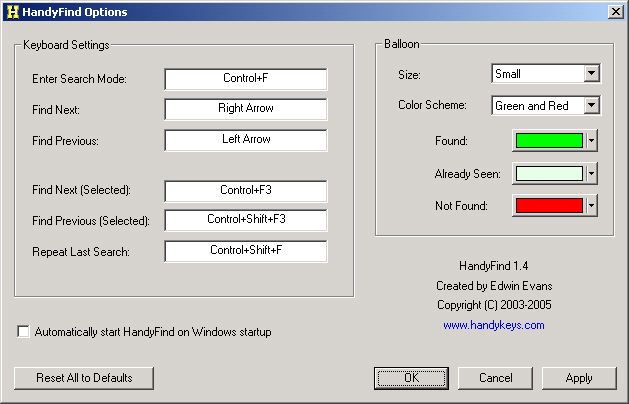 HandyFind is a very simple application that might be very helpful for some situations. Whenever you need to search for a word in MS Office applications (Word, Excel, etc) and IE, you have to go to find command or press CTRL F. You have to enter the word and press enter to go to that word. You still need to scroll to go to the next area where the word is found. HandyFind is a very simple application that might be very helpful for some situations. Whenever you need to search for a word in MS Office applications (Word, Excel, etc) and IE, you have to go to find command or press CTRL F. You have to enter the word and press enter to go to that word. You still need to scroll to go to the next area where the word is found.
This problem could be answered by HandyFind. This application will show the word you are looking for as you write them. Instead of going through the problem of pressing “next” and scrolling through the document or website to find the word, this application will help you find the word faster. This is very helpful when you’re using IE since this browser has a rather awkward way of looking for words in the website. With HandyFind, the word is searched as you write and will inform you immediately if the word is not found there.
The application also has an interesting feature: whenever the searched word is part of the URL, you can visit the link by simply pressing enter. This feature is the difference maker for HandyFind.
But HandyFind is an application that wants to oversimplify things. Although it could provide ease of usage for IE, using the application for MS Office applications may not really worth it especially if you’re already familiar with the native “find” functionality. Besides the “find” function in most office applications can find and replace words in the document – a feature not yet found in HandyFind.
Check it out at http://www.handykeys.com/
Rating: Loading... No Comments »
O. James Samson - February 24, 2009
 Gmail, Google’s answer to free email services of Yahoo, AOL and MSN when it was released easily became one of the most popular email service in the world. Aside from being made by Google, it’s friendly interface, additional options and continuously increasing storage capacity its no wonder why Gmail became a sought after email client. Although Gmail could be integrated to POP and IMAP for Microsoft Outlook, users still wish to have the actual version of Gmail to be fully available in their desktop – an application without a browser. To answer that need, Google launched an application for offline Gmail using Gears (Google Desktop Plug-in). Gmail, Google’s answer to free email services of Yahoo, AOL and MSN when it was released easily became one of the most popular email service in the world. Aside from being made by Google, it’s friendly interface, additional options and continuously increasing storage capacity its no wonder why Gmail became a sought after email client. Although Gmail could be integrated to POP and IMAP for Microsoft Outlook, users still wish to have the actual version of Gmail to be fully available in their desktop – an application without a browser. To answer that need, Google launched an application for offline Gmail using Gears (Google Desktop Plug-in).
But if you’re looking for something faster and more Gmail-like, consider the application called GeeMail. Compared to Gears-based application, this is a lot faster. With a decent connection, you can easily download more than a thousand of emails although it starts with the test first and the attachments later. Some functionality is only available when the application is online especially its labeling function.
The good thing about GeeMail is based on the fact that you can compose an email or respond to new emails even if you’re offline. Of course, it will only proceed to send the email of you is able to reconnect to the internet. The user interface is also very user friendly as it uses the old version of Gmail.
The downside of the application is that it doesn’t have the search functionality yet. It also uses Adobe AIR which might drag your computer if you don’t have a powerful gadget.
More info at sourcebits.com/geemail/
Rating: Loading... No Comments »
O. James Samson - February 20, 2009
 Sometimes reading a text online could become too straining for the eye. This is especially true if you’ve stayed in front of your computer for more than two hours. That is why it is recommended to stay away from your computer from time to time if possible, every hour, to prevent too much strain. Sometimes reading a text online could become too straining for the eye. This is especially true if you’ve stayed in front of your computer for more than two hours. That is why it is recommended to stay away from your computer from time to time if possible, every hour, to prevent too much strain.
So instead of reading them, why not listen to text? This could be easily done through Ultra Hal Text to Speech Reader. As the name suggests, the application aims to read your documents. This application is practically your assistant that will dictate you the document you want to read.
The interface of the application is very easy to understand. All you need to do is to load the document either in text (.txt) or rich text format (.rtf) and you can let the application start reading. You can choose a voice and even mix them according to speed, pitch and volume.
There are two interesting features of the application. First, the application could actually export the voice into .WAV format which could be read by almost any audio player. Second, the application will allow you to read only certain parts of the texts.
Ultra Hal Text to Speech could also be configured to read IM, pop-up messages from browsers and even text from browsers by copying and pasting the text to the clipboard.
An upgraded version is also available for a fee. The upgrade is basically an integration of AT&T Natural Voices which will greatly improve your listening experience.
More info available at http://www.zabaware.com/
Rating: Loading... No Comments »
O. James Samson - February 20, 2009
 EF Commander Lite is a very simple yet highly powerful application that will help you navigate through multiple files with ease. Based on the Norton Commander, the application is a Windows Version that almost has the same features. The Lite Version is the free version of the application wherein a full feature application is simply called “EF Commander”. EF Commander Lite is a very simple yet highly powerful application that will help you navigate through multiple files with ease. Based on the Norton Commander, the application is a Windows Version that almost has the same features. The Lite Version is the free version of the application wherein a full feature application is simply called “EF Commander”.
Aside from simple file navigation, file transfer is very easy since you’ll be using two windows. You can simply drag and drop files from one location to another. The application could also be used to rename multiple files at the same time.
The application is also fully compatible to wide ranges of file formats. It can unzip compressed folders in major formats such as .zip, .rar, .tar, .gz, .7z etc. The application itself could also be used to view pictures, movies and audio. You don’t have to download additional software to play those files. Although the support file formats in multi media is pretty basic, the support for these files right from a file navigation application is very impressive. If your DVD or CD Burner is Nero, this application could launch the burner right on their interface as the application has been fully integrated with the popular burner.
The upgraded version for EF Commander has the ability to connect two servers for efficient FTP transfer. It can pause its file transfer if disconnection is experienced so the users don’t have to start again in transferring files. The application could also be fully integrated with Smartphones or most Windows CE powered devices.
Interested? Check it out at http://www.efsoftware.com/cw/e.htm
Rating: Loading... No Comments »
O. James Samson - February 20, 2009
 The Operating Systems Windows XP and Vista have a built in functionality of providing step-by-step recommendations on how to fix your computer. But oftentimes these recommendations could either be too confusing or just too generic that you already have tried the recommendation. The Operating Systems Windows XP and Vista have a built in functionality of providing step-by-step recommendations on how to fix your computer. But oftentimes these recommendations could either be too confusing or just too generic that you already have tried the recommendation.
PC Fixer was created for that reason. This relatively small application could effectively scan your computer for problems and provide recommendations on how to deal with those problems. If the application sees that could be done without the assistance of the user, the application could automate the fix. Windows XP and Vista’s help support tool is only limited to system tools and Windows applications but PC Fixer could extend to other applications. The application will list the problems and you can choose which problems will be addressed for now. A restore point is also available in case the fix is not what you would expect from the application.
The good thing about PC Fixer is its strong knowledgebase. Aside from the fix that could be automated from the application, it also provides tips and step by step solution to problems that needs to be manually implemented. There is also an optional functionality wherein you can ask for help live if you’re online. The application could also connect you to the application developer’s forum wherein you’ll meet other users who also have the same problem.
PC Fixer is a small application (less than 2MB) but will effectively fix the problems in your computer. The solutions presented are not generic so you’ll learn new tricks in fixing your PC as the application also automates those fix.
Want to check it out? Go to http://www.digitalsupporttech.com/en-us/download.htm
Rating: Loading... No Comments »
O. James Samson - February 18, 2009
 EDSAC or Electronic Delay Storage Automatic Calculator is one of the first computers in the world. This computer was built in UK and was first used in 1949 wherein it provided simple calculations. Although it’s relatively unknown outside the developer’s and business realm, it became the basis of today’s computers. EDSAC or Electronic Delay Storage Automatic Calculator is one of the first computers in the world. This computer was built in UK and was first used in 1949 wherein it provided simple calculations. Although it’s relatively unknown outside the developer’s and business realm, it became the basis of today’s computers.
If you want to take a look at how the computer works, download the application called EDSAC Simulator. As the name suggests, the application will let you experience how one of the first computers in the world was used. The application will easily launch in the latest operating systems. Developers of the simulator have also developed versions for Linux and OS below Windows 95. The Mac version of EDSAC Simulator comes in black and white but might not load in recent OS of Mac.
Although the computer is very lightweight (around 2MB in size), the application is a little bit complicated to launch. Don’t forget to download the documentation wherein a tutorial on how to load additional applications to the simulator. Those who have worked with the simulator have also developed simple applications that could be used in EDSAC. The application itself already has a slew of applications to try. A debugging tool is also added in case you wanted to make some small improvements.
The EDSAC Simulator is your ultimate “Blast from the Past” application when it comes to computers. If you’re a computer teacher, you can show this to your students as part of the computer history lesson. It’s also a great way to fully understand how the first computer works.
Check it out at Edsac Software web page
Rating: Loading... 1 Comment »
|
|
|





