Ciaran Moore - January 11, 2009
 WeGame is a video gaming website for gamers to share gaming videos and screen-shots. These can then be commented and rated by others. Lately this site has also brought out a video game recording software also called WeGame. WeGame is a video gaming website for gamers to share gaming videos and screen-shots. These can then be commented and rated by others. Lately this site has also brought out a video game recording software also called WeGame.
You’ll need to create an account at the website, but this is free to do. The videos and screen-shots that can be made with the program are saved on your computer with the option of uploading to the website if you should choose so. It also includes an option to automatically upload screen-shots but this can be turned off in the settings.
Creating videos or taking snapshots of your gameplay can be controlled by 2 hotkeys. You can select the quality of the recording , so you can have low quality for faster loading from the web or better quality if you’re just watching it locally from your computer for example.
Well worth checking out if you’re an avid gamer wanting to show off your skills!
Check out the WeGame site here
Rating:  Loading... No Comments »
Ciaran Moore - January 11, 2009
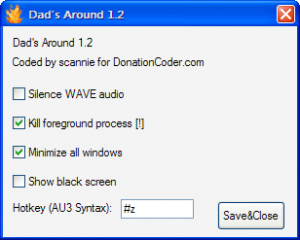 A Panic Button or Boss Key is a feature of some software for hiding some obvious open windows on your desktop when you press it. This usually works by minimizing or otherwise “hiding” open windows instantly when the key is pressed. A Panic Button or Boss Key is a feature of some software for hiding some obvious open windows on your desktop when you press it. This usually works by minimizing or otherwise “hiding” open windows instantly when the key is pressed.
“Dad’s Around” is one such utility. The software package is supplied in 7z format which means that an unzipper supporting this format is required. (Visit http://www.7-zip.org/)
The program itself is fully portable and can be ran from anywhere on your computer with no installing needed.
It offers up to four options that will be activated with the hotkey (Windows Z but you can change this). The choices can be selected or deselected with a right click on the system tray icon when the program is running. The options are to mute WAVE audio, kill the actual foreground process, minimize all windows and/or show a black screen. Each option can be activated or deactivated on an individual basis.
This utility uses around 5 MBs of memory while running. A useful little utility if you are a paranoid type for reasons best known to yourself!
Visit the homepage here
Rating: Loading... No Comments »
O. James Samson - January 7, 2009
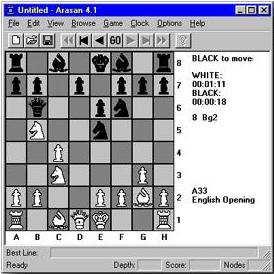 There is a new chess program for Windows and Linux, it is arasan. Arasan is copyrighted, but permits free distribution, with certain restrictions. There is a new chess program for Windows and Linux, it is arasan. Arasan is copyrighted, but permits free distribution, with certain restrictions.
Arasan 11.1 which is the newest model was released in December, 2008. The Windows version runs on Windows 95 or more recent versions. The Linux version comes in source only, and requires GCC to build (version 4.0 or greater recommended).
This program has both a native Windows user interface and a console-based chess engine for use with Winboard or xboard. It also functions with Arena, another free chess interface, and with UCI-compatible programs like Shredder.
The Arasan package includes an opening book with over 100,000 moves.
This is a simple and easy to play game. If you love heavy graphics you probably won’t like this as it is a very simple game. But it is still a delight for chess fans, check it out and see if it is your kind of game.
Check: www.arasanchess.org
Rating: Loading... No Comments »
Tilgore Kraut - December 25, 2008
 Smart Calendar software helps you to generate event calendar. You can type your events into calendar easily. Events can be highlighted with background or text color. The calendar can be exported into PDF, EXCEL or HTML format. Smart Calendar software helps you to generate event calendar. You can type your events into calendar easily. Events can be highlighted with background or text color. The calendar can be exported into PDF, EXCEL or HTML format.
Pros: Smart Calendar software lets you prepare a calendar. It is generated as a month per page event calendar. Each day slot can be marked up for specific events you have. You can type your events into calendar quickly and easily. It works like a traditional calendar. You choose the month for the calendar, and you will be provided with different day boxes to fill your events. When you select the month, select a year too. Set background colors to each day box. Text color and alignment of boxes can be selected to suit your preferences. You can get a preview of the calendar in the PDF format at any time. Edit tools available lets you polish up the final form easily. For interaction with team mates or colleagues you can share the calendar quite easily. Export the calendar into PDF and HTML format. You could export the calendar into Excel format too for further processing, if you like. The calendar can be sent via e-mail with a single click too.
Cons: The application lets you select a year too when selecting a month for your calendar to be prepared. What would one want to do with a calendar for some earlier year is not very clear. Similarly next year may be an useful thing but is it useful to go further into future! Also sharing the calendar would be effective only if marking events on one calendar updates details of collaborators calendars otherwise it is just exchange of documents.
{More Info and Download}
Rating: Loading... No Comments »
Tilgore Kraut - December 25, 2008
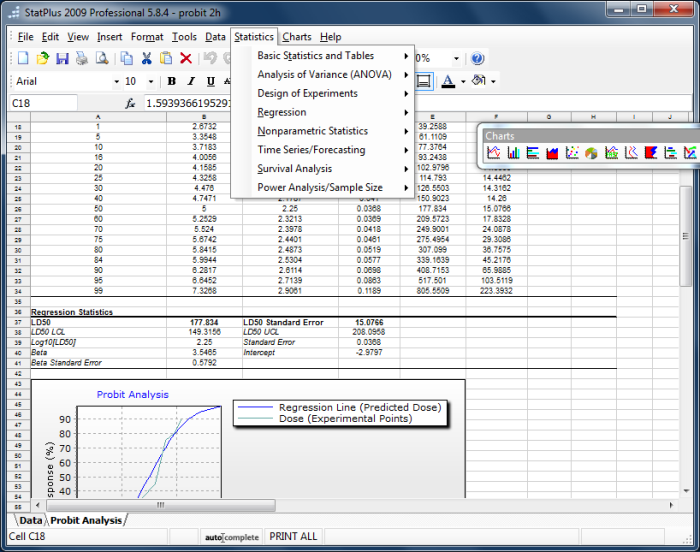 No need to carry a mainframe to perform a complex analysis when you visit a remote lab. Get the full power of a precise data analysis tool always with you. Perform a statistical analysis on-the-fly without carrying a powerful, bulky computer with you. No need to carry a mainframe to perform a complex analysis when you visit a remote lab. Get the full power of a precise data analysis tool always with you. Perform a statistical analysis on-the-fly without carrying a powerful, bulky computer with you.
Pros: This is a statistics lab in a USB flash drive. The application does powerful statistical analysis yet has a small enough footprint to be fitted into a pen drive. No PC or even a laptop need to be carried around. Once plugged in you have the environment you used to operating in. Though light weight it is a fully powered data analysis tool that performs a range of analysis. From basics to complex analysis like GLM ANOVA, non-parametric and regression analysis, Probit and Latin Squares analysis too. The analysis and calculations are compliant with standards such as ISO2602:1980, ISO 2854:1976, and ISO 3207:1975. Get consistent, repeatable, ISO compliant results every time you perform an analysis. Import and export to popular products such as Microsoft Excel and StatSoft Statistica makes StatPlus results and analyses even more compatible.
Most such package are usually very expensive and have a steep learning curve. The interface is simple and quite intuitive. It is in an Excel like format that in itself gives it a high level of familiarity. There’s even a little bit customization you can do to the look and feel when the package comes up after installation. Manipulating data in the spreadsheet environment is quite easy, the same familiar edit tools can be used. The package provides a range of charting/diagramming tools that is useful.
Cons: No problems found. It is for users of course who are familiar with statistical concepts of course.
{More Info and Download}
Rating: Loading... No Comments »
Tilgore Kraut - December 24, 2008
 We are always pretty sensitive about the ‘first time activities’ of our kids, and always try and preserve those cherished moments with us. Capturing different moments like first arrival at home, sleeping habits, first birthday, etc and then forming a beautiful album to share it with friends and family is a desire that every parent shares. This is where you may find TurtleTed Memory Album 1.27 worth using, as it provides a variety of templates to form an album of such events. It saves your efforts, as you just need to insert the images and fill in the text, and the pages of your baby’s album are ready. It’s as easy as it sounds and you can create fantastic and captivating album without putting much time and efforts. We are always pretty sensitive about the ‘first time activities’ of our kids, and always try and preserve those cherished moments with us. Capturing different moments like first arrival at home, sleeping habits, first birthday, etc and then forming a beautiful album to share it with friends and family is a desire that every parent shares. This is where you may find TurtleTed Memory Album 1.27 worth using, as it provides a variety of templates to form an album of such events. It saves your efforts, as you just need to insert the images and fill in the text, and the pages of your baby’s album are ready. It’s as easy as it sounds and you can create fantastic and captivating album without putting much time and efforts.
TurtleTed Memory Album 1.27 presents you with template pages for creating baby album that even can be customized. The interface of the program is pleasant and maintains the user’s interest while operating it. It opens with full screen view, and the right side displays the types of events to form the album pages like Cover Page, My Arrival Home, My First Photo, My Family, Bathing, Sleep, Meals, First Birthday, First Step, First Drawing, Kindergarten, etc. Make the selection of the pages and fill in the required elements. According to the pages, you need to enter the text with the given spaces, and to insert the images click on the provided area and load the suitable image. You can zoom, resize, and move the images to give it an apt view. Further you can select a suitable theme for the album, from the given ones. When you’re done with the process, you simply need to mark the pages that you want to publish in your baby’s album and then click on ‘Publish’. It also helps you in sending a message, and notifies friends and family about the album.
TurtleTed Memory Album 1.27 is extremely easy to work with and helps you bring together all your special moments relating to your baby.
{More Info and Download}
Rating: Loading... No Comments »
Tilgore Kraut - December 24, 2008
 The ideal choice for small to medium sized organizations and individuals looking for an affordable photo ID card solution. Free Edition offers an ideal photo ID management solution that is both powerful and easy-to-use. The ideal choice for small to medium sized organizations and individuals looking for an affordable photo ID card solution. Free Edition offers an ideal photo ID management solution that is both powerful and easy-to-use.
Pros: This is identity card design software. Small and medium organizations or an individual business could benefit from this application. The solution is easy to use yet quite a powerful one. The most versatile identity card design software! Easy user interface and nice design capabilities make this package equally useful for beginners as well as experienced users. It takes care of most useful security features too. designs and prints ID cards and badges, envelopes and labels, Student Identity Cards and much more. You could print out the designs on identity paper badges as well as plastic ID cards. Support is available for all kinds of card printers in fact it is supposedly optimized for accelerating the design as well as the printing process.
A range of photo id printers could be interfaced to the application. These include single sided, duplex and lamination capable card printers and in monochrome and color. The application is capable of latest encoding technologies. With combination of the software and the printers you get a user-friendly tool that helps you control, monitor, maintain, and most importantly, upgrade the security and quality of your photo ID card and badge system. It has an internal database for managing cardholders’ information and your ID cards design. It can be integrated with any type of external databases too. Use your own customized template if you like.
{More Info and Download}
Rating: Loading... 2 Comments »
Tilgore Kraut - December 24, 2008
 Final Uninstaller, a professional uninstall tool for your PC, offers a new and better way to completely clean up files and registry entries that were left after unsuccessful un-installation. Final Uninstaller, a professional uninstall tool for your PC, offers a new and better way to completely clean up files and registry entries that were left after unsuccessful un-installation.
Pros: Quite often un-installation of a program is not quite clean and complete. Files remain in the installation directories, registry entries do not get completely cleaned and such other problems remain. These eventually slow down the machine used for such program installation and un-installation. Final Uninstaller is a uninstall software that can delete files from an incomplete un-installation and clean up the registry.
This program uses a leftovers database to ensure implementation of its various functions. Functions include scanning, leftover detection, listing of applications that can be removed and completing the clean un-installation of programs. That helps PC performance to be maintained at optimum levels. The leftovers database is continually updated and thus this application is able to detect leftovers that the windows add/remove program is unable to do reliably.
You are thus able to safely uninstall stubborn drivers that are left by Windows Add/Remove program. It is true of systems services installed.1-click scan and 1-click clean make removing applications and left-over files easy.
{More Info and Download}
Rating: Loading... No Comments »
Tilgore Kraut - December 24, 2008
 Free Ape player is a free audio player can play ape file and mp3 file. it can run under Windows 98/Me/2000/XP/2003 server. This application may be freely distributed. Free Ape player is a free audio player can play ape file and mp3 file. it can run under Windows 98/Me/2000/XP/2003 server. This application may be freely distributed.
Pros: Monkey’s Audio (APE) is used by Windows users mostly. It is a free lossless audio compression format with a highly competitive compression algorithm. Decompression speeds of Monkey’s Audio are slow compared to other lossless audio formats. Files generated are also quite large. The free player plays APE files. It plays MP3 files as well. The interface has the play controls like play/pause and stop etc. The file controls lets you find the right files easily as it is integrated with the Windows explorer. There is a large play time display and another display area shows the track details.
The details displayed indicate the sampling and the overall bit-rate of the track. Two slider controls control navigation through the play-list and also the specific track. The program runs within Windows 98/Me/2000/XP/2003 server. This application is not only free to use but free to distribute as well.
Cons: Slider control navigating play list or specific track is a little uncommon. Most users are familiar with the more common forward/fast forward and rewind controls.
{More Info and Download}
Rating: Loading... No Comments »
Tilgore Kraut - December 23, 2008
 A lite version of the Feed Editor RSS Creator. A tool to create RSS Feeds. A lite version of the Feed Editor RSS Creator. A tool to create RSS Feeds.
Pros: This is a lite version of the Feed Editor RSS Creator which is useful for creating professional RSS feeds. It features an easy to use interface. The interface has an in-built HTML editor which makes HTML editing tasks simple and one doesn’t need to leave the tool to get that editing done. “Feed image” view is especially useful for visualizing what the RSS feed will look. “Feed items” view is where most of the editing takes place.
Cons: The publisher’s description reads the same as the Feed Editor RSS Creator version. This may give an impression that this is as good. Nothing can be farther from the truth.
Sadly, this is a (much) watered-down version of the Feed Editor and hardly any functions work or work to a level where they can be useful. The recommendation is to skip this one and go for the full version which is full-featured and a really nice tool for a novice as well as an expert looking to create professional RSS feeds. This is a trial version but one is better off trying the full version.
One of the best features which is the uploading of podcasts simply does not work in this version. As such the interface is too simple and could use some work.
{More Info and Download}
Rating: Loading... No Comments »
|
|
|





