O. James Samson - November 5, 2008
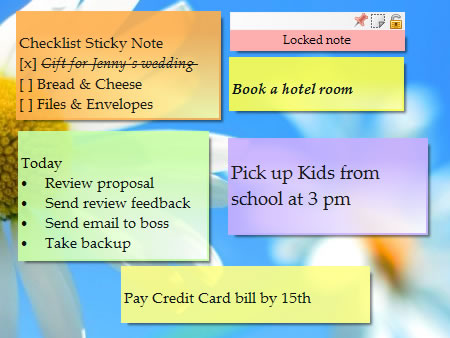 NoteZilla lets you create virtual sticky notes on your Windows Desktop and organize them in to folders. With this, you wouldn’t have to litter everywhere with sticky notes and looking diaorganized. You can also stick notes to websites, documents, programs or any window. It works well for me. NoteZilla lets you create virtual sticky notes on your Windows Desktop and organize them in to folders. With this, you wouldn’t have to litter everywhere with sticky notes and looking diaorganized. You can also stick notes to websites, documents, programs or any window. It works well for me.
You can use it for Meetings, Appointments, Ideas, To-Dos, Phone Numbers, User Name/Password, Website Addresses, Discount Coupon Numbers, Sticky Reminders, Doctor Appointments, Birthdays, Anniversaries, Tasks, Shopping List, Gifts List, to mention a few. It easy to use, saves time, stress less, neat. I’m sure you’d like it.
Check it out at ConceptWorld.com
Rating:  Loading... No Comments »
O. James Samson - November 5, 2008
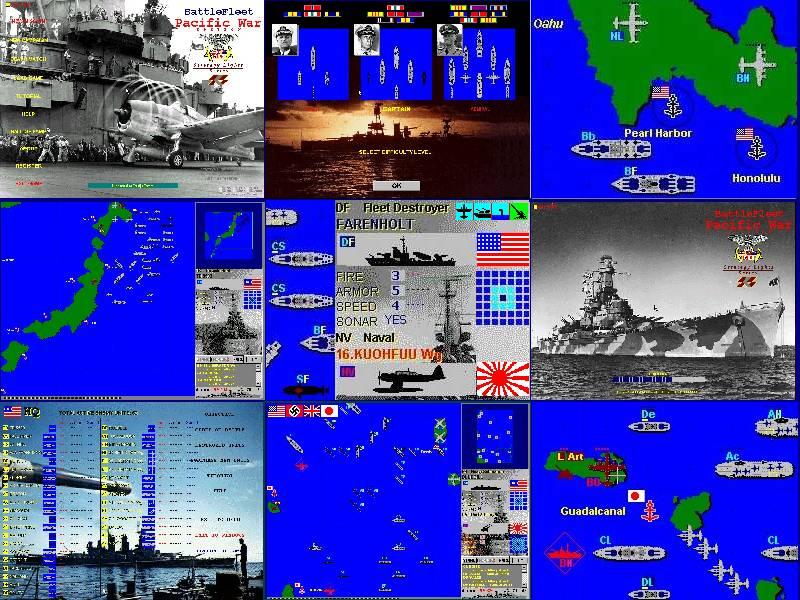 Battlefleet Pacific war is a naval strategy game. It is an extension to the classic Battleship war game where ships/planes/subs can move! Battlefleet Pacific war is a naval strategy game. It is an extension to the classic Battleship war game where ships/planes/subs can move!
The game actually contains missions, Death-Match and Free Hunt scenarios & campaigns from Pearl Harbor and Midway to the Iwo Jima and Leyte battle.
It looks so real. War Game objectives are like in real war situations to conquer enemy ports, defend friendly ports, destroy ships and secure transport convoy to the friendly port.
Players can purchase new ships, planes, submarines during the game. The best thing about this game is that it helps your thinking. I like it!
You should try it out.
Check it out at http://www.battle-fleet.com/pw
Rating: Loading... No Comments »
O. James Samson - November 5, 2008
 DVDs may have a collection of movies on it. Sometimes we might want a copy of a particular movie and not copy the whole DVD and then don’t copy the original features that come with that movie like subtitles, languages, and other settings. DVDs may have a collection of movies on it. Sometimes we might want a copy of a particular movie and not copy the whole DVD and then don’t copy the original features that come with that movie like subtitles, languages, and other settings.
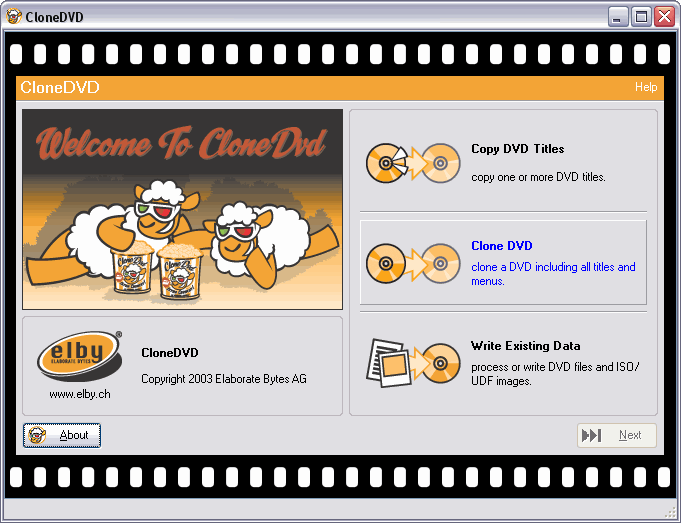
Elby cloneDVD enables you extract particular movies with their original features and copies them with an amazing image/sound quality. If it’s only the main movie or a complete DVD – elby CloneDVD software compresses even long footage in brilliant quality and at high speed: A special transcoding technology compresses your choice of DVD titles according to your audio and language selection automatically to a freely adjustable target size.
A Video Preview plays an overview of all selectable DVD titles. It is very easy to use. The unique Film Strip will guide you step by step through all settings – very suitable for beginners. With the help of the Video Preview you select the desired DVD titles and decide if you want to trim individual chapters. Quality bars show the direct influence of the title and language selection on the quality of the movie copy.
Check it out at http://www.elby.ch/en/products/clone_dvd
Rating: Loading... No Comments »
Tilgore Kraut - November 1, 2008
 With the advent of video websites, web users have started to frequently enjoy and share their favorite videos. While surfing through the video websites, we often wish to download and store them on our PCs. As most of these websites don’t include downloading options, we are generally unable to fulfill this wish. However, if you manage to download the videos, they are stored in flash format, which again necessitates users to install a video conversion application to convert it into a suitable video format. Both these tasks, download and conversion, can be performed with the assistance of YoutubeVideoConverter 1.10.0.24 application. It supports downloading the selected videos from YouTube and Google Videos website, and also assist user by converting them into supported MPEG, AVI, 3GP, iPod, PSP and other video formats. With the advent of video websites, web users have started to frequently enjoy and share their favorite videos. While surfing through the video websites, we often wish to download and store them on our PCs. As most of these websites don’t include downloading options, we are generally unable to fulfill this wish. However, if you manage to download the videos, they are stored in flash format, which again necessitates users to install a video conversion application to convert it into a suitable video format. Both these tasks, download and conversion, can be performed with the assistance of YoutubeVideoConverter 1.10.0.24 application. It supports downloading the selected videos from YouTube and Google Videos website, and also assist user by converting them into supported MPEG, AVI, 3GP, iPod, PSP and other video formats.
YoutubeVideoConverter 1.10.0.24 is a proficient application, convenient to use for videos downloading and conversion purpose. The interface of application is well-designed and includes features to surf, select, download and convert the videos from YouTube and Google Videos websites. The screen is divided as to give suitable space to different functions. The application provides you the ‘Web Browser’ feature that saves you from the efforts of surfing the websites, finding the video, and then copy-paste the URL. Surf the websites Google Video or YouTube through the Web browser feature and the URLs of the videos you watch are displayed at the top with the Page URL feature. Further, you can make the selection of the output format and its properties that you want to be applied to the resulting video. You can also put the URL, Browse and the start the video downloading process. When the process completes you need to select the destination and the program would convert and store the video file there. Watch and enjoy your favorite videos any time at your PC.
YoutubeVideoConverter 1.10.0.24 application supports a smooth downloading and conversion process that allows you to enjoy your favorite YouTube and Google videos on your system.
{More Info and Download}
Rating: Loading... 2 Comments »
Tilgore Kraut - November 1, 2008
 Many of us are unaware of the fact that nearly each and every activity that we undertake while surfing the web is recorded and leaves a trace on our systems. This often puts our work privacy at stake and even occupies space at your system disk. This may slows down the performance of our PCs and even may lead unauthorized use or access to sensitive information. Even if you try cleaning all internet temp files, cookies, etc manually it takes a great deal of time and efforts out of you, as every time you need to follow the same process from looking for required folders and then delete the unwanted files. To remove the hassles from the task and make it convenient for you to erase the internet activity traces from your PC, you may like trying Evidence Eraser delete internet activity 2.53 application. It completely erases traces of the internet activities by scanning the different areas of hard drive and shreds unwanted files. Many of us are unaware of the fact that nearly each and every activity that we undertake while surfing the web is recorded and leaves a trace on our systems. This often puts our work privacy at stake and even occupies space at your system disk. This may slows down the performance of our PCs and even may lead unauthorized use or access to sensitive information. Even if you try cleaning all internet temp files, cookies, etc manually it takes a great deal of time and efforts out of you, as every time you need to follow the same process from looking for required folders and then delete the unwanted files. To remove the hassles from the task and make it convenient for you to erase the internet activity traces from your PC, you may like trying Evidence Eraser delete internet activity 2.53 application. It completely erases traces of the internet activities by scanning the different areas of hard drive and shreds unwanted files.
Evidence Eraser deletes internet activity 2.53 application supports the users with an intuitive feature-set to perform and configure the cleaning process. Install and launch the application, and the program starts scanning the entire system for the unwanted internet files that contain the traces of your web activities. When the program completes the scanning process, it displays the types of files found on your system, on the upper part of the screen. The content of the found folders is shown at the bottom area of the interface. To start the cleaning process you just require clicking on ‘Start Erasing’ option, and the program would display the action being performed and the status, along with the given file list. You can even modify the ‘Erasing Settings’ and ‘Options’ to perform the erasing process in the desired manner.
The Evidence Eraser delete internet activity 2.53 protects the privacy of the users by deleting temporary files relating to audio/video files, chat logs, emails, Internet histories, search histories, deleted files along with image files, clipboard data, password files, cookies, etc.
{More Info and Download}
Rating: Loading... No Comments »
O. James Samson - October 31, 2008
 Mp3tag is a program designed to edit metadata of common audio formats. It has the ability to rename files based on the tag information, replace characters or words from tags and filenames, import/export tag information, create playlists and more. Mp3tag is a program designed to edit metadata of common audio formats. It has the ability to rename files based on the tag information, replace characters or words from tags and filenames, import/export tag information, create playlists and more.
Mp3tag supports the following audio formats:
- Advanced Audio Coding (aac)
- Free Lossless Audio Codec (flac)
- Mpeg Layer 3 (mp3)
- MPEG-4 (mp4 / m4a / m4b / iTunes compatible)
- Ogg Vorbis (ogg) and more.
Its basic features include:
- Format tags and filenames
- Write ID3v1.1-, ID3v2-, APEv2-Tags and Vorbis Comments to multiple files at once
- Full Unicode support
- Give room for regular expression
- Auto-creation of playlists
- Recursive subfolders support
- Remove parts or the entire tag of multiple files
- and lots more
The new version just hit the market recently, version 2.42. Here are some of the latest changes in the features of the new version…
- Support for drag’n’drop of cover art from Mp3tag
- MP4 fields ITUNESMEDIATYPE, TVEPISODEID, TVNETWORK, TVSEASON and TVEPISODE
- Context menu for cover-related functions now also available at the extended tags dialog
- Scripting functions $meta(x), $meta(x,n), and $meta_sep(x,sep)
- Support for Ogg Vorbis files with OGA file extension
- Type of cover art is now displayed in the main view
- Added _FOLDERPATH filtering option
- Belarusian language file
- Fields with multiple matching values are now displayed individually at the extended tags dialog also for multiple files
and lots more.
The tool is really worth checking out, give it a try, you will be hooked, check it at out www.mp3tag.de


Rating: Loading... No Comments »
Tilgore Kraut - October 31, 2008
 With the soaring popularity of video sharing sites, most of us have started sharing our video with the entire web fraternity. But, the real snag comes while uploading these videos, as due to their large sizes, these videos take substantive amount of time to get upload on your system. The issue can be addressed by compressing these large video files into smaller flash files, as it takes lesser time in uploading. To convert videos of various formats into SWF or FLV effectively, you can try out Macvide VideoFlash Converter 1.7.3 application. The utility is compatible with Apple Mac and converts videos with AVI, MOV, MPG, WMV, ASF, DivX, etc formats without compromising the quality. The easy operable features of the application make it apt for both experts as well as novice users. With the soaring popularity of video sharing sites, most of us have started sharing our video with the entire web fraternity. But, the real snag comes while uploading these videos, as due to their large sizes, these videos take substantive amount of time to get upload on your system. The issue can be addressed by compressing these large video files into smaller flash files, as it takes lesser time in uploading. To convert videos of various formats into SWF or FLV effectively, you can try out Macvide VideoFlash Converter 1.7.3 application. The utility is compatible with Apple Mac and converts videos with AVI, MOV, MPG, WMV, ASF, DivX, etc formats without compromising the quality. The easy operable features of the application make it apt for both experts as well as novice users.
The interface of the Macvide VideoFlash Converter 1.7.3 application has been well-designed to suit the user’s needs. To begin the video conversion process first you need to browse and choose the Input File. Selecting the file the application displays the ‘Source Video’ and ‘Source Audio’ details. You can easily confirm the video file selection as the application provides you with Preview feature. This also helps the users while performing the cropping function. The application consists of cropping feature that enables you to form small video clips and even modify the video height, width, etc. Further, you need to select the Output File destination, and then make the selection of ‘Settings’. With the Change Settings option you can set the Resolution of the video. Moving further, you can select the quality, bitrate, and FPS for the video quality. Enable/disable the audio settings as required, and make the selection of the output format to swf or flv. Selecting the features, you simply need to click on ‘Start’ for commencing the video conversion process.
Macvide VideoFlash Converter 1.7.3 application supports Mac users in converting various video file formats into web compatible flash file.
{More Info and Download}
Rating: Loading... No Comments »
Tilgore Kraut - October 31, 2008
 Are you thinking to present something different to your friend on his upcoming birthday? Well, you can take him on surprise by presenting his images with a whole new artistic and stylish look. Just fit his images to various frames and add some of the real eyeball grabbing effects to it, with the assistance of an all new Stick Photo Star 2.30 application. The application helps you in applying various effects and modifying the images as per your wish. The program comprises of variety of effects available for adding a captivating effect to the images. It also supports in resizing, rotating, flipping, reversing, and performing other such changes in the images. The modified images are saved with universal JPEG and BMP formats. Are you thinking to present something different to your friend on his upcoming birthday? Well, you can take him on surprise by presenting his images with a whole new artistic and stylish look. Just fit his images to various frames and add some of the real eyeball grabbing effects to it, with the assistance of an all new Stick Photo Star 2.30 application. The application helps you in applying various effects and modifying the images as per your wish. The program comprises of variety of effects available for adding a captivating effect to the images. It also supports in resizing, rotating, flipping, reversing, and performing other such changes in the images. The modified images are saved with universal JPEG and BMP formats.
Stick Photo Star 2.30 has an elegant interface with the features well-set on it, making it convenient for the users to operate the program. Select the image that you want to apply the effects to, with the Open or add option provided on the right side of the interface. The selected image is displayed at the upper part, and preview of the images with specified effects is shown at the lower part. The toolbar is provided between the interface partition, consisting of different effects and frames. It provides different effects with Preset, Single, Light, Scenery, and also provides beautiful frames for your images. You can easily generate the image with lighting, star, creative graphics, sky, etc, and even some features support customization also. Even you can adjust and place the effects by dragging, resizing and adjusting the angle of the effect for the images. The application also allows you to resize, move, rotate, flip, cut side, or reverse any object in the images. Finally save the image with JPEG or BMP format.
{More Info and Download}
Rating: Loading... No Comments »
O. James Samson - October 30, 2008
 If you are in need of file recovery or hard drive data recovery software you can make use of this product, it makes you recover deleted files quickly without stress. Recover My Files data recovery software conveniently recovers deleted files that have been emptied from the Windows Recycle Bin, or lost as a result of the format or corruption of virus, Trojan infection, a hard drive, an unexpected system shutdown or software failure. If you are in need of file recovery or hard drive data recovery software you can make use of this product, it makes you recover deleted files quickly without stress. Recover My Files data recovery software conveniently recovers deleted files that have been emptied from the Windows Recycle Bin, or lost as a result of the format or corruption of virus, Trojan infection, a hard drive, an unexpected system shutdown or software failure.
This Data Recovery Software offers the following:
- Recover files even if emptied from the Recycle Bin
- Recover files after a partitioning error
- Recover email, photos, documents and video music
- File recovery after accidental format, even if you have reinstalled Windows
- Disk recovery after a hard disk crash
- Get data back from RAW hard drives
- Recover from Zip, hard drive, floppy disk, camera card, USB, or other media
Recover My Files is a fast and easy application. No technical or data recovery software skill are required to undelete files. Use Recover My Files to perform hard drive data recovery, or if you are trying to unformat and recover data from floppy disk, zip drive, smart media, compact flash or other removable media.
This is a simple disk recovery software to undelete files and get data back.
More information is available on www.recovermyfiles.com
Rating: Loading... 3 Comments »
O. James Samson - October 30, 2008
 Wine is a compatibility layer for running Windows programs. It is an Open Source implementation of the Windows API on top of X, OpenGL, and Unix. This software does not require Microsoft Windows, since it is a completely free alternative implementation of the Windows API consisting of 100% non-Microsoft code, even though Wine can optionally use native Windows DLLs if they are available. Wine is a compatibility layer for running Windows programs. It is an Open Source implementation of the Windows API on top of X, OpenGL, and Unix. This software does not require Microsoft Windows, since it is a completely free alternative implementation of the Windows API consisting of 100% non-Microsoft code, even though Wine can optionally use native Windows DLLs if they are available.
This software gives both a development toolkit for porting Windows source code to Unix as well as a program loader, allowing many unmodified Windows programs to run on x86-based Unixes, including Solaris, Linux, FreeBSD and Mac OS X.
The most recent release of this application, Wine 1.1.7 has the following added features:
- Various bug fixes
- Improved device management for DOS drives
- Many Richedit fixes
- Various installer fixes, particularly for IE 7
- First steps of Direct3D 10 implementation.
Get more on www.winehq.org
Rating: Loading... No Comments »
|
|
|





